
تعارف
This manual provides detailed instructions for the setup, operation, and maintenance of your Zerone BN59-01179A Replacement Remote Control. Please read this manual carefully before using the product to ensure proper functionality and longevity.
پروڈکٹ ختمview
The Zerone BN59-01179A is a universal replacement remote control designed for compatible Smart TVs. It offers a compact design and a comprehensive set of buttons for various functions.
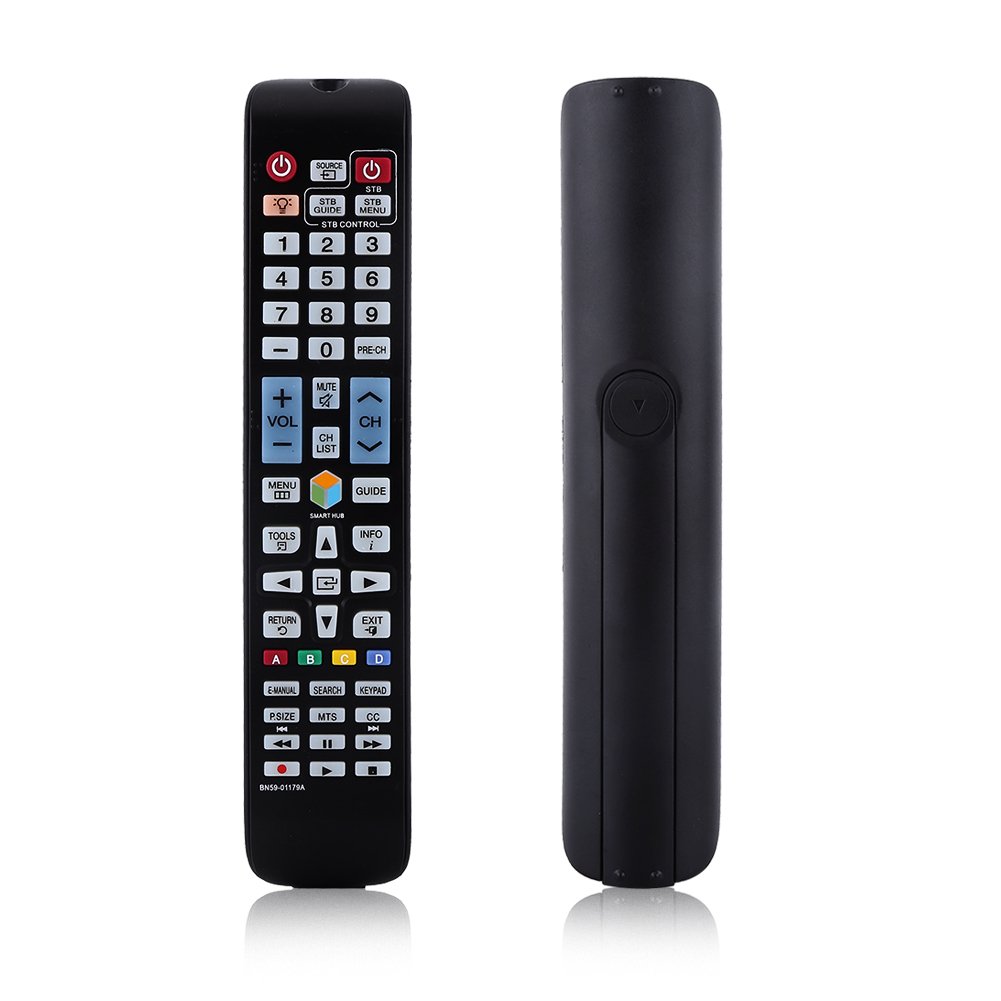
تصویر: سامنے view of the Zerone BN59-01179A remote control, showing its full layout and approximate dimensions (23cm length, 4.7cm width, 2cm thickness).
سیٹ اپ
بیٹری کی تنصیب
- ریموٹ کنٹرول کے پیچھے بیٹری کے ٹوکرے کو تلاش کریں۔
- بیٹری کور کو نیچے کی طرف سلائیڈ کریں یا لیچ دبائیں اور کھولنے کے لیے لفٹ کریں۔
- دو (2) AAA بیٹریاں ڈالیں، اس بات کو یقینی بناتے ہوئے کہ مثبت (+) اور منفی (-) ٹرمینلز کمپارٹمنٹ کے اندر نشانات کے ساتھ درست طریقے سے سیدھ میں ہوں۔
- بیٹری کور کو اس وقت تک تبدیل کریں جب تک کہ یہ محفوظ طریقے سے کلک نہ کرے۔
نوٹ: Batteries are not included with the remote control. Please use new AAA batteries for optimal performance.

Image: The back of the remote control with the battery cover removed, showing the empty battery compartment ready for two AAA batteries.
آپریٹنگ ہدایات
This remote control is designed for immediate use with compatible TVs without requiring programming. Simply insert batteries and point the remote towards your television.
کلیدی افعال

Image: A hand holding the Zerone remote control, with inset close-ups highlighting the power/source buttons and the navigation/Smart Hub buttons.
- پاور (سرخ بٹن): ٹی وی کو آن یا آف کرتا ہے۔
- ماخذ: ان پٹ ذرائع (HDMI، AV، وغیرہ) کو منتخب کرتا ہے۔
- STB/DTV: Switches between Set-Top Box and Digital TV modes.
- نمبر بٹن (0-9): براہ راست چینل کا انتخاب۔
- پری-CH: پچھلے چینل پر واپس آتا ہے۔
- والیوم (+/-): حجم کی سطح کو ایڈجسٹ کرتا ہے۔
- خاموش کریں: ٹی وی کی آواز کو خاموش یا چالو کریں۔
- Channel (CH Up/Down): ٹی وی چینلز کو ترتیب وار تبدیل کرتا ہے۔
- CH فہرست: چینل کی فہرست دکھاتا ہے۔
- مینو: TV کے مین مینو تک رسائی حاصل کرتا ہے۔
- اسمارٹ حب: Opens the Smart Hub interface for apps and streaming services.
- گائیڈ: الیکٹرانک پروگرام گائیڈ دکھاتا ہے۔
- معلومات: Shows information about the current program.
- ٹولز: Accesses quick settings or contextual options.
- Navigation Buttons (Up/Down/Left/Right/Enter): مینو کے ذریعے نیویگیٹ کرتا ہے اور اختیارات کا انتخاب کرتا ہے۔
- واپسی: پچھلی اسکرین یا مینو پر واپس چلا جاتا ہے۔
- باہر نکلیں: موجودہ مینو یا ایپلیکیشن سے باہر نکلتا ہے۔
- رنگ کے بٹن (A, B, C, D): ٹی وی ماڈل اور ایپلیکیشن کے لحاظ سے فعالیت مختلف ہوتی ہے۔
- E-MANUAL: TV کے الیکٹرانک دستی تک رسائی حاصل کرتا ہے۔
- تلاش کریں: Opens the search function.
- کی پیڈ: Displays an on-screen keypad.
- P.SIZE: Adjusts picture size/aspect ratio.
- ایم ٹی ایس: Multi-channel Television Sound (SAP).
- CC: Closed Captioning.
- میڈیا کنٹرول بٹن (پلے، توقف، سٹاپ، ریوائنڈ، فاسٹ فارورڈ): میڈیا پلے بیک کو کنٹرول کرتا ہے۔
دیکھ بھال
- صفائی: ریموٹ کنٹرول کو صاف کرنے کے لیے نرم، خشک کپڑا استعمال کریں۔ مائع کلینر یا کھرچنے والے مواد کا استعمال نہ کریں۔
- بیٹری کی تبدیلی: جب ریموٹ کا ردعمل سست ہو جائے یا کام کرنا بند کردے تو بیٹریاں بدل دیں۔ ہمیشہ ایک ہی وقت میں دونوں بیٹریوں کو نئی سے تبدیل کریں۔
- ذخیرہ: اگر ریموٹ طویل مدت تک استعمال نہیں کیا جائے گا، تو بیٹریوں کو ہٹا دیں تاکہ رساو اور نقصان کو روکا جا سکے۔
- ایکسپوژر سے بچنا: Keep the remote away from direct sunlight, heat sources, and moisture.
خرابی کا سراغ لگانا
- ریموٹ جواب نہیں دے رہا ہے:
- یقینی بنائیں کہ بیٹریاں درست قطبیت کے ساتھ صحیح طریقے سے داخل کی گئی ہیں۔
- پرانی بیٹریوں کو نئی AAA بیٹریوں سے بدلیں۔
- ریموٹ اور ٹی وی کے انفراریڈ سینسر کے درمیان کسی رکاوٹ کو چیک کریں۔
- یقینی بنائیں کہ ریموٹ براہ راست ٹی وی کی طرف اشارہ کیا گیا ہے۔
- محدود رینج:
- بیٹریاں تبدیل کریں۔
- Ensure there are no strong light sources or electronic devices interfering with the signal.
- مخصوص بٹن کام نہیں کر رہے ہیں:
- کسی بھی گندگی یا ملبے کو ہٹانے کے لیے ریموٹ کنٹرول کو صاف کریں، خاص طور پر غیر جوابی بٹنوں کے آس پاس۔
- If the issue persists after battery replacement and cleaning, the remote may be faulty.
وضاحتیں
| فیچر | تفصیل |
|---|---|
| برانڈ | زیرون |
| ماڈل کا نام | Zerone32687x9gqs (BN59-01179A compatible) |
| کنیکٹوٹی ٹیکنالوجی | اورکت |
| ہم آہنگ آلات | Television (specifically for Samsung BN59-01179A compatible models) |
| تعاون یافتہ آلات کی زیادہ سے زیادہ تعداد | 8 (Universal functionality) |
| بٹن کی مقدار | 12 (referring to main function groups, actual count is higher) |
| کنٹرولر کی قسم | بٹن کنٹرول |
| زیادہ سے زیادہ رینج | 8 میٹر |
| بیٹری کی قسم | اے اے اے |
| بیٹریوں کی تعداد | 2 AAA بیٹریاں درکار ہیں (شامل نہیں) |
| خصوصی خصوصیت | Universal replacement, no programming required |
وارنٹی اور سپورٹ
Zerone provides a service guarantee for this product. If you encounter any questions or issues regarding your remote control, please contact the seller or manufacturer for assistance. They will provide follow-up services to address your concerns.
For specific warranty details and support contact information, please refer to your purchase documentation or the retailer's webسائٹ