
تعارف
The VAIS Technology GSR-MZ01 adapter kit allows seamless integration of SiriusXM Satellite Radio into your compatible factory Mazda radio system. This adapter eliminates the need for additional mounts or FM modulation adapters, preserving your vehicle's original aesthetic and functionality. Enjoy a vast array of music, sports, news, and entertainment channels directly through your existing car stereo controls.
کیا شامل ہے۔
تصدیق کریں کہ آپ کے پیکیج میں تمام اجزاء موجود ہیں:
- جی ایس آر انٹرفیس اڈاپٹر
- GSR USB کیبل
- بجلی کا استعمال
- گاڑی اینٹینا
- SiriusXM Tuner SXV300 (Note: Vehicle Antenna and SiriusXM Tuner SXV300 are included in GSR-TKIT only)
- OBD II کنیکٹر

پروڈکٹ ختمview: GSR Connectors and Ports
Familiarize yourself with the connectors and ports on the GSR Interface Adapter:

- براؤن USB انٹرفیس کنیکٹر: Connects to the factory USB data port in your vehicle.
- SiriusXM SXV300 Tuner کے لیے انٹرفیس کنیکٹر: Connects to the SiriusXM tuner module.
- پاور کنیکٹر: Connects to the provided power harness.
- ایل ای ڈی: ڈیوائس کی حیثیت کے اشارے۔
- مائیکرو USB کنیکٹر: فرم ویئر اپ ڈیٹس کے لیے استعمال کیا جاتا ہے۔
مطابقت
The VAIS Technology GSR-MZ01 is specifically designed for select Factory Mazda models. Please refer to the table below to ensure compatibility with your specific vehicle model and year:

ہم آہنگ ماڈلز:
- Yaris / Yaris iA (2018-2019) - With factory USB
- iA (2017) - With factory USB
- Spider (2017-2019) - With Factory USB
- Mazda 3 (2015-2017) - With USB A
- Mazda 6 (2016-2017) - With USB A
- CX3 (2016-2017) - With USB A
- CX5 (2016-2017) - With USB A
- CX9/CX90 (2016-2017) - With USB A
- Miata/MX5 (2017) - With USB A
تنصیب
کامیاب تنصیب کے لیے ان اقدامات پر عمل کریں:
- OBD II کنیکٹر کو جوڑیں: Connect the provided OBD II connector to your vehicle's OBD II port for power.
- GSR کو فیکٹری USB پورٹ سے مربوط کریں: Plug the VAIS adapter into the factory USB data port to send SiriusXM data to the radio. This port is typically found on the dashboard or in the center console.
- چھت پر اینٹینا لگائیں: For optimal Satellite Radio reception, install the antenna on the highest point of the vehicle's roof. It must be mounted outside the vehicle with a clear view of the sky. Avoid placing it near other antennas or under roof racks.
- پینل کے پیچھے ہر چیز کو ماؤنٹ کریں: Secure the GSR and the SiriusXM tuner module behind the dash panels to keep them hidden and prevent clutter.

Antenna Installation Video Guide
Video 1: This video demonstrates the proper installation of a SiriusXM antenna, including recommended mounting locations and cable routing techniques.
آپریشن
Once installed, activating and using your SiriusXM Satellite Radio is straightforward:
- سبسکرپشن کو چالو کریں: After connecting the adapter, activate your SiriusXM subscription.
- SiriusXM ماخذ منتخب کریں: Turn on your vehicle and select SiriusXM from the source menu on your factory radio.
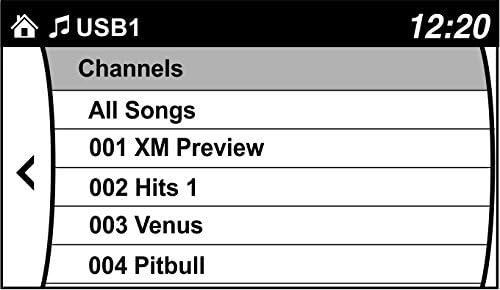
- Browse Channels: Use your factory radio controls and steering wheel controls to browse and enjoy SiriusXM channels. You can also save up to 36 presets.

پروڈکٹ ختمview ویڈیوز
Video 2: This video highlights the benefits of adding SiriusXM to your factory original radio with the VAIS Technology adapter, showcasing seamless integration and control.
Video 3: This video demonstrates how to quickly add SiriusXM to your factory radio using a GSR adapter, emphasizing the ease of installation and use.
خرابی کا سراغ لگانا
اگر آپ کو مسائل کا سامنا ہے، تو درج ذیل پر غور کریں:
- سگنل نہیں ہیں: Ensure the antenna is correctly positioned on the vehicle's roof with an unobstructed view of the sky. Check all cable connections.
- کوئی طاقت نہیں: Verify the OBD II connector is securely plugged into the vehicle's OBD II port.
- No Audio/Channels: Confirm the USB connection to the factory radio is secure. Ensure your SiriusXM subscription is active.
- وقفے وقفے سے سگنل: Re-evaluate antenna placement for optimal reception. Avoid areas with tall buildings or dense foliage.
مزید مدد کے لیے، براہ کرم VAIS ٹیکنالوجی کسٹمر سپورٹ سے رابطہ کریں۔
وضاحتیں
| ماڈل نمبر | GSR-MZ01 Interface Tuner Kit |
| برانڈ | VAIS ٹیکنالوجی |
| کنیکٹوٹی ٹیکنالوجی | یو ایس بی |
| ٹونر ٹیکنالوجی | سیٹلائٹ |
| طاقت کا منبع | گاڑی سے چلنے والا |
| شامل اجزاء | Antenna, OBD II connector, SXV300V1 SiriusXM tuner module |
| شے کا وزن | 1 پاؤنڈ (16 اونس) |
| پیکیج کے طول و عرض | 9.4 x 5.9 x 2.3 انچ |
وارنٹی کی معلومات
For detailed warranty information regarding your VAIS Technology GSR-MZ01 adapter kit, please refer to the warranty card included with your product or visit the official VAIS Technology webسائٹ وارنٹی کے دعووں کے لیے اپنی خریداری کا ثبوت رکھیں۔
کسٹمر سپورٹ
Should you require technical assistance, have questions about installation, or need to troubleshoot an issue, please contact VAIS Technology customer support. Contact information can typically be found on the product packaging or the official VAIS Technology webسائٹ