
1. تعارف
This manual provides instructions for the safe and efficient operation of your RCF MS1033 Home CD Player. The MS1033 is a dual sound source unit, featuring two independent sections for simultaneous use. It includes a CD player with anti-shock mechanics and electronics, capable of playing audio tracks and MP3 files from CD, CD-R, and CD-R/W discs. Additionally, it features an MP3 player that supports USB flash drives and Secure Digital (SD) cards, including Multimedia Cards.
براہ کرم ڈیوائس کو استعمال کرنے سے پہلے اس دستی کو اچھی طرح پڑھیں اور اسے مستقبل کے حوالے کے لیے اپنے پاس رکھیں۔
2. اہم حفاظتی ہدایات
- اس آلے کو بارش یا نمی کے سامنے نہ لائیں۔
- وینٹیلیشن کے کسی بھی سوراخ کو مسدود نہ کریں۔
- گرمی کے کسی بھی ذرائع جیسے ریڈی ایٹرز، ہیٹ رجسٹر، چولہے، یا دیگر آلات (بشمول amplifiers) جو گرمی پیدا کرتی ہے۔
- بجلی کی تار کو چلنے یا چوٹکی ہونے سے بچائیں۔
- صرف مینوفیکچرر کی طرف سے مخصوص منسلکات/لوازمات استعمال کریں۔
- بجلی کے طوفان کے دوران یا طویل عرصے تک غیر استعمال ہونے پر اس آلے کو ان پلگ کریں۔
- تمام سروسنگ کو اہل سروس اہلکاروں سے رجوع کریں۔
3. پیکیج کے مشمولات
تصدیق کریں کہ تمام اشیاء پیکیج میں موجود ہیں:
- RCF MS1033 ہوم سی ڈی پلیئر
- پاور کیبل
- صارف دستی (یہ دستاویز)
Note: The product specifications mention "Included components: cd/mps". This refers to the player unit itself and essential accessories.
4. کنٹرول اور خصوصیات
Familiarize yourself with the various controls and features of your RCF MS1033.
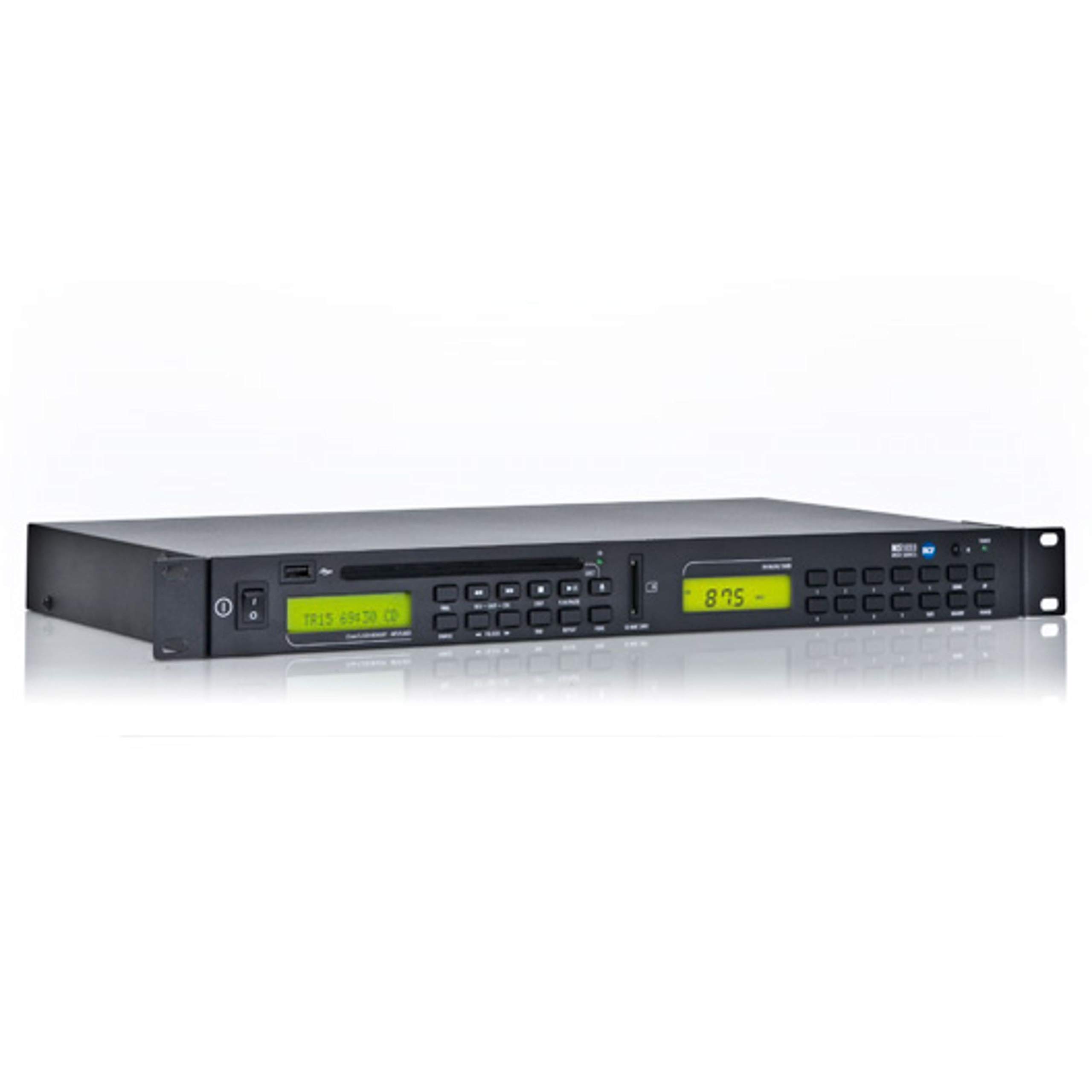
Figure 1: Front panel of the RCF MS1033 Home CD Player. This image displays the main unit with its CD tray, digital display, and various control buttons for playback and source selection.
4.1 فرنٹ پینل
- سی ڈی ٹرے: For inserting audio CDs, CD-R, and CD-R/W discs.
- ڈسپلے سکرین: Shows track information, playback status, and source selection.
- USB پورٹ: For connecting USB flash drives to play MP3 files.
- SD کارڈ سلاٹ: For inserting SD/MMC cards to play MP3 files.
- کنٹرول بٹن: Play/Pause, Stop, Skip Forward/Backward, Folder Navigation, Source Select.
4.2 پیچھے والا پینل
- آڈیو آؤٹ پٹ (RCA): ایک سے جوڑتا ہے۔ ampلیفائر یا وصول کنندہ۔
- پاور ان پٹ: AC پاور سپلائی سے جوڑتا ہے۔
5. سیٹ اپ
5.1 پیک کھولنا
یونٹ کو احتیاط سے اس کی پیکیجنگ سے ہٹا دیں۔ مستقبل کی نقل و حمل یا اسٹوریج کے لیے پیکیجنگ مواد کو اپنے پاس رکھیں۔
5.2 جگہ کا تعین
Place the RCF MS1033 on a stable, flat surface. Ensure adequate ventilation around the unit. Avoid placing it near heat sources or in direct sunlight.
5.3 پاور سے جڑنا۔
- Ensure the unit's power switch (if present) is in the OFF position.
- Connect the power cable to the power input on the rear of the MS1033.
- پاور کیبل کے دوسرے سرے کو ایک مناسب AC پاور آؤٹ لیٹ میں لگائیں۔
5.4 آڈیو سسٹم سے جڑنا
- Locate the RCA audio output jacks on the rear of the MS1033.
- Connect an RCA audio cable (not included) from these outputs to an available audio input on your amplifier or receiver (e.g., "CD IN", "AUX IN").
- Ensure the connections are secure and correctly matched (red to red, white to white).
6. آپریٹنگ ہدایات
6.1 پاور آن/آف۔
Press the Power button on the front panel or remote control (if included) to turn the unit ON or OFF.
6.2 سی ڈی پلے بیک
- Press the "CD" source button (if available) or ensure the unit is in CD mode.
- Press the "Eject" button to open the CD tray.
- Place a CD (audio CD, CD-R, CD-R/W with audio or MP3 files) onto the tray with the label side facing up.
- Press the "Eject" button again or gently push the tray to close it.
- The unit will read the disc. Playback should start automatically or by pressing the "Play" button.
- Use "Play/Pause", "Stop", and "Skip" buttons to control playback.
6.3 USB/SD کارڈ پلے بیک
- Insert a USB flash drive into the USB port or an SD/MMC card into the SD card slot.
- Press the "USB/SD" source button (if available) or ensure the unit is in USB/SD mode.
- The unit will scan the device for MP3 files.
- فولڈرز کو براؤز کرنے اور ٹریک منتخب کرنے کے لیے نیویگیشن بٹن استعمال کریں۔
- Press "Play" to start playback.
6.4 Dual Sound Source Operation
The RCF MS1033 features two independent sections. This allows for simultaneous playback from different sources if your amplifier or mixer has multiple inputs. Consult your amplifier's manual for connecting and managing multiple audio inputs.
7 دیکھ بھال
7.1 صفائی
Disconnect the power cord before cleaning. Use a soft, dry cloth to clean the exterior of the unit. Do not use liquid cleaners or aerosol cleaners.
7.2 ڈسک ہینڈلنگ
- Always hold discs by their edges.
- Keep discs clean and free from scratches.
- استعمال میں نہ ہونے پر ڈسکس کو ان کے کیسز میں اسٹور کریں۔
7.3 USB/SD Card Care
- Always safely remove USB drives and SD cards from the unit when not in use or before powering off.
- Avoid exposing storage devices to extreme temperatures or moisture.
8 خرابیوں کا سراغ لگانا
| مسئلہ | ممکنہ وجہ | حل |
|---|---|---|
| کوئی طاقت نہیں۔ | پاور کی ہڈی منسلک نہیں ہے؛ پاور آؤٹ لیٹ فعال نہیں ہے۔ | Check power cord connection; Test power outlet with another device |
| کوئی آواز نہیں۔ | Audio cables not connected; Incorrect input selected on ampزیادہ جان دار؛ Amplifier volume too low | آڈیو کیبل کنکشن چیک کریں؛ صحیح ان پٹ آن کو منتخب کریں۔ amplifier; Increase ampلیفائر حجم |
| ڈسک نہیں چل رہی | Disc inserted incorrectly; Disc is dirty or scratched; Disc format not supported | Reinsert disc correctly; Clean or replace disc; Ensure disc is CD, CD-R, CD-R/W with audio or MP3 files |
| USB/SD نہیں چل رہا ہے۔ | Device not inserted correctly; Files are not MP3 format; Device not recognized | Reinsert USB/SD; Ensure files are MP3; Try a different USB/SD device |
9. وضاحتیں
| فیچر | تفصیل |
|---|---|
| ماڈل | MS1033 |
| برانڈ | آر سی ایف |
| مصنوعات کے طول و عرض | 6 x 8 x 7 انچ |
| شے کا وزن | 8 پاؤنڈ |
| کنیکٹوٹی ٹیکنالوجی | یو ایس بی |
| خصوصی خصوصیت | CD-R/RW Compatible |
| سپورٹڈ ڈسک فارمیٹس | CD, CD-R, CD-R/W (Audio tracks and MP3 files) |
| Supported Digital Media | USB Flash Drives, SD Cards, Multimedia Cards (MP3 fileصرف s) |
10. وارنٹی اور سپورٹ
For warranty information and technical support, please refer to the official RCF website or contact your local RCF dealer. Keep your purchase receipt as proof of purchase.
نوٹ: مخصوص وارنٹی شرائط علاقے اور خوردہ فروش کے لحاظ سے مختلف ہو سکتی ہیں۔