
1. تعارف
Thank you for choosing the Vulcan Berkel 823E Gravity Feed Meat Slicer. This manual provides essential information for the safe and efficient operation, maintenance, and care of your new appliance. Please read all instructions carefully before using the slicer to ensure proper function and to prevent injury or damage.
The Berkel 823E is designed for commercial use, offering precise slicing of various meats. Its gravity feed mechanism simplifies operation, and the integrated sharpener ensures the blade remains optimally sharp.
2. اہم حفاظتی ہدایات
انتباہ: ان حفاظتی ہدایات پر عمل کرنے میں ناکامی کے نتیجے میں سنگین چوٹ یا موت واقع ہو سکتی ہے۔
- Always keep hands clear of the blade. The blade is extremely sharp.
- Ensure the slicer is unplugged before cleaning, maintenance, or when not in use.
- Never operate the slicer without all guards and safety devices in place.
- Use the food pusher and product tray correctly to hold food securely during slicing.
- Do not attempt to slice frozen meat or items containing bones.
- کام کے علاقے کو صاف اور اچھی طرح سے روشن رکھیں۔
- صرف تربیت یافتہ اہلکاروں کو ہی اس سامان کو چلانا اور برقرار رکھنا چاہیے۔
- Do not immerse the slicer in water or spray directly with water.
- Regularly inspect the power cord for damage. If damaged, contact a qualified technician for replacement.
3. پیک کھولنا اور ابتدائی اسمبلی
Carefully remove the slicer from its packaging. Inspect for any shipping damage. Report any damage immediately to the carrier and your supplier. Retain all packaging materials for future transport or return.
3.1 جگہ کا تعین
Place the slicer on a sturdy, level, non-slip surface capable of supporting its weight. Ensure adequate clearance around the unit for ventilation and operation. The slicer should be positioned near a grounded electrical outlet.
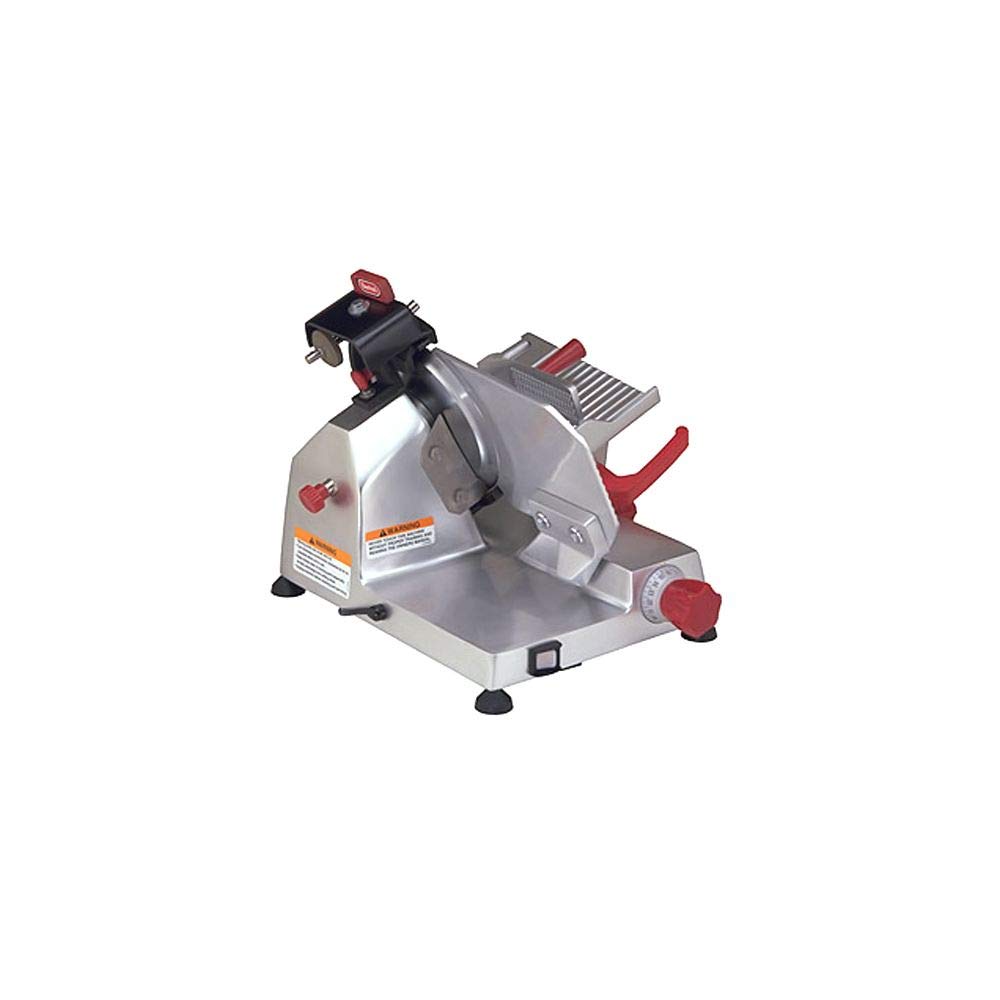
Image: The Berkel 823E Gravity Feed Meat Slicer positioned on a stable counter. This image illustrates the recommended placement for safe operation.
3.2 Attaching Components
Attach the product tray and food pusher according to the diagrams in the manual. Ensure all components are securely fastened before connecting to power.
4. Setup Before First Use
- Clean the Slicer: Before initial use, thoroughly clean all parts that will come into contact with food. Refer to the "Cleaning and Maintenance" section for detailed instructions.
- موونگ پارٹس کو چکنا کرنا: Apply food-grade lubricant to designated moving parts as indicated in the maintenance section.
- الیکٹریکل کنکشن: Plug the slicer into a grounded electrical outlet matching the voltage اور پروڈکٹ لیبل پر متعین تعدد۔
- Blade Guard Check: Verify that the blade guard is correctly positioned and secured.
5. آپریٹنگ ہدایات
5.1 سلائسنگ کی تیاری
- اس بات کو یقینی بنائیں کہ سلائسر صاف اور مناسب طریقے سے جمع ہے۔
- Place a receiving tray or container under the blade to collect sliced product.
- Adjust the slice thickness knob to the desired setting.
- Place the product (e.g., meat) onto the product tray. Use the food pusher to secure it against the fence.
5.2 سلائسنگ کا طریقہ کار
- Turn the slicer ON using the power switch.
- Using the handle, gently push the product tray back and forth, guiding the product against the rotating blade.
- Maintain a steady, even pressure. Do not force the product.
- Once slicing is complete, turn the slicer OFF.
- Return the slice thickness knob to the "0" position to cover the blade edge for safety.
Image: The Berkel 823E Gravity Feed Meat Slicer with a product on the tray, ready for slicing. This demonstrates the proper setup for operation.
6. صفائی اور دیکھ بھال
Regular cleaning and maintenance are crucial for the longevity and hygienic operation of your slicer. Always unplug the slicer before cleaning.
6.1 روزانہ صفائی
- Turn the slice thickness knob to "0" to cover the blade.
- Remove the product tray and food pusher. Wash these parts with warm, soapy water, rinse, and sanitize.
- Carefully wipe down the blade and blade guard with a damp cloth and mild detergent. Use a non-abrasive brush for hard-to-reach areas.
- Wipe all exterior surfaces with a damp کپڑا
- دوبارہ جوڑنے سے پہلے تمام اجزاء کو اچھی طرح خشک کریں۔
6.2 بلیڈ تیز کرنا
The Berkel 823E features a built-in sharpener. Sharpen the blade regularly (e.g., daily or after every few hours of use) to maintain optimal slicing performance.
- یقینی بنائیں کہ سلائسر ان پلگ ہے۔
- Clean the blade thoroughly before sharpening.
- Position the sharpener according to the instructions on the unit.
- Plug in the slicer and turn it ON.
- Engage the sharpening stones against the blade for a few seconds, following the specific instructions for your model's sharpener.
- Disengage the sharpener, turn the slicer OFF, and unplug it.
- Clean the blade again to remove any sharpening residue.
Image: Close-up of the Berkel 823E's integrated blade sharpener in position. This shows how to properly engage the sharpener for blade maintenance.
7 خرابیوں کا سراغ لگانا
This section addresses common issues you might encounter with your slicer. For problems not listed here, contact customer support.
| مسئلہ | ممکنہ وجہ | حل |
|---|---|---|
| سلائسر آن نہیں ہوتا ہے۔ | پلگ ان نہیں؛ پاور سوئچ آف؛ سرکٹ بریکر پھٹ گیا۔ | Check power cord connection; ensure power switch is ON; reset circuit breaker. |
| Blade not slicing cleanly. | Dull blade; incorrect slice thickness setting; product too warm. | Sharpen the blade; adjust slice thickness; ensure product is chilled. |
| Slicer making unusual noise. | Lack of lubrication; foreign object; worn parts. | Lubricate moving parts; inspect for obstructions; contact service if noise persists. |
8. وضاحتیں
- ماڈل: Berkel 823E
- برانڈ: ولکن
- بلیڈ قطر: 9 انچ
- آپریشن موڈ: دستی کشش ثقل فیڈ
- مواد: سٹینلیس سٹیل
- آئٹم کا وزن: تقریباً 36 پاؤنڈ
- خصوصی خصوصیت: Built-in Sharpener
- طاقت: (Typically 115V/60Hz, 1/4 HP - Consult product label for exact specifications)
9. وارنٹی اور کسٹمر سپورٹ
For warranty information, please refer to the warranty card included with your product or visit the official Vulcan webسائٹ خریداری کے ثبوت کے طور پر اپنی خریداری کی رسید اپنے پاس رکھیں۔
If you require technical assistance, replacement parts, or have questions not covered in this manual, please contact Vulcan customer support. Contact details can typically be found on the manufacturer's webسائٹ یا مصنوعات کی پیکیجنگ پر۔
آن لائن مدد: www.vulcanequipment.com/support (سابقampلی لنک، اصل لنک مختلف ہو سکتا ہے)