
1. تعارف
The SureCall Flare 3.0 is a cell phone signal booster designed to enhance 5G/4G LTE voice, text, and data signals within homes and offices. This system is compatible with all major North American cellular carriers, including AT&T, T-Mobile, Verizon, Sprint, Straight Talk, and U.S. Cellular. It is engineered to improve signal strength in areas up to 3500 sq ft, reducing dropped calls, improving audio quality, and accelerating data speeds. The Flare 3.0 features an integrated indoor antenna and a powerful Yagi outdoor antenna for optimal signal capture and distribution.
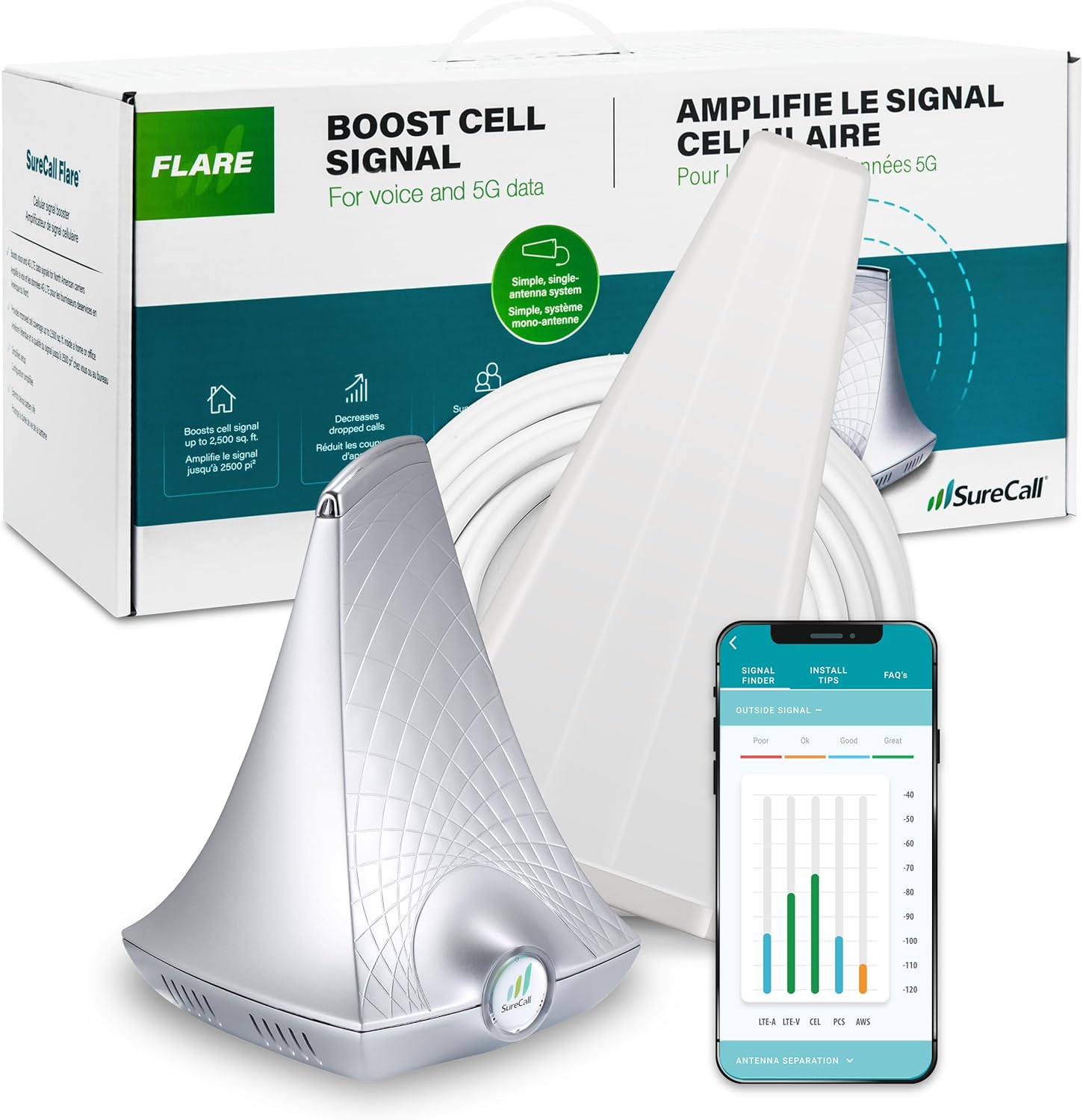
Image: SureCall Flare 3.0 kit components, including the booster, Yagi antenna, and a mobile app interface.
2. پیکیج کے مشمولات
Verify that all items are present in your SureCall Flare 3.0 package:
- Flare 3.0 Signal Booster (Base Unit with integrated indoor antenna)
- Yagi Outdoor Antenna
- 50 ft RG-6 Coaxial Cable
- پاور کی ہڈی
- Mounting Kit for Yagi Antenna
- صارف دستی (یہ دستاویز)

Image: Visual representation of the Flare 3.0 kit contents.
3. سیٹ اپ اور انسٹالیشن
زیادہ سے زیادہ کارکردگی کے لیے مناسب تنصیب بہت ضروری ہے۔ احتیاط سے ان اقدامات پر عمل کریں:
3.1 Outdoor Antenna Placement
The Yagi outdoor antenna must be mounted in a location with the strongest possible existing cell signal. It should be aimed towards the nearest cell tower for your carrier. Use a mobile application or online resources to identify the direction of your closest cell tower.
- Mount the Yagi antenna on a pole as high as possible, ideally above the roofline.
- Ensure the antenna is securely fastened using the provided mounting kit.
- Aim the antenna precisely towards the cell tower.

Image: Using a mobile app to determine optimal outdoor antenna placement and direction.
3.2 Indoor Unit Placement and Separation
The Flare 3.0 base unit, which contains the indoor antenna, should be placed in the area where you need improved signal. A critical aspect of installation is maintaining sufficient separation between the outdoor Yagi antenna and the indoor Flare 3.0 unit to prevent oscillation (feedback loop).
- Place the Flare 3.0 unit on a tabletop or shelf in the desired coverage area.
- Maintain a minimum of 30 feet of horizontal separation between the outdoor Yagi antenna and the indoor Flare 3.0 unit. Without this separation, performance may be reduced.
- The included 50 ft RG-6 coaxial cable connects the outdoor antenna to the Flare 3.0 unit.

Image: System setup diagram showing the required separation between outdoor and indoor units.
Image: Mobile app assisting in confirming ideal separation between components.
3.3 پاور کنکشن
Once both antennas are positioned and connected, plug the power cord into the Flare 3.0 unit and then into a standard electrical outlet. The unit will automatically begin boosting the signal.
4. Operating the SureCall Flare 3.0
The Flare 3.0 operates automatically once powered on. It captures weak outdoor cellular signals, amplifies them, and rebroadcasts them indoors. It also amplifies your phone's outgoing signal back to the cell tower.
4.1 کوریج ایریا
The indoor coverage area provided by the Flare 3.0 depends on the existing outdoor signal strength at the Yagi antenna's location:
- 1-2 bars outside: Approximately 1500 sq ft inside.
- 3-4 bars outside: Approximately 2500 sq ft inside.
- 5 bars outside: Up to 3500 sq ft inside.
If there is no usable signal at the exterior antenna location, a signal booster will not function.

Image: Illustration of indoor coverage area based on booster placement.
4.2 2XP Technology
The Flare 3.0 incorporates 2XP technology, which delivers 2x uplink power. This feature is particularly beneficial for improving performance in remote areas where the signal from your phone back to the cell tower might be weak.

Image: Visual representation of 2XP technology enhancing signal for users.
5 دیکھ بھال
The SureCall Flare 3.0 is designed for minimal maintenance. Keep the unit and antennas clean and free from obstructions. Periodically check cable connections to ensure they are secure. No user-serviceable parts are inside the booster unit.
6 خرابیوں کا سراغ لگانا
If you experience issues with your Flare 3.0, consider the following:
- سگنل میں کوئی بہتری نہیں:
- Ensure there is at least 1 bar of usable cell signal outside your home where the Yagi antenna is mounted. Boosters amplify existing signals; they do not create them.
- Verify the Yagi antenna is correctly aimed at the nearest cell tower.
- تنگی کے لیے تمام کیبل کنکشن چیک کریں۔
- Reduced Coverage Area:
- Confirm the minimum 30 feet of separation between the outdoor Yagi antenna and the indoor Flare 3.0 unit. Insufficient separation can lead to oscillation and reduced performance.
- Adjust the position of the indoor unit to optimize coverage in specific areas.
- اشارے کی روشنی:
- Refer to the full user manual for detailed explanations of the indicator lights on the Flare 3.0 unit. These lights provide information about the system's operational status and potential issues.

Image: Reminder to check for existing outdoor signal before installation.
7. وضاحتیں
| فیچر | تفصیل |
|---|---|
| ماڈل نمبر | SC-Flare3US |
| مصنوعات کے طول و عرض | 9 x 18 x 10 انچ |
| شے کا وزن | 7.85 پاؤنڈ |
| زیادہ سے زیادہ فائدہ | 72 ڈی بی |
| کوریج ایریا | Up to 3500 sq ft (dependent on outdoor signal) |
| تعاون یافتہ نیٹ ورکس | 5G/4G LTE Voice, Text, Data |
| معاون کیریئرز | All North American carriers (AT&T, T-Mobile, Verizon, Sprint, Straight Talk, U.S. Cellular, etc.) |
| خصوصی خصوصیات | 2XP technology, FCC Approved |
8. وارنٹی اور سپورٹ
SureCall products are designed and tested in the USA using high-quality components. The Flare 3.0 comes with an industry-best 3 سال کی وارنٹی. For any technical assistance or support, please contact SureCall's US-based customer support team. SureCall is an authorized Verizon 5G Signal Booster Vendor.
For further information or to contact support, visit the official SureCall webسائٹ یا اپنے پروڈکٹ کی دستاویزات کے ساتھ فراہم کردہ رابطے کی تفصیلات سے رجوع کریں۔

Image: SureCall's US-based customer support team.