
تعارف
The Xfinity HD 720p Wireless Indoor/Outdoor Home Security Camera allows you to monitor your home environment with live video accessible from anywhere. Designed for both indoor and outdoor use, this camera provides essential security features to keep you informed.
باکس میں کیا ہے۔
- Xfinity HD 720p Wireless Security Camera (Model: SCHC2AEW)
- پاور اڈاپٹر
- USB کیبل
- بڑھتے ہوئے ہارڈ ویئر (پیچ اور اینکرز)

Image: Xfinity Home Security Camera and accessories neatly packaged in its box.
سیٹ اپ گائیڈ
- پاور کنکشن: Connect the camera to the power adapter using the provided USB cable, then plug the adapter into a standard electrical outlet.
- ایپ ڈاؤن لوڈ کریں: Download the official Xfinity Home app from your smartphone's app store (iOS App Store or Android Google Play).
- ڈیوائس کا جوڑا بنانا: Open the Xfinity Home app and follow the on-screen instructions to add a new device. You will typically need to scan a QR code on the camera or manually enter its details to pair it with your home Wi-Fi network. Ensure your Wi-Fi network is 2.4 GHz for compatibility.

Image: The Xfinity Home Security Camera placed on a surface, ready for setup.
آپریٹنگ ہدایات
جیو View اور بنیادی کنٹرولز
Once paired, access the live video feed through the Xfinity Home app. The app provides controls for:
- لائیو سٹریمنگ: View حقیقی وقت footage آپ کے کیمرے سے۔
- ریکارڈنگ: Manually record video clips.
- اسکرین شاٹ: لائیو فیڈ سے اسٹیل امیجز کیپچر کریں۔
- دو طرفہ آڈیو: Speak through the camera's speaker and hear audio from its microphone.
نائٹ ویژن
The camera features night vision capabilities for clear monitoring in low-light conditions. This feature automatically activates when ambient light is insufficient, providing a black-and-white image. Some models may offer color night vision depending on ambient light and settings.
حرکت کا پتہ لگانے اور انتباہات
Configure motion detection settings within the Xfinity Home app to receive alerts on your smartphone when activity is detected. You can customize sensitivity levels and notification preferences.
اسٹوریج کے اختیارات
The camera supports local storage via a MicroSD card (not included). Insert a compatible MicroSD card into the designated slot to store recorded video clips directly on the device. Cloud storage options may also be available through your Xfinity Home service subscription.
انسٹالیشن اور ماؤنٹنگ
The Xfinity Home Security Camera can be placed on a flat surface or mounted to a wall. Use the included mounting hardware for secure wall installation. Ensure the camera is positioned to cover the desired monitoring area.
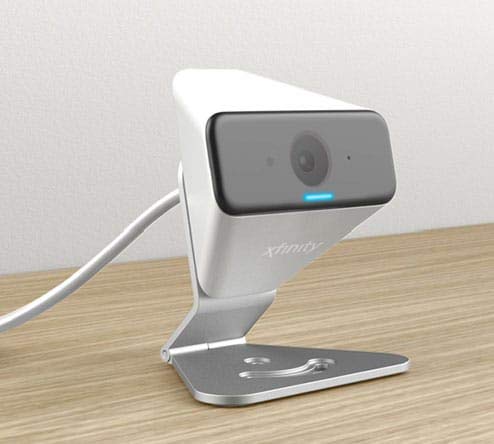
Image: The Xfinity Home Security Camera positioned on a desk, demonstrating its compact design.
مصنوعات کی وضاحتیں
| فیچر | تفصیل |
|---|---|
| ماڈل نمبر | SCHC2AEW |
| ویڈیو کیپچر ریزولوشن | 720ص |
| کنیکٹوٹی ٹیکنالوجی | وائرلیس (وائی فائی) |
| کنیکٹیویٹی پروٹوکول | Wi-Fi (2.4 GHz compatible) |
| انڈور / آؤٹ ڈور استعمال | انڈور، آؤٹ ڈور |
| خصوصی خصوصیات | Motion Sensor, Night Vision |
| طاقت کا منبع | DC (12 Volts, 1 Watt) |
| طول و عرض (L x W x H) | 3 x 3 x 2 انچ |
| شے کا وزن | 1.57 پاؤنڈ |
| بین الاقوامی تحفظ کی درجہ بندی | آئی پی 65 |
خرابی کا سراغ لگانا
- کوئی طاقت نہیں: یقینی بنائیں کہ پاور اڈاپٹر محفوظ طریقے سے کیمرے اور کام کرنے والے الیکٹریکل آؤٹ لیٹ دونوں سے جڑا ہوا ہے۔
- رابطے کے مسائل: Verify your Wi-Fi network is 2.4 GHz. Restart your router and the camera. Ensure the camera is within range of your Wi-Fi signal.
- ایپ جواب نہیں دے رہی ہے: Close and reopen the Xfinity Home app. If the issue persists, try reinstalling the app.
- خراب ویڈیو کوالٹی: اپنے Wi-Fi سگنل کی طاقت چیک کریں۔ یقینی بنائیں کہ کیمرے کا لینس صاف اور رکاوٹوں سے پاک ہے۔
وارنٹی اور کسٹمر سپورٹ
For warranty information, please refer to the documentation included with your purchase or visit the official Xfinity support website. For technical assistance or customer service, please contact Xfinity customer support directly.