
1. تعارف
Welcome to the user manual for your AAXA LED Pico Micro Video Projector. This compact and versatile projector is designed for personal media sharing, business presentations, and home cinema experiences. This manual provides detailed instructions on setting up, operating, maintaining, and troubleshooting your device to ensure optimal performance.
پیکیج کے مشمولات
براہ کرم تصدیق کریں کہ تمام اشیاء آپ کے پیکیج میں موجود ہیں:
- AAXA LED Pico Micro Video Projector
- USB کیبل
- اے وی کیبل
- Mini Tripod (optional, may vary by package)
- پاور اڈاپٹر (واضح طور پر درج نہیں لیکن چارج کرنے کے لیے مضمر)
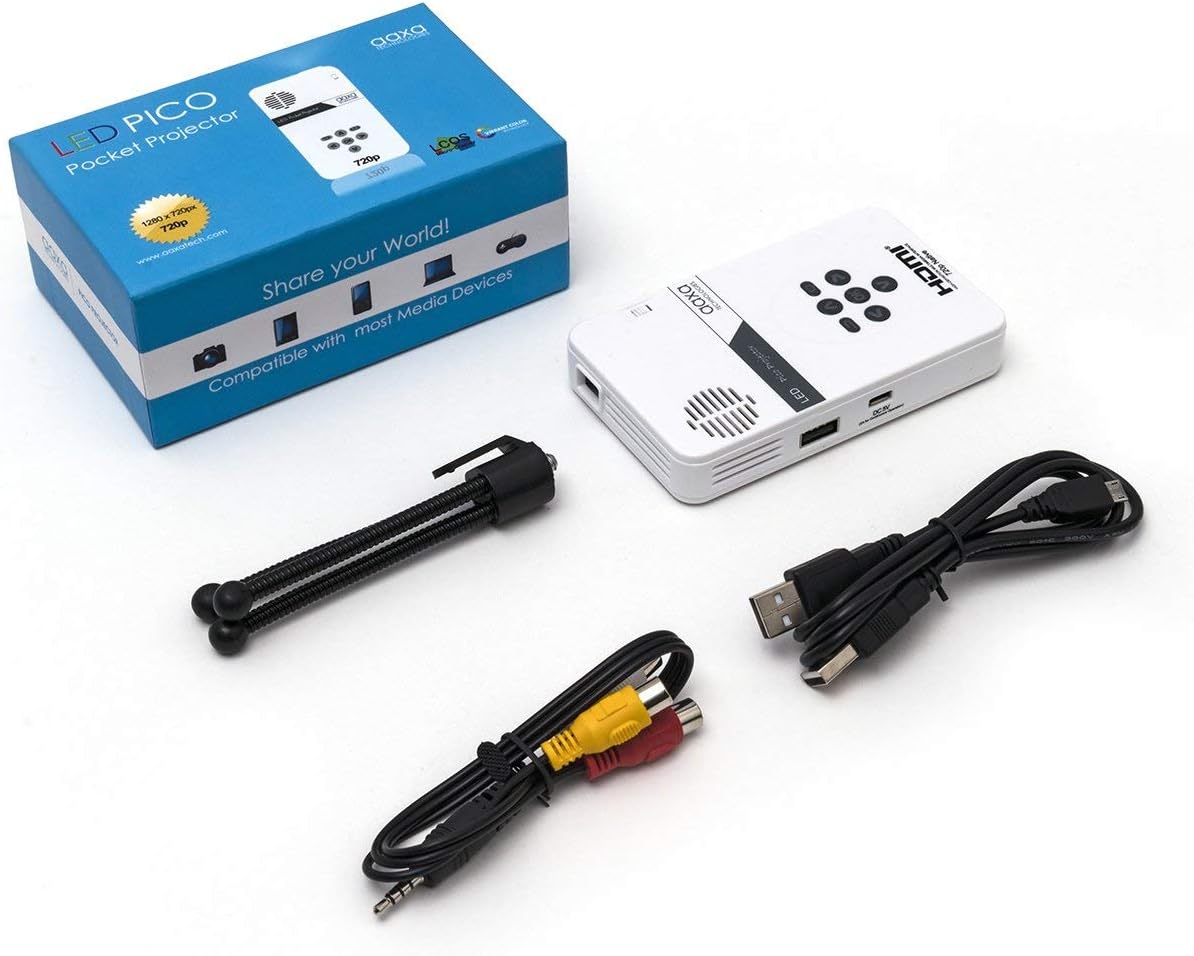
Figure 1: Package contents including the projector, cables, and tripod.
2. پروڈکٹ ختمview
The AAXA LED Pico Micro Video Projector is a compact device featuring a user-friendly interface and multiple connectivity options. It is designed for portability and ease of use.
اہم خصوصیات:
- Ultra Bright 25 Lumens LED light source with 15,000-hour lifespan.
- High Definition 720p (1280x720) native resolution, supporting up to 1080p input.
- Vibrant Color Technology for rich and accurate colors.
- Built-in 80-minute rechargeable Lithium-ion battery.
- Integrated media player and speakers.
- Compact and lightweight design (4.25 x 2.36 x 0.7 inches, 6.3 ounces).
کنٹرولز اور پورٹس:
Familiarize yourself with the various controls and connection ports on your projector:

تصویر 2: اوپر view of the projector with navigation buttons (Up, Down, Left, Right, OK, Menu, Back) and speaker grille.
- نیویگیشن بٹن: مینو کو نیویگیٹ کرنے اور اختیارات کو منتخب کرنے کے لیے استعمال کیا جاتا ہے۔
- اسپیکر گرل: For audio output from the built-in speakers.
- فوکس وہیل: Located on the side, used to adjust image clarity.

شکل 3: سامنے view of the projector showing the HDMI, AV, and 3.5mm audio out ports.
- HDMI ان پٹ: لیپ ٹاپ، گیمنگ کنسولز، یا دیگر HDMI فعال آلات سے جڑیں۔
- اے وی ان پٹ: شامل اے وی کیبل کا استعمال کرتے ہوئے پرانے آلات کو جوڑنے کے لیے۔
- 3.5 ملی میٹر آڈیو آؤٹ: بیرونی ہیڈ فون یا اسپیکر کو جوڑیں۔

شکل 4: طرف view of the projector showing the USB port and DC 5V charging port.
- USB پورٹ: میڈیا پلے بیک کے لیے USB ڈرائیوز کو جوڑنے کے لیے۔
- DC 5V ان پٹ: Power input for charging the internal battery.

شکل 5: طرف view of the projector showing the TF Card slot.
- Micro SD (TF Card) Slot: Insert a Micro SD card (up to 16GB) for media playback.
3. سیٹ اپ
3.1 پاور آن/آف اور چارجنگ
- چارج کرنا: Connect the supplied micro USB cable to the DC 5V input on the projector and a compatible USB power source. The LED indicator will show charging status.
- پاور آن: Press and hold the power button (usually located near the focus wheel or on the top panel) until the projector powers on.
- بجلی بند: Press and hold the power button again until the projector shuts down.
3.2 Positioning the Projector
Place the projector on a stable, flat surface. For optimal image quality, project onto a smooth, light-colored wall or a dedicated projector screen. The distance from the surface will determine the image size.

Figure 6: The projector can be mounted on a tripod for stable positioning and angle adjustment.
3.3 فوکس کو ایڈجسٹ کرنا
To achieve a clear image, rotate the focus wheel located on the side of the projector until the projected image appears sharp and in focus.
4. آپریٹنگ ہدایات
4.1 کنیکٹنگ ڈیوائسز
- HDMI: Connect an HDMI cable from your source device (laptop, game console, etc.) to the HDMI input port on the projector. Select HDMI as the input source in the projector's menu.
- اے وی: Use the provided AV cable to connect to devices with composite video and audio outputs. Select AV as the input source.
- USB/Micro SD: Insert a USB flash drive into the USB port or a Micro SD card into the TF Card slot. The projector's media player interface will typically appear, allowing you to browse and play files.
4.2 میڈیا پلے بیک
The built-in media player supports various video, music, and picture formats. Use the navigation buttons on the projector to browse files اور پلے بیک کے لیے مواد منتخب کریں۔
4.3 آڈیو آؤٹ پٹ۔
The projector has built-in speakers. For private listening or enhanced audio, connect headphones or external speakers to the 3.5mm Audio Out port.
5 دیکھ بھال
- صفائی: Use a soft, dry cloth to clean the exterior of the projector. For the lens, use a lens cleaning cloth and specialized lens cleaning solution. Do not use abrasive cleaners.
- ذخیرہ: جب استعمال میں نہ ہو تو، پروجیکٹر کو ٹھنڈی، خشک جگہ پر، براہ راست سورج کی روشنی اور انتہائی درجہ حرارت سے دور رکھیں۔
- بیٹری کی دیکھ بھال: To prolong battery life, avoid fully discharging the battery frequently. Charge the projector regularly, even if not in active use.
6 خرابیوں کا سراغ لگانا
| مسئلہ | ممکنہ وجہ | حل |
|---|---|---|
| کوئی تصویر پیش نہیں کی گئی۔ | Projector not powered on; incorrect input source; loose cable connection. | Ensure projector is on and charged. Select correct input source (HDMI, AV, USB/SD). Check all cable connections. |
| تصویر دھندلی ہے | فوکس ایڈجسٹ نہیں ہوا؛ پروجیکٹر سطح سے بہت قریب/دور۔ | Adjust the focus wheel until the image is clear. Adjust the distance of the projector from the projection surface. |
| کوئی آواز نہیں۔ | Volume too low; external audio device connected; audio format not supported. | Increase volume. Disconnect external audio devices if using internal speakers. Ensure audio format is supported. |
| پروجیکٹر غیر متوقع طور پر بند ہوجاتا ہے۔ | Low battery; overheating. | Charge the battery. Ensure proper ventilation and clear any obstructions from vents. |
7. وضاحتیں
| فیچر | تفصیل |
|---|---|
| برانڈ | AAXA ٹیکنالوجیز |
| ماڈل نمبر | KP-101-01-cr |
| ڈسپلے ریزولوشن | 1280 x 720 (Native), Max 1080p Input |
| چمک | 25 Lumens |
| روشنی کا ذریعہ زندگی | 15,000 گھنٹے (LED) |
| کنیکٹوٹی ٹیکنالوجی | HDMI, USB, Micro SD, 3.5mm Aux Out, Composite AV |
| بیٹری کی زندگی | Up to 80 minutes (Lithium-Ion) |
| مصنوعات کے طول و عرض | 4.25 x 2.36 x 0.7 انچ |
| شے کا وزن | 6.3 اونس |
| تجویز کردہ استعمال | Business, Education, Home Cinema |
8. وارنٹی اور سپورٹ
This product is offered as an Amazon Renewed item, which means it has been professionally inspected and tested to work and look like new. Amazon Renewed products are eligible for replacement or refund under the Amazon Renewed Guarantee if you are not satisfied with your purchase.
For further assistance or technical support, please refer to the official AAXA Technologies webسائٹ یا ان کی کسٹمر سروس سے براہ راست رابطہ کریں۔