
تعارف
The HyperX Alloy Core RGB Gaming Keyboard is designed to provide a responsive and durable typing experience with dynamic RGB lighting. This manual provides detailed instructions for setting up, operating, and maintaining your keyboard, ensuring optimal performance.

Image: The HyperX Alloy Core RGB Gaming Keyboard, showcasing its full layout and design.
خصوصیات
- متحرک آرجیبی لائٹنگ: Features a distinctive light bar and dynamic RGB lighting effects with multiple customizable patterns.
- پائیدار تعمیر: Built with a reinforced plastic frame for enhanced durability and stability.
- خاموش اور ذمہ دار کلیدیں: Equipped with soft-touch membrane keys that offer a quiet typing experience and anti-ghosting functionality for accurate input.
- اسپل مزاحم ڈیزائن: Tested to withstand up to 120ml of liquid spills, providing protection against accidental damage.
- سرشار میڈیا کنٹرولز: Convenient buttons for audio playback, volume adjustment, and mute functions.
- فوری رسائی کے بٹن: Dedicated buttons for adjusting brightness, changing lighting modes, and activating game mode.
- کی بورڈ لاک موڈ: Prevents accidental key presses during intense gaming sessions.
- مطابقت: Supports Windows 7, 8, 8.1, and 10.
- طول و عرض: Approximately 443.20mm (width) x 175.31mm (depth) x 35.68mm (height).
سیٹ اپ
- کی بورڈ کھولیں: کی بورڈ کو اس کی پیکیجنگ سے احتیاط سے ہٹا دیں۔
- کمپیوٹر سے جڑیں: Plug the USB-A connector of the keyboard cable into an available USB port on your computer. The keyboard is a plug-and-play device and typically does not require additional drivers for basic functionality.
- کی بورڈ فٹ کو ایڈجسٹ کریں: For ergonomic comfort, you can extend the adjustable feet located on the underside of the keyboard to tilt it to your preferred angle.
Video: This video demonstrates the physical handling of the keyboard, including adjusting the feet for optimal typing angle, and showcases the initial RGB lighting effects upon connection.

Image: A hand connecting the USB-A cable of the keyboard to a computer's USB port.
آپریٹنگ ہدایات
آر جی بی لائٹنگ کنٹرول
The HyperX Alloy Core RGB keyboard features dynamic RGB lighting. Use the dedicated quick access buttons located above the function keys to customize your lighting experience.
- چمک ایڈجسٹمنٹ: Press the sun icon button to cycle through different brightness levels.
- لائٹنگ موڈ کا انتخاب: Press the color palette icon button to switch between various lighting effects (e.g., Color Cycle, Spectrum Wave, Breathing, Solid, 5 Zones, Aurora).
- Effect Speed: Use the FN key + Up/Down arrow keys to increase or decrease the speed of lighting effects.
- Solid Color Selection: Use the FN key + Left/Right arrow keys to switch between solid colors.
- 5-Zone Customization: For 5-zone lighting, press the FN key + F1-F5 keys multiple times to customize the color of each zone.
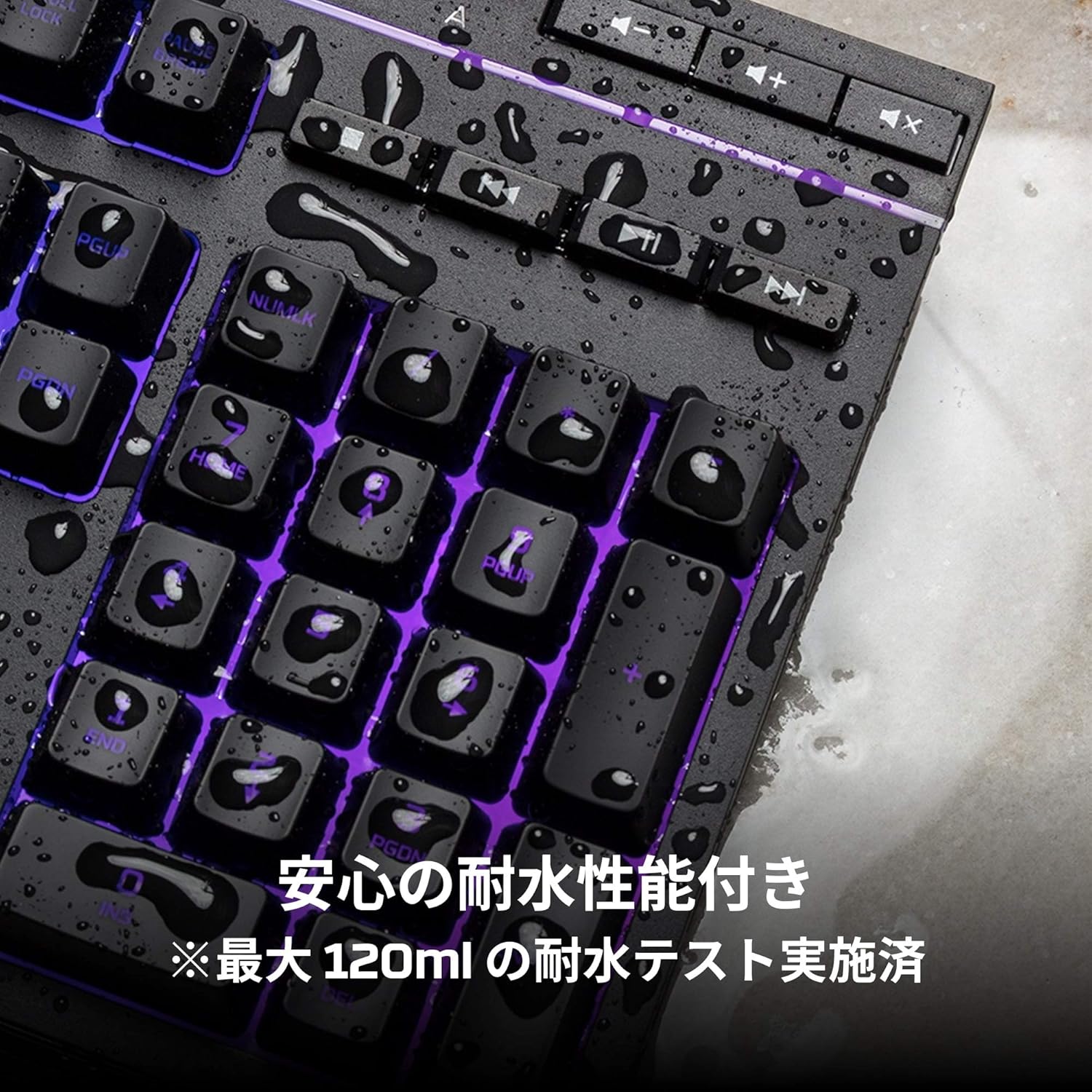
Image: Visual representation of various RGB lighting patterns and key combinations for controlling them.
میڈیا کنٹرولز
Dedicated media control buttons are located on the top right of the keyboard for easy access to audio functions.
- والیوم اوپر/نیچے: سسٹم والیوم کو ایڈجسٹ کریں۔
- خاموش کریں: آڈیو کو خاموش یا چالو کریں۔
- چلائیں/روکیں: میڈیا پلے بیک کو کنٹرول کریں۔
- پچھلا/اگلا ٹریک: Skip to the previous or next media track.

Image: Close-up of the dedicated media control buttons on the top right of the keyboard.
Game Mode and Keyboard Lock
- گیم موڈ: Press the game controller icon button to activate Game Mode, which disables the Windows key to prevent accidental interruptions during gameplay.
- کی بورڈ لاک: Press FN + F12 to enable keyboard lock mode, which temporarily disables all key inputs.
دیکھ بھال
اپنے HyperX Alloy Core RGB کی بورڈ کی لمبی عمر اور بہترین کارکردگی کو یقینی بنانے کے لیے، دیکھ بھال کے ان رہنما خطوط پر عمل کریں:
- صفائی: کی بورڈ کو نرم، خشک کپڑے سے باقاعدگی سے صاف کریں۔ ضدی گندگی کے لیے، تھوڑا سا ڈیamp کپڑا استعمال کیا جا سکتا ہے، اس بات کو یقینی بناتے ہوئے کہ کلیدی سوئچ میں کوئی مائع داخل نہ ہو۔
- پھیلنے کی مزاحمت: While the keyboard is spill-resistant (up to 120ml), it is not waterproof. In case of a spill, immediately disconnect the keyboard from your computer, wipe off any liquid, and allow it to air dry completely before reconnecting.
- انتہائی حالات سے بچیں: Do not expose the keyboard to extreme temperatures, humidity, or direct sunlight.

Image: The keyboard with water droplets on its surface, illustrating its spill-resistant feature.
خرابی کا سراغ لگانا
If you encounter issues with your HyperX Alloy Core RGB keyboard, refer to the following common solutions:
- کی بورڈ جواب نہیں دے رہا ہے:
- یقینی بنائیں کہ USB کیبل کی بورڈ اور کمپیوٹر دونوں سے محفوظ طریقے سے جڑی ہوئی ہے۔
- اپنے کمپیوٹر پر کی بورڈ کو کسی دوسرے USB پورٹ سے جوڑنے کی کوشش کریں۔
- اپنے کمپیوٹر کو دوبارہ شروع کریں۔
- Check if Keyboard Lock Mode (FN + F12) is active.
- آرجیبی لائٹنگ کام نہیں کر رہی:
- Ensure the brightness is not set to the lowest level using the brightness adjustment button.
- Cycle through different lighting modes using the lighting mode selection button.
- تصدیق کریں کہ کی بورڈ مناسب طریقے سے جڑا ہوا ہے اور پاور حاصل کر رہا ہے۔
- چابیاں صحیح طریقے سے رجسٹر نہیں ہو رہی ہیں:
- کسی بھی ملبے کو ہٹانے کے لیے متاثرہ چابیاں کے ارد گرد صاف کریں۔
- Ensure your operating system is compatible (Windows 7/8/8.1/10).
- گیم موڈ کے مسائل:
- Ensure Game Mode is properly activated by pressing the game controller icon button. The indicator light should be on.
If the issue persists after trying these steps, please contact HyperX customer support for further assistance.
وضاحتیں
| فیچر | تفصیل |
|---|---|
| برانڈ | ہائپر ایکس |
| ماڈل نمبر | HX-KB5ME2-JP |
| کنیکٹوٹی | USB-A |
| کی بورڈ کی قسم | جھلی گیمنگ کی بورڈ۔ |
| بیک لائٹ کا رنگ | آر جی بی |
| خصوصی خصوصیات | Backlit, Spill-Resistant |
| طول و عرض (L x W x H) | 44.32 x 17.53 x 3.57 سینٹی میٹر |
| وزن | 1.1 کلوگرام |
| ہم آہنگ OS | ونڈوز 7/8/8.1/10 |
وارنٹی اور سپورٹ
The HyperX Alloy Core RGB Gaming Keyboard comes with a 2 سال کی وارنٹی خریداری کی تاریخ سے. وارنٹی کے دعووں کے لیے براہ کرم اپنی خریداری کا ثبوت اپنے پاس رکھیں۔
For technical support, warranty inquiries, or additional information, please visit the official HyperX support webسائٹ یا ان کے کسٹمر سروس ڈیپارٹمنٹ سے رابطہ کریں۔
Official HyperX Webسائٹ: www.hyperx.com