
1. تعارف
The Cangaroo 3-in-1 device is a versatile instrument designed to monitor indoor temperature and humidity, while also functioning as a digital clock with an alarm feature. This manual provides detailed instructions for its setup, operation, and maintenance, ensuring you get the most accurate readings and functionality from your device.
2. مصنوعات کی خصوصیات
- درجہ حرارت اور نمی کی پیمائش: Accurately measures ambient temperature and relative humidity.
- Digital Clock with Alarm Function: Displays time and includes a programmable alarm.
- بڑا ڈسپلے: Clear and easy-to-read digital screen.
- وسیع پیمائش کی حد: Temperature from -50°C to 70°C; Humidity from 10% to 99%.
- اعلی درستگی: Temperature accuracy of +/- 1°C; Humidity accuracy of +/- 5%.
- بیٹری سے چلنے والا: Requires one AA 1.5V battery (not included) for portable use.
- جدید ڈیزائن: کومپیکٹ اور جمالیاتی لحاظ سے pleasing for various environments.
3. پیکیج کے مشمولات
براہ کرم درج ذیل اشیاء کے لیے پیکج چیک کریں:
- 1 x Cangaroo 3-in-1 Thermometer, Hygrometer, Digital Clock with Alarm (Model 103548)
Note: AA 1.5V battery is not included and must be purchased separately.
4. سیٹ اپ
4.1 بیٹری کی تنصیب
- ڈیوائس کے پچھلے حصے میں بیٹری کے ٹوکرے کا پتہ لگائیں۔
- بیٹری کے ٹوکری کا احاطہ کھولیں۔
- Insert one AA 1.5V battery, ensuring the correct polarity (+ and -).
- بیٹری کے کمپارٹمنٹ کور کو محفوظ طریقے سے بند کریں۔
Upon successful battery installation, the display will power on and show current temperature, humidity, and time.

تصویر: پیچھے view of the device, highlighting the battery compartment and control buttons (ADJ, MODE, °C/°F).
4.2 ابتدائی جگہ کا تعین
Place the device on a flat, stable surface or mount it on a wall using the integrated hanging hole. For accurate readings, avoid placing the device near heat sources, direct sunlight, or areas with extreme drafts.
5. آپریٹنگ ہدایات
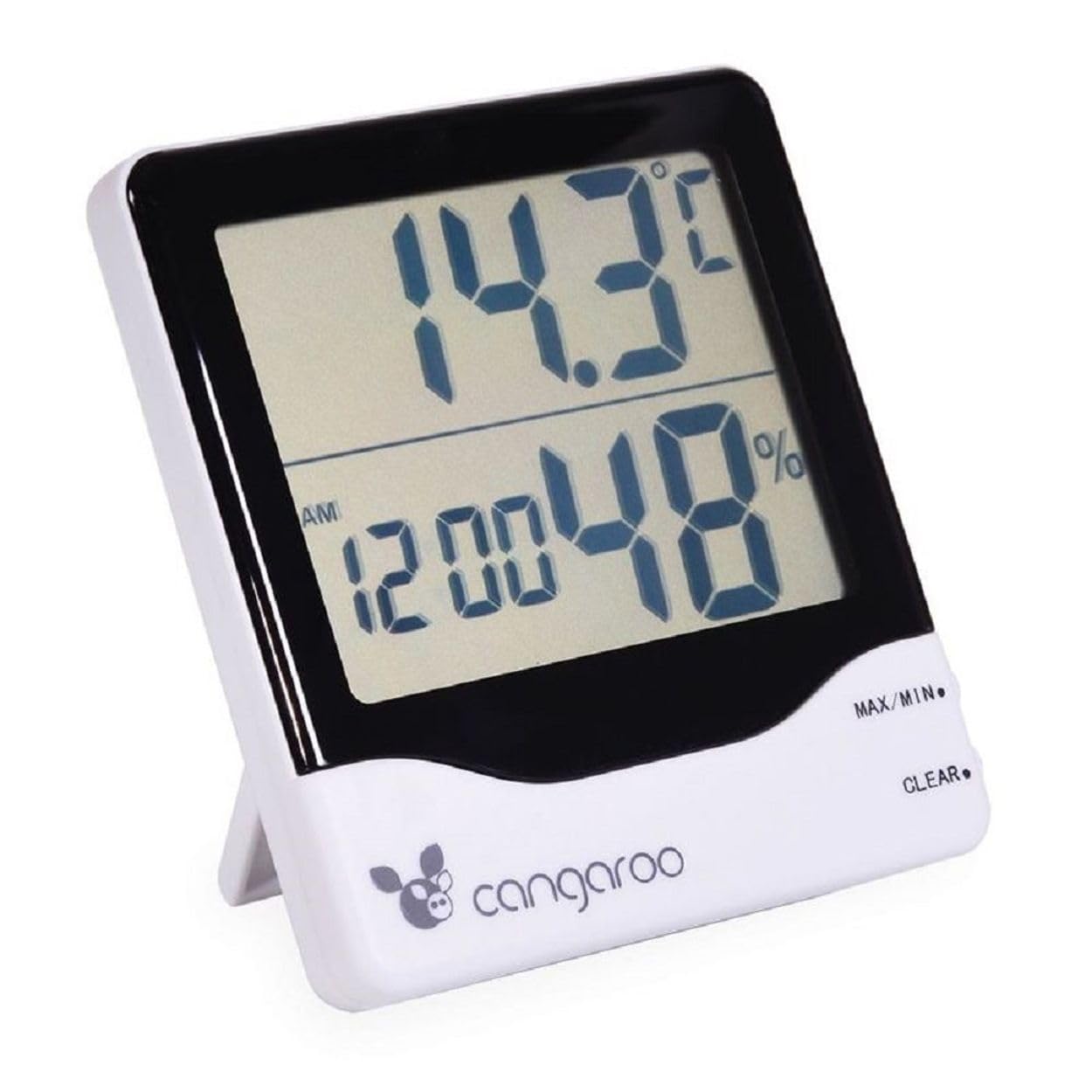
تصویر: سامنے view of the Cangaroo 3-in-1 device, showing the main display with temperature, time, and humidity readings.
5.1 ڈسپلے ختمview
بڑی LCD اسکرین درج ذیل معلومات دکھاتی ہے۔
- اوپری ڈسپلے: موجودہ درجہ حرارت °C یا °F میں۔
- لوئر ڈسپلے: Current time (AM/PM indicator) and relative humidity in %.
5.2 وقت اور تاریخ کی ترتیب
- دبائیں موڈ button on the back of the device to cycle through display modes until the time setting is active (usually indicated by flashing digits).
- While in time setting mode, press the اے ڈی جے (Adjust) button to change the flashing digit (hours, minutes).
- دبانا جاری رکھیں موڈ to move to the next setting (e.g., minutes, 12/24 hour format, date if available).
- استعمال کریں۔ اے ڈی جے button to set the desired value for each.
- تمام ترتیبات مکمل ہونے کے بعد، دبائیں۔ موڈ سیٹنگ موڈ سے باہر نکلنے کے لیے دوبارہ۔
5.3 الارم سیٹ کرنا۔
- دبائیں موڈ button until the alarm time is displayed (often indicated by an alarm icon or 'AL').
- دبائیں اور تھامیں۔ موڈ button for a few seconds until the alarm hours start flashing.
- استعمال کریں۔ اے ڈی جے مطلوبہ الارم گھنٹہ سیٹ کرنے کے لیے بٹن۔
- دبائیں موڈ to move to alarm minutes, then use اے ڈی جے قائم کرنے کے لئے.
- دبائیں موڈ الارم کی ترتیب کی تصدیق اور باہر نکلنے کے لیے دوبارہ۔
- الارم کو فعال/غیر فعال کرنے کے لیے، دبائیں۔ اے ڈی جے button while in alarm display mode (not setting mode). An alarm icon will appear/disappear on the display.
5.4 درجہ حرارت کی اکائیوں کو تبدیل کرنا (°C/°F)
دبائیں ° C / ° F button on the back of the device to toggle between Celsius and Fahrenheit temperature display.
5.5 MAX/MIN Temperature and Humidity Readings
The device records the maximum and minimum temperature and humidity values since the last reset.
- دبائیں MAX/MIN button (located on the front right side) once to display the maximum recorded temperature and humidity.
- دبائیں MAX/MIN again to display the minimum recorded temperature and humidity.
- دبائیں MAX/MIN a third time to return to current readings.
- To clear the MAX/MIN records, press the صاف کریں۔ button (located on the front right side, below MAX/MIN) while MAX or MIN values are displayed.
6 دیکھ بھال
6.1 صفائی
Wipe the device with a soft, dry cloth. Do not use abrasive cleaners or immerse the device in water. Avoid spraying liquids directly onto the display or buttons.
6.2 بیٹری کی تبدیلی
When the display becomes dim or the device stops functioning, it is time to replace the battery. Follow the steps in Section 4.1 Battery Installation to replace the AA 1.5V battery.
6.3 اسٹوریج
If the device will not be used for an extended period, remove the battery to prevent leakage and damage. Store the device in a cool, dry place away from direct sunlight.
7 خرابیوں کا سراغ لگانا
- کوئی ڈسپلے نہیں: Check if the battery is inserted correctly with the right polarity. Replace the battery if it is depleted.
- غلط پڑھنا: Ensure the device is not placed near heat sources, direct sunlight, or in areas with extreme drafts. Allow the device to stabilize for 15-30 minutes after initial setup or relocation.
- الارم نہیں بج رہا ہے: Verify that the alarm function is activated (check for the alarm icon on the display). Ensure the alarm time is set correctly.
8. وضاحتیں
| ماڈل نمبر | 103548 |
| رنگ | سفید اور سیاہ |
| درجہ حرارت کی حد | -50 ° C سے 70 ° C (-58 ° F سے 158 ° F) |
| درجہ حرارت کی درستگی | +/- 1°C |
| نمی کی حد | 10% سے 99% RH |
| نمی کی درستگی | +/- 5% RH |
| طاقت کا منبع | 1 x AA 1.5V Battery (not included) |
| طول و عرض (L x W x H) | 11 x 10 x 2.5 سینٹی میٹر (تقریباً) |
| وزن | 120 Grams (approximately) |
9. وارنٹی اور سپورٹ
This product is covered by a standard manufacturer's warranty. For specific warranty details, please refer to the documentation provided with your purchase or contact Cangaroo customer support. If you encounter any issues or require assistance, please reach out to the retailer or manufacturer's support channels.
10. ضائع کرنے کی معلومات
Please dispose of the device and its batteries responsibly according to local environmental regulations. Do not dispose of electronic devices or batteries with household waste. Contact your local authorities for information on recycling programs.