
Oraimo OEB-H66D
Oraimo OEB-H66D Wireless Studio Sound Bluetooth Headset
صارف دستی
تعارف
Thank you for choosing the Oraimo OEB-H66D Over-ear Wireless Studio Sound Bluetooth Headset. This manual provides essential information for setting up, operating, and maintaining your headphones to ensure an optimal audio experience. Please read this manual thoroughly before use.
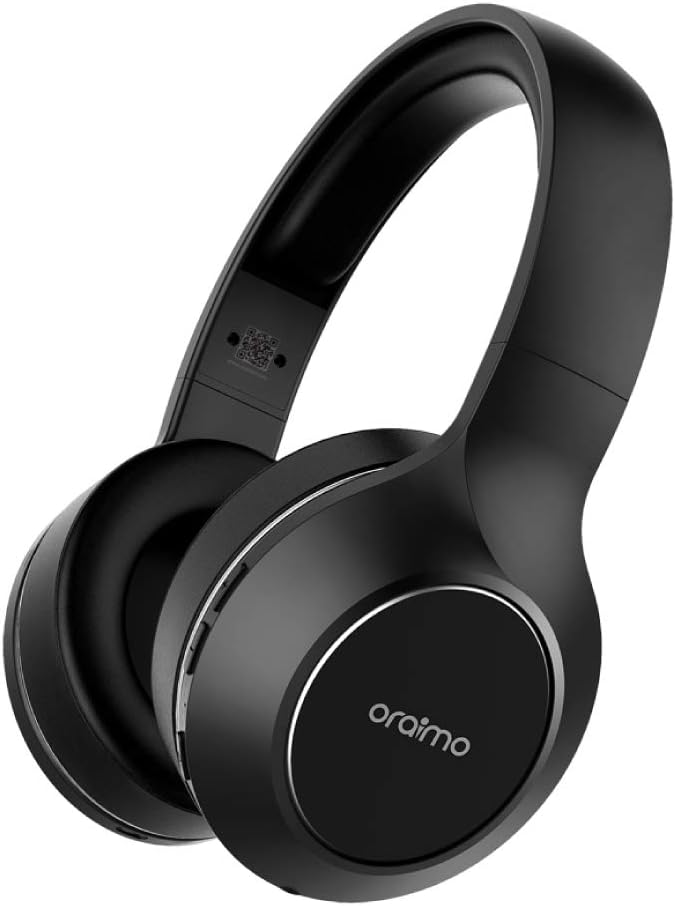
Image: The Oraimo OEB-H66D Over-ear Wireless Headset, showcasing its sleek black design and comfortable earcups.
حفاظتی معلومات
- ہیڈ فون کو انتہائی درجہ حرارت یا نمی کے سامنے نہ رکھیں۔
- ہیڈ فونز کو گرانے یا ان کو شدید اثرات کے تابع کرنے سے گریز کریں۔
- ہیڈ فون کو جدا یا تبدیل نہ کریں۔ اس سے وارنٹی ختم ہو جائے گی۔
- Clean with a soft, dry cloth. Do not use harsh chemicals.
- سماعت کو پہنچنے والے نقصان کو روکنے کے لیے اعتدال کے حجم کی سطح پر سنیں۔
پیکیج کے مشمولات
براہ کرم درج ذیل اشیاء کے لیے پیکج چیک کریں:
- Oraimo OEB-H66D Over-ear Wireless Headset
- USB چارجنگ کیبل
- 3.5 ملی میٹر آڈیو کیبل (AUX کیبل)
- صارف دستی (یہ دستاویز)
سیٹ اپ
1. ہیڈ فون چارج کرنا
Before first use, fully charge your Oraimo OEB-H66D headphones. Connect the provided USB charging cable to the charging port on the headphones and the other end to a USB power source (e.g., computer USB port, wall adapter). The LED indicator will show charging status and turn off when fully charged.
- بیٹری کی صلاحیت: 500mAh
- اسٹینڈ بائی ٹائم: 200 گھنٹے تک
- گفتگو کا وقت: 20 گھنٹے تک
- موسیقی بجانے کا وقت: 20 گھنٹے تک
2. بلوٹوت جوڑی بنانا
اپنے ہیڈ فون کو بلوٹوتھ فعال ڈیوائس سے جوڑنے کے لیے:
- یقینی بنائیں کہ ہیڈ فون چارج اور پاور آف ہیں۔
- ہیڈ فون پر پاور بٹن کو دبائیں اور پکڑے رکھیں جب تک کہ LED اشارے نیلے اور سرخ نہ ہو جائیں، جو جوڑنے کے موڈ کی نشاندہی کرتے ہیں۔
- اپنے آلے پر (اسمارٹ فون، ٹیبلیٹ، کمپیوٹر)، بلوٹوتھ کو فعال کریں اور دستیاب آلات تلاش کریں۔
- Select "Oraimo OEB-H66D" from the list of found devices.
- ایک بار منسلک ہونے کے بعد، ایل ای ڈی اشارے ٹھوس نیلے رنگ کا ہو جائے گا۔
بلوٹوتھ ورژن: V4.2
Talk Range: 10 میٹر

Image: A person wearing the Oraimo OEB-H66D headphones, emphasizing the wireless freedom and high-definition sound experience.
آپریٹنگ ہدایات
کنٹرول کرتا ہے۔
The ear cup controls provide convenient management of your audio and calls:
- پاور آن/آف: پاور بٹن کو دبائے رکھیں۔
- چلائیں/روکیں: پلے/پاز بٹن پر سنگل کلک کریں۔
- جواب / کال ختم کریں: Single click the Play/Pause button during a call.
- اواز بڑھایں: والیوم اپ بٹن کو دیر تک دبائیں۔
- آواز کم: والیوم ڈاؤن بٹن کو دیر تک دبائیں۔
- اگلا ٹریک: Double click the Volume Down button.
- پچھلا ٹریک: Double click the Volume Up button.

تصویر: تفصیلی view of the ear cup controls on the Oraimo OEB-H66D, showing buttons for volume, track control, and call management.
آڈیو تجربہ
The Oraimo OEB-H66D headphones are designed to deliver a rich and immersive audio experience, bringing near studio levels of sound quality to your home. They feature active noise cancellation for an enhanced listening environment.

Image: The Oraimo OEB-H66D headphones set against a backdrop of vibrant sound waves, symbolizing their "Studio Sound" capabilities.
آرام دہ فٹ
These headphones feature a round-ear design and comfort-cushion ear cups, ensuring a comfortable fit for extended listening sessions. The adjustable headband allows for a personalized and secure fit.

Image: A person comfortably resting on a couch while wearing the Oraimo OEB-H66D headphones, demonstrating the comfortable fit for long listening sessions.
دیکھ بھال
- صفائی: Use a soft, lint-free cloth to wipe the headphones. Do not use liquid cleaners or sprays directly on the headphones.
- ذخیرہ: ہیڈ فونز کو کسی ٹھنڈی، خشک جگہ پر براہ راست سورج کی روشنی اور انتہائی درجہ حرارت سے دور رکھیں۔
- بیٹری کی دیکھ بھال: بیٹری کی زندگی کو طول دینے کے لیے، بار بار بیٹری کو مکمل طور پر خارج کرنے سے گریز کریں۔ ہیڈ فون کو باقاعدگی سے چارج کریں، چاہے وہ طویل عرصے تک استعمال میں نہ ہوں۔
خرابی کا سراغ لگانا
| مسئلہ | ممکنہ حل |
|---|---|
| ہیڈ فون آن نہیں ہوتے۔ | یقینی بنائیں کہ ہیڈ فون پوری طرح سے چارج ہیں۔ پاور سورس سے جڑیں اور چارجنگ انڈیکیٹر چیک کریں۔ |
| آلہ کے ساتھ جوڑا نہیں بنایا جا سکتا۔ |
|
| کوئی آواز یا کم والیوم نہیں۔ |
|
| AUX cable not working. | Ensure the 3.5mm AUX cable is fully inserted into both the headphone jack and the audio source. Try a different AUX cable if available. |
وضاحتیں
| ماڈل کا نام | OEB-H66D (Over-Ear) |
| برانڈ | اورائمو |
| کنیکٹوٹی ٹیکنالوجی | وائرلیس (بلوٹوتھ) |
| بلوٹوتھ ورژن | V4.2 |
| ٹاک رینج | 10m |
| بیٹری کی صلاحیت | 500mAh |
| اسٹینڈ بائی ٹائم | 200 گھنٹے |
| ٹاک ٹائم | 20 گھنٹے |
| موسیقی بجانے کا وقت | 20 گھنٹے |
| ہیڈ فون کان کی جگہ کا تعین | کان کے اوپر |
| شور کنٹرول | فعال شور منسوخی |
| ہیڈ فون جیک | 3.5 ملی میٹر جیک |
| رنگ | سیاہ |
| شامل اجزاء | کان کے کشن، ہیڈ بینڈ |
| کارخانہ دار | اورائمو |
| پہلی دستیاب تاریخ | یکم جون 21 |
وارنٹی اور سپورٹ
Oraimo products come with a limited warranty. For detailed warranty information, product support, or service inquiries, please refer to the warranty card included with your purchase or visit the official Oraimo webسائٹ وارنٹی کے دعووں کے لیے اپنی خریداری کا ثبوت رکھیں۔
For further assistance, please contact Oraimo customer support through their official channels.
Ask a question about this manual
Ask about setup, troubleshooting, compatibility, parts, safety, or missing instructions. Manuals+ will review the question and use this page’s manual context to help answer it.