
اہم حفاظتی ہدایات
To ensure safe operation and prolong the life of your monitor, please read and follow these instructions carefully:
- مانیٹر کو صاف کرنے سے پہلے ہمیشہ بجلی کے آؤٹ لیٹ سے پاور کورڈ کو منقطع کریں۔
- بجلی کے جھٹکے سے بچنے کے لیے مانیٹر کو بارش یا نمی کے سامنے نہ رکھیں۔
- Ensure proper ventilation around the monitor to prevent overheating. Do not block ventilation openings.
- مینوفیکچرر کی طرف سے فراہم کردہ پاور اڈاپٹر اور کیبلز ہی استعمال کریں۔
- بجلی کی تار یا مانیٹر پر بھاری اشیاء رکھنے سے گریز کریں۔
- If the monitor is damaged or malfunctions, do not attempt to repair it yourself. Contact qualified service personnel.
پیکیج کے مشمولات
Before proceeding with the setup, please check the contents of your package to ensure all items are present:
- Acer CB272U smiiprx LED Monitor
- مانیٹر اسٹینڈ (بیس اور بازو)
- پاور کی ہڈی
- HDMI کیبل
- کوئیک سٹارٹ گائیڈ/وارنٹی کارڈ
سیٹ اپ
1. مانیٹر اسٹینڈ کو جمع کرنا
- Carefully remove the monitor from its packaging. Place the monitor face down on a soft, clean cloth or surface to prevent scratches to the screen.
- Attach the stand arm to the back of the monitor panel. Ensure it is securely fastened, typically by sliding it into place until it clicks or by tightening screws.
- Connect the stand base to the bottom of the stand arm. Secure the base by tightening the captive screw located underneath the base.

شکل 1: پیچھے view of the Acer CB272U smiiprx monitor with the stand attached, illustrating the assembly points.
2. Connecting the Monitor to Your Computer
- Connect one end of the provided HDMI cable to the HDMI port on the monitor.
- Connect the other end of the HDMI cable to the HDMI output port on your computer or graphics card.
- Plug the power cord into the monitor's power input, then plug the other end into a grounded electrical outlet.

شکل 2: زاویہ والا پیچھے view showing the input ports of the monitor, including HDMI and power connections.
مانیٹر چل رہا ہے
پاور آن اور آف
Locate the power button on the monitor's bezel. Press it once to turn the monitor on. The power indicator light will illuminate. Press it again to turn the monitor off.
Adjusting Display Settings (OSD Menu)
The On-Screen Display (OSD) menu allows you to customize various monitor settings. Use the control buttons (usually located on the back or bottom right of the monitor) to navigate the OSD menu. Common adjustments include:
- چمک / تضاد: روشنی اور تاریک علاقوں کے درمیان مجموعی روشنی اور فرق کو ایڈجسٹ کریں۔
- رنگ کی ترتیبات: رنگ درجہ حرارت، گاما، اور انفرادی RGB سطحوں میں ترمیم کریں۔
- ان پٹ ماخذ: Manually select the video input (e.g., HDMI).
- آڈیو: Control volume for the built-in speakers.
ایرگونومک ایڈجسٹمنٹ
The Acer CB272U smiiprx monitor stand offers multiple ergonomic adjustments to optimize your viewسکون:
- اونچائی ایڈجسٹمنٹ: مانیٹر کو آنکھ کی سطح تک بلند یا کم کریں۔
- جھکاؤ: Adjust the screen angle forward or backward to reduce glare.
- کنڈا: Rotate the monitor horizontally to share your screen or adjust viewING زاویہ
- محور: Rotate the screen to a portrait orientation for document viewing یا کوڈنگ.
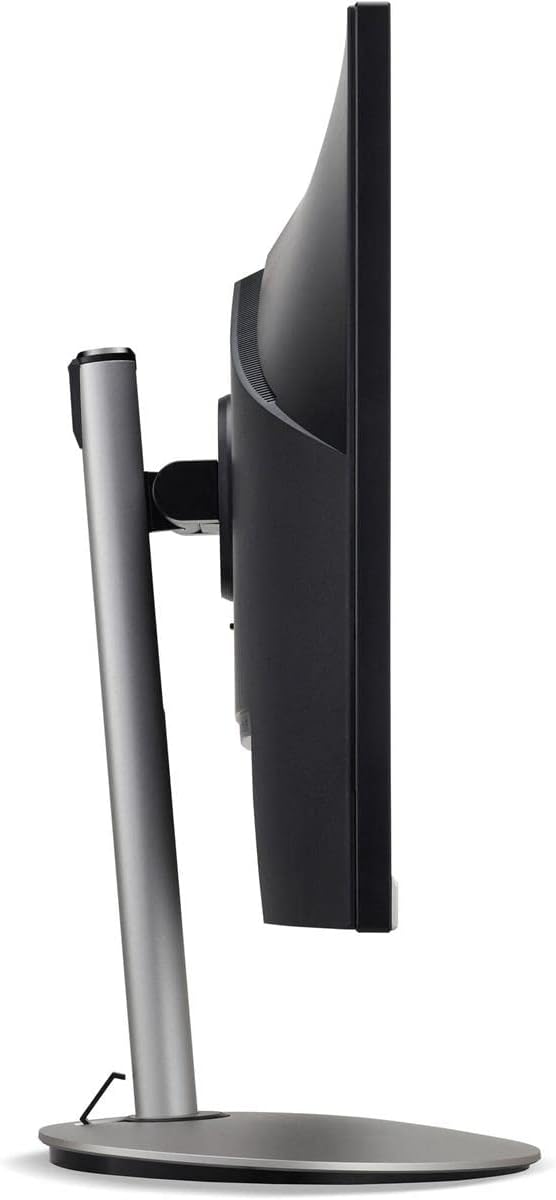
شکل 3: سائیڈ پروfile of the monitor, illustrating its adjustable stand for ergonomic positioning.
دیکھ بھال
Cleaning the Monitor Screen and Casing
To clean your monitor, first ensure it is turned off and unplugged from the power outlet. Use a soft, lint-free cloth. For stubborn marks, lightly dampen the cloth with water or a specialized non-abrasive screen cleaner. مائع کو براہ راست اسکرین پر نہ چھڑکیں یا casing. سخت کیمیکلز، کھرچنے والے کلینر یا سالوینٹس کے استعمال سے پرہیز کریں۔
اسٹوریج کے رہنما خطوط
If you need to store the monitor for an extended period, it is recommended to use its original packaging to protect it from dust, moisture, and physical damage. Store in a cool, dry environment away from direct sunlight and extreme temperatures.
خرابی کا سراغ لگانا
عام مسائل اور ان کے حل کے لیے درج ذیل جدول کو دیکھیں:
| مسئلہ | ممکنہ وجہ | حل |
|---|---|---|
| اسکرین پر کوئی تصویر نہیں ہے | پاور کیبل منقطع؛ ویڈیو کیبل منقطع غلط ان پٹ سورس کا انتخاب کیا گیا۔ | Check power and video cable connections; Ensure the monitor is powered on; Select the correct input source via the OSD menu. |
| تصویر دھندلی یا مسخ شدہ ہے۔ | Incorrect resolution setting; Faulty video cable. | Set the display resolution to 2560 x 1440 at 75 Hz; Try a different HDMI cable. |
| اسپیکر سے کوئی آواز نہیں۔ | Monitor volume too low or muted; Incorrect audio output selected on computer. | Adjust monitor volume via OSD; Unmute audio; Select the monitor as the audio output device in your computer's sound settings. |
| ٹمٹماہٹ کی نگرانی کریں۔ | Refresh rate mismatch; Interference; Faulty cable. | Ensure refresh rate is set to 75 Hz; Check for nearby electronic devices causing interference; Replace video cable. |
وضاحتیں
Key technical specifications for the Acer CB272U smiiprx LED Monitor:
| فیچر | تفصیل |
|---|---|
| ماڈل کا نام | CB272U smiiprx |
| اسکرین کا سائز | 24.1 انچ |
| مقامی قرارداد | 2560 x 1440 (WQHD) |
| ریفریش ریٹ | 75 Hz |
| رسپانس ٹائم | 1 Millisecond (VRB) |
| پہلو کا تناسب | 16:9 |
| ڈسپلے کی قسم | LED-backlit LCD / TFT active matrix (IPS) |
| چمک | 350 cd/m² |
| کنٹراسٹ ریشو | 1000:1 (جامد) |
| کنیکٹوٹی | HDMI |
| اڈاپٹیو سنک | فری سنک |
| بلٹ ان اسپیکرز | جی ہاں |
| Dimensions (WxDxH with stand) | 24.1 انچ x 9.2 x 20.5 انچ |
| وزن (اسٹینڈ کے ساتھ) | 18.1 پاؤنڈز |

Figure 4: Monitor dimensions with stand, indicating width, depth, and height.
وارنٹی کی معلومات
The Acer CB272U smiiprx LED Monitor comes with a 3 سالہ صنعت کار کی محدود وارنٹی. This warranty covers defects in materials and workmanship under normal use. For complete details regarding warranty coverage, limitations, and how to make a claim, please refer to the warranty documentation included with your product or visit the official Acer support webسائٹ
Please retain your proof of purchase (receipt or invoice) as it will be required for any warranty service.
کسٹمر سپورٹ
Should you require further assistance, technical support, or wish to download the latest drivers and firmware updates for your monitor, please visit the official Acer support webسائٹ:
You can also find contact information for Acer customer service in your region on the support webذاتی مدد کے لیے سائٹ۔