
1. تعارف
The JDIAG JD101 is a universal On-Board Diagnostics II (OBD2) car code reader designed to diagnose engine-related issues in vehicles. It provides essential information such as Diagnostic Trouble Codes (DTCs), live data streams, and vehicle information, helping users identify and resolve common car problems. This device also includes a battery test function to assess the vehicle's battery status. It is compatible with most OBDII compliant vehicles manufactured in the USA (1996 and newer), Europe (EOBD, 2000 and newer), and Asia (2000 and newer), as well as newer OBDII and CAN protocol vehicles.

تصویر 1.1: The JDIAG JD101 scanner helps identify various vehicle issues.
2. پیکیج کے مشمولات
پیکیج کھولنے پر، براہ کرم تصدیق کریں کہ تمام اشیاء موجود ہیں اور اچھی حالت میں ہیں:
- 1 x JDIAG JD101 OBD2 Scanner Unit
- 1 x کثیر لسانی صارف دستی

تصویر 2.1: Contents of the JDIAG JD101 package.
3. پروڈکٹ ختمview
The JDIAG JD101 features a compact design with a 2.4-inch LCD display and a user-friendly 4-button keypad for navigation. It connects directly to your vehicle's OBD2 port for power and data transfer.

تصویر 3.1: JDIAG JD101 Product Components.
اہم خصوصیات:
- عالمگیر مطابقت: Supports most US OBDII (1996+), European EOBD (2000+), Asian (2000+) vehicles, and newer OBDII/CAN protocols.
- ایک کلک I/M تیاری: Quickly checks emission system status.
- DTC Retrieval: Reads generic (P0, P2, P3, U0) and manufacturer-specific (P1, P3, U1) codes, including pending, stored, and permanent codes.
- MIL کنٹرول: Determines the reason for the Malfunction Indicator Lamp (MIL) illumination and allows for its deactivation.
- ڈسپلے: 2.4-inch LCD with DTC definitions directly on screen.
- ڈیٹا ڈسپلے: Shows freeze frame data and live data streams (over 130 PIDs).
- DTC تلاش: Built-in DTC library for quick reference.
- گاڑی کی معلومات: گاڑی کا شناختی نمبر (VIN)، کیلیبریشن ID (CIN)، اور کیلیبریشن تصدیقی نمبر (CVN) بازیافت کرتا ہے۔
- بیٹری ٹیسٹ فنکشن: Assesses the vehicle's battery status.
- کثیر لسانی حمایت: English, Spanish, French, Russian, German, Italian, etc.
- فرم ویئر اپ ڈیٹس: Free online firmware updates via USB cable.

تصویر 3.2: کلیدی ایڈوانtages of the JDIAG JD101 scanner.
4. سیٹ اپ اور کنکشن
The JDIAG JD101 does not require batteries. It is powered directly by your vehicle's OBD2 port.
- OBD2 پورٹ کا پتہ لگائیں: The OBD2 port is typically located under the dashboard on the driver's side, often near the steering column. Refer to your vehicle's owner's manual if you cannot find it.
- Turn Off Ignition: Ensure your vehicle's ignition is in the OFF position before connecting the scanner.
- سکینر کو جوڑیں: Plug the OBD2 connector of the JD101 scanner firmly into your vehicle's OBD2 port.
- اگنیشن آن کریں: Turn the vehicle's ignition to the ON position (do not start the engine unless instructed by a specific test procedure). The scanner will automatically power on and display the main menu.
5. آپریٹنگ ہدایات
استعمال کریں۔ Up اور نیچے buttons to navigate through menu options, the داخل کریں۔ button to select an option, and the باہر نکلیں۔ پچھلے مینو پر واپس آنے یا کسی فنکشن سے باہر نکلنے کے لیے بٹن۔
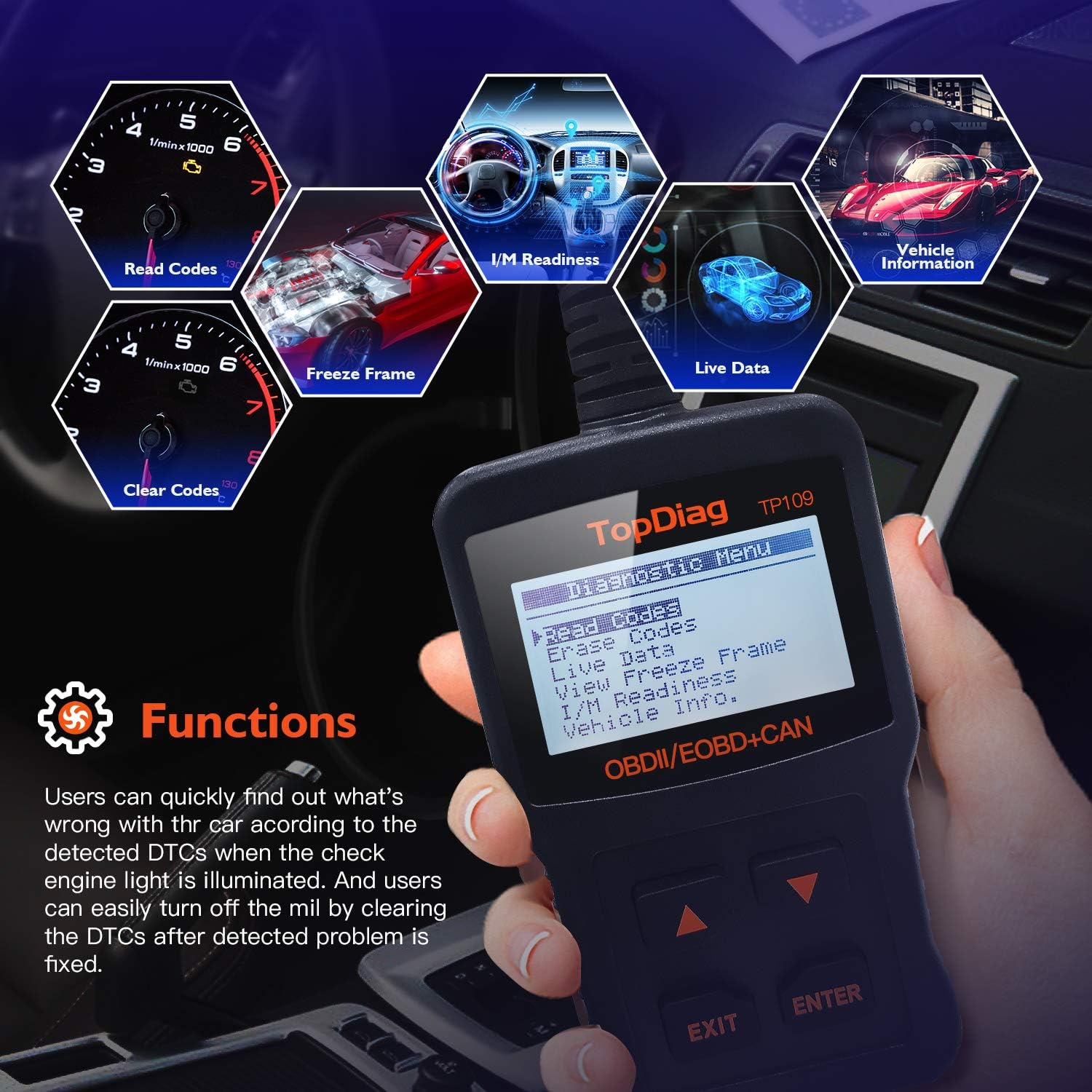
تصویر 5.1: Main functions of the JDIAG JD101 scanner.
5.1 کوڈز پڑھیں
This function retrieves Diagnostic Trouble Codes (DTCs) from the vehicle's computer. These codes indicate specific issues detected by the vehicle's self-diagnostic system.
- مین مینو سے، منتخب کریں۔ کوڈز پڑھیں اور دبائیں داخل کریں۔.
- The scanner will display any detected DTCs, along with their definitions on the 2.4-inch LCD.
- استعمال کریں۔ Up اور نیچے buttons to scroll through multiple codes if present.
5.2. کوڈز کو مٹا دیں۔
This function clears all Diagnostic Trouble Codes (DTCs) from the vehicle's computer and turns off the Malfunction Indicator Lamp (MIL). Ensure the underlying issue has been resolved before clearing codes.
- مین مینو سے، منتخب کریں۔ کوڈز کو مٹا دیں۔ اور دبائیں داخل کریں۔.
- اشارہ کرنے پر اپنی پسند کی تصدیق کریں۔
- The scanner will clear the codes and turn off the MIL.
5.3 لائیو ڈیٹا اسٹریم
This function displays real-time operational parameters from the vehicle's sensors and components, such as engine RPM, vehicle speed, oxygen sensor readings, and more. The JD101 supports over 130 PIDs (Parameter IDs).
- مین مینو سے، منتخب کریں۔ لائیو ڈیٹا اور دبائیں داخل کریں۔.
- The scanner will display a list of available PIDs. Select the desired parameters to view.
- The data will be displayed in real-time. Use the Up اور نیچے buttons to scroll through the data.
5.4. I/M تیاری
I/M Readiness (Inspection/Maintenance Readiness) indicates whether the various emissions-related systems on the vehicle are operating correctly and have completed their diagnostic tests. This is useful for emissions testing.
- مین مینو سے، منتخب کریں۔ I/M تیاری اور دبائیں داخل کریں۔.
- The scanner will display the status of various monitors (e.g., Catalyst Monitor, O2 Sensor Monitor). A 'PASS' or 'OK' status indicates the monitor has completed its test.
5.5. فریم ڈیٹا منجمد کریں۔
When an emission-related fault occurs, the vehicle's computer stores a snapshot of operating conditions at the moment the fault was detected. This is called Freeze Frame Data and can help in diagnosing intermittent problems.
- مین مینو سے، منتخب کریں۔ View فریز فریز کریں۔ اور دبائیں داخل کریں۔.
- The scanner will display the recorded parameters.
5.6. Vehicle Information (VIN, CIN, CVN)
یہ فنکشن آپ کو گاڑی کی شناخت کی اہم معلومات حاصل کرنے کی اجازت دیتا ہے۔
- VIN (Vehicle Identification Number): A unique 17-character code for the vehicle.
- CIN (Calibration Identification Number): Identifies the software version of the vehicle's Engine Control Unit (ECU).
- CVN (Calibration Verification Number): A checksum value used to verify the integrity of the ECU software.
- مین مینو سے، منتخب کریں۔ گاڑی کی معلومات اور دبائیں داخل کریں۔.
- The scanner will display the available vehicle information.

تصویر 5.2: Retrieving vehicle identification information.
5.7. Battery Test Function
The JD101 includes a function to determine the vehicle's battery status, providing a quick assessment of its health.
- مین مینو سے، منتخب کریں۔ بیٹری ٹیسٹ (or similar option) and press داخل کریں۔.
- Follow the on-screen prompts to perform the test. The scanner will display the battery voltage اور حیثیت۔
6 دیکھ بھال
6.1. فرم ویئر اپ ڈیٹ
The JDIAG JD101 supports free online firmware updates to ensure compatibility with newer vehicles and to add new features. This process requires a computer running Windows and a Mini USB cable (not included).
- سافٹ ویئر ڈاؤن لوڈ کریں: Visit the official JDiag webسائٹ (www.jdiag.com) and navigate to the 'Downloads' section. Download the latest firmware update tool (e.g., 'JD setup toolkit') and the firmware file for the JD101.
- ڈرائیور انسٹال کریں: Install the provided USB driver (e.g., STMicroelectronics driver) on your Windows PC.
- Connect Scanner: Connect the JD101 scanner to your PC using a Mini USB cable.
- اپ ڈیٹ ٹول چلائیں: Launch the appropriate upgrade tool (e.g., 'JD Series upgrade tool', نہیں 'Elite II upgrade tool').
- اشارے پر عمل کریں: Follow the on-screen instructions to select the firmware file and initiate the update process. The update may take several minutes. Do not disconnect the device during this time.
- تصدیق: Once complete, the tool will display a success message, including the new firmware version and device serial number.
نوٹ: The update software is compatible with Windows operating systems, including Windows XP as specified in product details. Ensure your PC meets the minimum system requirements for the update tool.
7 خرابیوں کا سراغ لگانا
- ڈیوائس آن نہیں ہوتی: Ensure the scanner is correctly plugged into the vehicle's OBD2 port and the vehicle's ignition is in the ON position. The device draws power directly from the OBD2 port.
- گاڑی سے کوئی رابطہ نہیں: Verify that your vehicle is OBDII compliant (most US vehicles 1996+, European EOBD 2000+, Asian 2000+). Check the connection to the OBD2 port. If issues persist, try the scanner on another compatible vehicle to rule out a vehicle-specific problem.
- Scanner Not Working Properly: If the device exhibits unexpected behavior, try performing a firmware update as described in Section 6.1. If the problem persists, contact JDIAG technical support.
- Cannot Read ABS/Airbag Codes: The JDIAG JD101 is designed to work exclusively with engine-related codes (OBDII/EOBD). It does not support diagnostic functions for ABS (Anti-lock Braking System) or Airbag systems.
8. وضاحتیں
| فیچر | تفصیلات |
|---|---|
| برانڈ | JDIAG |
| ماڈل نمبر | JD101 (also referred to as 'code reader') |
| طاقت کا منبع | Vehicle OBD2 Port Powered (No internal batteries required for operation) |
| اسکرین کا سائز | 2.4 انچ |
| تعاون یافتہ پروٹوکول | SAE J1850 PWM, SAE J1850 VPW, ISO 9141-2, ISO 14230-4 KWP, ISO 15765-4 CAN |
| Operating System (for updates) | Windows XP and newer (for firmware update software) |
| شے کا وزن | 220 گرام |
| کارخانہ دار | JDiag Electronics Technology Co.,Ltd |
| یو پی سی | 780614143477، 791280490895 |
9. وارنٹی اور سپورٹ
The JDIAG JD101 OBD2 scanner comes with a دو سالہ وارنٹی خریداری کی تاریخ سے، مینوفیکچرنگ کے نقائص اور خرابیوں کو عام استعمال کے تحت کور کرنا۔
For technical assistance, troubleshooting, or warranty claims, please contact JDIAG customer support or visit the official JDIAG website for further resources and contact information:
سرکاری Webسائٹ: www.jdiag.com