
1. تعارف اور اوورview
Thank you for choosing the Lorex Analog 4K Weatherproof Indoor/Outdoor HD Wired Add-On Security Camera. This manual provides essential information for the proper installation, operation, and maintenance of your new security camera. This camera is designed as an add-on unit and requires a compatible Lorex recorder (DVR/NVR) for full functionality.
This camera features 4K resolution for superior image clarity, robust weatherproof construction for reliable indoor and outdoor use, and advanced deterrence features such as motion-activated lights and remote-triggered sirens. Its long-range night vision ensures comprehensive surveillance even in low-light conditions.
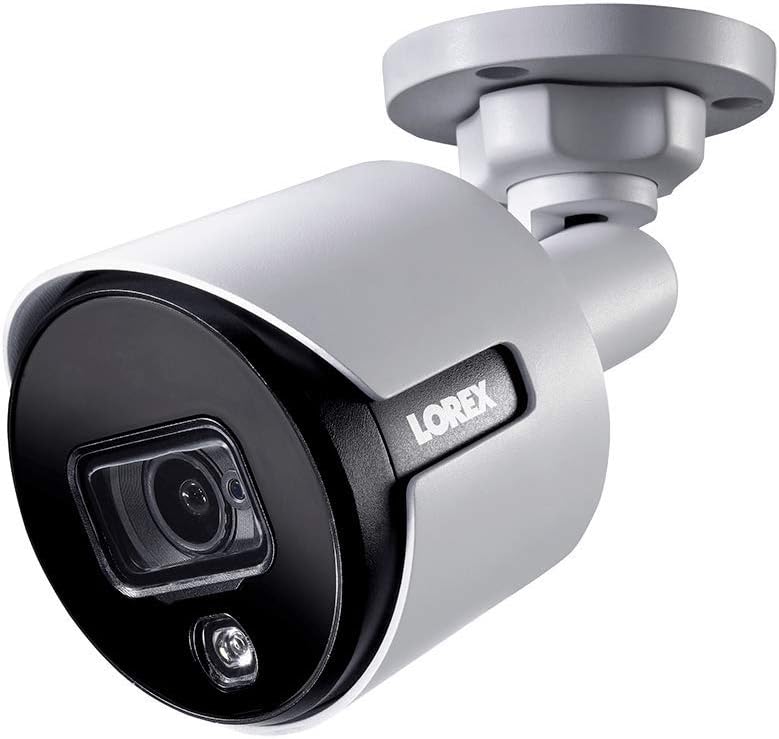
شکل 1.1: سامنے کا زاویہ view of the Lorex 4K Weatherproof Security Camera. This image shows the camera's bullet form factor, lens, and integrated light.
2. پیکیج کے مشمولات
The Lorex Analog 4K Weatherproof Indoor/Outdoor HD Wired Add-On Security Camera package includes:
- 1 x Lorex Analog 4K Weatherproof Indoor/Outdoor HD Wired Add-On Security Camera (Model: LBV8543XW)
- Mounting Kit (screws and wall plugs)
- Allen Key (for adjustment)
Note: This is an add-on camera. Video cables, power adapters, and a compatible Lorex recorder are sold separately and are required for operation.
3. کلیدی خصوصیات
- 4K الٹرا ایچ ڈی ریزولوشن: Provides exceptional detail and clarity with an 8MP effective still resolution.
- ویدر پروف ڈیزائن (IP67): Durable metal housing ensures reliable performance in various weather conditions, suitable for both indoor and outdoor installation.
- لانگ رینج نائٹ ویژن: See clearly up to 150 feet (45m) in ambient night conditions and up to 98 feet (30m) in total darkness. Features Color Night Vision for enhanced detail in low light.
- Motion-Activated Warning Light: Integrated LED light can be triggered by motion to deter intruders.
- Remote-Triggered Siren: Activate a loud siren directly from your Lorex recorder or connected app to scare away unwanted visitors.
- Wired Connectivity (BNC): Ensures a stable and secure connection to your Lorex DVR/NVR system.
- وسیع آپریٹنگ درجہ حرارت: Functions reliably in temperatures up to 60 degrees Celsius.
4. سیٹ اپ اور انسٹالیشن
Before installation, ensure you have a compatible Lorex recorder (DVR/NVR) and necessary video/power cables.
4.1 مقام کا انتخاب
مطلوبہ جگہ کا انتخاب کریں۔ viewing angle and is within reach of your Lorex recorder and a power source. Consider areas prone to intrusion, such as entry points or vulnerable perimeters. The camera is suitable for ceiling mount and wall mount applications.

شکل 4.1: طرف view of the Lorex 4K Weatherproof Security Camera, showing its adjustable mounting base.
4.2 کیمرہ لگانا
- نشان ڈرل سوراخ: Use the mounting template (if provided) or the camera base to mark the positions for drilling.
- سوراخ ڈرل: Drill pilot holes for the mounting screws. If mounting on drywall or masonry, insert the provided wall plugs.
- محفوظ کیمرہ: کیمرہ بیس کو ڈرل شدہ سوراخوں کے ساتھ سیدھ میں رکھیں اور فراہم کردہ پیچ کا استعمال کرتے ہوئے اسے محفوظ کریں۔
- زاویہ کو ایڈجسٹ کریں: Loosen the adjustment screws on the camera body using the Allen key to position the camera for the optimal viewزاویہ ایک بار ایڈجسٹ ہونے کے بعد پیچ کو سخت کریں۔
4.3 کیمرے کو جوڑنا
- ویڈیو کیبل جڑیں: Connect one end of the BNC video cable (not included) to the camera's BNC port and the other end to an available video input channel on your Lorex recorder.
- پاور سے رابطہ کریں: Connect the camera's power input to a compatible power adapter (not included). Ensure the power adapter is connected to a power outlet.
- پاور آن ریکارڈر: Ensure your Lorex recorder is powered on and properly configured.
5. آپریٹنگ ہدایات
Once the camera is physically installed and connected to your Lorex recorder, you can begin operation.
5.1 Viewلائیو فیڈ
Access your Lorex recorder's interface (via monitor, Lorex Home app, or client software) to view the live video feed from the camera. Ensure the correct channel is selected.

تصویر 5.1: کلوز اپ view of the Lorex 4K Weatherproof Security Camera's lens and integrated light.
5.2 Motion Detection and Smart Deterrence
Your Lorex recorder manages motion detection settings. Refer to your recorder's manual for detailed instructions on configuring motion zones and sensitivity.
- Motion-Activated Light: The camera's integrated light can be set to activate automatically upon motion detection. This setting is typically configured within your Lorex recorder's deterrence or alarm settings.
- Remote-Triggered Siren: You can manually activate the camera's siren through your Lorex recorder's interface or the Lorex Home app. This feature is useful for immediate deterrence.

Figure 5.2: The Lorex 4K Weatherproof Security Camera mounted on a brick wall at night, demonstrating its motion-activated light feature.
5.3 نائٹ ویژن
The camera automatically switches to night vision mode in low-light conditions. The infrared (IR) LEDs provide illumination for clear black and white video. Color Night Vision (CNV) may be available if there is sufficient ambient light, providing full-color video in low-light scenarios.
6 دیکھ بھال
باقاعدگی سے دیکھ بھال آپ کے سیکیورٹی کیمرے کی بہترین کارکردگی اور لمبی عمر کو یقینی بناتی ہے۔
- صفائی: وقتاً فوقتاً کیمرے کے لینس اور ہاؤسنگ کو نرم، ڈی سے صاف کریں۔amp کپڑا کھرچنے والے کلینر یا سالوینٹس سے پرہیز کریں جو فنش یا لینس کو نقصان پہنچا سکتے ہیں۔
- کنکشن چیک کریں: Ensure all cable connections (BNC and power) are secure and free from corrosion, especially for outdoor installations.
- فرم ویئر اپ ڈیٹس: Regularly check the Lorex website or your recorder's settings for available firmware updates for your camera and recorder to ensure the latest features and security enhancements.
- ماحولیاتی حالات: While weatherproof, extreme conditions outside the specified operating temperature range (up to 60°C) may affect performance.
7 خرابیوں کا سراغ لگانا
If you encounter issues with your Lorex camera, refer to the following common troubleshooting steps:
| مسئلہ | ممکنہ وجہ | حل |
|---|---|---|
| کیمرے سے کوئی ویڈیو فیڈ نہیں۔ | ڈھیلا کیبل کنکشن No power to camera Incorrect channel selected on recorder | Check BNC and power connections. Ensure power adapter is working and connected. Verify the correct input channel on your Lorex recorder. |
| ناقص امیج کوالٹی / دھندلی ویڈیو | گندی عینک Improper focus (if adjustable) Cable interference/damage | کیمرے کے لینس کو نرم کپڑے سے صاف کریں۔ Ensure the camera is properly focused (if applicable). Check video cable for damage or interference. Use high-quality cables. |
| نائٹ ویژن کام نہیں کرتا | IR LEDs obstructed ناکافی طاقت کیمرے کی ترتیبات | Ensure nothing is blocking the IR LEDs. مستحکم بجلی کی فراہمی کی تصدیق کریں۔ Check night vision settings on your Lorex recorder. |
| حرکت کا پتہ لگانا متحرک نہیں ہو رہا ہے۔ | Incorrect motion zone setup حساسیت بہت کم ہے۔ میں رکاوٹ view | Review and adjust motion detection zones on your recorder. تحریک کی حساسیت میں اضافہ کریں۔ Clear any obstructions from the camera's field of view. |
For more advanced troubleshooting, consult your Lorex recorder's user manual or visit the Lorex support webسائٹ
8. وضاحتیں
| فیچر | تفصیلات |
|---|---|
| ماڈل نمبر | LBV8543XW |
| ویڈیو کیپچر ریزولوشن | 4K (8MP مؤثر اسٹیل ریزولوشن) |
| کنیکٹوٹی ٹیکنالوجی | BNC (Wired) |
| انڈور / آؤٹ ڈور استعمال | انڈور، آؤٹ ڈور |
| بین الاقوامی تحفظ کی درجہ بندی | IP67 (ویدر پروف) |
| نائٹ ویژن رینج۔ | 150 فٹ (45 میٹر) |
| خصوصی خصوصیات | Motion Sensor, Night Vision, Motion Activated Lights, Remote-Triggered Siren |
| فارم فیکٹر | گولی |
| مواد | دھات |
| Operating Temperature (Upper) | 60 ڈگری سیلسیس |
| پروڈکٹ کے طول و عرض (L x W x H) | 16 x 6 x 6 انچ |
| شے کا وزن | 0.01 اونس |
| یو پی سی | 695529017136 |
| کنٹرول کا طریقہ | App, Remote (via compatible Lorex recorder) |
9. وارنٹی اور سپورٹ
Lorex مصنوعات کو قابل اعتماد اور کارکردگی کے لیے ڈیزائن کیا گیا ہے۔ اپنے پروڈکٹ کی وارنٹی کے بارے میں معلومات کے لیے، براہ کرم آفیشل Lorex پر دستیاب وارنٹی پالیسی سے رجوع کریں۔ website or the documentation included with your Lorex recorder.
For technical support, product registration, or to download the latest software and firmware updates, please visit the official Lorex support page or the Lorex Store:
- Lorex Store: Visit the Lorex Store on Amazon
- صارف گائیڈ (پی ڈی ایف): A comprehensive user guide in PDF format is also available for download: یوزر گائیڈ ڈاؤن لوڈ کریں۔
When contacting support, please have your product model number (LBV8543XW) and serial number ready.