
1. تعارف
The Waveshare Industrial RS232/RS485 to Ethernet Converter is a robust device designed for reliable data transmission between serial devices (RS232/RS485) and an Ethernet network. It features a high-performance M4 series 32-bit ARM processor, ensuring stable and efficient operation in industrial environments. This converter supports dual serial ports, allowing independent operation of RS232 and RS485 interfaces simultaneously. Its versatile working modes and configuration options make it suitable for a wide range of applications.
2 خصوصیات
- پروسیسر: M4 series 32-bit ARM processor with up to 120MHz frequency for fast, stable, and reliable performance.
- ایتھرنیٹ انٹرفیس: 10/100M Auto-MDI/MDIX, compatible with both cross-over and straight-through cables.
- Dual Serial Ports: Independent RS232 and RS485 interfaces operating simultaneously.
- Configurable Baudrate: Supports 600bps to 230.4Kbps with five parity options (None, Odd, Even, Mark, Space).
- Multi-Indicators: LEDs for monitoring communication and working status.
- کام کرنے کے طریقوں: TCP Server, TCP Client, UDP Server, UDP Client, HTTPD Client (supports GET and POST).
- Modbus Support: Suitable for industrial applications.
- Websocket Support: Bi-directional transparent data transmission with RS232/RS485 via webصفحہ
- ترتیب کے طریقے: کے ذریعے webصفحہ، اے ٹی کمانڈز، سیریل پروٹوکول، اور نیٹ ورک پروٹوکول۔
- حسب ضرورت: Supports customized heartbeat packets, registration packets, and webصفحہ
- RFC2217-like Protocol: Communicates with devices whose serial settings may change.
- کنکشن استحکام: KeepAlive mechanism, auto re-connecting, and time-out reboot.
- نیٹ ورک کی خصوصیات: DNS domain name resolution, DHCP (auto-obtained or static IP).
- فرم ویئر: Upgradable via the network.
- ری سیٹ کے اختیارات: سافٹ ویئر اور/یا ہارڈ ویئر کے ذریعے فیکٹری سیٹنگز پر بحال کریں۔
- میک ایڈریس: Comes with a default MAC address, which is customizable.
- سافٹ ویئر ٹولز: Module configuration software, TCP/UDP testing tool, VCOM virtual serial port software.
3. پیکیج کے مشمولات
تصدیق کریں کہ نیچے دی گئی تمام اشیاء آپ کے پیکیج میں شامل ہیں:
- Waveshare Industrial RS232/RS485 to Ethernet Converter
- پاور اڈاپٹر (DC 5V)
- ایتھرنیٹ کیبل
- RS232 Male-to-Male Cable
- RS232 Male-to-Female Cable

Image: The package contents include the main converter unit, a power adapter, an Ethernet cable, and two RS232 cables (male-to-male and male-to-female).
4. پروڈکٹ ختمview
4.1 اجزاء اور اشارے
The converter features several ports and LED indicators to monitor its status and facilitate connections.
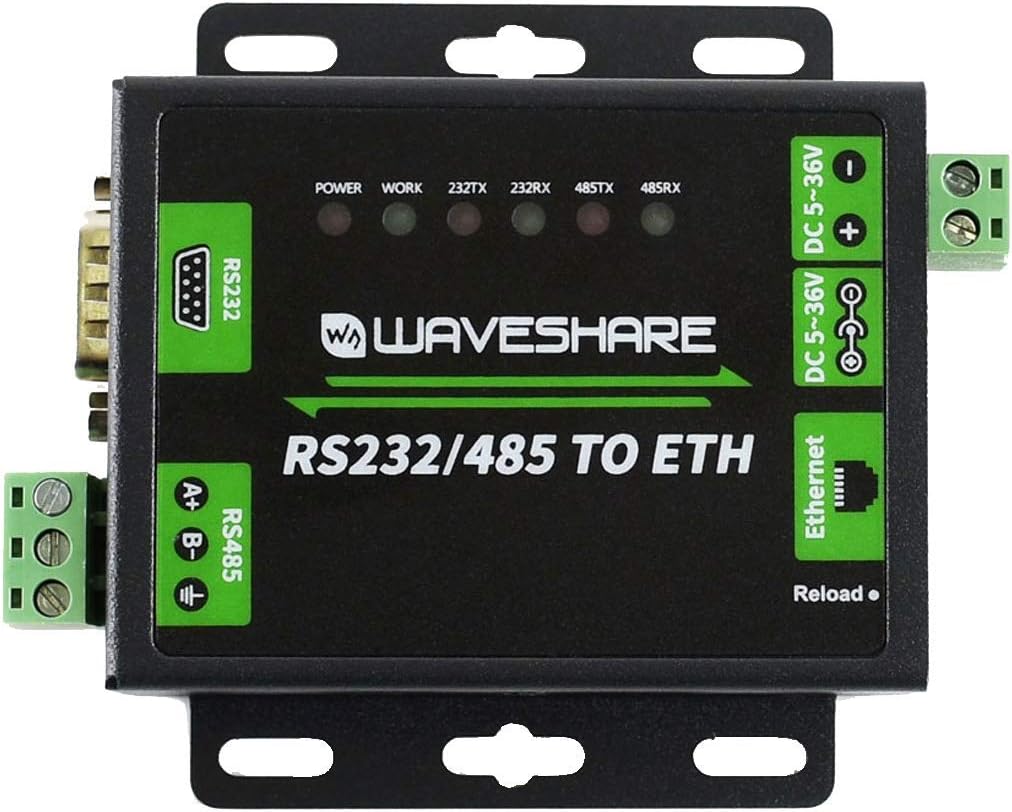
تصویر: اوپر view of the converter highlighting the RS232 port, RS485 terminals, Ethernet port, DC power input, and LED indicators.
- پاور ایل ای ڈی: طاقت کی حیثیت کی نشاندہی کرتا ہے۔
- WORK LED: Indicates device working status.
- 232TX/232RX LEDs: Indicate data transmission/reception activity on the RS232 port.
- 485TX/485RX LEDs: Indicate data transmission/reception activity on the RS485 port.
- دوبارہ لوڈ بٹن: Used for factory reset or other specific functions as per configuration.
4.2. بندرگاہیں
- RS232 پورٹ: RS232 سیریل مواصلات کے لئے معیاری DB9 مرد کنیکٹر۔
- RS485 Terminals: Screw terminals for RS485 differential pair (A+, B-) and ground.
- ایتھرنیٹ پورٹ: RJ45 connector for 10/100M Ethernet connection.
- ڈی سی پاور ان پٹ: Barrel jack for DC 5-36V power supply.
- DC 5-36V Terminals: Screw terminals for alternative DC 5-36V power input.

تصویر: سائیڈ view of the converter showing the DB9 RS232 port and the green screw terminals for RS485.

تصویر: سائیڈ view of the converter showing the RJ45 Ethernet port and the DC power input barrel jack.
5. سیٹ اپ
5.1. ابتدائی کنکشن
- پاور سے رابطہ کریں: Connect the provided power adapter to the DC power input port (DC 5-36V). The POWER LED should illuminate.
- ایتھرنیٹ سے جڑیں: Connect an Ethernet cable from the converter's RJ45 port to your network switch or router.
- Connect Serial Devices: Connect your RS232 device to the DB9 port and/or your RS485 device to the RS485 screw terminals.
5.2. پہلے سے طے شدہ ترتیبات
The device comes with default network settings for initial configuration.

Image: Bottom label of the converter displaying default configuration details.
- ڈیفالٹ IP: 192.168.0.7
- صارف نام: منتظم
- پاس ورڈ: منتظم
- ان پٹ: DC 5-36V/500mA
- Default MAC Address: (Specific address printed on the label, e.g., 9CA525RD7B9A)
It is recommended to change the default login credentials after initial setup for security purposes.
6۔ آپریٹنگ موڈ
The converter supports various operating modes to suit different network communication requirements:
- TCP سرور: کنورٹر کلائنٹس سے آنے والے TCP کنکشن کو سنتا ہے۔
- TCP کلائنٹ: The converter initiates a TCP connection to a specified remote server.
- UDP سرور: کنورٹر آنے والے UDP پیکٹ کو سنتا ہے۔
- UDP کلائنٹ: The converter sends UDP packets to a specified remote host and port.
- HTTPD کلائنٹ: Supports HTTP GET and POST requests for data transmission.
- موڈبس: Optimized for Modbus protocol communication, commonly used in industrial automation.
- Webساکٹ: Enables bi-directional transparent data transmission between the serial port and a webصفحہ
7. ترتیب
The converter's settings can be configured using several methods:
- Webصفحہ: Access the converter's web interface by entering its IP address (default: 192.168.0.7) into a web browser. This provides a graphical interface for all settings.
- اے ٹی کمانڈز: Configuration can be performed by sending specific AT commands via the serial port.
- سیریل پروٹوکول: A dedicated serial protocol allows for programmatic configuration.
- نیٹ ورک پروٹوکول: Configuration can also be done over the network using specific protocols.
- کنفیگریشن سافٹ ویئر: Waveshare provides dedicated software for easy configuration on a host computer.
8 دیکھ بھال
- فرم ویئر اپ گریڈ: The device firmware can be upgraded via the network to incorporate new features or bug fixes. Refer to the Waveshare website for the latest firmware and upgrade instructions.
- فیکٹری کی ترتیبات پر بحال کریں: If configuration issues arise, the device can be restored to its factory default settings via software or by pressing the 'Reload' button (refer to specific instructions for the button sequence).
- KeepAlive Mechanism: The built-in KeepAlive mechanism helps detect broken connections and automatically re-establishes them, ensuring continuous operation.
- Time-out Reboot: Configure a time-out reboot (no-data reboot) to ensure long-term stable connections, especially in environments where intermittent communication might occur.
9 خرابیوں کا سراغ لگانا
اگر آپ کو کنورٹر کے ساتھ مسائل کا سامنا ہے، تو درج ذیل پر غور کریں:
- کوئی طاقت نہیں: یقینی بنائیں کہ پاور اڈاپٹر صحیح طریقے سے منسلک ہے اور مخصوص والیوم فراہم کر رہا ہے۔tage (DC 5-36V). Check the POWER LED.
- کوئی نیٹ ورک کنکشن نہیں: Verify the Ethernet cable connection. Check network settings (IP address, subnet mask, gateway). Ensure the Ethernet port LEDs are active.
- Serial Communication Failure: Check serial port wiring (RS232 pinout, RS485 A+/B- polarity). Verify baudrate, data bits, parity, and stop bits settings match the connected serial device. Observe 232TX/RX and 485TX/RX LEDs for activity.
- رسائی نہیں ہو سکتی Web انٹرفیس: Ensure your computer's IP address is in the same subnet as the converter's default IP (192.168.0.x). Try pinging the converter's IP address.
- وقفے وقفے سے رابطہ: Check for network interference or cable issues. Review KeepAlive and time-out reboot settings.
- از سرے نو ترتیب: If configuration becomes problematic, perform a factory reset.
For further assistance, refer to the Waveshare official webسائٹ یا ان کی تکنیکی مدد سے رابطہ کریں۔
10. وضاحتیں
| فیچر | تفصیلات |
|---|---|
| پروسیسر | M4 series 32-bit ARM, 120 MHz |
| رام | LPDDR4 |
| میموری کی رفتار | 120 میگاہرٹز |
| ایتھرنیٹ انٹرفیس | 10/100M Auto-MDI/MDIX |
| سیریل پورٹس | 1x RS232 (DB9), 1x RS485 (Screw Terminal) |
| حرکت نبض | 600bps ~ 230.4Kbps |
| Parity Options | کوئی بھی نہیں ، عجیب ، یہاں تک کہ ، مارک ، اسپیس |
| پاور ان پٹ | DC 5-36V (Barrel Jack or Screw Terminal) |
| آپریٹنگ سسٹم | Linux (internal) |
| شے کا وزن | 1.1 پاؤنڈ (تقریباً 0.5 کلوگرام) |
| پیکیج کے طول و عرض | 8.07 x 6.18 x 1.89 انچ (تقریباً 20.5 x 15.7 x 4.8 سینٹی میٹر) |
| ماڈل نمبر | RS232 / 485 ETH |
| کنیکٹوٹی ٹیکنالوجی | ایتھرنیٹ |
10.1. جسمانی طول و عرض

Image: Technical drawing showing the dimensions of the converter in millimeters (e.g., 85.70mm height, 82.76mm width, 25.20mm depth).
11. وارنٹی اور سپورٹ
وارنٹی معلومات، تکنیکی مدد، اور اضافی وسائل کے لیے، براہ کرم آفیشل Waveshare ملاحظہ کریں۔ website. You can find detailed documentation, software downloads, and contact information for customer service there.
ویو شیئر آفیشل Webسائٹ: www.waveshare.com۔