
1. پروڈکٹ ختمview
The TP-Link Archer T4U Plus is an AC1300 Dual Band Wireless USB Adapter designed to provide high-speed Wi-Fi connectivity for desktop computers. It supports the 802.11ac Wi-Fi standard, offering speeds of up to 867 Mbps on the 5 GHz band and 400 Mbps on the 2.4 GHz band. Equipped with dual high-gain antennas and a USB 3.0 interface, it aims to enhance wireless range and data transfer efficiency.

The TP-Link Archer T4U Plus USB WiFi Adapter, featuring two high-gain antennas and a USB 3.0 cable for connection to a computer.
2. پیکیج کے مشمولات
تصدیق کریں کہ آپ کے پیکیج میں درج ذیل آئٹمز ہیں:
- AC1300 ڈوئل اینٹینا ہائی گین وائرلیس USB اڈاپٹر (آرچر T4U پلس)
- 1 میٹر USB 3.0 کیبل
- فوری انسٹالیشن گائیڈ
- Resource CD (for drivers)
3. سیٹ اپ ہدایات
3.1 ہارڈ ویئر کی تنصیب
- اڈاپٹر کھولیں: Carefully remove the Archer T4U Plus adapter and its USB cable from the packaging.
- USB کیبل کو جوڑیں: Connect one end of the provided 1-meter USB 3.0 cable to the USB 3.0 port on the Archer T4U Plus adapter.
- کمپیوٹر سے جڑیں: Plug the other end of the USB 3.0 cable into an available USB 3.0 port on your desktop computer. For optimal performance, use a USB 3.0 port (typically blue inside).
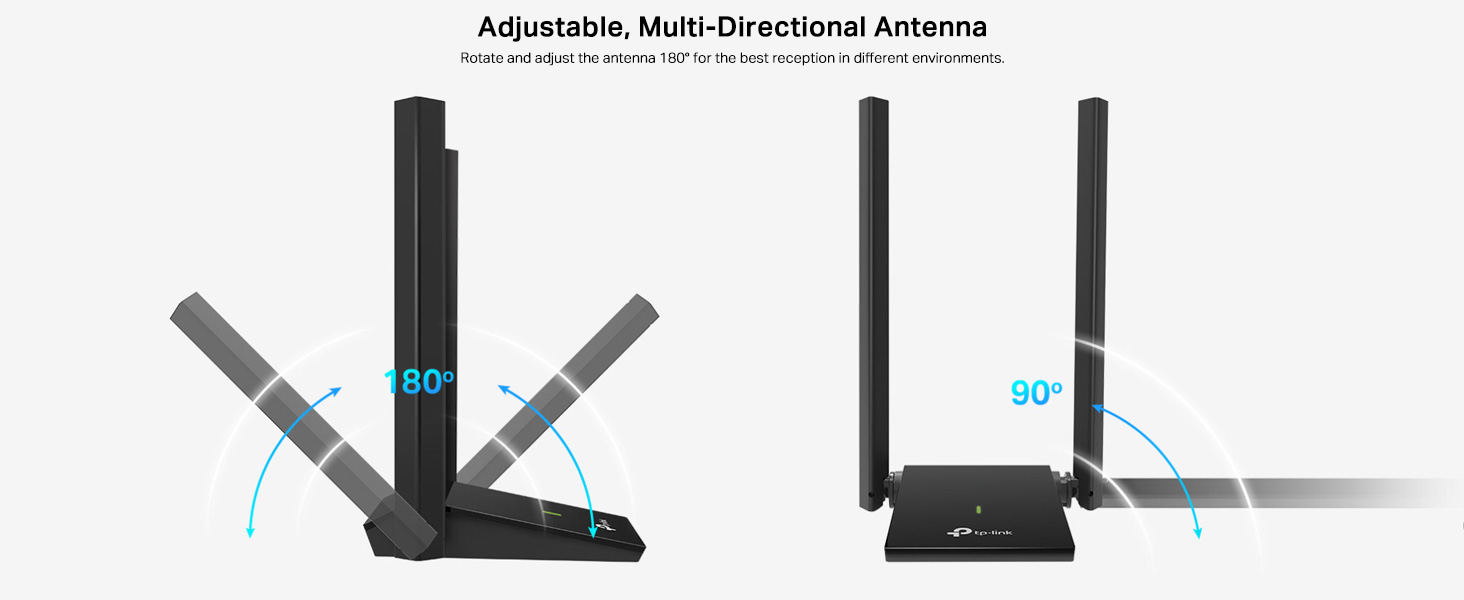
- اڈاپٹر کی پوزیشن: Place the adapter in a location that allows for good signal reception, ideally away from obstructions. The adjustable antennas can be rotated and angled for best performance.

The Archer T4U Plus adapter shown connected to a USB port via its included cable, illustrating its desktop placement.
3.2 ڈرائیور کی تنصیب
The Archer T4U Plus requires drivers to function correctly. Drivers can be installed via the included Resource CD or by downloading them from the TP-Link webسائٹ
For Windows Operating Systems (Windows 11/10/8.1/8/7/XP):
- ریسورس سی ڈی کا استعمال کرتے ہوئے: Insert the Resource CD into your computer's CD-ROM drive. Follow the on-screen instructions to install the drivers.
- Downloading from TP-Link Webسائٹ: If your computer lacks a CD-ROM drive, visit the official TP-Link support website, search for "Archer T4U Plus", and download the latest drivers for your specific Windows version. Run the downloaded installer and follow the prompts.
- Automatic Installation (Windows 10/11): In some cases, Windows 10 or 11 may automatically detect and install the necessary drivers upon connecting the adapter. Verify installation in Device Manager under "Network Adapters".
For Mac OS (10.15 and earlier):
- Downloading from TP-Link Webسائٹ: آفیشل TP-Link سپورٹ پر جائیں۔ website, search for "Archer T4U Plus", and download the latest drivers for your Mac OS version.
- ڈرائیورز انسٹال کریں: ڈاؤن لوڈ کو کھولیں۔ file and follow the installation instructions. You may need to restart your computer after installation.
4. آپریٹنگ ہدایات
4.1 وائرلیس نیٹ ورک سے جڑنا
Once the drivers are successfully installed, you can connect to a Wi-Fi network:
- نیٹ ورک کی ترتیبات تک رسائی حاصل کریں:
- ونڈوز: سسٹم ٹرے میں Wi-Fi آئیکن پر کلک کریں (اسکرین کے نیچے دائیں کونے میں)۔
- میک OS: مینو بار میں Wi-Fi آئیکن پر کلک کریں (اسکرین کے اوپری دائیں کونے میں)۔
- نیٹ ورک منتخب کریں: دستیاب وائرلیس نیٹ ورکس کی فہرست ظاہر ہوگی۔ اپنے مطلوبہ نیٹ ورک (SSID) کو منتخب کریں۔
- پاس ورڈ درج کریں: If prompted, enter the Wi-Fi password (security key) for your network.
- جڑیں: وائرلیس کنکشن قائم کرنے کے لیے "کنیکٹ" پر کلک کریں۔
4.2 ڈوئل بینڈ آپریشن
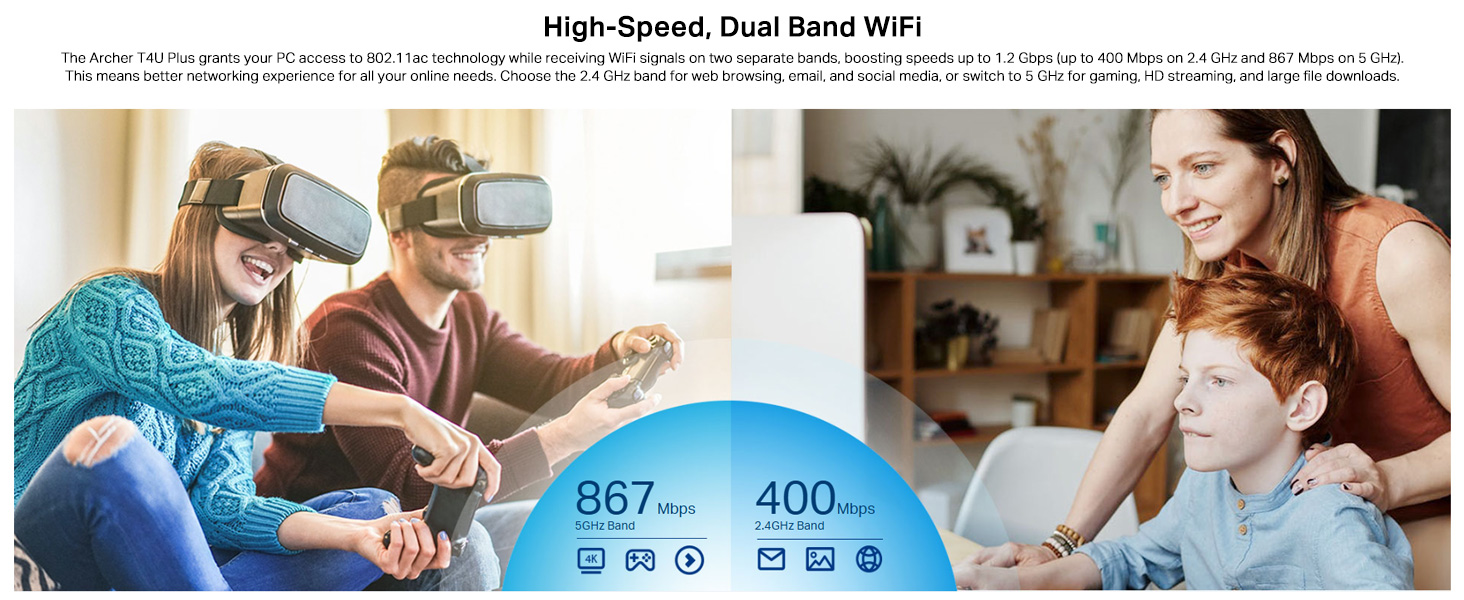
The Archer T4U Plus supports both 2.4 GHz and 5 GHz Wi-Fi bands. You can choose the band that best suits your needs:
- 2.4 GHz بینڈ: Offers broader coverage and better penetration through walls, suitable for general internet use like web براؤزنگ اور ای میل.
- 5 GHz بینڈ: Provides faster speeds and less interference, ideal for bandwidth-intensive activities such as online gaming, HD video streaming, and large file منتقلی
Your router may broadcast separate SSIDs for each band (e.g., "MyWiFi_2.4GHz" and "MyWiFi_5GHz"). Select the appropriate network from the available list.

An image illustrating the dual-band capabilities of the adapter, showing 867 Mbps on the 5GHz band for activities like 4K streaming and gaming, and 400 Mbps on the 2.4GHz band for web براؤزنگ اور ای میل.
4.3 Enhanced Coverage and MU-MIMO
The dual high-gain antennas are designed to improve signal transmission and reception, extending your wireless coverage. For optimal performance, adjust the antennas to point towards your wireless router.
Illustrates the flexibility of the adapter's antennas, which can be rotated 180 degrees and adjusted 90 degrees for optimal signal reception.
The adapter also supports MU-MIMO technology. When used with a compatible MU-MIMO router, this technology allows the adapter to communicate with multiple devices simultaneously, improving network throughput and efficiency.
A visual representation of MU-MIMO technology, showing how the Archer T4U Plus adapter, when paired with a compatible router, can communicate with multiple devices simultaneously for improved network efficiency.
5 دیکھ بھال
- ڈرائیوروں کو اپ ڈیٹ رکھیں: Regularly check the TP-Link support website for the latest drivers to ensure optimal performance and compatibility.
- ڈیوائس کو صاف کریں: Use a soft, dry cloth to clean the adapter. Avoid using liquid cleaners or solvents.
- مناسب جگہ کا تعین: Ensure the adapter is placed in a well-ventilated area and not covered, to prevent overheating.
- محفوظ کنکشن: Ensure the USB cable is securely connected to both the adapter and your computer to prevent intermittent disconnections.
6 خرابیوں کا سراغ لگانا
- کوئی وائی فائی کنکشن نہیں:
- یقینی بنائیں کہ اڈاپٹر USB پورٹ سے مناسب طریقے سے جڑا ہوا ہے۔
- Verify that the drivers are correctly installed. Check Device Manager (Windows) or System Information (Mac OS) for the adapter's status.
- اپنے کمپیوٹر اور روٹر کو دوبارہ شروع کریں۔
- کسی دوسرے USB پورٹ سے جڑنے کی کوشش کریں۔
- سست Wi-Fi کی رفتار:
- Ensure you are connected to the 5 GHz band if available and your router supports it, for faster speeds.
- بہتر سگنل ریسپشن کے لیے اڈاپٹر کے اینٹینا کو ایڈجسٹ کریں۔
- اڈاپٹر اور اپنے راؤٹر کے درمیان جسمانی رکاوٹوں کو کم سے کم کریں۔
- دوسرے آلات (مثلاً مائیکرو ویوز، کورڈ لیس فون) سے مداخلت کی جانچ کریں۔
- Update your adapter's drivers to the latest version.
- بار بار رابطہ منقطع ہونا:
- Ensure the USB cable is not loose.
- ایک مختلف USB پورٹ آزمائیں، ترجیحاً USB 3.0 پورٹ۔
- Check for updated drivers.
- Ensure the adapter is not overheating.
- ڈرائیور کی تنصیب کے مسائل:
- Disable any antivirus or firewall software temporarily during installation.
- Download drivers directly from the official TP-Link webآپ کے مخصوص آپریٹنگ سسٹم کے لیے سائٹ۔
- For Linux users, specific driver installation steps may be required, often involving command-line instructions. Refer to community forums or TP-Link's support for detailed guidance.
7. وضاحتیں
| فیچر | تفصیل |
|---|---|
| برانڈ | ٹی پی لنک |
| ماڈل نمبر | آرچر T4U پلس |
| ہارڈ ویئر انٹرفیس | USB 3.0 |
| وائرلیس معیار | 802.11ac |
| ڈیٹا کی منتقلی کی شرح | 1300 Mbps (867 Mbps on 5GHz, 400 Mbps on 2.4GHz) |
| انٹینا | Dual High-Gain 5dBi Antennas |
| آپریٹنگ سسٹمز | Windows 11/10/8.1/8/7/XP, Mac OS 10.15 and earlier |
| طول و عرض (L x W x H) | 8.4L x 15.6W x 1.9H سینٹی میٹر |
| شے کا وزن | 100 گرام |
| رنگ | سیاہ |
8. وارنٹی اور تکنیکی مدد
8.1 وارنٹی کی معلومات
یہ پروڈکٹ ایک کے ساتھ آتا ہے۔ 3 سالہ صنعت کار کی وارنٹی. وارنٹی کے دعووں کے لیے براہ کرم اپنی خریداری کا ثبوت اپنے پاس رکھیں۔
8.2 تکنیکی معاونت
For technical assistance, driver downloads, or further inquiries, please contact TP-Link support:
- TP-Link India Private Limited
- پتہ: Green Industrial Park, Dongri Pada, Poman, Kaman-Bhiwandi Road, Vasai East, Palghar, Maharashtra – 401208
- Toll Free Contact: 1800 2094 168
- ای میل سپورٹ: support.in@tp-link.com
- مینوفیکچرر: TP-Link Corporation, South Building, No.5 Keyuan Road, Central Zone, Science & Technology Park, Nanshan, Shenzhen, P.R. China
For the most up-to-date support information and resources, please visit the official TP-Link webسائٹ