
1. تعارف
This manual provides detailed instructions for the installation, operation, and maintenance of your ESX VN715-E39-DAB In-Car Navigation and Multimedia System. Please read this manual thoroughly before using the device to ensure proper functionality and to prevent damage. Keep this manual for future reference.
2. پروڈکٹ ختمview اور خصوصیات
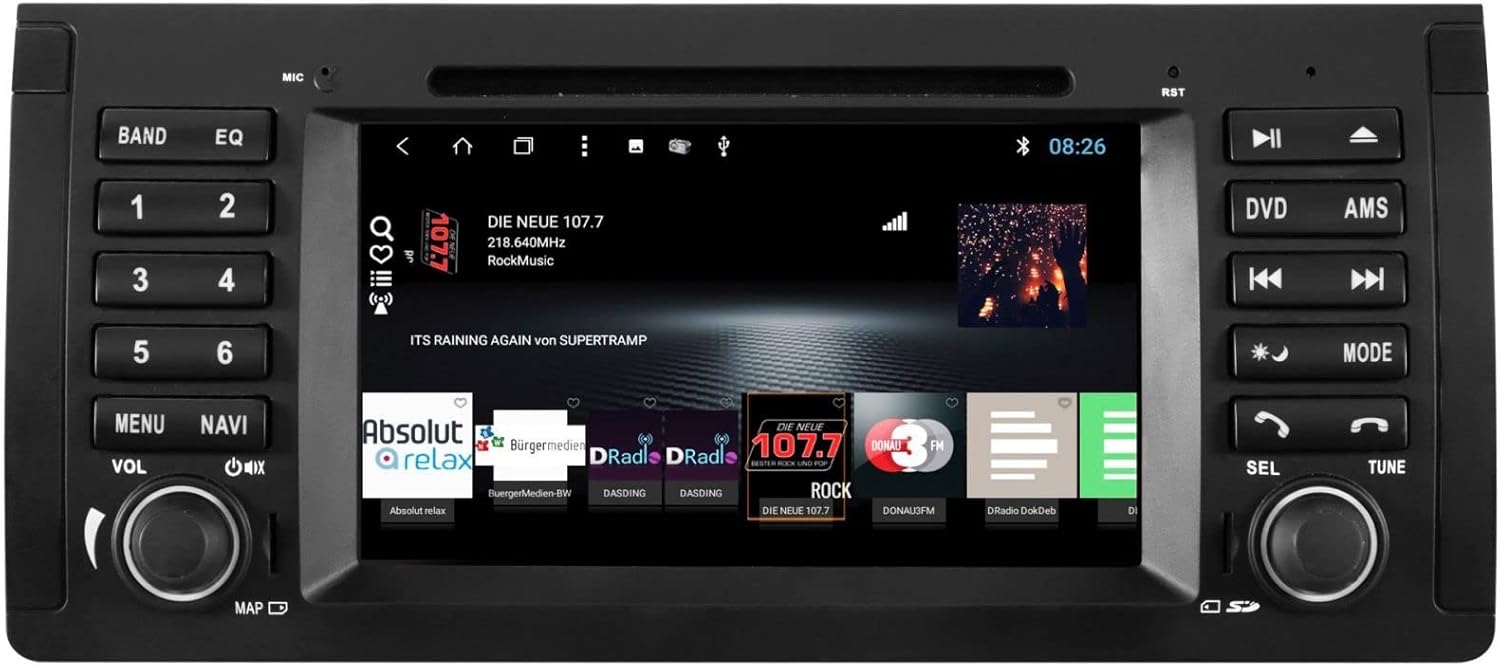
The ESX VN715-E39-DAB is an advanced in-car multimedia system designed to enhance your driving experience with navigation, entertainment, and connectivity features. It integrates seamlessly into compatible BMW vehicles.
اہم خصوصیات:
- High-Resolution 8-inch Touchscreen: Provides clear visuals and intuitive control.
- Advanced Android i15 Operating System: Offers a familiar and customizable user interface.
- Google Maps Navigation: Supports both online and offline navigation for reliable route guidance.
- Mobile Internet Connectivity: Connects via Wi-Fi hotspot for online services.
- DAB+ ڈیجیٹل ریڈیو: Includes a DAB antenna for high-quality digital radio reception with station logos.
- AM/FM Radio with RDS: Standard analog radio reception with Radio Data System functionality.
- Multi-format DVD Player: Supports DVD, DVD-R/RW, DVD+R/RW, VCD, CD, CD Text, CD-R/RW, and MP3 formats.
- Bluetooth Hands-Free Kit: Enables safe phone calls and audio streaming with an internal microphone and optional external microphone connection.
- اسمارٹ فون انٹیگریشن: Connect iPhone or Android smartphones via USB for various functions.
- وائس کنٹرول: Utilize voice commands through a connected smartphone.
- آڈیو آؤٹ پٹ: قبل ازamplifier outputs for front, rear, subwoofer, and center channels.
- کیمرہ ان پٹ: One adjustable camera input for reverse cameras.
- معاون ان پٹ/آؤٹ پٹ: One AUX video input, two audio/video outputs, and one AUX audio input.
- USB پورٹس: Two USB ports for media and connectivity.
- مائیکرو ایسڈی کارڈ سلاٹ: Dedicated slot for navigation data and media files.
- حسب ضرورت: Personalize with customizable logos and wallpapers.
- Authenticity Certificate: Included with the product.
3. سیٹ اپ اور انسٹالیشن
Installation of the ESX VN715-E39-DAB system requires technical knowledge and should ideally be performed by a qualified professional. Incorrect installation can lead to damage to the device or vehicle electrical system.
مطابقت:
This unit is compatible with specific BMW models and connector types:
- BMW 5 Series E39 (1996-2001) with 17-pin system connector.
- BMW 5 Series E39 (2002-2003) with 40-pin system connector.
- BMW X5 E53 (2000-2001) with 17-pin system connector.
- BMW X5 E53 (2002-2007) with 40-pin system connector.
- BMW M5 (1996-2003) with 17/40-pin system connector.
عام تنصیب کے اقدامات (پیشہ ورانہ تنصیب کی تجویز کردہ):
- بیٹری منقطع کریں: Always disconnect the vehicle's battery before starting any electrical work.
- موجودہ یونٹ کو ہٹا دیں: Carefully remove the factory radio or navigation system from the dashboard.
- وائرنگ ہارنس کو جوڑیں: Connect the appropriate wiring harness (17-pin or 40-pin) to the vehicle's electrical system and the ESX unit. Ensure all connections are secure.
- اینٹینا کو جوڑیں: Connect the GPS antenna, DAB antenna, and radio antenna to their respective ports on the unit. Position the antennas for optimal reception.
- پیری فیرلز کو جوڑیں: Connect any optional accessories such as a reverse camera, external microphone, USB devices, or auxiliary inputs/outputs.
- یونٹ کو ماؤنٹ کریں: Securely mount the ESX unit into the dashboard opening.
- بیٹری کو دوبارہ جوڑیں: گاڑی کی بیٹری کو دوبارہ جوڑیں اور سسٹم کی جانچ کریں۔

4. آپریٹنگ ہدایات
Familiarize yourself with the touchscreen interface and physical buttons for optimal use.
4.1 بنیادی آپریشن
- پاور آن/آف: Press and hold the power button (usually the VOL knob) to turn the unit on or off. A short press typically mutes or unmutes the audio.
- حجم کنٹرول: Rotate the VOL knob to adjust the audio volume.
- ٹچ اسکرین انٹرفیس: Navigate through menus and applications by tapping, swiping, and pinching on the 8-inch touchscreen.

4.2 نیویگیشن
Access the navigation application (e.g., Google Maps) from the home screen. Input your destination, and the system will provide turn-by-turn directions. Ensure GPS antenna is properly connected for accurate positioning.

4.3 Radio (DAB+/AM/FM)
- موڈ منتخب کریں: Tap the 'Radio' or 'DAB+' icon on the home screen or press the 'BAND' button.
- اسکین اسٹیشنز: Use the 'AMS' (Auto Memory Store) button or on-screen controls to scan and save available stations.
- ٹیون: Manually tune using the 'TUNE' knob or on-screen frequency controls.
- پیش سیٹ: Save your favorite stations to preset buttons (1-6) for quick access.

4.4 بلوٹوتھ کنیکٹیویٹی
- جوڑا بنانا: Go to the Bluetooth settings on the unit and your smartphone. تلاش کریں۔ available devices and select 'ESX VN715-E39-DAB'. Enter the PIN if prompted (usually '0000' or '1234').
- ہینڈز فری کالنگ: Once paired, you can make and receive calls directly through the unit.
- آڈیو سٹریمنگ: Play music from your smartphone via Bluetooth A2DP.
4.5 Media Playback (DVD/USB/SD)
- DVD: Insert a DVD into the disc slot. The system will automatically switch to DVD mode or prompt you to select it.
- USB/SD: Insert a USB drive into a USB port or an SD card into the Micro SD slot. Access media files through the 'Media' or 'File Explorer' application.
5 دیکھ بھال
Regular maintenance ensures the longevity and optimal performance of your ESX VN715-E39-DAB system.
- سکرین کی صفائی: ٹچ اسکرین کو آہستہ سے صاف کرنے کے لیے نرم، لنٹ سے پاک کپڑا استعمال کریں۔ ضدی smudges کے لئے، تھوڑا سا dampur کپڑے میں پانی یا سکرین سے محفوظ کلینر۔ سخت کیمیکلز سے پرہیز کریں۔
- سافٹ ویئر اپ ڈیٹس: Periodically check for software updates from the manufacturer's official website or through the unit's system settings (if available) to ensure you have the latest features and bug fixes.
- Disc Drive Care: Keep the DVD slot free of dust and debris. Avoid inserting damaged or non-standard discs.
6 خرابیوں کا سراغ لگانا
If you encounter issues with your unit, refer to the following common troubleshooting steps:
| مسئلہ | ممکنہ وجہ | حل |
|---|---|---|
| کوئی طاقت نہیں۔ | بجلی کا ڈھیلا کنکشن، اڑا ہوا فیوز، گاڑی کی بیٹری کا مسئلہ۔ | Check power cables and fuse. Ensure vehicle battery is charged. Consult a professional if issues persist. |
| کوئی آواز نہیں۔ | Volume muted, speaker wires disconnected, incorrect audio source. | Check volume level and mute status. Verify speaker connections. Select the correct audio source. |
| GPS سگنل کھو گیا۔ | GPS antenna improperly connected or obstructed, unit in an area with poor satellite reception. | یقینی بنائیں کہ GPS اینٹینا محفوظ طریقے سے جڑا ہوا ہے اور صاف ہے۔ view آسمان کے کسی کھلے علاقے میں چلے جائیں۔ |
| بلوٹوتھ جوڑا بنانے میں ناکامی۔ | Bluetooth not enabled on device, incorrect PIN, device out of range. | Ensure Bluetooth is active on both devices. Re-enter PIN. Bring devices closer. Restart both devices. |
| ٹچ اسکرین غیر جوابدہ | System freeze, dirt on screen. | Perform a soft reset (refer to device settings or power cycle). Clean the screen. |
اگر ان اقدامات سے مسئلہ حل نہیں ہوتا ہے، تو براہ کرم کسٹمر سپورٹ یا کسی قابل سروس ٹیکنیشن سے رابطہ کریں۔
7. وضاحتیں
Detailed technical specifications for the ESX VN715-E39-DAB unit:
- برانڈ: ای ایس ایکس
- ماڈل: VN715-E39-DAB
- سکرین کا سائز: 8 انچ
- ڈسپلے کی قسم: LCD
- آپریٹنگ سسٹم: Android i15
- کنیکٹوٹی ٹیکنالوجی: Bluetooth, USB, Wi-Fi (via hotspot)
- میڈیا کی قسم: DVD, DVD-R/RW, DVD+R/RW, VCD, CD, CD Text, CD-R/RW, MP3, USB, Micro SD
- ریڈیو ٹیونر: DAB+, AM/FM with RDS
- نیویگیشن: Google Maps (online/offline)
- مطابقت: BMW 5 Series E39 (1996-2003), BMW X5 E53 (2000-2007), BMW M5 (1996-2003)
- اصل: چین
8. وارنٹی اور سپورٹ
For warranty information, please refer to the documentation provided with your purchase or contact your retailer. For technical support, please visit the official ESX website or contact their customer service department. Ensure you have your model number (VN715-E39-DAB) and proof of purchase available when seeking support.