
i-Star T-7M1HD-RED
صارف دستی
ISTAR T-7M1HD-RED 5.25" to 3.5" 2.5" 12Gb/s HDD SSD Hot-swap Rack
Model: T-7M1HD-RED
1. تعارف
The i-Star T-7M1HD-RED is an aluminum hot-swappable mobile rack designed to convert a 5.25" drive bay into a versatile bay for 3.5" or 2.5" HDDs/SSDs. It features a high-performance SAS/SATA interface, offering robust functionality and compact design. This unit is built for durability and includes an 80mm blower fan for enhanced cooling, ensuring optimal performance even under demanding conditions. LED indicators provide real-time monitoring of power and hard drive activity.

شکل 1: سامنے view of the T-7M1HD-RED hot-swap rack, showing the 5.25" bay form factor and the red drive insert.
2. کلیدی خصوصیات
- Power/Drive Activity LEDs: Visual indicators for system power and hard drive read/write operations.
- Point to Point, Free from Master/Slave Setting: Simplifies drive configuration and connectivity.
- Best Air Ventilation with 1x80mm HDD Blower Fan: Integrated fan for efficient heat dissipation, maintaining optimal drive temperatures.
- پاور آن/آف بٹن: Convenient control for the installed drive.
- Cableless Connection, Support Plug & Play, Hot-Swappable: Enables easy installation, removal, and replacement of drives without system shutdown.
3. پیکیج کے مشمولات
براہ کرم تصدیق کریں کہ نیچے دی گئی تمام اشیاء آپ کے پیکیج میں شامل ہیں:
- ISTAR T-7M1HD-RED Hot-swap Rack Unit
- SATA Data Cable (typically red)
- بڑھتے ہوئے پیچ
- صارف دستی (یہ دستاویز)

Figure 2: Included accessories, showing the SATA data cable and mounting screws.
4. سیٹ اپ اور انسٹالیشن
Follow these steps to properly install your T-7M1HD-RED hot-swap rack and integrate your drives.
4.1 Installing the Rack into a PC Bay
- یقینی بنائیں کہ آپ کا کمپیوٹر پاور آف ہے اور وال آؤٹ لیٹ سے ان پلگ ہے۔
- اندرونی ڈرائیو بے تک رسائی حاصل کرنے کے لیے اپنا کمپیوٹر کیس کھولیں۔
- Locate an available 5.25" drive bay. Remove any front panel covers or brackets if necessary.
- Slide the T-7M1HD-RED unit into the 5.25" bay from the front of the case until the mounting holes align.
- Secure the unit using the provided mounting screws on both sides of the rack.

شکل 3: طرف view of the rack, highlighting the mounting points for installation into a 5.25" PC bay.
4.2 Connecting Power and Data Cables
- Connect a SATA power cable from your power supply unit (PSU) to the power connector on the rear of the T-7M1HD-RED unit.
- Connect one end of the provided SATA data cable to the data port on the rear of the T-7M1HD-RED unit.
- SATA ڈیٹا کیبل کے دوسرے سرے کو اپنے مدر بورڈ پر دستیاب SATA پورٹ سے مربوط کریں۔

شکل 4: نیچے view of the rack, illustrating the location of the SATA data and power connectors.
4.3 Installing a 2.5" or 3.5" HDD/SSD
- Open the front door of the T-7M1HD-RED unit.
- Carefully slide your 2.5" or 3.5" HDD/SSD into the drive bay until it firmly connects with the internal SATA/SAS connector. Ensure the drive is oriented correctly.
- Close the front door. The mechanism will secure the drive in place.
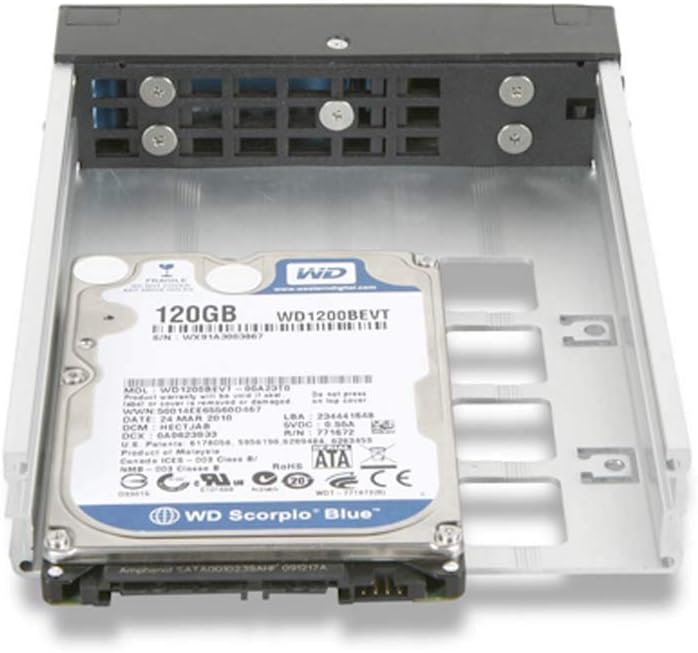
Figure 5: A 2.5" hard drive being inserted into the hot-swap rack.
5. آپریٹنگ ہدایات
5.1 پاور آن/آف۔
After installing the rack and a drive, power on your computer. The T-7M1HD-RED unit has a dedicated power button on its front panel. Press this button to power on or power off the installed drive. The Power LED will illuminate when the drive is powered on.
5.2 Hot-Swapping Drives
The T-7M1HD-RED supports hot-swapping, allowing you to insert or remove drives while the computer is running, provided your operating system and motherboard support this feature (e.g., AHCI mode enabled in BIOS/UEFI). Always ensure the drive is safely ejected or unmounted through your operating system before physically removing it to prevent data loss.
5.3 ایل ای ڈی اشارے
- پاور ایل ای ڈی: Indicates that the rack unit and the installed drive are receiving power.
- سرگرمی ایل ای ڈی: Flashes to indicate data read/write activity on the installed drive.
6 دیکھ بھال
To ensure optimal performance and longevity of your T-7M1HD-RED hot-swap rack, consider the following maintenance tips:
- دھول ہٹانا: Periodically inspect the unit's fan and ventilation openings for dust accumulation. Use compressed air to gently clear any dust, ensuring proper airflow for the integrated blower fan.
- صفائی: Keep the exterior of the unit clean with a soft, dry cloth. Avoid using liquid cleaners directly on the unit.
- ماحولیاتی حالات: Operate the unit within recommended temperature and humidity ranges to prevent damage to internal components and installed drives.
7 خرابیوں کا سراغ لگانا
If you encounter issues with your T-7M1HD-RED hot-swap rack, refer to the following common problems and solutions:
| مسئلہ | ممکنہ وجہ | حل |
|---|---|---|
| Drive not detected by system. | Loose SATA data/power cables, drive not fully seated, BIOS/UEFI settings. |
|
| پاور ایل ای ڈی بند ہے۔ | No power to the unit, unit's power button off. |
|
| Drive activity LED not flashing. | No drive activity, drive not recognized, faulty LED. |
|
8. وضاحتیں
| فیچر | تفصیل |
|---|---|
| برانڈ | آئی اسٹار |
| سلسلہ | T-7M1HD-RED |
| ماڈل نمبر | T-7M1HD-RED |
| شے کا وزن | 1.62 پاؤنڈ |
| پروڈکٹ کے طول و عرض (LxWxH) | 8 x 6 x 2 انچ |
| کارخانہ دار | iStar |
| ASIN | B07V1229PF |
| پہلی تاریخ دستیاب ہے۔ | 5 جولائی 2019 |
| مطابقت | 5.25" PC Drive Bay, 3.5" / 2.5" SAS/SATA HDDs/SSDs |
| انٹرفیس | 12Gb/s SAS/SATA |
| کولنگ | 1x 80mm HDD Blower Fan |
9. وارنٹی اور سپورٹ
For information regarding warranty coverage and technical support for your i-Star T-7M1HD-RED hot-swap rack, please refer to the official i-Star webسائٹ یا ان کی کسٹمر سروس سے براہ راست رابطہ کریں۔ کسی بھی وارنٹی دعووں کے لیے خریداری کے ثبوت کے طور پر اپنی خریداری کی رسید رکھیں۔
For further assistance, you may visit the i-Star store on Amazon: i-Star Amazon Store
Ask a question about this manual
Ask about setup, troubleshooting, compatibility, parts, safety, or missing instructions. Manuals+ will review the question and use this page’s manual context to help answer it.