
Waveshare 4.2inch E-Ink Display Module
Waveshare 4.2inch E-Ink ڈسپلے ماڈیول صارف دستی
Model: 4.2inch E-Ink Display Module
1. تعارف
The Waveshare 4.2inch E-Ink Display Module features a 400x300 resolution and supports partial refresh. It is designed for low power consumption, offers a wide viewing angle, and provides a paper-like display effect. This module includes an embedded controller and communicates via an SPI interface, making it compatible with various controller boards such as Raspberry Pi, Jetson Nano, Arduino, and STM32.
Its ultra-low power consumption and ability to retain display content without continuous power make it suitable for applications like electronic shelf labels and industrial instrumentation.

Image 1.1: Waveshare 4.2inch E-Ink Display Module with connection wires.
2. کلیدی خصوصیات
- ڈسپلے ٹیکنالوجی: 4.2inch E-Ink (e-Paper) with 400x300 pixel resolution.
- بجلی کی کارکردگی: Ultra-low power consumption; power is primarily required only during display refresh cycles.
- مسلسل ڈسپلے: No backlight required. Retains the last displayed content indefinitely, even when power is removed.
- انٹرفیس: SPI interface (3-wire or 4-wire) for broad compatibility.
- کنٹرولر مطابقت: Designed for use with Raspberry Pi, Jetson Nano, Arduino, STM32, and other microcontrollers.
- والیومtage Translation: آن بورڈ والیم۔tage translator supports both 3.3V and 5V MCUs.
- Refresh Capability: Supports partial refresh for faster updates of specific screen areas.
- Viewزاویہ: چوڑا viewing angle, offering clear visibility from over 170 degrees.

تصویر 2.1: ختمview of the 4.2-inch E-Paper Module's key characteristics.
3. پیکیج کے مشمولات
مندرجہ ذیل اشیاء آپ کے پروڈکٹ پیکج میں شامل ہیں:
- 1x Waveshare 4.2inch e-Paper ماڈیول
- 1x PH2.0 20cm 8-pin cable

Image 3.1: Contents of the product package, including the e-Paper module and connection cable.
4. وضاحتیں
Detailed technical specifications for the 4.2inch E-Ink Display Module are provided below:
| پیرامیٹر | قدر | پیرامیٹر | قدر |
|---|---|---|---|
| آپریٹنگ والیومtage | 3.3V/5V | ڈسپلے کا رنگ | سیاہ، سفید |
| انٹرفیس | 3 وائر ایس پی آئی، 4 وائر ایس پی آئی | گرے لیول | 4 |
| خاکہ کے طول و عرض | 103.0 × 78.5 ملی میٹر | مکمل ریفریش ٹائم | 5s |
| ڈسپلے سائز | 84.8 × 63.6 ملی میٹر | فاسٹ ریفریش ٹائم | 1s/1.5s* |
| ڈاٹ پچ | 0.212 × 0.212 ملی میٹر | جزوی ریفریش ٹائم | 0.4s |
| Viewآئی اینگل | >170° | پاور ریفریش کریں۔ | 26.4mW (قسم) |
| قرارداد | 400 × 300 پکسلز | اسٹینڈ بائی کرنٹ | <0.01uA (تقریبا کوئی نہیں) |
*فاسٹ ریفریش فنکشن صرف V2 ورژن میں دستیاب ہے۔

Image 4.1: Summary of features and detailed specifications for the e-Paper module.

Image 4.2: Detailed outline dimensions of the 4.2inch E-Ink Display Module.
5. سیٹ اپ اور ہارڈ ویئر کنکشن
The 4.2inch E-Ink Display Module communicates via an SPI interface. Ensure proper pin connections to your chosen microcontroller board.
5.1 Onboard SPI Control Interface
The module features an onboard SPI control interface. The pin definitions are crucial for correct operation.
| پن | تفصیل |
|---|---|
| وی سی سی | 3.3V/5V پاور سپلائی |
| جی این ڈی | گراؤنڈ |
| DIN | SPI MOSI پن |
| سی ایل کے | SPI SCK پن |
| CS | SPI چپ انتخاب، کم فعال |
| DC | Data / Command selection (high for data, low for command) |
| RST | External reset, low active |
| مصروف | Busy status output |
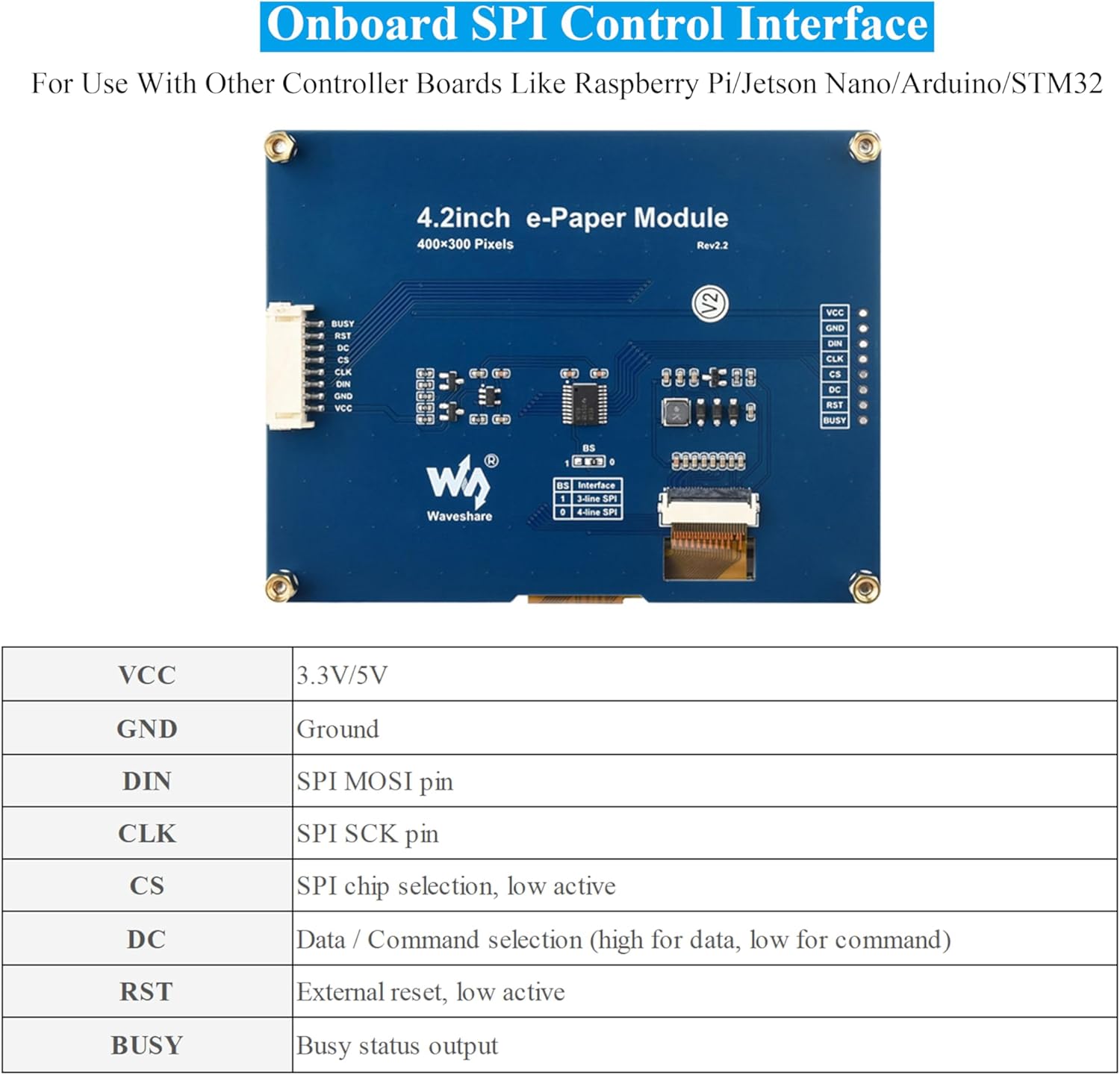
Image 5.1: Diagram of the onboard SPI control interface and its pin definitions.
5.2 آن بورڈ والیومtagای مترجم
The module includes an onboard voltage translator, ensuring compatibility with both 3.3V and 5V microcontrollers. This simplifies integration by eliminating the need for external level shifters.
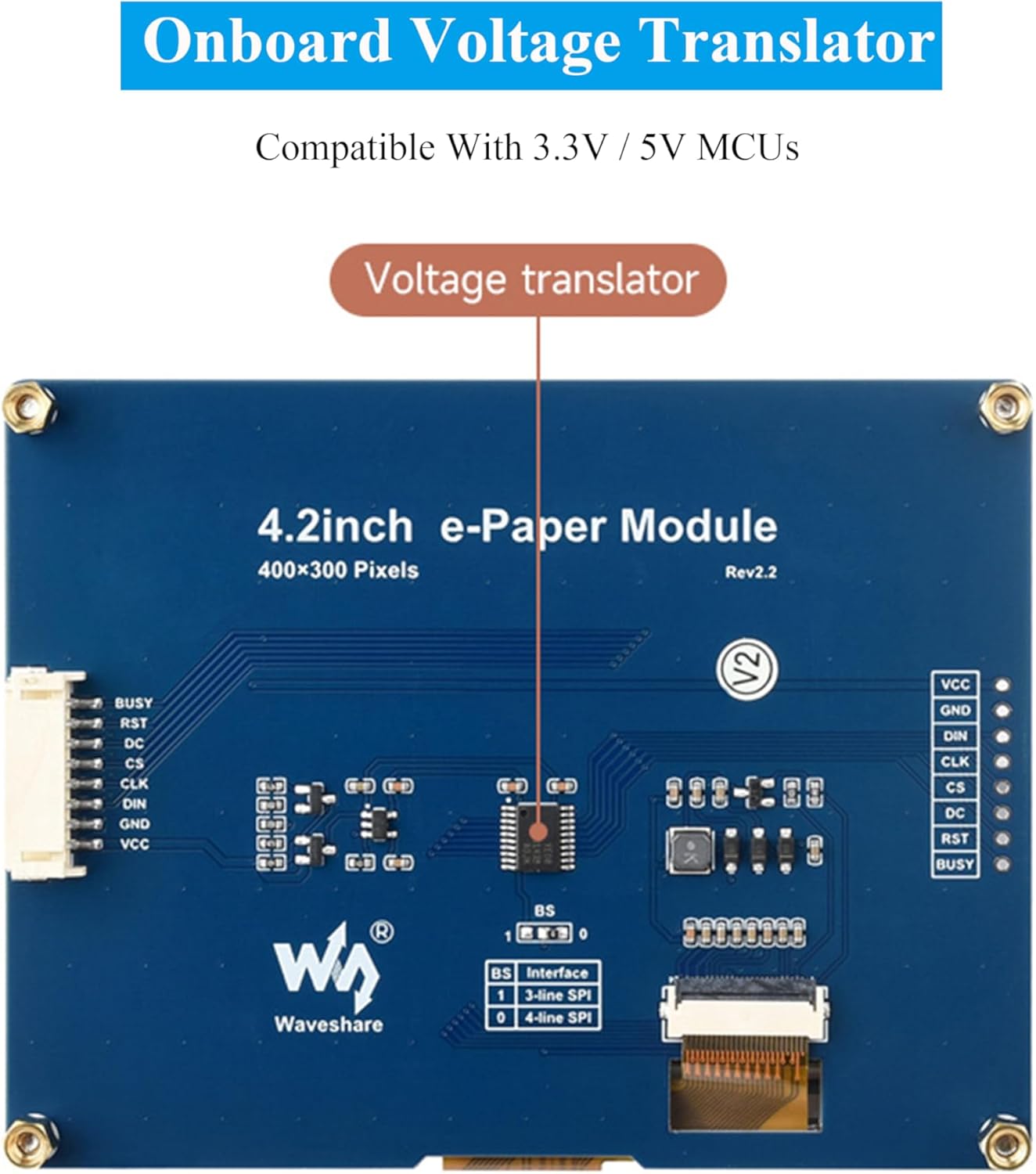
Image 5.2: Location of the onboard voltage translator on the module.
5.3 Connection with Raspberry Pi
When connecting to a Raspberry Pi, you can directly insert the module into the 40-pin GPIO header. If using an 8-pin cable, refer to the pin correspondence table below:
| ای پیپر | BCM2835 | بورڈ |
|---|---|---|
| وی سی سی | 3.3V | 3.3V |
| جی این ڈی | جی این ڈی | جی این ڈی |
| DIN | موسی | 19 |
| سی ایل کے | ایس سی ایل کے | 23 |
| CS | CE0 | 24 |
| DC | 25 | 22 |
| RST | 17 | 11 |
| مصروف | 24 | 18 |
5.4 Connection with Arduino
Use an 8-pin cable to connect the module to an Arduino board. Refer to the pin correspondence table below for Arduino UNO and Mega2560:
| ای پیپر | Arduino UNO | میگا 2560 |
|---|---|---|
| وی سی سی | 5V | 5V |
| جی این ڈی | جی این ڈی | جی این ڈی |
| DIN | ڈی11 | ڈی51 |
| سی ایل کے | ڈی13 | ڈی52 |
| CS | ڈی10 | ڈی10 |
| DC | D9 | D9 |
| RST | D8 | D8 |
| مصروف | D7 | D7 |
5.5 Connection with Jetson Nano
The 40-pin GPIO of Jetson Nano is compatible with the 40-pin RPi GPIO. The module can be directly inserted into the 40-pin headers of the Jetson Nano when using the 40-pin interface. If you choose to connect with an 8-pin cable, refer to the pin correspondence table below:
| ای پیپر | BCM2835 | بورڈ |
|---|---|---|
| وی سی سی | 3.3V | 3.3V |
| جی این ڈی | جی این ڈی | جی این ڈی |
| DIN | 10 (SPI0_MOSI) | 19 |
| سی ایل کے | 11 (SPI0_SCK) | 23 |
| CS | 8 (SPI0_CS0) | 24 |
| DC | 25 | 22 |
| RST | 17 | 11 |
| مصروف | 24 | 18 |
Image 5.3: Pin connection tables for Raspberry Pi, Arduino, and Jetson Nano.
6. Operating Principles (E-Ink Technology)
E-paper displays utilize microcapsule electrophoretic technology for displaying images. The principle involves charged particles suspended in a clear fluid moving to the sides of microcapsules when an electric field is applied. This process makes the microcapsule content visible by reflecting ambient light, similar to traditional printed paper.
E-paper displays offer clear visibility under lamplight or natural light, do not require a backlight, and provide a wide viewing angle of nearly 180 degrees. This paper-like effect makes them an ideal choice for applications requiring readability and low power consumption.

Image 6.1: Comparison of E-Paper display with traditional printed paper and LCD monitors, highlighting E-Ink advantages
7. درخواست سابقamples
The Waveshare 4.2inch E-Ink Display Module is versatile and suitable for various applications where low power, clear display, and persistent content are beneficial. Common uses include:
- قیمت Tags in retail environments
- Asset and Equipment Tags for inventory management
- الیکٹرانک شیلف لیبلز
- کانفرنس کا نام Tags
- Industrial instrumentation displays

تصویر 7.1: بصری سابقamples of the e-Paper module used in various settings such as supermarkets, hospitals, and conference venues.
8 دیکھ بھال
ای انک ڈسپلے عام طور پر کم دیکھ بھال کے ہوتے ہیں۔ لمبی عمر اور بہترین کارکردگی کو یقینی بنانے کے لیے:
- ہینڈلنگ: Handle the module by its edges to avoid touching the display surface directly.
- صفائی: If necessary, gently wipe the display surface with a soft, dry, lint-free cloth. Avoid using harsh chemicals or abrasive materials.
- ذخیرہ: Store the module in a dry, dust-free environment within its specified operating temperature range.
- طاقت: مخصوص والیوم کے اندر بجلی کی مستحکم فراہمی کو یقینی بنائیںtagای رینج (3.3V/5V)۔
9 خرابیوں کا سراغ لگانا
If you encounter issues with your Waveshare 4.2inch E-Ink Display Module, consider the following common troubleshooting steps:
- کوئی ڈسپلے/خالی اسکرین نہیں:
- Verify all power connections (VCC, GND) are correct and stable.
- Check SPI data lines (DIN, CLK, CS, DC, RST, BUSY) for proper connection and continuity.
- Ensure your microcontroller code is correctly initializing the display and sending data.
- صحیح جلد کی تصدیق کریں۔tage (3.3V or 5V) is being supplied to the module.
- غلط/گڑا ہوا ڈسپلے:
- Double-check your SPI communication protocol and timing in your code.
- Ensure the correct display resolution (400x300) is configured in your software.
- Verify that the data format (e.g., black/white, grey levels) matches the display's capabilities and your code's output.
- سست ریفریش ریٹ:
- E-Ink displays inherently have slower refresh rates than LCDs. Refer to the specifications for expected refresh times.
- If using partial refresh, ensure your code is correctly implementing it for faster updates of specific areas.
- ماڈیول جواب نہیں دے رہا ہے:
- Perform a hard reset by momentarily disconnecting and reconnecting power.
- Check the BUSY pin status in your code to ensure the display is not busy before sending new commands.
For more detailed troubleshooting or specific error codes, refer to the online development resources provided by Waveshare.
10 سپورٹ اور وسائل
Waveshare provides comprehensive online development resources and manuals to assist with the integration and programming of this module. These resources typically include driver board circuit diagrams and example code for Raspberry Pi, Jetson Nano, Arduino, and STM32.
Access the official online development resources here: bit.ly/4btDibU
For further assistance, please visit the Waveshare official webسائٹ یا ان کے کسٹمر سپورٹ سے رابطہ کریں۔
11. وارنٹی کی معلومات
Warranty information for the Waveshare 4.2inch E-Ink Display Module is typically provided by the seller or manufacturer at the time of purchase. Please retain your proof of purchase for any warranty claims.
For specific details regarding warranty terms, duration, and claim procedures, refer to the documentation included with your product or contact the retailer/manufacturer directly.
Ask a question about this manual
Ask about setup, troubleshooting, compatibility, parts, safety, or missing instructions. Manuals+ will review the question and use this page’s manual context to help answer it.