
1. پروڈکٹ ختمview
The Schneider SC600SND is a versatile 2.0 channel soundbar designed to enhance your audio experience. It offers a total output power of 30W (15W x 2) and supports multiple connectivity options including Bluetooth, HDMI (ARC), Optical, and Aux. A unique feature of this soundbar is its convertible design, allowing it to be used as a single horizontal unit or split into two vertical speaker columns.

Image 1.1: The Schneider SC600SND Soundbar in its standard monoblock configuration.
2. سیٹ اپ
2.1 پیک کھولنا اور جگہ کا تعین کرنا
Carefully remove all components from the packaging. Ensure you have the soundbar unit, remote control, and 3.5mm Jack cable.
The SC600SND soundbar offers two primary placement options:
- Monoblock Configuration: Use the soundbar as a single horizontal unit, ideal for placing below your television.
- Split Column Configuration: The soundbar can be separated into two vertical speaker columns. This allows for flexible placement on either side of your television or entertainment unit. To split, gently twist and pull the two halves apart at the central connection point. Attach the provided bases to each column for stability.

Image 2.1: Detail of the central connection point, allowing the soundbar to be split into two columns.
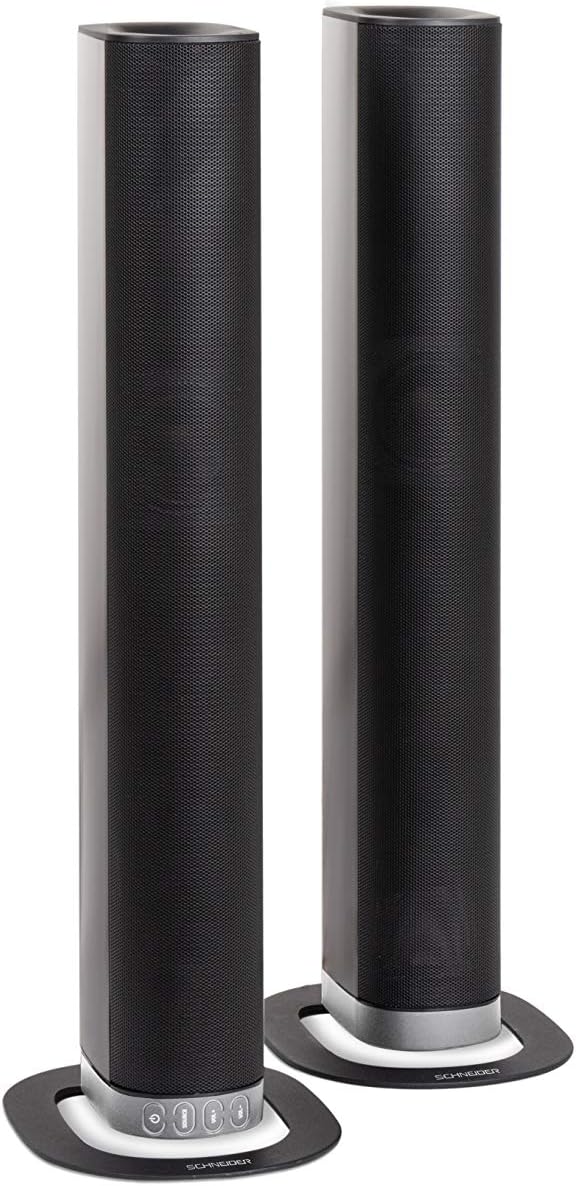
Image 2.2: The soundbar configured as two independent vertical speaker columns.
2.2 پاور سے جڑنا۔
Connect the power cable to the soundbar's power input and then to a suitable wall outlet. The soundbar will enter standby mode.
2.3 آڈیو کنکشن
اپنے آڈیو ماخذ کو مربوط کرنے کے لیے درج ذیل طریقوں میں سے ایک کا انتخاب کریں:
- ایچ ڈی ایم آئی (اے آر سی): For optimal audio quality and control, connect an HDMI cable from the soundbar's HDMI ARC port to your TV's HDMI ARC port. This allows your TV remote to control the soundbar's volume.
- نظری: Connect an optical cable from the soundbar's OPTICAL input to your TV's optical output.
- AUX: Use the included 3.5mm Jack cable to connect the soundbar's AUX input to the headphone jack or audio output of your device (e.g., TV, smartphone, MP3 player).
- بلوٹوتھ: For wireless connection, refer to the Bluetooth pairing instructions in the Operating section.
3. آپریٹنگ ہدایات
3.1 پاور آن/آف
دبائیں طاقت یونٹ کو آن یا آف کرنے کے لیے ساؤنڈ بار یا ریموٹ کنٹرول پر بٹن۔
3.2 ماخذ کا انتخاب
دبائیں ذریعہ button on the soundbar or the remote control to cycle through the available input sources: Bluetooth (BT), HDMI (ARC), Optical, and AUX.

Image 3.1: On-unit control buttons for power, source selection, and volume adjustment.
3.3 والیوم کنٹرول
استعمال کریں۔ VOL+ اور والیوم- buttons on the soundbar or remote control to adjust the volume. Press the گونگا آڈیو کو عارضی طور پر خاموش کرنے کے لیے ریموٹ پر بٹن۔
3.4 بلوٹوتھ جوڑی
- Select Bluetooth as the source input. The soundbar will enter pairing mode, indicated by a flashing LED.
- اپنے موبائل ڈیوائس (اسمارٹ فون، ٹیبلیٹ، وغیرہ) پر، بلوٹوتھ کو فعال کریں اور دستیاب آلات تلاش کریں۔
- Select "SC600SND" from the list of devices.
- Once paired, the LED indicator on the soundbar will stop flashing and remain solid. You can now play audio wirelessly from your device.
3.5 ساؤنڈ موڈز
The remote control includes dedicated buttons for different sound modes to optimize your listening experience:
- خبریں: Enhances vocal clarity for news broadcasts and dialogue.
- مووی: زیادہ عمیق آوازیں فراہم کرتا ہے۔tagای فلموں کے لیے۔
- موسیقی: موسیقی پلے بیک کے لیے آڈیو کو بہتر بناتا ہے۔

Image 3.2: The included remote control with dedicated buttons for power, source, volume, mute, and sound modes.
4 دیکھ بھال
اپنے ساؤنڈ بار کی لمبی عمر اور بہترین کارکردگی کو یقینی بنانے کے لیے، دیکھ بھال کے ان رہنما خطوط پر عمل کریں:
- صفائی: Use a soft, dry cloth to clean the exterior surfaces of the soundbar. Do not use liquid cleaners, aerosols, or abrasive materials, as these can damage the finish or internal components.
- وینٹیلیشن: Ensure that the soundbar's ventilation openings are not blocked. Proper airflow prevents overheating.
- ذخیرہ: If storing the soundbar for an extended period, disconnect it from power and store it in a cool, dry place, away from direct sunlight and extreme temperatures.
- ہینڈلنگ: ساؤنڈ بار کو شدید اثرات کے لیے چھوڑنے یا اس کے تابع کرنے سے گریز کریں۔
5 خرابیوں کا سراغ لگانا
If you encounter issues with your SC600SND soundbar, refer to the following common problems and solutions:
- کوئی طاقت نہیں:
- یقینی بنائیں کہ پاور کیبل ساؤنڈ بار اور ورکنگ پاور آؤٹ لیٹ دونوں سے محفوظ طریقے سے منسلک ہے۔
- کسی دوسرے آلے میں پلگ لگا کر چیک کریں کہ آیا پاور آؤٹ لیٹ کام کر رہا ہے۔
- کوئی آواز نہیں:
- Verify that the correct input source (HDMI, Optical, AUX, Bluetooth) is selected on the soundbar.
- Increase the volume on both the soundbar and your connected audio source (e.g., TV, smartphone).
- یقینی بنائیں کہ ساؤنڈ بار خاموش نہیں ہے۔
- Check all audio cables for secure connections and damage. Try a different cable if possible.
- If using HDMI ARC, ensure your TV's HDMI ARC function is enabled in its settings.
- Poor Sound Quality / Distorted Audio:
- Adjust the volume levels to avoid distortion.
- Try switching between the different sound modes (NEWS, MOVIE, MUSIC) to see if one improves the audio for your content.
- Ensure the soundbar is placed on a stable surface and not vibrating excessively.
- If using Bluetooth, ensure your device is within range and there are no obstructions causing interference.
- بلوٹوتھ جوڑا بنانے کے مسائل:
- یقینی بنائیں کہ ساؤنڈ بار بلوٹوتھ پیئرنگ موڈ (فلیشنگ LED) میں ہے۔
- Make sure your device's Bluetooth is enabled and it is searching for new devices.
- اپنے آلے کو ساؤنڈ بار کے قریب لے جائیں۔
- اگر پہلے جوڑا بنایا گیا ہو، تو آلہ کا جوڑا ختم کرنے اور دوبارہ جوڑا بنانے کی کوشش کریں۔
- ریموٹ کنٹرول کام نہیں کر رہا:
- ریموٹ کنٹرول میں بیٹریاں چیک کریں اور تبدیل کریں۔
- یقینی بنائیں کہ ریموٹ کنٹرول اور ساؤنڈ بار کے سینسر کے درمیان کوئی رکاوٹ نہیں ہے۔
- ریموٹ کو براہ راست ساؤنڈ بار کی طرف اشارہ کریں۔
6. وضاحتیں
| فیچر | تفصیلات |
|---|---|
| ماڈل نمبر | SC600SND |
| چینلز | 2.0 |
| آؤٹ پٹ پاور | 30W (15W x 2) |
| کنیکٹوٹی ٹیکنالوجی | Bluetooth, HDMI (ARC), Optical, Aux |
| وائرلیس کمیونیکیشن | بلوٹوتھ |
| کنٹرول کا طریقہ | ریموٹ کنٹرول |
| اسپیکر کی قسم | ساؤنڈ بار |
| اسپیکر کا سائز | 2 انچ |
| طاقت کا منبع | Cable Electric |
| Product Dimensions (Monoblock) | 80.5 x 6.2 x 9 سینٹی میٹر |
| پروڈکٹ کا وزن | 2.5 کلوگرام |
| شامل اجزاء | Remote Control, 3.5mm Jack Cable |
| رنگ | سیاہ |
7. وارنٹی اور سپورٹ
7.1 محدود وارنٹی
This Schneider SC600SND Soundbar is covered by a Limited Warranty. Please refer to the warranty card included with your product or contact your retailer for specific terms and conditions regarding warranty coverage and duration.
7.2 کسٹمر سپورٹ
For technical assistance, troubleshooting beyond this manual, or warranty claims, please contact the retailer where you purchased the product or visit the official Schneider webسپورٹ کی معلومات کے لیے سائٹ۔