
1. تعارف
This manual provides detailed instructions for the safe and proper installation and operation of your MOUNTUP MU0009 Full Motion TV Wall Mount. Please read this manual thoroughly before installation to ensure correct setup and to prevent damage or injury. This mount is designed for most 26-60 inch LED, LCD, OLED, and 4K TVs weighing up to 77 lbs (35 kg).
The full motion design allows for optimal viewing flexibility, including swivel, tilt, and extension capabilities. It features a robust alloy steel construction for durability and security.

Image: The MOUNTUP MU0009 full motion TV wall mount with a television extended from the wall, demonstrating its range of motion.
2. حفاظتی معلومات
- تمام ہدایات پڑھیں: Before installation, read and understand all assembly instructions. If you have any questions, contact customer support.
- وزن کی صلاحیت: زیادہ سے زیادہ وزن کی گنجائش 77 پونڈ (35 کلوگرام) سے زیادہ نہ ہو۔ اس حد سے تجاوز کرنا سنگین چوٹ یا املاک کو نقصان پہنچا سکتا ہے۔
- سکرین کا سائز: یہ ماؤنٹ 26 اور 60 انچ کے درمیان ٹی وی کے لیے ڈیزائن کیا گیا ہے۔
- دیوار کی قسم: This mount is designed for installation on wood studs or solid concrete/brick walls. اکیلے ڈرائی وال پر انسٹال نہ کریں۔ یقینی بنائیں کہ بڑھتی ہوئی سطح محفوظ طریقے سے ماؤنٹ اور ٹی وی کے مشترکہ وزن کو سہارا دے سکتی ہے۔
- اوزار: Use appropriate tools for installation. A stud finder, drill, level, and socket wrench are typically required.
- امداد: Due to the size and weight of TVs, it is recommended to have at least two people for installation.
- ہارڈ ویئر: صرف فراہم کردہ ہارڈ ویئر استعمال کریں۔ اگر کوئی پرزہ غائب یا خراب ہو تو کسٹمر سپورٹ سے رابطہ کریں۔
- پوسٹ انسٹالیشن چیک: After installation, ensure the mount is securely fastened and the TV is stable before use.
3. وضاحتیں
| فیچر | تفصیل |
|---|---|
| ماڈل نمبر | MU0009 |
| ٹی وی سائز مطابقت | 26 - 60 انچ |
| وزن کی صلاحیت | 77 پونڈ (35 کلوگرام) تک |
| VESA مطابقت | 100x100 ملی میٹر سے 400x400 ملی میٹر |
| چڑھنے کی قسم | Full Motion (Articulating) |
| کنڈا رینج | 180° تک (ٹی وی کے سائز پر منحصر ہے) |
| جھکاؤ کی حد | 0° سے -10° |
| لیول ایڈجسٹمنٹ | +/- 3° post-installation |
| دیوار سے توسیع | 2" (واپس لیا) سے 15.3" (توسیع شدہ) |
| مواد | مرکب سٹیل |
| رنگ | سیاہ |
| شے کا وزن | 2 کلوگرام |
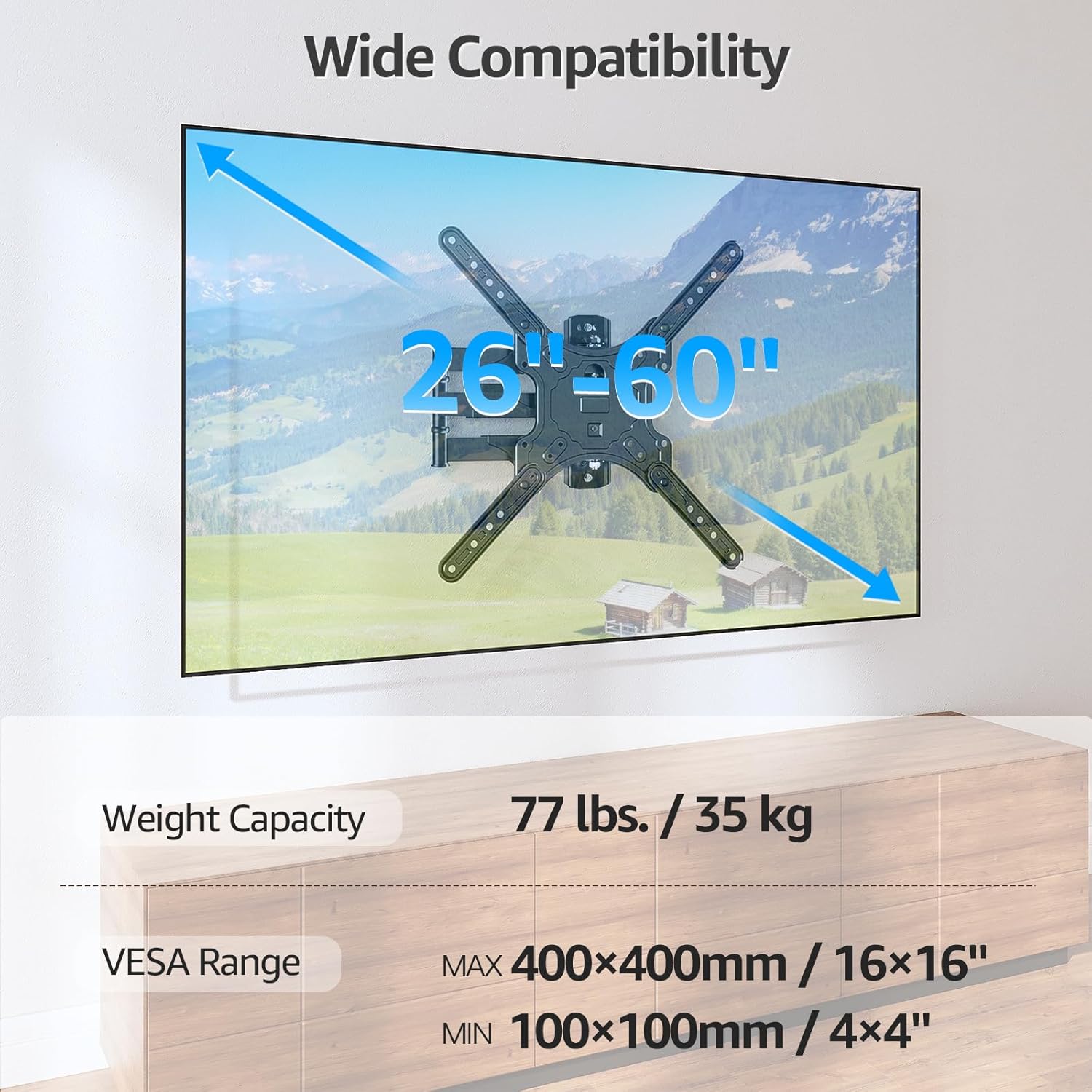
Image: Visual representation of the mount's compatibility, including supported TV sizes (26-60 inches), weight capacity (77 lbs / 35 kg), and VESA range (100x100mm to 400x400mm).
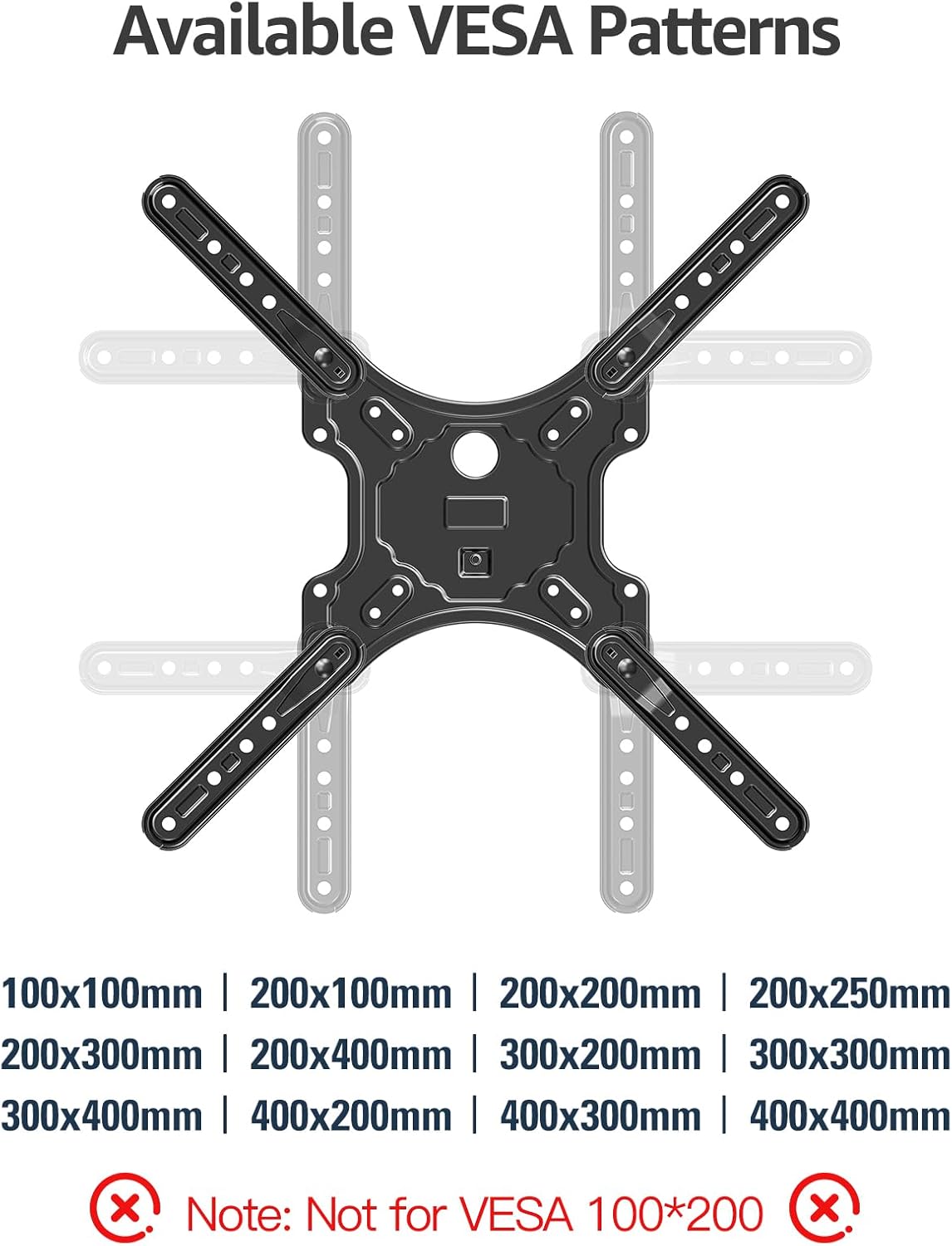
Image: A detailed diagram showing the available VESA patterns that the MOUNTUP MU0009 mount can accommodate, ranging from 100x100mm to 400x400mm.
4. تنصیب (سیٹ اپ)
Before beginning, ensure you have all necessary tools and hardware. It is highly recommended to have a second person assist with the installation.
4.1. Check Wall Compatibility
The MOUNTUP MU0009 is designed for installation on a single wood stud or solid concrete/brick walls. اکیلے ڈرائی وال پر نہ لگائیں۔
- ووڈ سٹڈ کی تنصیب: Locate the center of a wood stud using a stud finder.
- Concrete/Brick Wall Installation: Use appropriate concrete anchors (not included, but typically provided with the mount) and a masonry drill bit.

Image: Illustration of diverse wall compatibility, showing installation on a wood stud and a concrete/brick wall, with a clear warning not to mount on drywall alone.
4.2 مرحلہ وار تنصیب
Follow these general steps for installation. Refer to the included instruction sheet for detailed diagrams and specific hardware usage.
- Step 1: Mount Brackets to TV. Attach the VESA plate and extension arms to the back of your TV using the appropriate screws, washers, and spacers from the hardware kit. Ensure the brackets are centered and securely tightened.
- Step 2: Install Wall Plate. Mark the desired height and position for the wall plate on your chosen wall type. Drill pilot holes according to the instructions for your wall type (wood stud or concrete). Secure the wall plate to the wall using the provided lag bolts. Ensure it is level and firmly attached.
- Step 3: Hang TV on Wall Plate. Carefully lift the TV (with brackets attached) and hook it onto the wall plate. Secure the TV to the wall plate using the safety screws or locking mechanisms as indicated in the detailed instructions.

Image: A visual guide to the easy 3-step installation process: 1. Mount brackets to TV, 2. Install wall plate, 3. Hang TV on the wall plate.
4.3. کونے کی تنصیب
The single stud design and 15.3-inch extension make this mount suitable for corner installations, allowing the TV to be positioned optimally within a corner space.

Image: The MOUNTUP MU0009 TV mount shown installed in a room corner, highlighting its corner mounting solution capability.
5. آپریشن
Once installed, your MOUNTUP MU0009 TV wall mount offers various adjustments for an optimal viewتجربہ ہے.
- کنڈا: The articulating arms allow the TV to swivel up to 180° (90° left to 90° right), depending on TV size and wall clearance. Gently push or pull the TV to the desired angle.
- جھکاؤ: The mount offers a tilt range of 0° to -10°. Use the tool-free tilt adjustment knobs on the TV brackets to set the desired vertical angle, reducing glare.
- Extension & Retraction: The mount can extend up to 15.3 inches from the wall and retract back to 2 inches, providing flexibility for viewing and saving space when not in use.
- سطح ایڈجسٹمنٹ: A post-installation leveling adjustment of +/- 3° allows for perfect TV alignment even if the wall plate was not perfectly level during installation.

Image: Illustration of the mount's swivel function, enabling a comfortable viewing experience by rotating the TV up to 90 degrees left or right.
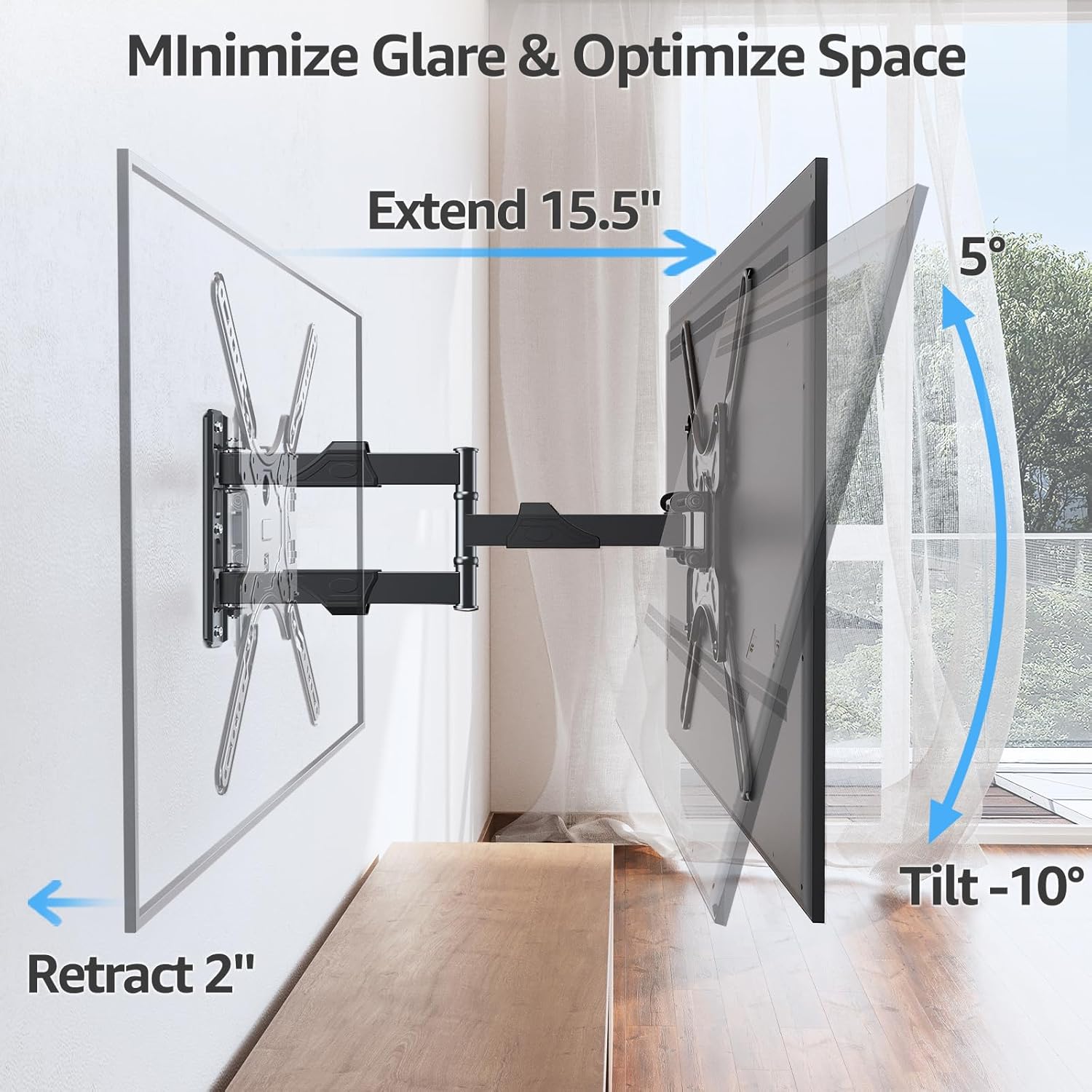
Image: Demonstrates how the mount extends up to 15.5 inches, retracts to 2 inches, and tilts up to -10 degrees to minimize glare and optimize space.
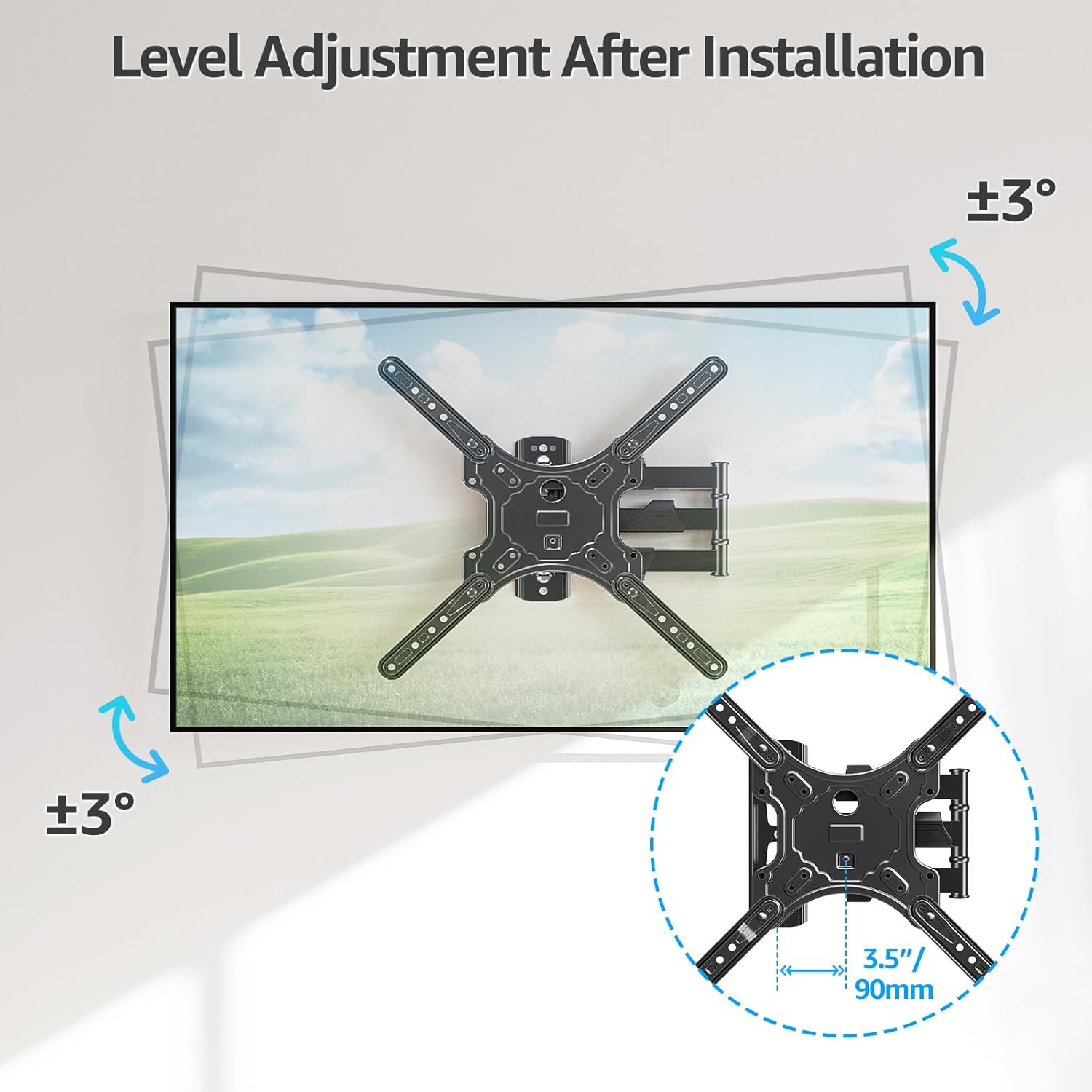
Image: Illustrates the level adjustment feature, allowing for a +/- 3 degree rotation of the TV after installation for perfect leveling.
5.1. کیبل کا انتظام
Utilize the included cable ties to organize and secure cables along the articulating arms, providing a cleaner and more organized appearance.

Image: The MOUNTUP MU0009 mount with cables neatly managed along its arms, contributing to a clean living room aesthetic.
6 دیکھ بھال
- باقاعدہ چیکس: وقتاً فوقتاً تمام پیچ اور کنکشن چیک کریں تاکہ یہ یقینی بنایا جا سکے کہ وہ سخت اور محفوظ رہیں۔
- صفائی: نرم، خشک کپڑے سے پہاڑ کو صاف کریں۔ کھرچنے والے کلینر یا سالوینٹس سے پرہیز کریں جو ختم کو نقصان پہنچا سکتے ہیں۔
- چکنا: The articulating joints are designed for smooth operation and generally do not require lubrication. If movement becomes stiff, contact customer support.
7 خرابیوں کا سراغ لگانا
- ٹی وی سطح نہیں ہے: Use the post-installation level adjustment feature (+/- 3°) to fine-tune the TV's horizontal position.
- پہاڑ ڈھیلا محسوس ہوتا ہے: Re-check all wall plate and TV bracket screws. Ensure they are tightened securely. If mounted on a wood stud, verify the stud was properly located and the lag bolts are fully engaged. If on concrete, ensure anchors are correctly installed.
- Difficulty moving TV: Ensure no cables are snagged. Check that all joints are free from obstruction. If the mount is new, it may require a few movements to loosen up.
- گمشدہ حصے: Refer to the package contents list. If any parts are missing, contact MOUNTUP customer support immediately.
8. Official Product Video Guide
Watch the official MOUNTUP product video for a visual guide on the features and installation of the MU0009 TV Wall Mount.
Video: Official MOUNTUP video demonstrating the features and installation process of the MU0009 Swivel TV Wall Mount for 26-60 inch TVs.
9. وارنٹی اور سپورٹ
This MOUNTUP product comes with a 3 سال کی وارنٹی. For any pre-purchase questions, installation assistance, or warranty claims, please contact our professional support team.
رابطہ کی معلومات: Refer to the contact details provided on the product packaging or the official MOUNTUP webسائٹ