
AMD AMD Ryzen 7 5800X
AMD Ryzen 7 5800X ڈیسک ٹاپ پروسیسر صارف دستی
ماڈل: AMD Ryzen 7 5800X | برانڈ: AMD
1. تعارف
This manual provides essential information for the installation, operation, and maintenance of your AMD Ryzen 7 5800X 8-core, 16-thread unlocked desktop processor. The AMD Ryzen 5000 Series processors are designed to deliver high performance for a wide range of computing tasks, from gaming to professional applications. Please read this manual thoroughly before proceeding with installation.
2. مصنوعات کی خصوصیات
- AMD's fastest 8 core processor for mainstream desktop, with 16 processing threads. OS Support-Windows 10 64-Bit Edition
- دنیا کے مقبول ترین گیمز میں ایلیٹ 100+ FPS کارکردگی پیش کر سکتا ہے۔
- Cooler not included, high-performance cooler recommended
- 4.7 GHz میکس بوسٹ، اوور کلاکنگ کے لیے غیر مقفل، 36 MB کیشے، DDR-3200 سپورٹ
- اعلی درجے کی ساکٹ AM4 پلیٹ فارم کے لیے، X570 اور B550 مدر بورڈز پر PCIe 4.0 کو سپورٹ کر سکتا ہے۔
3. سیٹ اپ اور انسٹالیشن
Proper installation is crucial for optimal performance and longevity of your processor. Always handle the processor by its edges to avoid touching the gold contacts or pins.
3.1 پری انسٹالیشن چیک لسٹ
- ہم آہنگ مدر بورڈ: Ensure your motherboard has an AM4 socket and supports AMD Ryzen 5000 series processors. A BIOS update may be required for older motherboards. Refer to your motherboard manufacturer's website for compatibility and BIOS update instructions.
- CPU کولر: The AMD Ryzen 7 5800X does not include a stock cooler. A high-performance CPU cooler (air or liquid) is highly recommended to manage thermal output.
- تھرمل پیسٹ: If your cooler does not come with pre-applied thermal paste, ensure you have a high-quality thermal compound.
- اوزار: Phillips head screwdriver, anti-static wrist strap (recommended).
3.2. تنصیب کے مراحل
- مدر بورڈ تیار کریں: With the motherboard installed in your PC case (or on a test bench), locate the AM4 CPU socket. Lift the small metal lever on the side of the socket to open it.
- Unpack Processor: Carefully remove the AMD Ryzen 7 5800X processor from its packaging. Avoid touching the pins on the underside.
- سیدھ پروسیسر: Locate the small golden triangle or arrow on one corner of the processor. Align this with the corresponding triangle/arrow on the CPU socket on the motherboard. Gently lower the processor straight down into the socket. Do not force it. If it does not seat easily, re-check alignment.
- محفوظ پروسیسر: Once the processor is fully seated, push the metal lever back down and under the retention tab to lock the processor into place.
- تھرمل پیسٹ لگائیں: If your CPU cooler does not have pre-applied thermal paste, apply a small pea-sized amount of thermal paste to the center of the CPU's integrated heat spreader (IHS).
- CPU کولر انسٹال کریں: Follow the instructions provided with your specific CPU cooler to mount it securely onto the motherboard and CPU. Ensure proper contact between the cooler's base and the CPU's IHS.
- کولر فین کو جوڑیں: Connect the CPU cooler's fan cable(s) to the designated CPU_FAN header(s) on your motherboard.

Figure 1: AMD Ryzen 7 5800X Processor Retail Box (Front View)

Figure 2: AMD Ryzen 7 5800X Processor Retail Box (Rear View with Installation Note)

Figure 3: Close-up of the AMD Ryzen 7 5800X Processor Chip

شکل 4: تفصیلی view of the AMD Ryzen 7 5800X Processor showing model number
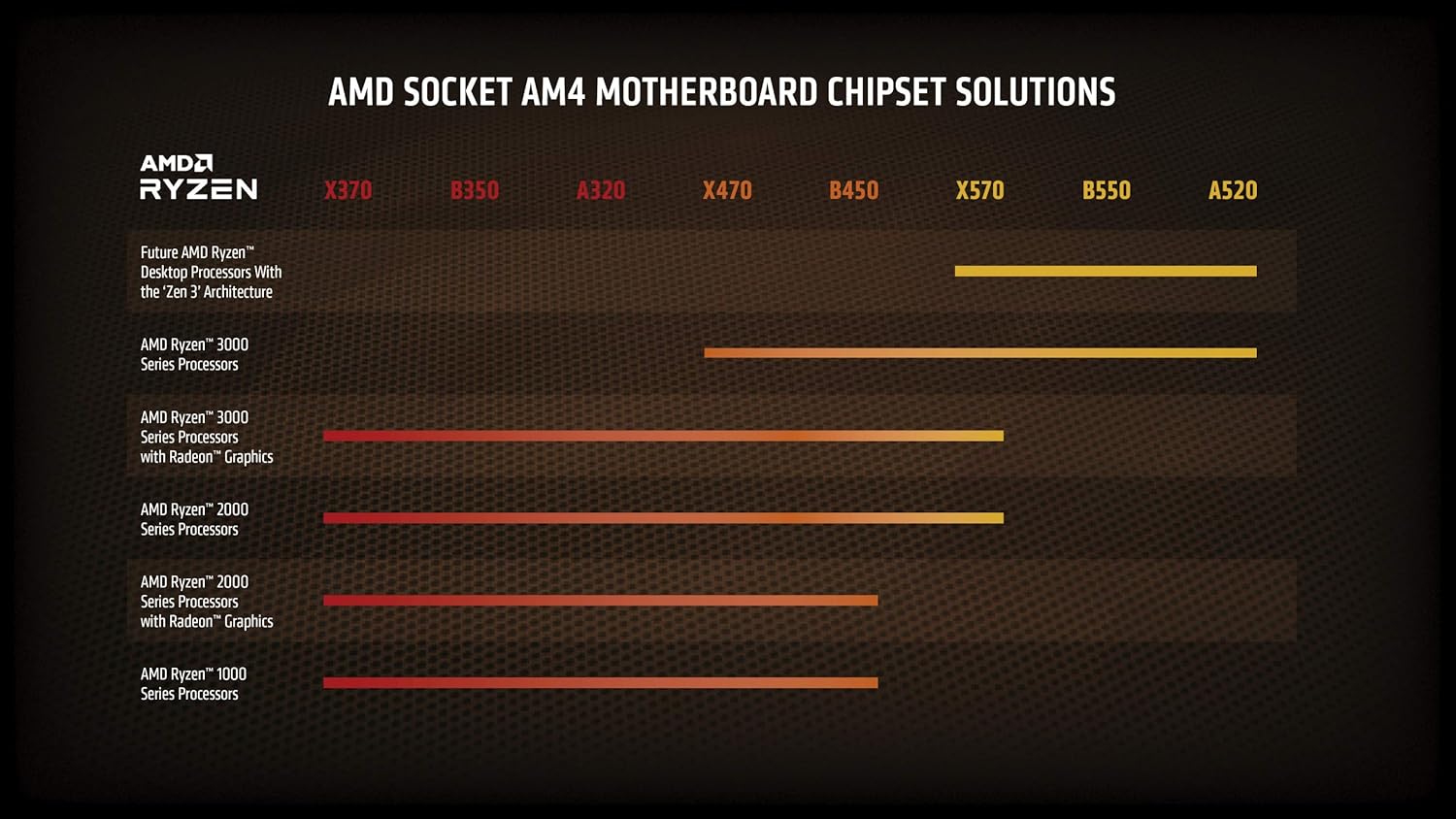
Figure 5: AMD Socket AM4 Motherboard Chipset Solutions Compatibility Chart
4. آپریٹنگ ہدایات
Once installed, your AMD Ryzen 7 5800X processor will operate automatically with your system. For optimal performance and stability, consider the following:
- BIOS/UEFI ترتیبات: Ensure your motherboard's BIOS/UEFI is updated to the latest version to fully support the processor and enable features like Precision Boost Overdrive (PBO) or XMP/DOCP for memory.
- ڈرائیور کی تنصیب: AMD سے جدید ترین چپ سیٹ ڈرائیورز انسٹال کریں۔ website for your motherboard's chipset. This ensures proper communication and performance.
- کولنگ: Maintain adequate airflow within your PC case. Monitor CPU temperatures using system monitoring software to ensure they remain within safe operating limits, especially under heavy loads.
- اوور کلاکنگ: The Ryzen 7 5800X is an unlocked processor, allowing for manual overclocking. However, overclocking should only be attempted by experienced users and requires careful monitoring of temperatures and stability. Incorrect overclocking can lead to system instability or damage.
5 دیکھ بھال
Regular maintenance helps ensure the longevity and consistent performance of your system and processor.
- دھول ہٹانا: Periodically clean dust from your CPU cooler fins and case fans using compressed air. Dust accumulation can impede airflow and lead to higher temperatures.
- تھرمل پیسٹ کی دوبارہ درخواست: If you notice consistently high temperatures after extended use (several years), consider reapplying thermal paste. This involves carefully removing the CPU cooler, cleaning off old paste, and applying new paste.
- سافٹ ویئر اپ ڈیٹس: Keep your operating system, motherboard BIOS/UEFI, and AMD chipset drivers updated to benefit from performance improvements and bug fixes.
6 خرابیوں کا سراغ لگانا
If you encounter issues with your AMD Ryzen 7 5800X processor, consider the following common troubleshooting steps:
6.1 سسٹم بوٹنگ نہیں ہے / کوئی ڈسپلے نہیں ہے۔
- کنکشن چیک کریں: Ensure all power cables (24-pin ATX, 8-pin CPU) are securely connected to the motherboard and power supply. Verify the CPU cooler fan is connected to the CPU_FAN header.
- سی پی یو سیٹنگ: Re-seat the CPU in its socket, ensuring it is properly aligned and the retention lever is locked.
- رام: Ensure RAM modules are correctly seated in their slots. Try booting with only one RAM stick.
- BIOS اپ ڈیٹ: If you upgraded from an older CPU, your motherboard may require a BIOS update to support the Ryzen 5000 series. Refer to your motherboard manual for instructions on how to update the BIOS, often without a compatible CPU installed (e.g., BIOS Flashback).
6.2. Overheating Issues
- کولر کی تنصیب: Verify the CPU cooler is properly installed and making good contact with the CPU. Ensure mounting pressure is even.
- تھرمل پیسٹ: Check if thermal paste was applied correctly and adequately. Reapply if necessary.
- ہوا کا بہاؤ: Ensure your PC case has sufficient airflow with properly configured intake and exhaust fans. Clean any dust buildup.
- پنکھے کی رفتار: Check CPU cooler fan speeds in BIOS/UEFI or monitoring software. Ensure they are responding to temperature changes.
6.3. Performance Issues / Instability
- ڈرائیورز: آفیشل اے ایم ڈی سے جدید ترین AMD چپ سیٹ ڈرائیورز انسٹال کریں۔ webسائٹ
- BIOS ترتیبات: Reset BIOS to default settings. If overclocking, revert to stock speeds to check for stability.
- بجلی کی فراہمی: یقینی بنائیں کہ آپ کے پاور سپلائی یونٹ (PSU) میں واٹ کافی ہے۔tage and stable power delivery for your entire system, including the CPU and GPU.
- آپریٹنگ سسٹم: یقینی بنائیں کہ آپ کا آپریٹنگ سسٹم اپ ٹو ڈیٹ ہے۔
7. وضاحتیں
| فیچر | تفصیلات |
|---|---|
| پروسیسر | 4.7 GHz amd_ryzen_7 |
| برانڈ | اے ایم ڈی |
| سلسلہ | AMD Ryzen 7 5800X |
| آئٹم ماڈل نمبر | AMD Ryzen 7 5800X |
| شے کا وزن | 2.8 اونس |
| مصنوعات کے طول و عرض | 1.57 x 1.57 x 0.1 انچ |
| آئٹم کے طول و عرض LxWxH | 1.57 x 1.57 x 0.1 انچ |
| رنگ | سیاہ |
| پروسیسر برانڈ | اے ایم ڈی |
| پروسیسرز کی تعداد | 8 |
| کمپیوٹر میموری کی قسم | ڈی آئی ایم ایم۔ |
| بیٹریاں | 1 لیتھیم آئن بیٹریاں درکار ہیں۔ |
| کارخانہ دار | اے ایم ڈی |
| زبان | انگریزی |
| ASIN | B0815XFSGK |
| اصل ملک | چین |
| پہلی تاریخ دستیاب ہے۔ | 5 نومبر 2020 |
| کسٹمر ری۔views | 4.8 5 میں سے 4.8 ستارے 21,829 ریٹنگز 5 میں سے 4.8 ستارے |
| بیسٹ سیلرز رینک | #5 in Computer CPU Processors |
| سی پی یو مینوفیکچرر | اے ایم ڈی |
| سی پی یو ماڈل | AMD Ryzen 7 |
| سی پی یو کی رفتار | 4.7 GHz |
| سی پی یو ساکٹ | ساکٹ AM4 |
8. وارنٹی اور سپورٹ
Your AMD Ryzen 7 5800X processor is covered by a manufacturer's warranty. For specific warranty terms and conditions, please refer to the official AMD website or the documentation included with your purchase. For technical support, driver downloads, and additional resources, visit the official AMD support page.
AMD سپورٹ Webسائٹ: www.amd.com/support
Ask a question about this manual
Ask about setup, troubleshooting, compatibility, parts, safety, or missing instructions. Manuals+ will review the question and use this page’s manual context to help answer it.