
Homcloud TY-WCS4S
ہوم کلاؤڈ وائی فائی اسپیڈ 4S پین اینڈ ٹیلٹ کیمرہ صارف دستی
Model: TY-WCS4S
تعارف
Thank you for choosing the Homcloud Wi-Fi Speed 4S Pan&Tilt Camera. This manual provides detailed instructions for the installation, operation, and maintenance of your new smart home security device. Please read this manual thoroughly before use to ensure proper functionality and safety.

تصویر: سامنے view of the Homcloud Wi-Fi Speed 4S Pan&Tilt Camera, showcasinجی اس کا کمپیکٹ ڈیزائن۔
پیکیج کے مشمولات
براہ کرم تصدیق کریں کہ پیکیج میں تمام اجزاء موجود ہیں:
- Homcloud Wi-Fi PTZ Camera (Model TY-WCS4S)
- پاور اڈاپٹر (5V)
- بڑھتے ہوئے لوازمات (پیچ، وال پلگ)
- صارف دستی
سیٹ اپ گائیڈ
1. پاورنگ آن۔
- Connect the power adapter to the camera's power input port.
- Plug the power adapter into a standard electrical outlet. The camera will power on and initiate its self-check sequence.
- Wait for the indicator light to flash, indicating it's ready for network configuration.
2. ایپ انسٹال کرنا اور اکاؤنٹ بنانا
The Homcloud camera operates with the Homcloud App. Download the app from your smartphone's app store:

- Open the Homcloud App and register a new account if you don't have one, or log in with an existing account.
3. ایپ میں کیمرہ شامل کرنا
- In the Homcloud App, tap the "+" icon (usually in the top right corner) to add a new device.
- Select "Security & Video Surveillance" or search for "Camera (Wi-Fi)".
- Follow the on-screen instructions to connect the camera to your Wi-Fi network. Ensure your Wi-Fi network is 2.4GHz, as 5GHz networks are not supported.
- You may be prompted to scan a QR code displayed on your phone screen with the camera lens. Hold the phone approximately 15-20 cm (6-8 inches) in front of the camera until you hear a confirmation sound.
- Once connected, you can name your camera and assign it to a specific room.
4. کیمرہ لگانا (اختیاری)
The camera can be placed on a flat surface or mounted on a wall.
- وال ماؤنٹ: Use the provided mounting bracket, screws, and wall plugs to secure the camera to a desired wall location. Ensure the camera is positioned to cover the desired surveillance area.
آپریٹنگ ہدایات
جیو View اور کنٹرول
Once connected, open the Homcloud App and select your camera to access the live video feed.
- پین اور جھکاؤ: Use the directional controls within the app to remotely rotate the camera horizontally (355°) and vertically (90°) to adjust the viewING زاویہ
- دو طرفہ آڈیو: Tap the microphone icon to speak through the camera's speaker, and listen to audio from the camera's microphone.
- سنیپ شاٹ اور ریکارڈ: Capture still images or record video clips directly from the live view.
- نائٹ ویژن: The camera automatically switches to night vision mode in low-light conditions, providing clear black and white video using its LED illuminators.
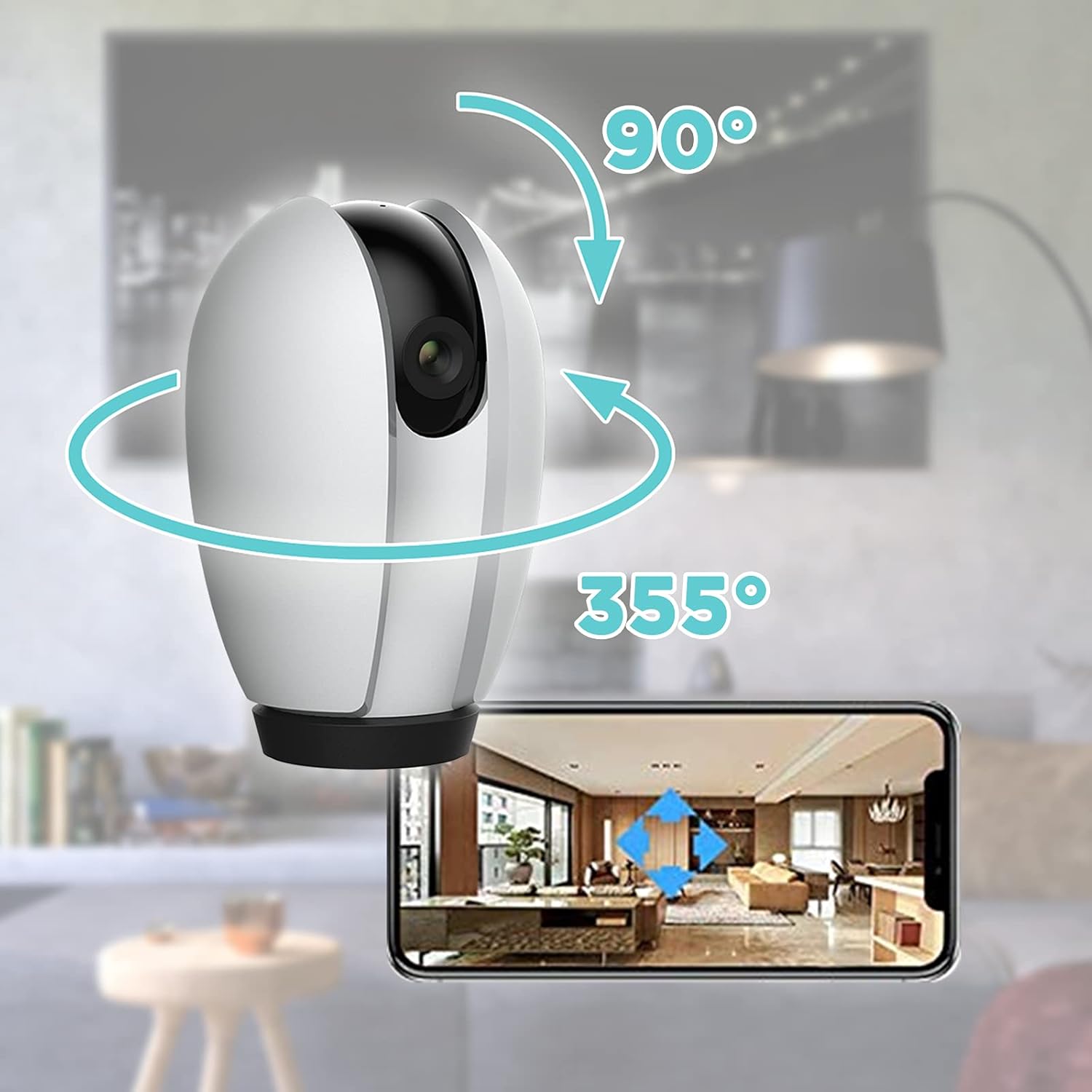
Image: Illustration of the camera's 355-degree horizontal pan and 90-degree vertical tilt capabilities, controlled via the smartphone app.
حرکت کا پتہ لگانے اور انتباہات
Configure motion detection settings in the app to receive alerts when movement is detected.
- حساسیت: Adjust the motion detection sensitivity to minimize false alarms.
- سرگرمی زونز: کیمرے کے اندر مخصوص علاقوں کی وضاحت کریں۔ view تحریک کا پتہ لگانے کے لئے.
- الرٹ اطلاعات: Enable push notifications to receive instant alerts on your smartphone.
اسٹوریج کے اختیارات
The camera supports local storage and cloud storage (subscription may be required).
- مائیکرو ایس ڈی کارڈ: Insert a MicroSD card (not included) into the camera's slot for continuous recording or event-triggered recording. The camera supports up to 128GB.
- کلاؤڈ اسٹوریج: Check the Homcloud App for available cloud storage plans to securely store your video recordings online.
اسمارٹ ہوم انٹیگریشن
The Homcloud Wi-Fi Speed 4S Pan&Tilt Camera is compatible with popular smart home platforms:
- Alexa کے ساتھ کام کرتا ہے: صوتی کنٹرول کے لیے Amazon Alexa کے ساتھ مربوط ہوں۔
- گوگل اسسٹنٹ کے ساتھ کام کرتا ہے: Integrate with Google Assistant for voice control.

Image: The Homcloud camera highlighting its compatibility with Wi-Fi, Amazon Alexa, and Google Assistant for seamless smart home integration.
دیکھ بھال
- صفائی: کیمرے کے لینس اور جسم کو صاف کرنے کے لیے نرم، خشک کپڑا استعمال کریں۔ مائع کلینر یا کھرچنے والے مواد کا استعمال نہ کریں۔
- فرم ویئر اپ ڈیٹس: Regularly check the Homcloud App for firmware updates to ensure optimal performance and security.
- پاور سائیکل: If the camera becomes unresponsive, unplug it from the power source for 10 seconds and then plug it back in.
خرابی کا سراغ لگانا
| مسئلہ | ممکنہ وجہ | حل |
|---|---|---|
| ایپ میں کیمرہ آف لائن | کوئی طاقت نہیں؛ وائی فائی منقطع راؤٹر کا مسئلہ۔ | Check power connection. Verify Wi-Fi signal strength. Restart router and camera. Re-add camera if necessary. |
| Wi-Fi سے منسلک نہیں ہو سکتا | Incorrect Wi-Fi password; 5GHz network; Weak signal. | درست 2.4GHz Wi-Fi پاس ورڈ کو یقینی بنائیں۔ کیمرے کو روٹر کے قریب لے جائیں۔ کیمرہ ری سیٹ کریں اور دوبارہ کوشش کریں۔ |
| موشن الرٹس موصول نہیں ہوئے۔ | App notifications disabled; Motion detection off; Sensitivity too low. | Enable app notifications. Turn on motion detection in app. Increase sensitivity. |
| ناقص ویڈیو کا معیار | Insufficient light; Dirty lens; Weak Wi-Fi signal. | Ensure adequate lighting. Clean the camera lens. Improve Wi-Fi signal. |
وضاحتیں
| فیچر | تفصیل |
|---|---|
| ماڈل نمبر | TY-WCS4S |
| برانڈ | ہوم کلاؤڈ |
| ویڈیو ریزولوشن | 1080p (Effective 1080) |
| پین کی حد | 355 ڈگری |
| جھکاؤ کی حد | 90 ڈگری |
| کنیکٹوٹی | Wi-Fi (صرف 2.4GHz) |
| پاور ان پٹ | 5 وولٹ ، 5 واٹ۔ |
| مواد | پولی کاربونیٹ (PC) |
| طول و عرض (L x W x H) | 12 x 10 x 6 سینٹی میٹر |
| وزن | 250 گرام |
| خصوصی خصوصیات | نائٹ ویژن، دو طرفہ آڈیو، حرکت کا پتہ لگانا |
| تجویز کردہ استعمال | نگرانی |
وارنٹی اور سپورٹ
Homcloud products typically come with a standard manufacturer's warranty. Please refer to the warranty card included in your product packaging or visit the official Homcloud webتفصیلی وارنٹی شرائط و ضوابط کے لیے سائٹ۔
For technical support, troubleshooting assistance, or any inquiries regarding your Homcloud Wi-Fi Speed 4S Pan&Tilt Camera, please contact Homcloud customer service through their official website or the contact information provided in the Homcloud App.
آن لائن وسائل:
- Homcloud Official Webسائٹ: www.homcloud.com (نوٹ: یہ پلیس ہولڈر ہے۔ URL کوئی خاص حمایت کے طور پر URL was provided in the input. Users should refer to their product documentation for exact support details.)
- Homcloud App Support Section
Ask a question about this manual
Ask about setup, troubleshooting, compatibility, parts, safety, or missing instructions. Manuals+ will review the question and use this page’s manual context to help answer it.