
1. تعارف
Thank you for choosing the KONKA Robot Vacuum Cleaner and Mop. This device is designed to provide efficient and convenient cleaning for various floor types, including hard floors and carpets. Featuring strong suction, remote control operation, and automatic charging, it simplifies your cleaning routine. Please read this manual thoroughly before use to ensure proper operation and maintenance.
2. باکس میں کیا ہے۔
پیک کھولنے پر، براہ کرم یقینی بنائیں کہ ذیل میں دی گئی تمام اشیاء موجود ہیں اور اچھی حالت میں ہیں:
- 1 x KONKA Robot Vacuum Cleaner
- 2 ایکس سائیڈ برش
- 1 ایکس ریموٹ کنٹرول (بیٹریز شامل نہیں)
- 1 x Cleaning Mop Pad
- 1 ایکس چارجنگ ڈاک
- 1 ایکس پاور اڈاپٹر
- 1 ایکس یوزر مینوئل (یہ دستاویز)

تصویر: پروڈکٹ پیکج میں شامل تمام اجزاء۔
3. مصنوعات کی خصوصیات
The KONKA Robot Vacuum Cleaner and Mop is equipped with several advanced features to enhance your cleaning experience:
- طاقتور سکشن: 1800Pa suction power effectively cleans dust, pet hair, and debris from various surfaces including wooden floors, tiles, marble, and carpets.
- پتلا ڈیزائن: Its thin body allows it to easily clean under beds, sofas, and other low-clearance furniture.
- بہتر نقل و حرکت: Large diameter wheels facilitate climbing over obstacles and navigating different floor levels.
- Large Capacity Dust Box: Features a 650ml dust box with a built-in HEPA filter for double filtration and high dust interception.
- لمبی بیٹری کی زندگی: A 4400mAh high-performance lithium battery provides up to 90 minutes of cleaning time.
- Automatic Route Planning: The robot intelligently plans its cleaning path for comprehensive coverage.
- Auto-Recharge Function: The robot automatically returns to its charging dock when cleaning is complete or the battery is low.
- Anti-Impact and Fall Prevention: Equipped with sensors to detect obstacles and prevent falls from stairs or elevated surfaces.
- Sweeping and Mopping: Combines sweeping and mopping functionalities for a thorough clean.

Image: The KONKA Robot Vacuum Cleaner and Mop on a hard floor, demonstrating its compact design.

Image: The robot vacuum demonstrating its 1800Pa strong suction, capable of cleaning hair, particles, dust, and bacteria.

Image: Visual representation of the robot's automatic route planning, anti-fall sensors, and ability to navigate around obstacles.
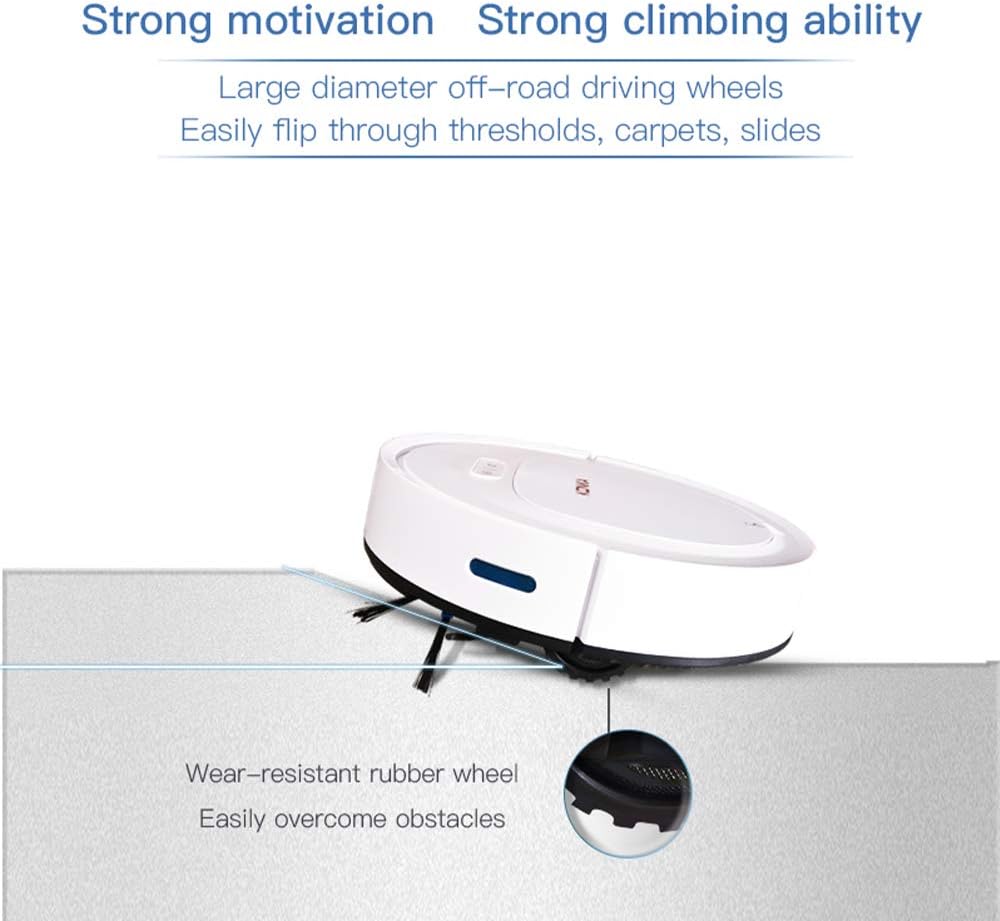
Image: The robot vacuum showcasing its strong climbing ability over thresholds and carpets, supported by wear-resistant rubber wheels.

Image: Illustration of the robot's large 4400mAh high-performance lithium battery, providing approximately 90 minutes of working time and covering about 100m².

Image: The robot vacuum's anti-impact sensors preventing collisions with furniture.

Image: The robot vacuum's fall prevention sensors detecting edges and avoiding drops.
Video: An official demonstration of the KONKA Robot Vacuum Cleaner and Mop's various cleaning modes, obstacle navigation, and mopping function.
4. سیٹ اپ
- روبوٹ کو کھولیں: پیکیجنگ سے روبوٹ ویکیوم اور تمام لوازمات کو احتیاط سے ہٹا دیں۔ کسی بھی حفاظتی فلم یا پیکنگ مواد کو ہٹا دیں۔
- سائیڈ برش انسٹال کریں: Attach the two side brushes to the designated posts on the bottom of the robot until they click into place.
- Position the Charging Dock: Place the charging dock against a wall in an open, uncluttered area. Ensure there is at least 1 meter (3 feet) of clear space on both sides and 2 meters (6 feet) in front of the dock for the robot to easily return and charge. Connect the power adapter to the charging dock and plug it into a power outlet.
- ابتدائی چارج: Place the robot onto the charging dock, ensuring the charging contacts on the robot align with those on the dock. The indicator light on the robot will show charging status. For first-time use, charge the robot for at least 6 hours to ensure the battery is fully conditioned.
- Prepare for Mopping (Optional): If using the mopping function, dampen the cleaning mop pad and attach it to the bottom of the robot.

Image: The robot vacuum automatically docking for charging.
5. آپریٹنگ ہدایات
- پاور آن/آف: Press and hold the power button on the robot for a few seconds to turn it on or off. The indicator light will illuminate when powered on.
- صفائی شروع کریں: Press the power button once to start cleaning in automatic mode. The robot will begin cleaning and intelligently navigate your home.
- ریموٹ کنٹرول کا استعمال: The remote control allows you to select different cleaning modes and direct the robot manually.
- خودکار صفائی: Press the 'Auto' button for general cleaning.
- اسپاٹ کی صفائی: Press the 'Spot' button to clean a specific area more intensely.
- کنارے کی صفائی: Press the 'Edge' button for cleaning along walls and corners.
- دستی کنٹرول: Use the directional arrows to guide the robot.
- Return to Charge: Press the 'Home' button to send the robot back to its charging dock.
- خودکار چارجنگ: When the battery level is low, or cleaning is complete, the robot will automatically return to the charging dock. Ensure the charging dock is powered on and accessible.

Image: The remote control used to operate the robot vacuum, enabling various cleaning modes and manual navigation.
6 دیکھ بھال
باقاعدگی سے دیکھ بھال بہترین کارکردگی کو یقینی بناتی ہے اور آپ کے روبوٹ ویکیوم کی عمر میں توسیع کرتی ہے۔
6.1. Cleaning the Dust Box and HEPA Filter
- Open the top cover of the robot.
- Remove the dust box by pulling it out.
- ڈسٹ باکس کھولیں اور اس کے مواد کو ردی کی ٹوکری میں خالی کریں۔
- Remove the HEPA filter and tap it gently to remove dust. The HEPA filter can be rinsed with water, but ensure it is completely dry before reinserting.
- Rinse the dust box with water if necessary, and allow it to air dry completely.
- Reassemble the HEPA filter and dust box, then reinsert into the robot.
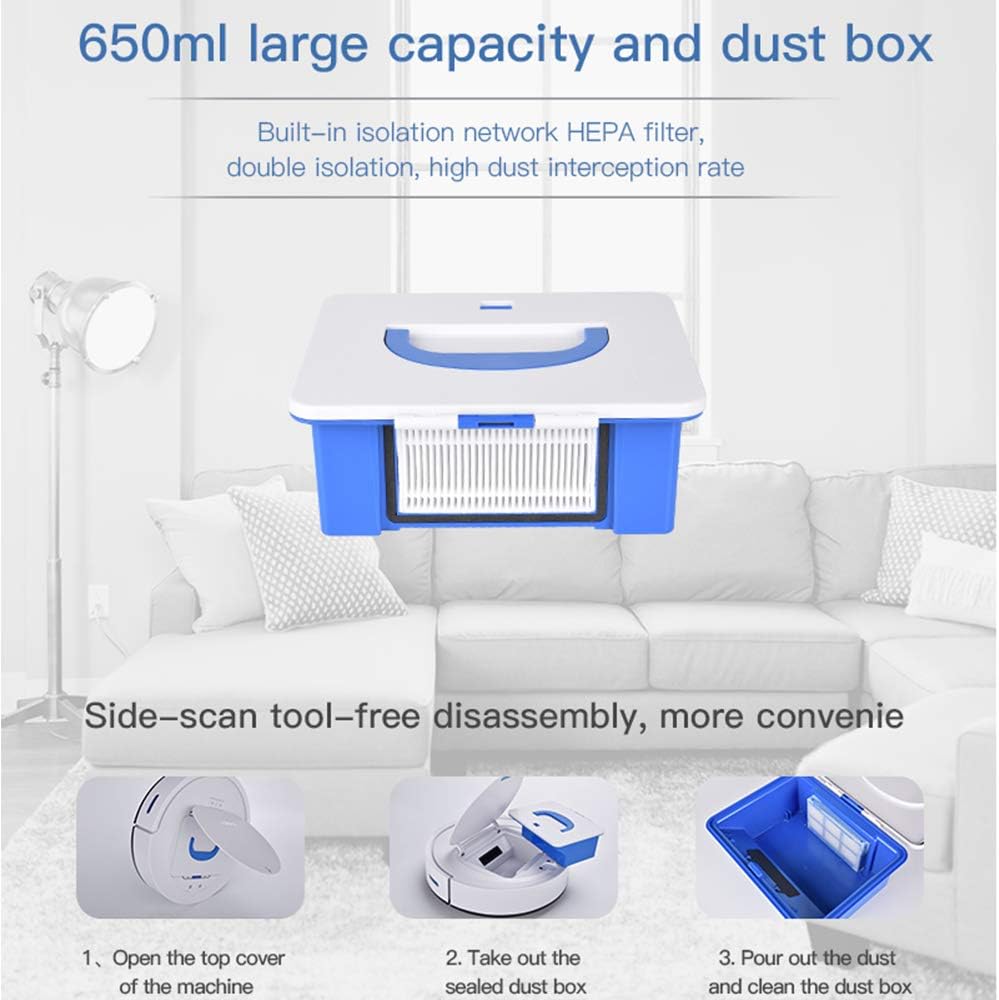
Image: The robot vacuum's 650ml dust box with a built-in HEPA filter, designed for easy removal and cleaning.


Image: Step-by-step guide for cleaning the dust box.
6.2. سائیڈ برش کی صفائی
Periodically check the side brushes for tangled hair or debris. Remove them by gently pulling upwards and clean any obstructions. Reinstall them firmly.
6.3. صفائی کے سینسر
Wipe the cliff sensors (located on the bottom of the robot) and the anti-collision sensors (on the front bumper) with a clean, dry cloth to ensure they function correctly.
6.4. Cleaning the Mopping Pad
After each mopping session, remove the mopping pad, rinse it thoroughly with water, and allow it to air dry before reattaching.
7 خرابیوں کا سراغ لگانا
If you encounter issues with your robot vacuum, please refer to the following common problems and solutions:
| مسئلہ | ممکنہ وجہ | حل |
|---|---|---|
| روبوٹ پاور آن نہیں کرتا ہے۔ | کم بیٹری؛ پاور بٹن درست طریقے سے نہیں دبایا گیا۔ | Charge the robot fully; Press and hold the power button for a few seconds. |
| روبوٹ چارج نہیں کرتا۔ | Charging dock not powered; Contacts are dirty; Robot not properly docked. | Ensure charging dock is plugged in; Clean charging contacts on robot and dock; Re-dock the robot. |
| ناقص صفائی کی کارکردگی۔ | Dust box full; Filter clogged; Side brushes worn or tangled. | Empty and clean dust box; Clean or replace filter; Clean or replace side brushes. |
| روبوٹ اکثر پھنس جاتا ہے۔ | Obstacles on the floor; Robot stuck on high thresholds. | Clear obstacles from cleaning path; Use virtual barriers if available; Manually move the robot. |
| روبوٹ سیڑھیوں سے نیچے گرتا ہے۔ | Cliff sensors are dirty or obstructed. | Clean cliff sensors with a dry cloth. |
اگر ان حلوں کو آزمانے کے بعد بھی مسئلہ برقرار رہتا ہے، تو مزید مدد کے لیے براہ کرم کسٹمر سپورٹ سے رابطہ کریں۔
8. وضاحتیں
| فیچر | تفصیلات |
|---|---|
| برانڈ | کونکا۔ |
| ماڈل | روبوٹ ویکیوم کلینر اور ایم او پی |
| ASIN | B083K7CZDM |
| سکشن پاور | 1800Pa |
| سطح کی سفارش | قالین، ہارڈ فلور |
| خصوصی خصوصیات | HEPA Filter, Wheels |
| رنگ | سفید |
| کنٹرولر کی قسم | ریموٹ کنٹرول |
| فلٹر کی قسم | ڈسک (HEPA) |
| بیٹری کی زندگی | 90 منٹ |
| بیٹری کی قسم | لتیم آئن (4400mAh) |
| ڈسٹ باکس کی اہلیت | 0.65 لیٹر |
| طاقت کا منبع | بیٹری سے چلنے والا |
| شے کا وزن | 2.29 کلوگرام |
9. وارنٹی اور سپورٹ
KONKA products are manufactured to high-quality standards and come with a standard manufacturer's warranty. For specific warranty details, including coverage period and terms, please refer to the warranty card included in your product packaging or visit the official KONKA webسائٹ
For technical support, troubleshooting assistance, or to inquire about replacement parts, please contact KONKA customer service through the contact information provided on the official website or your purchase platform. Please have your product model and ASIN (B083K7CZDM) ready when contacting support.