
1. تعارف
خریداری کے لیے آپ کا شکریہasing the ICON 12-inch Bluetooth Speaker. This manual provides detailed instructions for the safe and efficient operation of your new speaker. Please read this manual thoroughly before use and retain it for future reference.
2. پیکیج کے مشمولات
- ICON 12-inch Bluetooth Speaker
- پاور کیبل
- وائرلیس مائیکروفون
- ریموٹ کنٹرول
- صارف دستی

Image: The ICON Bluetooth speaker shown with its included wireless microphone and remote control, highlighting the complete package contents.
3. پروڈکٹ ختمview
The ICON 12-inch Bluetooth Speaker is a versatile audio system designed for various applications, offering powerful sound output and multiple connectivity options. It features a built-in rechargeable battery for portability and integrated wheels and a retractable handle for easy transport.

تصویر: سامنے view of the ICON 12-inch Bluetooth Speaker, showcasing its robust design and blue illuminated woofer.

تصویر: پیچھے view of the ICON 12-inch Bluetooth Speaker, displaying the main control panel and retractable handle.
اہم خصوصیات:
- Powerful 6000W PMPO Output
- Bluetooth Connectivity for Wireless Streaming
- USB and SD Card Playback
- 3.5mm AUX ان پٹ
- بلٹ ان ایف ایم ریڈیو
- مائیکروفون اور گٹار ان پٹ
- Rechargeable Battery for Extended Playtime
- Integrated Equalizer for Sound Customization
- TWS (True Wireless Stereo) Functionality for connecting multiple speakers
- ایل ای ڈی روشنی کے اثرات

Image: Visual representation of the ICON Bluetooth Speaker's key features, including excellent sound quality, Bluetooth compatibility, AUX input, rechargeable battery, FM radio, and equalizer.
4. سیٹ اپ
4.1 ابتدائی چارجنگ
Before first use, fully charge the speaker's internal battery. Connect the power cable to the AC INPUT port on the rear panel and plug it into a standard wall outlet. The charging indicator will illuminate. Charging time may vary.
4.2 کنٹرول پینل ختمview
اسپیکر کے عقب میں واقع کنٹرول پینل سے اپنے آپ کو واقف کریں۔
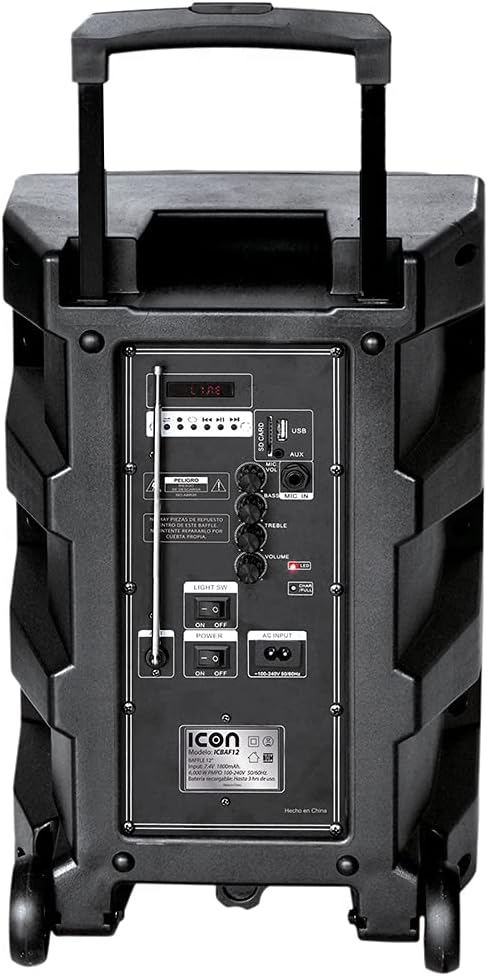
تصویر: تفصیلی view of the ICON speaker's rear control panel, showing various inputs, volume, treble, and bass controls.
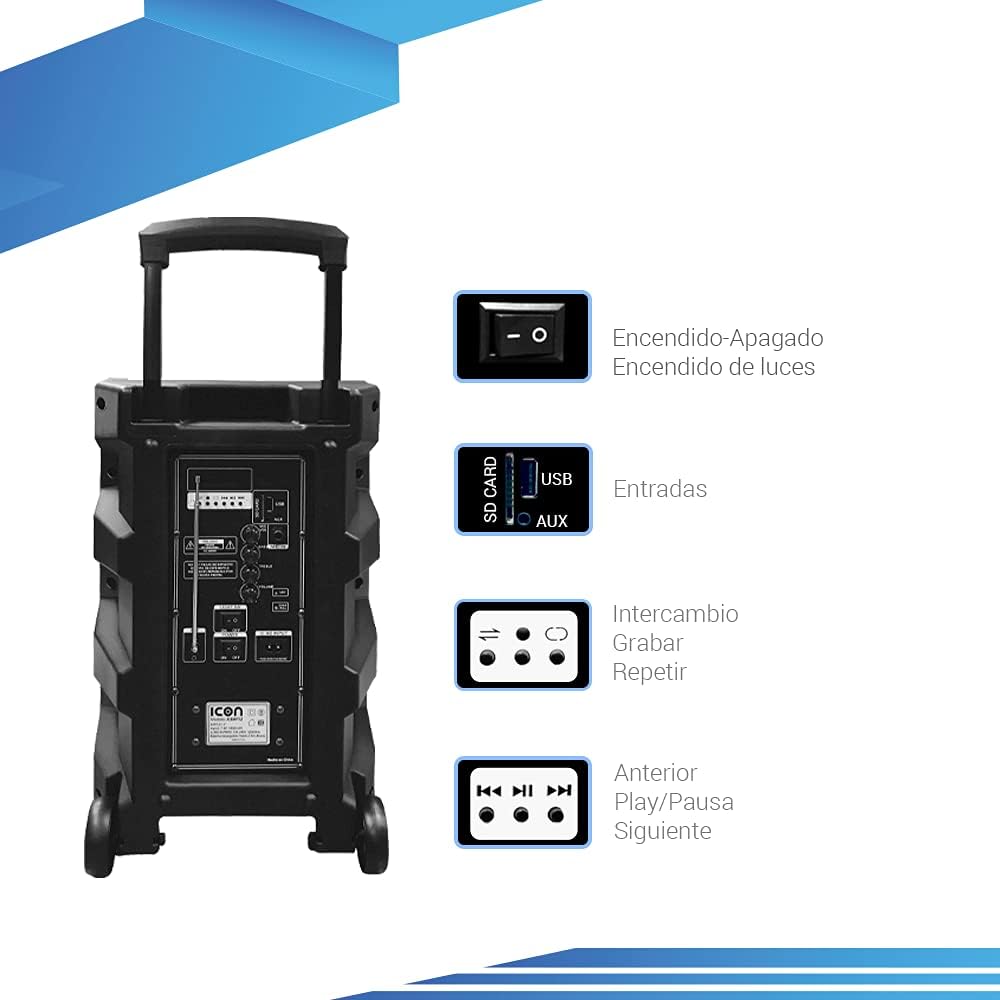
Image: Diagram illustrating key controls on the ICON speaker, including the power switch, light switch, input ports (SD Card, USB, AUX), and playback control buttons (Mode Switch, Record, Repeat, Previous, Play/Pause, Next).
- بجلی کے سوئچ: Turns the speaker On or Off.
- روشنی SW: Toggles the LED light effects On or Off.
- SD CARD / USB / AUX Inputs: For connecting external media or devices.
- موڈ سوئچ: Cycles through input modes (Bluetooth, USB, SD, AUX, FM).
- ریکارڈ بٹن: Initiates recording (e.g., microphone input to USB/SD).
- دہرائیں بٹن: موجودہ ٹریک یا پلے لسٹ کو دہراتا ہے۔
- PREVIOUS / PLAY/PAUSE / NEXT Buttons: معیاری میڈیا پلے بیک کنٹرولز۔
- وولم نوب: ماسٹر والیوم ایڈجسٹ کرتا ہے۔
- TREBLE / BASS Knobs: Adjusts high and low frequencies.
- MIC INPUT / GUITAR INPUT: For connecting microphones and guitars.
5. آپریٹنگ ہدایات
5.1 پاور آن/آف۔
To turn the speaker ON, flip the پاور switch to the 'ON' position. To turn it OFF, flip the switch to 'OFF'.
5.2 بلوٹوتھ جوڑی
- اسپیکر کو آن کریں۔ یہ خود بخود بلوٹوتھ پیئرنگ موڈ میں داخل ہو جائے گا، جس کا اشارہ ڈسپلے پر چمکتے بلوٹوتھ آئیکن سے ہوتا ہے۔
- اپنے موبائل ڈیوائس (اسمارٹ فون، ٹیبلیٹ، لیپ ٹاپ) پر، بلوٹوتھ کو فعال کریں اور دستیاب آلات تلاش کریں۔
- Select "ICON Speaker" (or similar name) from the list of devices.
- Once paired, the speaker will emit a confirmation sound, and the Bluetooth icon will stop flashing. You can now play audio wirelessly from your device.
5.3 USB/SD کارڈ پلے بیک
- USB فلیش ڈرائیو یا SD کارڈ داخل کریں (MP3 آڈیو کے ساتھ files) متعلقہ بندرگاہ میں۔
- The speaker will automatically switch to USB/SD mode and begin playing the first compatible track. If not, press the موڈ button to select USB/SD mode.
- استعمال کریں۔ پچھلا, چلائیں/روکیں۔، اور اگلا پلے بیک کو کنٹرول کرنے کے لیے بٹن۔
5.4 AUX ان پٹ
ایک بیرونی آڈیو ڈیوائس (مثال کے طور پر، MP3 پلیئر، کمپیوٹر) سے منسلک کریں۔ AUX input using a 3.5mm audio cable. Press the موڈ button until AUX mode is selected.
5.5 ایف ایم ریڈیو آپریشن
- دبائیں موڈ ایف ایم ریڈیو موڈ پر سوئچ کرنے کے لیے بٹن۔
- دبائیں اور تھامیں۔ چلائیں/روکیں۔ دستیاب ایف ایم اسٹیشنوں کو خود بخود اسکین اور محفوظ کرنے کے لیے بٹن۔
- استعمال کریں۔ پچھلا اور اگلا محفوظ کردہ اسٹیشنوں کے درمیان نیویگیٹ کرنے کے لیے بٹن۔
5.6 Microphone and Guitar Usage
Plug your microphone or guitar into the respective مائک ان پٹ or گٹار ان پٹ۔ jacks. Adjust the volume using the main حجم knob and any dedicated microphone/guitar volume controls if present.
5.7 TWS (True Wireless Stereo) فنکشن
The TWS function allows you to connect two ICON speakers wirelessly for a true stereo sound experience.
- یقینی بنائیں کہ دونوں اسپیکر آن ہیں اور کسی بلوٹوتھ ڈیوائس سے منسلک نہیں ہیں۔
- On one speaker (this will be the master), press and hold the TWS button (if available, or a combination of buttons as per specific model instructions, often the 'Mode' button or a dedicated TWS button).
- The speaker will search for another TWS-compatible speaker. Once connected, you will hear a confirmation sound.
- Now, connect your mobile device to the master speaker via Bluetooth as described in section 5.2. Audio will play through both speakers in stereo.
6 دیکھ بھال
6.1 صفائی
Wipe the speaker's exterior with a soft, dry cloth. Do not use abrasive cleaners, waxes, or solvents. Ensure no liquids enter the speaker's openings.
6.2 بیٹری کی دیکھ بھال
- بیٹری کی زندگی کو طول دینے کے لیے، بار بار بیٹری کو مکمل طور پر خارج کرنے سے گریز کریں۔
- Recharge the battery regularly, even if the speaker is not in use for extended periods (e.g., every 3 months).
- استعمال میں نہ ہونے پر اسپیکر کو ٹھنڈی، خشک جگہ پر اسٹور کریں۔
6.3 اسٹوریج
When storing the speaker for a long time, ensure it is turned off and disconnected from the power source. Store it in a clean, dry environment away from extreme temperatures and direct sunlight.
7 خرابیوں کا سراغ لگانا
| مسئلہ | ممکنہ وجہ | حل |
|---|---|---|
| سپیکر آن نہیں ہوتا۔ | Battery is depleted; Power cable not connected; Power switch is OFF. | Charge the speaker; Ensure power cable is securely connected; Flip POWER switch to ON. |
| کوئی آواز نہیں۔ | حجم بہت کم ہے؛ غلط ان پٹ موڈ منتخب ڈیوائس ٹھیک سے منسلک نہیں ہے۔ | Increase volume; Press MODE button to select correct input; Reconnect device/re-pair Bluetooth. |
| بلوٹوتھ کنکشن ناکام ہو جاتا ہے۔ | اسپیکر جوڑا بنانے کے موڈ میں نہیں ہے۔ آلہ بہت دور؛ مداخلت | Ensure speaker is in pairing mode; Move device closer; Turn off other Bluetooth devices. |
| مسخ شدہ آواز۔ | حجم بہت زیادہ آڈیو سورس کا معیار خراب ہے۔ | حجم کو کم کریں؛ ایک مختلف آڈیو ماخذ آزمائیں۔ |
| مائکروفون کام نہیں کر رہا ہے۔ | Microphone not plugged in correctly; Microphone volume too low; Microphone batteries dead (if wireless). | Ensure microphone is fully inserted; Adjust microphone volume; Replace microphone batteries. |
8. وضاحتیں
| فیچر | تفصیلات |
|---|---|
| ماڈل نمبر | US-ICBAF12 |
| آؤٹ پٹ پاور | 6000 واٹس پی ایم پی او |
| اسپیکر کا سائز | 12 انچ |
| کنیکٹوٹی ٹیکنالوجی | Bluetooth, USB, AUX, SD Card |
| ہم آہنگ آلات | لیپ ٹاپ، اسمارٹ فون |
| طاقت کا منبع | Rechargeable Battery, AC Input |
| پروڈکٹ کے طول و عرض (L x W x H) | 38 x 36.5 x 54 سینٹی میٹر |
| پروڈکٹ کا وزن | 7.62 کلوگرام |
| خصوصی خصوصیات | Bluetooth, FM Radio, Microphone Input, Guitar Input, TWS Function, LED Lights |

Image: Packaging of the ICON Bluetooth Speaker, displaying key features and product dimensions (37.5 cm x 36 cm x 54 cm).
9. وارنٹی اور سپورٹ
This product is covered by a limited warranty. Please refer to the warranty card included in your package for specific terms and conditions. For technical support, troubleshooting assistance, or warranty claims, please contact your retailer or the manufacturer's customer service department. Keep your purchase receipt as proof of purchase.
For more information, visit the official ICON store on Amazon: ICON Store