
تعارف
This manual provides instructions for the safe and efficient operation of your Forty4 10000mAh Battery Operated Clip Fan. Please read this manual thoroughly before use and retain it for future reference.
اہم حفاظتی ہدایات
- Do not insert fingers or any objects into the fan grill when the fan is operating.
- Keep hair, clothing, and jewelry away from the fan blades.
- Do not expose the fan to water or excessive humidity.
- Use only the provided charging cable or a compatible 5V/2A adapter.
- Do not attempt to disassemble or repair the fan yourself. Contact customer support for assistance.
- بچوں کی پہنچ سے دور رکھیں۔
- Ensure the fan is placed on a stable surface or securely clipped before operation.
پیکیج کے مشمولات
- 1 x Forty4 10000mAh Battery Operated Clip Fan
- 1 ایکس USB چارجنگ کیبل
- 1 ایکس صارف دستی
پروڈکٹ ختمview
The Forty4 10000mAh Battery Operated Clip Fan features a versatile design for various applications. It includes a powerful motor, a large capacity battery, and multiple speed settings.

Image: The fan in a tent, illustrating its 10000mAh battery capacity and working hours: Speed 1 (40H), Speed 2 (18H), Speed 3 (7.5H), Natural Wind (18H).

Image: The fan clipped to a wall in a horse stall, providing airflow to a horse. This highlights its utility in various environments.
سیٹ اپ
فین کو چارج کر رہا ہے
- Connect the provided USB charging cable to the fan's charging port (Type-C or Micro USB).
- Connect the other end of the cable to a 5V/2A USB power adapter (not included) or a compatible power source.
- The indicator light will remain red during charging. Note: The indicator stays red even after a full charge.
- A full charge takes approximately 7.3 hours with fast charging technology.
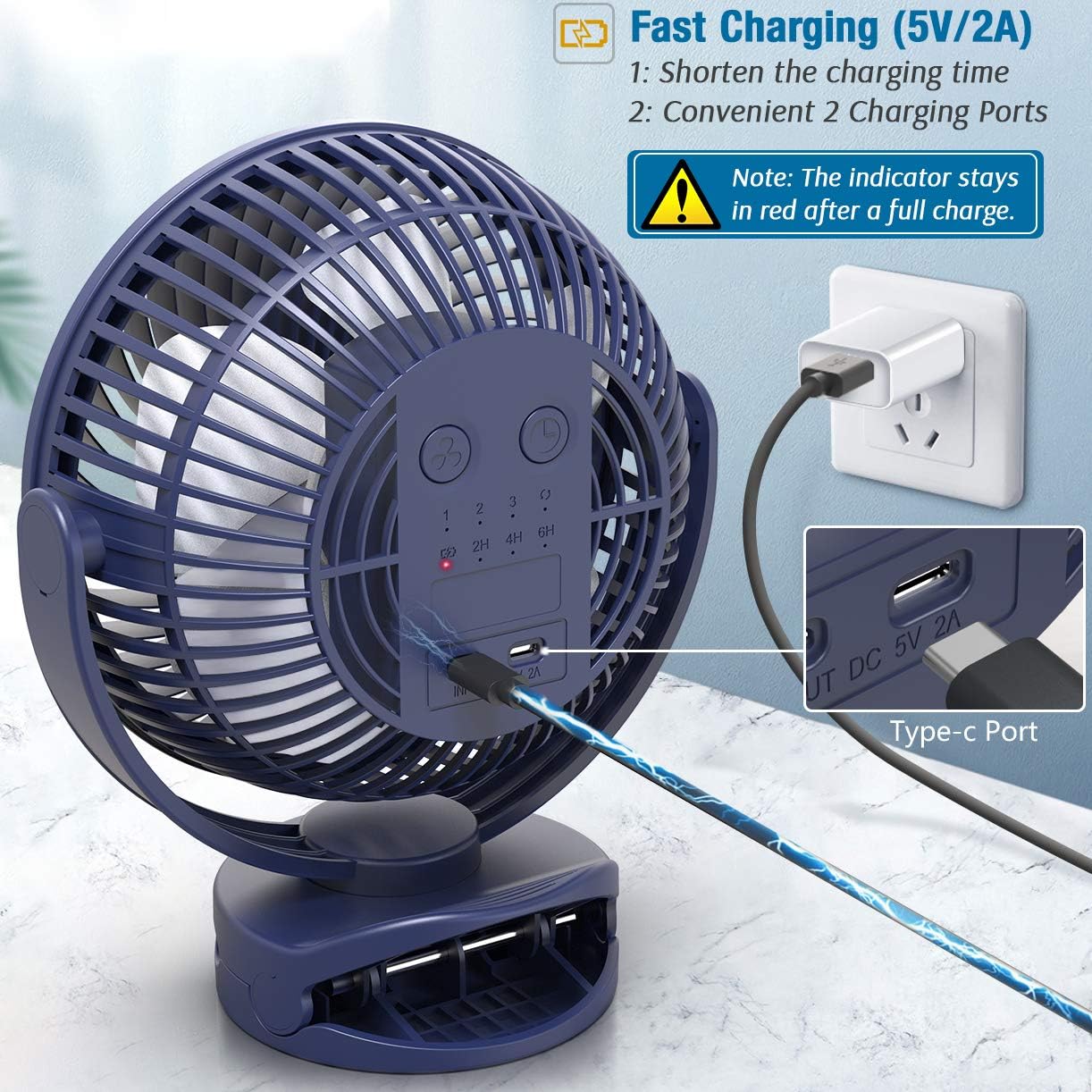
Image: The fan connected to a power adapter via its Type-C charging port, illustrating the fast charging capability and dual charging options.
پلیسمنٹ کے اختیارات
The fan offers multiple placement options:
- کلپ آن: Use the sturdy clamp to attach the fan to surfaces up to 2.5 inches thick, such as desks, shelves, or treadmill handles.
- پھانسی: Utilize the integrated hook for hanging the fan in tents, golf carts, or other suitable locations.
- ٹیبل ٹاپ: Place the fan on any flat surface using its stable base.

Image: The fan securely clipped to the handle of a treadmill, showcasing its strong clamp and powerful airflow for personal cooling during exercise.

Image: The fan hanging from the ceiling inside a tent, illustrating its unique hook design for overhead placement.
آپریٹنگ ہدایات
پاور آن/آف اور سپیڈ ایڈجسٹمنٹ
- Press the power button once to turn the fan on at Speed 1 (Low).
- Press the power button repeatedly to cycle through Speed 2 (Medium), Speed 3 (High), and Natural Wind mode.
- Press the power button again after Natural Wind mode to turn the fan off.
The fan offers 4 speeds: Low, Medium, High, and Natural Wind.
ٹائمر فنکشن
- While the fan is operating, press the timer button to set the auto-off timer.
- Each press cycles through 2 hours, 4 hours, and 6 hours.
- The fan will automatically shut off after the selected duration.

Image: The fan on a bedside table, showing the control panel with timer settings (2H, 4H, 6H) and speed indicators, ideal for use during sleep.
360 ڈگری گھماؤ
The fan head can be manually rotated 360 degrees horizontally and vertically to direct airflow as needed.
دیکھ بھال
صفائی
- اس بات کو یقینی بنائیں کہ پنکھا بند ہے اور صفائی سے پہلے ان پلگ ہے۔
- ایک نرم استعمال کریں، ڈیamp پنکھے کی بیرونی سطحوں کو صاف کرنے کے لیے کپڑا۔
- For the fan blades, use a dry cloth or a soft brush to gently remove dust. Do not use abrasive cleaners or solvents.
- Ensure the fan is completely dry before resuming operation.
ذخیرہ
When not in use for extended periods, store the fan in a cool, dry place away from direct sunlight.
خرابی کا سراغ لگانا
پنکھا آن نہیں ہو رہا ہے۔
- Check if the battery is charged. Connect the fan to a power source and allow it to charge.
- یقینی بنائیں کہ پاور بٹن صحیح طریقے سے دبایا گیا ہے۔
کمزور ہوا کا بہاؤ
- پنکھے کی رفتار کی ترتیب میں اضافہ کریں۔
- Check for any obstructions around the fan grill.
- Clean the fan blades if they are dusty.
غیر معمولی شور
- یقینی بنائیں کہ پنکھا مستحکم سطح پر رکھا گیا ہے۔
- Check for any foreign objects caught in the fan blades.
- اگر شور جاری رہتا ہے تو استعمال بند کر دیں اور کسٹمر سپورٹ سے رابطہ کریں۔
وضاحتیں
| فیچر | تفصیل |
|---|---|
| برانڈ | چالیس۔ |
| ماڈل نمبر | d52b67e1-8a10-4105-a8bc-fee6f7552eee |
| بیٹری کی صلاحیت | 10000mAh |
| رفتار کی تعداد | 4 (Low, Medium, High, Natural Wind) |
| چارج کرنے کا وقت | تقریبا 7.3 گھنٹے (5V/2A اڈاپٹر کے ساتھ) |
| آپریٹنگ ٹائم | 7.5 - 40 hours (depending on speed) |
| شور کی سطح | Less than 60 Decibels |
| طاقت کا منبع | بیٹری سے چلنے والا |
| چڑھنے کی قسم | Hanging, Clamp Mount, Tabletop, Freestanding |
| گردش | 360-degree manual rotation |
| طول و عرض | 8x9x4.3 انچ |
وارنٹی اور سپورٹ
For warranty information or technical support, please contact Forty4 customer service through the retailer where the product was purchased. Please have your model number (d52b67e1-8a10-4105-a8bc-fee6f7552eee) and purchase details available.
پروڈکٹ ویڈیوز
Forty4 10000mAh Clip Fan with Super Strong Airflow
Video: An official product video from Forty4 demonstrating the powerful airflow and features of the 10000mAh Clip Fan. This video showcases the fan's performance and versatility.