
1. پروڈکٹ ختمview
The Alecto WS-1560 is a wireless weather station designed to provide accurate indoor and outdoor environmental data. Featuring a clear color display and a remote outdoor sensor, it offers comprehensive weather information and additional useful functions for your home.
اہم خصوصیات:
- اندرونی اور بیرونی درجہ حرارت اور نمی کی پیمائش کرتا ہے۔
- Long-range wireless outdoor sensor (up to 100 meters).
- 5.7-inch well-lit color display with animated weather forecast icons.
- Temperature and ice alarm functions.
- اسنوز فنکشن کے ساتھ الارم گھڑی۔
- Memory function for latest and highest readings.
- Moon phase indicator, date, day, and time display.
- Battery-operated main unit and outdoor sensor with backup batteries.

Figure 1.1: Alecto WS-1560 Main Unit and Wireless Outdoor Sensor.
2. پیکیج کے مشمولات
Ensure all components are present and in good condition upon unpacking:
- Alecto WS-1560 Main Unit (Indoor Display)
- وائرلیس آؤٹ ڈور سینسر۔
- صارف دستی
- (Power adapter and batteries may be included depending on package)
Video 2.1: Illustrative video showing typical weather station components and basic setup. (Note: This video is for a related product and may not show the exact Alecto WS-1560 model.)
3. سیٹ اپ اور انسٹالیشن
3.1. بیٹری کی تنصیب
Both the main unit and the outdoor sensor require batteries for operation. Ensure you use the correct type and polarity.
- آؤٹ ڈور سینسر:
- وائرلیس آؤٹ ڈور سینسر کی پشت پر بیٹری کا ٹوکری کھولیں۔
- Insert 2x AA batteries (not included) according to the polarity markings (+/-).
- بیٹری کے ڈبے کو محفوظ طریقے سے بند کریں۔
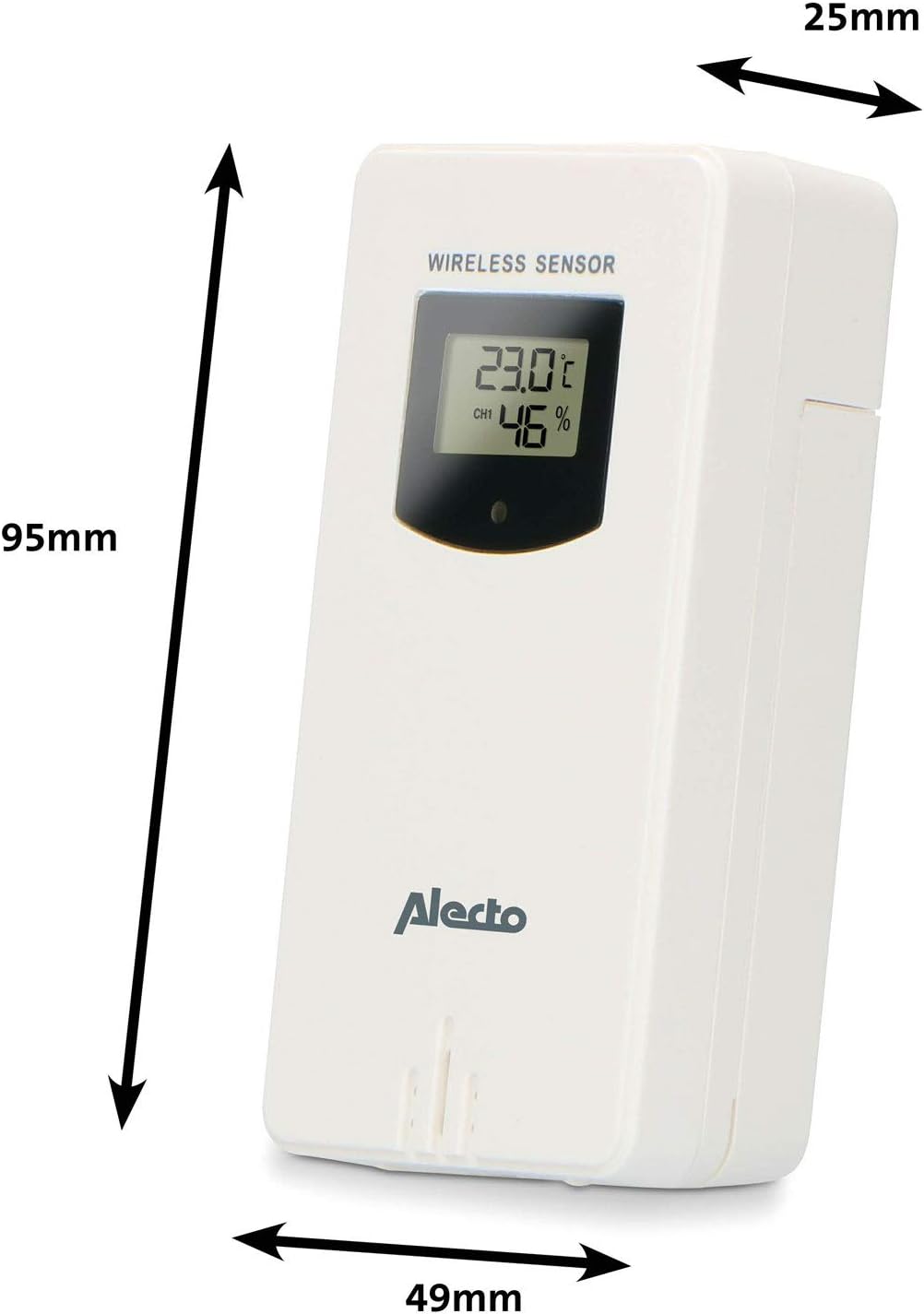
Figure 3.1: Wireless Outdoor Sensor dimensions and battery compartment location.
- مین یونٹ:
- Open the battery compartment on the back of the main unit.
- Insert 2x AA batteries (not included) according to the polarity markings (+/-). These serve as backup batteries.
- بیٹری کے ڈبے کو محفوظ طریقے سے بند کریں۔
- Connect the main unit to a power outlet using the provided power adapter (if included).

Figure 3.2: Main Unit dimensions and power input.
3.2. سینسر کی جگہ کا تعین
For accurate outdoor readings, proper placement of the wireless sensor is crucial:
- Place the sensor in a shaded area, away from direct sunlight, to prevent inaccurate temperature readings.
- Ensure good air circulation around the sensor.
- Mount the sensor vertically, approximately 1.5 to 2.5 meters (5 to 8 feet) above the ground.
- Avoid placing the sensor near heat sources (e.g., vents, windows) or moisture sources.
- The maximum transmission range is 100 meters (328 feet) in open air. Walls and other obstacles will reduce this range.

شکل 3.3: سابقample of outdoor sensor placement on a wall.
3.3. سینسر کو مین یونٹ کے ساتھ جوڑنا
The main unit and sensor should automatically pair once both are powered on. If pairing does not occur:
- Ensure both units have fresh batteries and are within range.
- Press the "TX" button inside the outdoor sensor's battery compartment to manually send a signal.
- On the main unit, you may need to initiate a search for the outdoor sensor (refer to the "Operation" section for specific button functions).
4. آپریشن
4.1. ڈسپلے لے آؤٹ
The 5.7-inch color display provides a clear overview of all measured data. Key areas include:
- بیرونی درجہ حرارت اور نمی: Displays current outdoor conditions.
- اندرونی درجہ حرارت اور نمی: Displays current indoor conditions.
- Animated Weather Forecast: Icons predict upcoming weather (sunny, partly cloudy, cloudy, rainy, snowy).
- وقت اور تاریخ: Current time, day, and date.
- بیرومیٹرک پریشر: موجودہ ماحولیاتی دباؤ۔
- چاند کا مرحلہ: Graphical representation of the current moon phase.
- Temperature/Ice Alarm Indicators: Alerts for specific temperature thresholds or potential ice conditions.

شکل 4.1: تفصیلی view of the main unit's color display.
4.2. بٹن کے افعال
The main unit features several buttons for setting and adjusting functions. Common buttons include:
- سیٹ: Enters setup mode for time, date, and other settings.
- ہدایات: Switches between display modes or confirms settings.
- UP/DOWN (or +/-): Adjusts values during setup or cycles through channels.
- الارم: الارم فنکشن کو سیٹ یا فعال کرتا ہے۔
- ایم ای ایم: Displays maximum/minimum temperature and humidity records. Long press to clear records.
- اسنوز/لائٹ: Activates snooze during an alarm or adjusts backlight brightness.
Video 4.2: Illustrative video demonstrating various features and settings of a weather station. (Note: This video is for a related product and may not show the exact Alecto WS-1560 model.)
4.3. وقت اور تاریخ کا تعین کرنا
- "SET" بٹن کو دبائیں اور پکڑے رکھیں جب تک کہ ٹائم ڈسپلے چمکنا شروع نہ کرے۔
- Use the "UP" or "DOWN" buttons to adjust the hour, then press "SET" to confirm and move to minutes.
- منٹ، سال، مہینہ اور دن کے لیے دہرائیں۔
- Press "SET" again to exit the setting mode.
4.4 الارم کی ترتیبات
- Press the "ALARM" button once to view الارم کا وقت
- Press and hold the "ALARM" button until the alarm time starts flashing.
- Use the "UP" or "DOWN" buttons to set the desired alarm hour and minute.
- Press "ALARM" to confirm.
- To activate/deactivate the alarm, press the "ALARM" button briefly when the alarm time is displayed. An alarm icon will appear/disappear.
4.5. زیادہ سے زیادہ/کم سے کم ریکارڈز
The weather station automatically records the maximum and minimum temperature and humidity values over a 24-hour period.
- Press the "MEM" button briefly to view the maximum recorded values.
- Press "MEM" again to view the minimum recorded values.
- Press "MEM" a third time to return to current readings.
- To clear the records, press and hold the "MEM" button for a few seconds.
5 دیکھ بھال
- صفائی: Wipe the display and unit surfaces with a soft, damp کپڑا کھرچنے والے کلینر یا سالوینٹس کا استعمال نہ کریں۔
- بیٹری کی تبدیلی: جب ڈسپلے پر کم بیٹری انڈیکیٹر ظاہر ہوتا ہے تو مین یونٹ اور آؤٹ ڈور سینسر دونوں میں بیٹریاں تبدیل کریں۔ ہمیشہ ایک ہی وقت میں تمام بیٹریاں ایک ہی قسم کی نئی بیٹریوں سے بدلیں۔
- سینسر کی دیکھ بھال: Periodically check the outdoor sensor for debris or obstructions that might affect its readings. Ensure it remains in a shaded, well-ventilated area.
6 خرابیوں کا سراغ لگانا
| مسئلہ | ممکنہ وجہ | حل |
|---|---|---|
| No outdoor temperature/humidity reading (or "---" displayed) |
|
|
| غلط درجہ حرارت/نمی ریڈنگ |
|
|
| ڈسپلے مدھم یا خالی ہے۔ |
|
|
7. وضاحتیں
| ماڈل نمبر | ڈبلیو ایس ۔1560 |
| برانڈ | الیکٹو |
| پاور سورس (مین یونٹ) | Power Adapter (if included) + 2x AA batteries (backup) |
| پاور سورس (بیرونی سینسر) | 2x AA بیٹریاں |
| پروڈکٹ کے طول و عرض (مین یونٹ) | 5.1 x 16.5 x 12.3 سینٹی میٹر |
| پروڈکٹ کا وزن | 440 گرام |
| وائرلیس سینسر کی حد | Up to 100 meters (open air) |
| ڈسپلے سائز | 5.7 انچ / 14.5 سینٹی میٹر |
| اصل | چین |
8. وارنٹی اور سپورٹ
For warranty information, technical support, or service inquiries, please refer to the warranty card included with your product or visit the official Alecto webسائٹ خریداری کے ثبوت کے طور پر اپنی خریداری کی رسید اپنے پاس رکھیں۔
الیکٹو Webسائٹ: www.alecto.nl (General Alecto webسائٹ، مخصوص سپورٹ پیج مختلف ہو سکتا ہے)