
1. تعارف
This manual provides instructions for the proper setup, operation, and maintenance of your IPD IPH-160 Monaural Wired Headset. The IPH-160 is designed for clear communication in various environments, featuring a noise-cancelling microphone and a 3.5mm jack for broad compatibility.
2. پیکیج کے مشمولات
براہ کرم تصدیق کریں کہ تمام اشیاء آپ کے پیکیج میں موجود ہیں:
- IPD IPH-160 Monaural Headset
- Quick Disconnect (QD) to 3.5mm Jack Cable (4-pole)
- کان کے کشن (پہلے سے نصب یا اسپیئر)
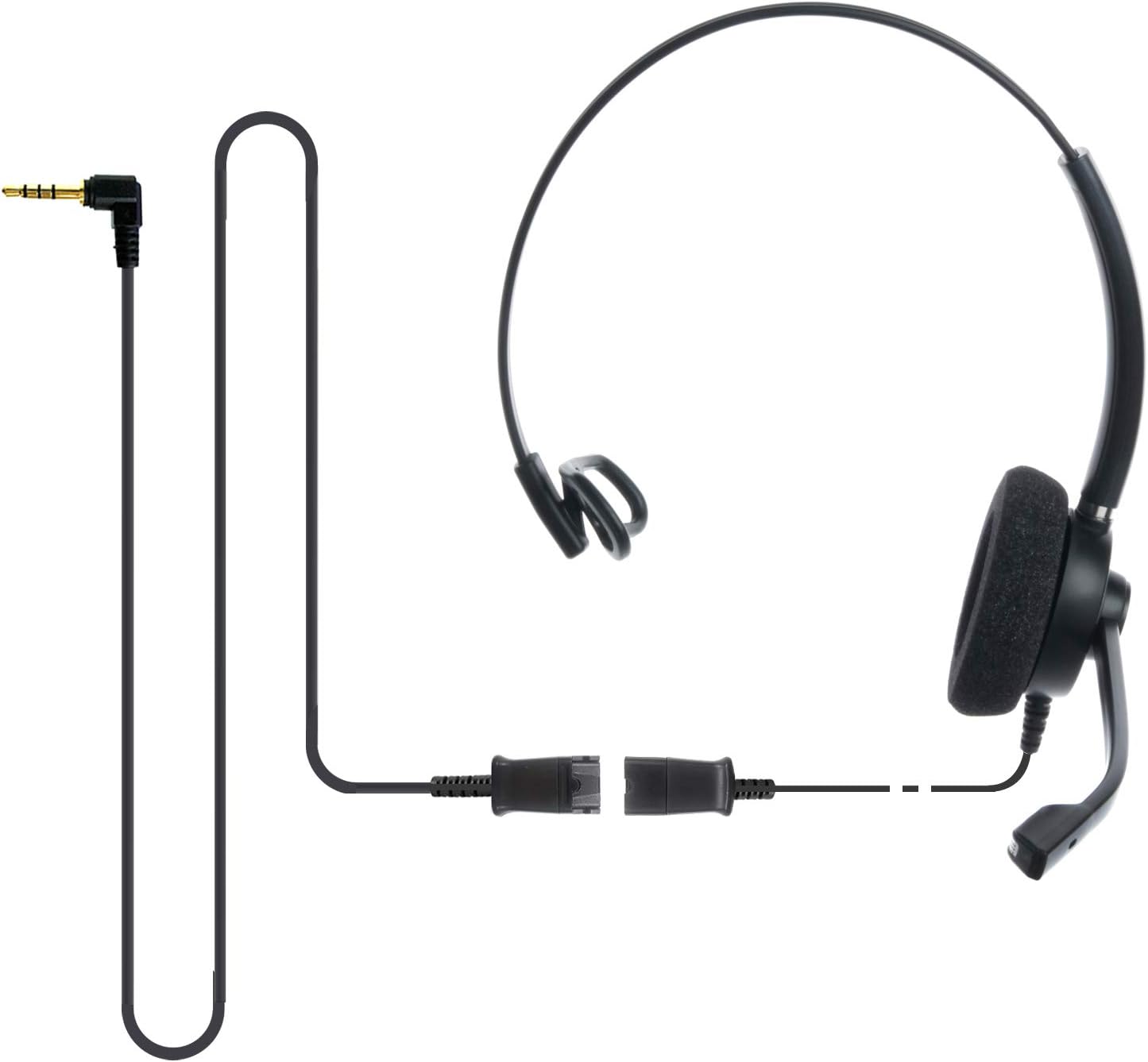
Image: The IPD IPH-160 headset with its detachable Quick Disconnect cable and 3.5mm jack connector.
3. سیٹ اپ
3.1 ہیڈسیٹ کو جوڑنا
- Connect the Quick Disconnect (QD) cable to the headset. Ensure a secure connection.
- Insert the 3.5mm jack of the cable into the corresponding port on your device (Android cell phone, laptop, tablet, Apple MacBook, or other smart device).

تصویر: ایک قریبی اپ view of the 3.5mm jack connector, illustrating its connection to a mobile device and laptop.
3.2 ڈیوائس کی مطابقت
The 3.5mm jack (4 poles) is compatible with a wide range of devices including:
- Android cell phones (e.g., Samsung, Huawei, HTC, ZTE)
- لیپ ٹاپ
- گولیاں
- Apple MacBooks with a single 3.5mm headset port
نوٹ:
- iPhone 7/7S and later models may require an additional Lightning to 3.5mm adapter (not included).
- If your specific phone model is not listed or you encounter compatibility issues, please contact IPD support for assistance.

Image: The IPD headset shown with various connection options for desk phones, PCs/softphones, and mobile phones, highlighting the versatility of Quick Disconnect cables.
4. ہیڈسیٹ کو چلانا
4.1 Wearing and Adjusting
The IPH-160 headset is designed for all-day comfort. Adjust the headband for a secure yet comfortable fit. The microphone boom is flexible; position it approximately 1-2 inches from your mouth for optimal voice pickup.
4.2 شور منسوخ مائکروفون
The headset features a passive noise-cancelling microphone to reduce background noise, ensuring clearer conversations. Proper microphone positioning is crucial for effective noise cancellation.

Image: A user wearing the headset, demonstrating the microphone's position and illustrating the effect of noise cancellation on audio waveforms.
4.3 Acoustic Shock Protection (ASP)
The headset incorporates an Acoustic Shock Protection (ASP) circuit on the speaker. This feature protects your hearing from sudden, unwanted loud noises by cutting sounds over 105dB and maintaining levels below 105dB.
4.4 Wideband Audio
The HD Wideband speaker delivers clear sound, enhancing the quality of your calls and audio monitoring.

Image: A close-up of the headset's ear cushion, visually representing the distinction between acoustic noise and clear sound for high-quality voice communication.
5 دیکھ بھال
5.1 صفائی
To maintain hygiene and performance, regularly clean the ear cushions and other surfaces of the headset with a soft, dry cloth. Avoid using harsh chemicals or abrasive materials.
5.2 اسٹوریج
When not in use, store the headset in a clean, dry place away from direct sunlight and extreme temperatures. Avoid tangling the cable to prevent damage.
6 خرابیوں کا سراغ لگانا
6.1 کوئی آواز یا کم والیوم نہیں۔
- یقینی بنائیں کہ 3.5mm جیک آپ کے آلے میں مکمل طور پر داخل ہے۔
- اپنے آلے کی والیوم کی ترتیبات چیک کریں۔
- Verify that the headset is selected as the audio output device in your computer's sound settings.
- Confirm the Quick Disconnect (QD) cable is securely connected to the headset.
6.2 مائیکروفون کام نہیں کر رہا ہے۔
- اس بات کو یقینی بنائیں کہ مائیکروفون بوم آپ کے منہ کے قریب صحیح جگہ پر ہے۔
- Check your device's microphone input settings and ensure the headset is selected as the input device.
- Test the headset with another compatible device to rule out a device-specific issue.
6.3 مطابقت کے مسائل
If you experience compatibility problems with your device, especially if it's not explicitly listed as compatible, please contact IPD customer support for guidance.
7. وضاحتیں
| فیچر | تفصیلات |
|---|---|
| ماڈل کا نام | IPH-160-35 |
| کنیکٹوٹی ٹیکنالوجی | وائرڈ |
| ہیڈ فون جیک | 3.5 mm Jack (4-pole) |
| شور کنٹرول | غیر فعال شور منسوخی |
| تعدد رسپانس | 10 KHz |
| حساسیت | 58 ڈی بی |
| رکاوٹ | 150 اوہم |
| شے کا وزن | 198 گرام (7 اونس) |
| مواد | پلاسٹک |
| کان کی جگہ کا تعین | کان کے اوپر |
| خصوصی خصوصیت | شور کی منسوخی |
| شامل اجزاء | کان کے کشن |
8. وارنٹی کی معلومات
The IPD IPH-160 Headset comes with a 3 سال کی وارنٹی خریداری کی تاریخ سے. یہ وارنٹی عام استعمال کے تحت مینوفیکچرنگ نقائص کا احاطہ کرتی ہے۔ وارنٹی کے دعووں کے لیے براہ کرم اپنی خریداری کا ثبوت اپنے پاس رکھیں۔
9. سپورٹ
For technical assistance, warranty claims, or any questions regarding your IPD IPH-160 Headset, please contact IPD customer support. You can find contact information on the official IPD webسائٹ یا اپنے خوردہ فروش کے ذریعے۔
کا دورہ کریں۔ IPD Store مزید معلومات اور مصنوعات کے لیے۔