
1. تعارف
Welcome to the user manual for your Orbic Journey V Verizon Postpaid 4G LTE Flip Phone. This guide provides essential information on setting up, operating, maintaining, and troubleshooting your device. The Orbic Journey V is a compact and reliable flip phone designed for clear communication and essential smart features, running on the KaiOS operating system and supporting 4G LTE connectivity.
Please read this manual thoroughly to ensure proper use and to maximize the performance and longevity of your phone.
2. سیٹ اپ
2.1. ان باکسنگ اور پیکیج کے مشمولات
Upon opening your Orbic Journey V package, verify that all components are present:
- Orbic Journey V پلٹائیں فون
- ریچارج ایبل لتیم آئن بیٹری
- چارجر
2.2. بیٹری کی تنصیب
- فون کے پچھلے حصے میں بیٹری کور تلاش کریں۔
- Gently pry open the battery cover using the designated notch.
- Align the battery's gold contacts with the terminals inside the battery compartment.
- بیٹری کو مضبوطی سے نیچے دبائیں جب تک کہ یہ جگہ پر کلک نہ کرے۔
- Replace the battery cover, ensuring it is securely latched.
2.3. سم کارڈ کی تنصیب
Your Orbic Journey V requires a Nano-SIM card for cellular service. Ensure the phone is powered off before inserting or removing the SIM card.
- Remove the battery cover and the battery as described in Section 2.2.
- Locate the SIM card slot, typically near the battery compartment.
- Insert the Nano-SIM card into the slot with the gold contacts facing down and the notched corner aligned with the slot's guide.
- سم کارڈ کو اس وقت تک آہستہ سے دبائیں جب تک کہ یہ اپنی جگہ پر مقفل نہ ہوجائے۔
- بیٹری اور بیٹری کور کو دوبارہ انسٹال کریں۔
2.4 ابتدائی پاور آن اور چارجنگ
To power on your phone for the first time, press and hold the Power/End Call button until the screen illuminates. It is recommended to fully charge the phone before first use.
- چارجر کو فون کے چارجنگ پورٹ سے جوڑیں۔
- چارجر کو معیاری الیکٹریکل آؤٹ لیٹ میں لگائیں۔
- چارجنگ انڈیکیٹر اسکرین پر ظاہر ہوگا۔
- مکمل چارج ہونے کے بعد، چارجر کو منقطع کریں۔
3. اپنا فون آپریٹ کرنا
3.1. Phone Layout and Keys
Familiarize yourself with the physical components and buttons of your Orbic Journey V.
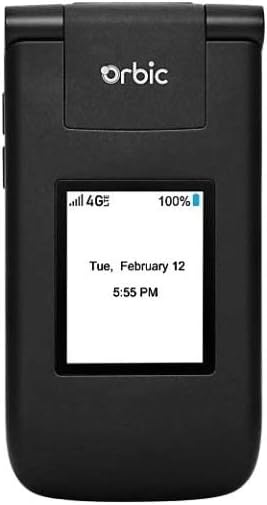
شکل 3.1: سامنے view of the Orbic Journey V, closed. The external display shows signal strength, battery level, and the current time and date.

Figure 3.2: Orbic Journey V in open position, revealing the main screen and the full alphanumeric keypad with navigation buttons.

شکل 3.3: پیچھے view of the Orbic Journey V, highlighting the main camera lens and the Verizon branding.
- بیرونی ڈسپلے: Shows time, date, notifications, and caller ID when the phone is closed.
- Internal Display: Main screen for navigating menus, viewing content, and interacting with applications.
- Navigation Key (D-Pad): مینو کے ذریعے منتقل کرنے اور اختیارات کو منتخب کرنے کے لیے استعمال کیا جاتا ہے۔
- Center Select Key: انتخاب کی تصدیق کرتا ہے۔
- Call/Send Key: Initiates calls and answers incoming calls.
- اختتامی کال/پاور کلید: Ends calls, returns to the home screen, and powers the phone on/off.
- پیچھے/کلیئر کلید: Returns to the previous screen or deletes characters.
- حجم کیز: Adjusts call volume, media volume, and ringer volume.
- کیمرے کی چابی: کیمرہ فنکشن تک فوری رسائی۔
3.2. بنیادی نیویگیشن
The Orbic Journey V operates on KaiOS. Use the Navigation Key to scroll through menu options and the Center Select Key to open applications or confirm actions.
- From the home screen, press the Navigation Key (up, down, left, right) to access shortcuts or navigate the main menu.
- Press the Center Select Key to open the main application menu.
- Press the Back/Clear key to go back to the previous screen.
3.3. کال کرنا اور وصول کرنا
- کال کرنے کے لیے: Enter the phone number using the keypad and press the Call/Send key. Alternatively, navigate to Contacts, select a contact, and press the Call/Send key.
- کال کا جواب دینے کے لیے: When the phone rings, press the Call/Send key.
- کال ختم کرنے کے لیے: Press the End Call/Power key.
3.4. پیغامات بھیجنا اور وصول کرنا
- پیغام بھیجنے کے لیے: From the main menu, select 'Messages'. Choose 'New Message', enter the recipient's number or select from contacts, type your message using the keypad, and press 'Send'.
- To Receive a Message: New messages will typically display a notification on the screen. Navigate to the 'Messages' application to view آپ کا ان باکس۔
3.5. کیمرے کا استعمال
The Orbic Journey V is equipped with front and rear cameras. The rear camera is located on the upper-right back of the phone.
- کیمرہ کھولنے کے لیے: Press the dedicated Camera key or navigate to the 'Camera' application from the main menu.
- تصویر لینے کے لیے: Frame your shot on the screen and press the Center Select key to capture the image.
- Viewتصویریں Access your photos through the 'Gallery' application.
3.6. Connectivity (Bluetooth, Wi-Fi)
Your phone supports Bluetooth and Wi-Fi for wireless connectivity.
- بلوٹوتھ: Go to 'Settings' > 'Network & Connectivity' > 'Bluetooth'. Turn Bluetooth on, and the phone will search for available devices. Select a device to pair.
- وائی فائی: Go to 'Settings' > 'Network & Connectivity' > 'Wi-Fi'. Turn Wi-Fi on, select an available network, and enter the password if required.
4 دیکھ بھال
4.1. اپنے فون کو صاف کرنا
To keep your phone in optimal condition, clean it regularly:
- اسکرین اور جسم کو صاف کرنے کے لیے نرم، لنٹ سے پاک کپڑا استعمال کریں۔
- سخت کیمیکلز، کھرچنے والے کلینر، یا ایروسول سپرے استعمال کرنے سے گریز کریں۔
- Ensure the phone is powered off and unplugged before cleaning.
4.2. بیٹری کی دیکھ بھال
بیٹری کی مناسب دیکھ بھال اس کی عمر کو بڑھا سکتی ہے:
- انتہائی درجہ حرارت سے پرہیز کریں۔
- فون بھر جانے کے بعد اسے زیادہ دیر تک چارجنگ میں نہ چھوڑیں۔
- If the phone will not be used for an extended period, store it with a partial charge (around 50%).
4.3. سافٹ ویئر اپڈیٹس
Regular software updates provide new features, security enhancements, and bug fixes.
- اپنے فون کو Wi-Fi سے مربوط کریں۔
- Go to 'Settings' > 'Device' > 'Software Update'.
- کسی بھی دستیاب اپ ڈیٹس کو چیک کرنے اور انسٹال کرنے کے لیے آن اسکرین پرامپٹس پر عمل کریں۔
5 خرابیوں کا سراغ لگانا
This section addresses common issues you might encounter with your Orbic Journey V.
5.1 فون آن نہیں ہو رہا ہے۔
- یقینی بنائیں کہ بیٹری درست طریقے سے انسٹال اور چارج ہوئی ہے۔ چارجر کو جوڑیں اور پاور آن کرنے کی کوشش کرنے سے پہلے چند منٹ انتظار کریں۔
- Try removing and reinserting the battery, then attempt to power on again.
5.2. Poor Call Quality or No Signal
- Check your location for network coverage. Move to an area with better signal.
- یقینی بنائیں کہ آپ کا سم کارڈ صحیح طریقے سے داخل کیا گیا ہے۔
- فون کو دوبارہ شروع کریں۔
- Verify that your account with Verizon is active and in good standing.
5.3 بیٹری تیزی سے ختم ہو رہی ہے۔
- پس منظر میں چلنے والی غیر استعمال شدہ ایپلیکیشنز کو بند کریں۔
- اسکرین کی چمک کو کم کریں۔
- Turn off Wi-Fi, Bluetooth, or GPS when not in use.
- Check for and install any available software updates, as these often include battery optimizations.
5.4. Software or Navigation Issues
- If the phone is unresponsive, try a soft reset by removing and reinserting the battery.
- Ensure the phone's software is up to date.
- اگر مسائل برقرار رہتے ہیں تو فیکٹری ری سیٹ پر غور کریں (Note: This will erase all data on the phone. Back up important information first.). Navigate to 'Settings' > 'Device' > 'Reset Phone'.
6. وضاحتیں
| فیچر | تفصیل |
|---|---|
| ماڈل کا نام | Orbic Journey V |
| برانڈ | مدار |
| ASIN | B08971YYM1 |
| آپریٹنگ سسٹم | KaiOS |
| وائرلیس کیریئر | ویریزون |
| سیلولر ٹیکنالوجی | ایل ٹی ای |
| کنیکٹیویٹی ٹیکنالوجیز | بلوٹوتھ ، وائی فائی |
| فارم فیکٹر | پلٹائیں |
| رنگ | سیاہ |
| اسکرین کا سائز | 5.8 inches (Standing screen display size) |
| قرارداد | 1520 x 720 |
| کیمرے کی خصوصیات | فرنٹ ریئر |
| آڈیو جیک | کوئی ہیڈ فون جیک نہیں۔ |
| بیٹریاں | 1 لتیم آئن بیٹری (شامل) |
| شے کا وزن | 12.8 اونس |
| پیکیج کے طول و عرض | 5 x 3 x 3 انچ |
| پہلی تاریخ دستیاب ہے۔ | 26 مئی 2020 |
7. وارنٹی اور سپورٹ
For warranty information and technical support regarding your Orbic Journey V phone, please refer to the documentation provided with your purchase or contact Orbic directly. You can also visit the official Orbic webسپورٹ وسائل کے لیے سائٹ۔
For service-related inquiries, please contact your wireless carrier, Verizon.
- مینوفیکچرر: مدار
- وائرلیس کیریئر: ویریزون