
BESDER ZX-X2-W/200W
BESDER Smart Home Security FULL HD 1080P IP WiFi Camera User Manual
Model: ZX-X2-W/200W
تعارف
Thank you for choosing the BESDER Smart Home Security Camera. This manual provides detailed instructions for setting up, operating, and maintaining your camera. Please read this manual carefully before use to ensure proper functionality and safety.
This camera offers Full HD 1080P resolution, Pan/Tilt functionality, Two-Way Audio, and IR Night Vision for comprehensive home surveillance. It supports both wired and WiFi connections, mobile monitoring via iOS and Android apps, and cloud services.
پیکیج کے مشمولات
Please check the package contents upon opening. If any items are missing or damaged, please contact customer support.
- 1 x BESDER IP Camera 1080P
- 1 ایکس صارف دستی
- 1 x DC 5V پاور سپلائی
- 1 x Small Bracket
- بڑھتے ہوئے پیچ اور وال پلگ
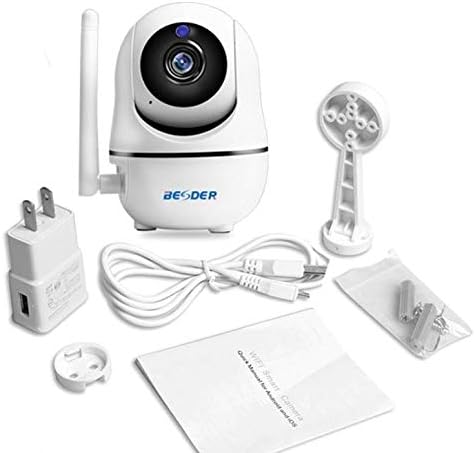
تصویر 1: Package contents of the BESDER Smart Home Security Camera, showing the camera unit, power adapter, USB cable, mounting bracket, screws, and the user manual.
پروڈکٹ ختمview
Familiarize yourself with the various components of your BESDER Smart Home Security Camera.
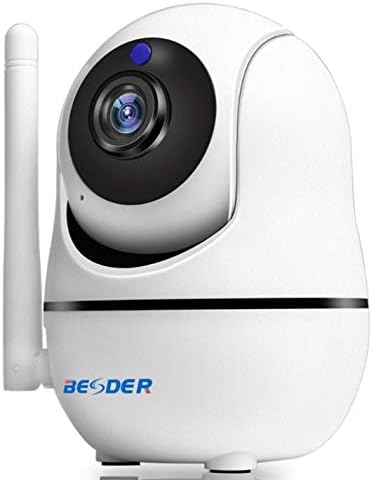
تصویر 2: سامنے والا view of the BESDER Smart Home Security Camera, highlighting the camera lens, infrared LEDs for night vision, and the status indicator light.

تصویر 3: پیچھے view of the BESDER Smart Home Security Camera, detailing the memory card slot (for microSD up to 128GB), reset button, built-in speaker, DC 5V power input, and the Ethernet network port for wired connection.
کلیدی اجزاء:
- کیمرے کا لینس: ویڈیو foo کیپچر کرتا ہے۔tage.
- IR ایل ای ڈی: رات کے نظارے کے لیے اورکت روشنی فراہم کریں۔
- اسٹیٹس انڈیکیٹر لائٹ: Indicates camera status (e.g., power on, network connection).
- مائیکروفون: For audio input and two-way audio communication.
- اسپیکر: For audio output and two-way audio communication.
- میموری کارڈ سلاٹ: Supports microSD cards up to 128GB for local storage.
- ری سیٹ بٹن: فیکٹری سیٹنگز کو بحال کرنے کے لیے استعمال کیا جاتا ہے۔
- DC 5V پاور ان پٹ: فراہم کردہ پاور اڈاپٹر سے جوڑتا ہے۔
- Network Port (RJ45): وائرڈ ایتھرنیٹ کنکشن کے لیے۔
سیٹ اپ
1. پاورنگ آن۔
- Connect the DC 5V power adapter to the camera's power input port.
- پاور اڈاپٹر کو وال آؤٹ لیٹ میں لگائیں۔
- The camera will power on, and the status indicator light will illuminate. Wait for the camera to complete its self-test (it may pan and tilt).
2. Network Connection (Wired or Wireless)
The camera supports both wired (Ethernet) and wireless (Wi-Fi) connections.
وائرڈ کنکشن:
- Connect one end of an Ethernet cable (not included) to the camera's network port.
- ایتھرنیٹ کیبل کے دوسرے سرے کو اپنے روٹر یا نیٹ ورک سوئچ سے جوڑیں۔
- کیمرہ خود بخود نیٹ ورک سے جڑ جائے گا۔
Wireless (Wi-Fi) Connection:
- Download the recommended mobile application (e.g., XMEYE or iCsee) from your device's app store (iOS or Android).
- ایک اکاؤنٹ رجسٹر کریں اور لاگ ان کریں۔
- Follow the in-app instructions to add your camera. This typically involves scanning a QR code on the camera or using a Wi-Fi configuration method (e.g., AP mode, SmartLink).
- Ensure your mobile device is connected to the 2.4GHz Wi-Fi network you intend to connect the camera to.
- Enter your Wi-Fi password when prompted by the app.
- The camera will attempt to connect to your Wi-Fi network. Once connected, the status indicator light will change (refer to app or camera manual for specific light indications).
3 مائیکرو ایس ڈی کارڈ کی تنصیب (اختیاری)
- Ensure the camera is powered off before inserting or removing the microSD card.
- Locate the microSD card slot (refer to Figure 3).
- مائیکرو ایس ڈی کارڈ کو آہستہ سے سلاٹ میں داخل کریں جب تک کہ یہ اپنی جگہ پر کلک نہ کر دے۔
- Power on the camera. You may need to format the SD card via the mobile app settings for optimal performance.
آپریٹنگ ہدایات
1. Mobile Monitoring (iOS/Android)
- Open the XMEYE or iCsee app on your smartphone.
- آلہ کی فہرست سے اپنا کیمرہ منتخب کریں۔ view لائیو فیڈ.
- Use the on-screen controls to pan (horizontal rotation) and tilt (vertical rotation) the camera lens.
- Access playback of recorded footage stored on the microSD card or cloud service.
2. دو طرفہ آڈیو
- جبکہ viewing the live feed in the app, tap the microphone icon to speak through the camera's speaker.
- کیمرے کے مائیکروفون سے آڈیو سننے کے لیے اسپیکر کے آئیکن کو تھپتھپائیں۔
3. IR Night Vision
- The camera automatically switches to IR night vision mode in low-light conditions.
- The IR LEDs will illuminate, providing clear black and white video up to 15 meters.
4. حرکت کا پتہ لگانا اور الارم
- ایپ کی ترتیبات میں حرکت کا پتہ لگانے کو فعال کریں۔
- Configure sensitivity levels and detection zones as needed.
- When motion is detected, the camera can send push notifications to your phone and/or record footage.
5. کلاؤڈ سروس
- The camera supports cloud storage services (subscription may be required).
- Refer to the mobile app for details on activating and managing cloud storage.
دیکھ بھال
- صفائی: کیمرے کے لینس اور جسم کو صاف کرنے کے لیے نرم، خشک کپڑا استعمال کریں۔ مائع کلینر یا ایروسول استعمال نہ کریں۔
- فرم ویئر اپ ڈیٹس: Regularly check for firmware updates via the mobile app to ensure optimal performance and security.
- جگہ کا تعین: Ensure the camera is placed in a location where it is protected from direct water exposure and extreme temperatures.
- ایسڈی کارڈ مینجمنٹ: Periodically check the status of your microSD card. If it becomes full, older recordings may be overwritten, or recording may stop.
خرابی کا سراغ لگانا
| مسئلہ | ممکنہ وجہ | حل |
|---|---|---|
| کیمرا آف لائن/وائی فائی سے منسلک نہیں ہو سکتا | غلط وائی فائی پاس ورڈ؛ کیمرہ روٹر سے بہت دور؛ راؤٹر کے مسائل؛ 5GHz Wi-Fi نیٹ ورک۔ |
|
| No image/Black screen | Power issue; Network issue; Lens obstruction. |
|
| دو طرفہ آڈیو کام نہیں کر رہا ہے۔ | Microphone/speaker disabled in app; Volume too low; Network latency. |
|
| حرکت کا پتہ لگانا متحرک نہیں ہو رہا ہے۔ | حرکت کا پتہ لگانا غیر فعال حساسیت بہت کم؛ غلط پتہ لگانے کا زون۔ |
|
| SD کارڈ ریکارڈنگ نہیں کر رہا ہے۔ | SD card full/corrupted; Incorrect format; SD card not inserted properly. |
|
وضاحتیں
| فیچر | تفصیل |
|---|---|
| ماڈل کا نام | BESDER Smart Home Security |
| صنعت کار حوالہ | ZX-X2-W/200W |
| ویڈیو ریزولوشن | Full HD 1080P (1920x1080) |
| سینسر | 1/2.8'' F22 CMOS sensor (for 1080P) |
| ویڈیو کمپریشن | H.264, supports dual stream, 0.1 – 6 Mpbs |
| لینس | 3.6 mm G7 (default) |
| IR نائٹ ویژن فاصلہ | Max 15 meters (6 IR LEDs) |
| کنیکٹوٹی | Wi-Fi (2.4GHz)، وائرڈ ایتھرنیٹ |
| ذخیرہ | MicroSD card up to 128GB (not included), Cloud Service |
| آڈیو | دو طرفہ آڈیو (بلٹ ان مائکروفون اور اسپیکر) |
| موبائل مانیٹرنگ | iOS, Android (APP: XMEYE or iCsee) |
| بجلی کی فراہمی | DC 5V 2A |
| کام کرنے کا درجہ حرارت | -5 to 60°C (23 - 140°F) |
| طول و عرض | 6.39 x 4.33 x 3.11 سینٹی میٹر (تخمینی پیکیج کے طول و عرض) |
وارنٹی اور سپورٹ
For warranty information and technical support, please refer to the contact details provided with your purchase or visit the official BESDER webسائٹ خریداری کے ثبوت کے طور پر اپنی خریداری کی رسید اپنے پاس رکھیں۔
مینوفیکچرر: بیسڈر۔
Ask a question about this manual
Ask about setup, troubleshooting, compatibility, parts, safety, or missing instructions. Manuals+ will review the question and use this page’s manual context to help answer it.