
تعارف
This manual provides instructions for the proper setup, operation, and maintenance of your TeknoGame N64 Controller. Please read this manual thoroughly before use to ensure optimal performance and longevity of your device.
پروڈکٹ ماڈل: VGA-0625-R
رنگ: Clear Purple
پیکیج کے مشمولات
یقینی بنائیں کہ تمام اشیاء پیکیج میں موجود ہیں:
- 1 x TeknoGame N64 Controller (Clear Purple)
- 1 ایکس یوزر مینوئل (یہ دستاویز)
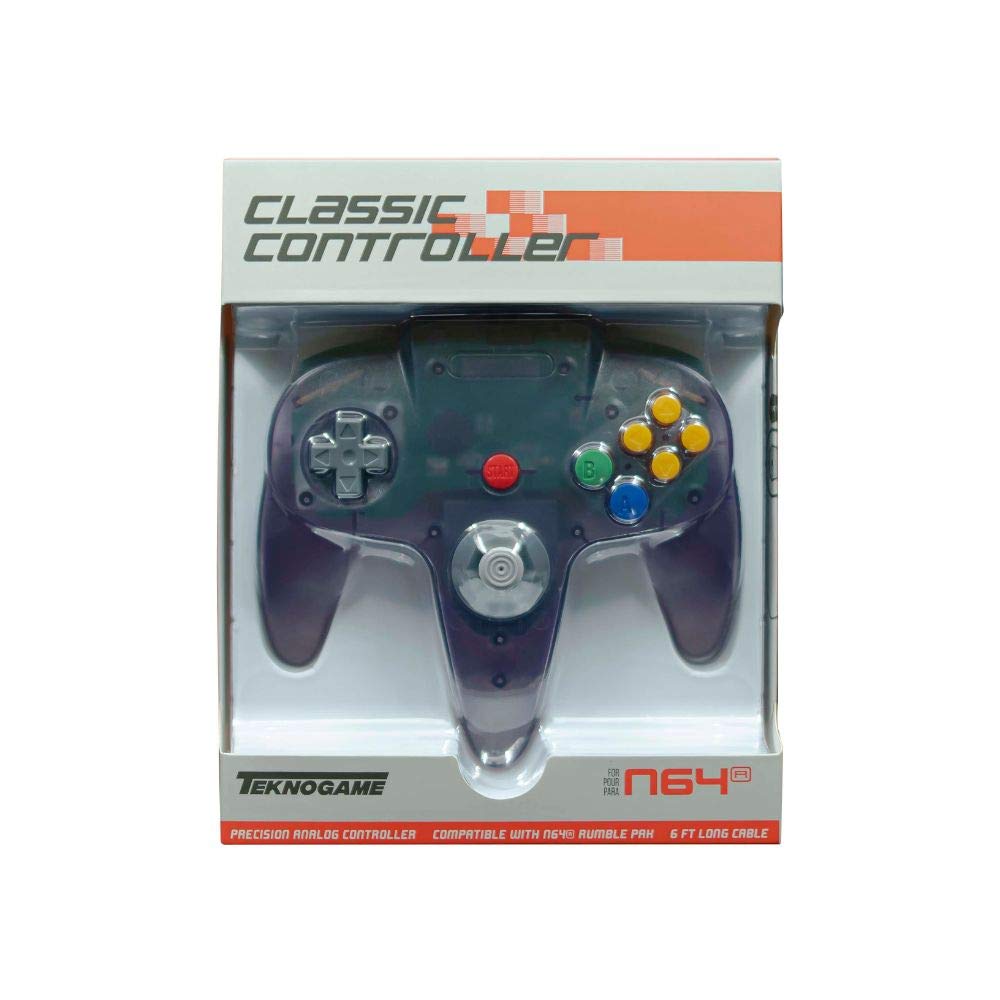
Image: The TeknoGame N64 Controller in Clear Purple. This image displays the front view of the controller, highlighting its transparent purple casing and button layout.
کنٹرولر لے آؤٹ
Familiarize yourself with the buttons and controls of your TeknoGame N64 Controller:
- اینالاگ اسٹک: عین مطابق 360 ڈگری حرکت کے لیے۔
- ڈی پیڈ: For directional input in games that support it.
- ایک بٹن: پرائمری ایکشن بٹن۔
- بی بٹن: سیکنڈری ایکشن بٹن۔
- C بٹن (پیلا): Four directional buttons for camera control or specific in-game actions.
- اسٹارٹ بٹن: Pauses games or confirms selections.
- ایل بٹن: Left shoulder button.
- R بٹن: Right shoulder button.
- Z Trigger: Located on the underside of the central handle.
- یو ایس بی کیبل: For connecting to your console or PC.
سیٹ اپ کی ہدایات
Connecting to Nintendo 64 Console
- Ensure your Nintendo 64 console is powered off.
- Locate an available controller port on the front of your Nintendo 64 console.
- Insert the controller's connector firmly into the chosen port.
- Power on your Nintendo 64 console. The controller is now ready for use.
ونڈوز پی سی سے جڑ رہا ہے۔
- اپنے ونڈوز پی سی پر دستیاب یو ایس بی پورٹ تلاش کریں۔
- Plug the controller's USB cable into the USB port.
- Your Windows PC should automatically detect and install the necessary drivers. This may take a few moments.
- Once drivers are installed, the controller will be recognized as a standard gamepad. You may need to configure controller settings within your game or emulator software.
نوٹ: For optimal performance on PC, ensure your operating system is up to date. Some games or emulators may require manual button mapping.
آپریٹنگ ہدایات
The TeknoGame N64 Controller functions identically to the original Nintendo 64 controller, providing a familiar gaming experience.
- اینالاگ اسٹک: Use for movement and precise control in 3D environments.
- ڈی پیڈ: Primarily used for menu navigation or specific 2D game controls.
- A & B Buttons: Perform primary and secondary actions as defined by the game.
- C Buttons: Often used for camera control, item selection, or specific character abilities.
- اسٹارٹ بٹن: Typically used to pause the game, access menus, or confirm selections.
- L & R Buttons: Shoulder buttons for various in-game actions like strafing or targeting.
- Z Trigger: Commonly used for aiming, crouching, or other context-sensitive actions.
The controller features a rumble function for enhanced immersion in supported games. This feature is automatically activated when supported by the game or emulator.
دیکھ بھال اور دیکھ بھال
Proper care will extend the life of your controller:
- صفائی: Use a soft, dry cloth to wipe the surface of the controller. For stubborn dirt, slightly dampپانی کے ساتھ کپڑے. سخت کیمیکلز یا کھرچنے والے کلینر سے پرہیز کریں۔
- ذخیرہ: Store the controller in a cool, dry place away from direct sunlight and extreme temperatures. Avoid wrapping the cable tightly around the controller to prevent damage.
- ہینڈلنگ: Do not drop the controller or subject it to strong impacts. Avoid pulling the cable forcefully when disconnecting.
- مائع کی نمائش: Keep the controller away from liquids. If liquid enters the controller, disconnect it immediately and allow it to dry completely before attempting to use it again.
خرابی کا سراغ لگانا
| مسئلہ | ممکنہ وجہ | حل |
|---|---|---|
| Controller not responding on N64. | Loose connection; Console off. | Ensure the controller is firmly plugged into the N64 port. Verify the N64 console is powered on. |
| Controller not recognized on PC. | Loose USB connection; Driver issue; Faulty USB port. | Try a different USB port. Restart your PC. Check Device Manager for driver status. Ensure your operating system is updated. |
| Buttons or analog stick not working correctly. | Dirt or debris; Software calibration issue; Physical damage. | Clean around the affected buttons/stick. For PC, check game/emulator controller settings for calibration. If on N64, try another game. |
| Rumble feature not working. | Game/emulator does not support rumble; Rumble feature disabled in settings. | Verify the game or emulator supports rumble. Check in-game or emulator settings to ensure rumble is enabled. |
If you continue to experience issues, please contact TeknoGame customer support.
وضاحتیں
- ماڈل: VGA-0625-R
- برانڈ: TeknoGame
- رنگ: Clear Purple
- کنیکٹوٹی: USB (کورڈڈ الیکٹرک)
- کنٹرولر کی قسم: گیم پیڈ
- ہم آہنگ آلات: Nintendo 64, Windows PC
- خصوصیات: Ergonomic design, Rumble feedback
- Button Quantity: 10
- UPC: 722267833718
وارنٹی کی معلومات
TeknoGame warrants this product against defects in materials and workmanship for a period of [Insert Warranty Period, e.g., one year] from the original date of purchase. This warranty does not cover damage caused by accident, misuse, abuse, modification, improper installation, or normal wear and tear.
To make a warranty claim, please retain your proof of purchase and contact TeknoGame customer support.
حمایت
For technical support, troubleshooting assistance, or warranty inquiries, please contact TeknoGame customer service:
- Webسائٹ: www.teknogame.com/support (Example link, replace with actual if available)
- ای میل: support@teknogame.com (Example email, replace with actual if available)
- فون: [Insert Phone Number, if available]
Please have your product model number (VGA-0625-R) and proof of purchase ready when contacting support.