
1. پروڈکٹ ختمview
The Cosmic Byte Callisto Wireless Gamepad is designed for an immersive gaming experience on Windows PC. It features an ergonomic design for comfortable extended play, sensitive triggers for precise control, and customizable macro keys for personalized gameplay.

Image: Cosmic Byte Callisto Wireless Gamepad with its USB dongle.
اہم خصوصیات:
- Ergonomic Design and Textured Grip: Provides comfort and a secure hold during long gaming sessions.
- Sensitive Triggers and Accurate Analog Sticks: Ensures precise control and responsiveness in games.
- Customisable Macro Keys: Two programmable buttons (K1, K2) located on the back of the controller for personalized commands.
- Vibration Feature: Offers tactile feedback for enhanced immersion.
- Zero Lag Connection: Achieved via the included USB dongle for seamless wireless gameplay.
- وائرلیس رینج: Operates effectively within a 6-8 meter range.
- LED Backlit Buttons: Enhances visibility and aesthetic appeal.
2. باکس میں کیا ہے۔
Upon opening your Cosmic Byte Callisto Wireless Gamepad package, you should find the following items:
- Cosmic Byte Callisto Wireless Gamepad
- USB ڈونگل
- چارجنگ کیبل
- صارف دستی (یہ دستاویز)

Image: The gamepad, USB dongle, and charging cable as found in the box.
3. سیٹ اپ گائیڈ
3.1 گیم پیڈ کو چارج کرنا
Before initial use, ensure your gamepad is fully charged.
- Connect the small end of the provided charging cable to the charging port on the front of the gamepad.
- Connect the larger USB end of the charging cable to a USB power source (e.g., PC USB port, USB wall adapter).
- The LED indicators on the gamepad will illuminate to show charging status. They will typically stop blinking or change color once fully charged.
3.2 Connecting to a Windows PC
The Callisto Wireless Gamepad connects to your PC via a dedicated USB dongle.
- Insert the USB dongle into an available USB port on your Windows PC.
- Press and hold the Home button (Cosmic Byte logo) on the gamepad to power it on.
- The gamepad will automatically attempt to connect to the USB dongle. The LED indicators will flash during pairing and become solid once a connection is established.
- Your Windows PC should automatically detect the gamepad and install any necessary drivers. This process may take a few moments.
- Once connected, the gamepad is ready for use in compatible games.
4. آپریٹنگ ہدایات
4.1 بنیادی کنٹرولز
Familiarize yourself with the standard layout of the gamepad:
- بائیں/دائیں اینالاگ اسٹکس: نقل و حرکت اور کیمرہ کنٹرول کے لیے۔
- ڈی پیڈ: For directional input, often used in menus or for specific game actions.
- ایکشن بٹن (A, B, X, Y): For primary game actions.
- کندھے کے بٹن (L1, R1) اور محرکات (L2, R2): For various in-game functions, with L2/R2 offering sensitive, analog input.
- اسٹارٹ/بیک بٹن: For pausing games, accessing menus, or specific in-game commands.
- ہوم بٹن: Powers the gamepad on/off and can open system menus.

تصویر: سامنے view of the gamepad highlighting the main buttons and analog sticks.
4.2 Programmable Macro Keys (K1, K2)
The Callisto Wireless Gamepad features two customizable macro keys (K1 and K2) on the back, allowing you to assign complex button sequences or single button functions for quick access.
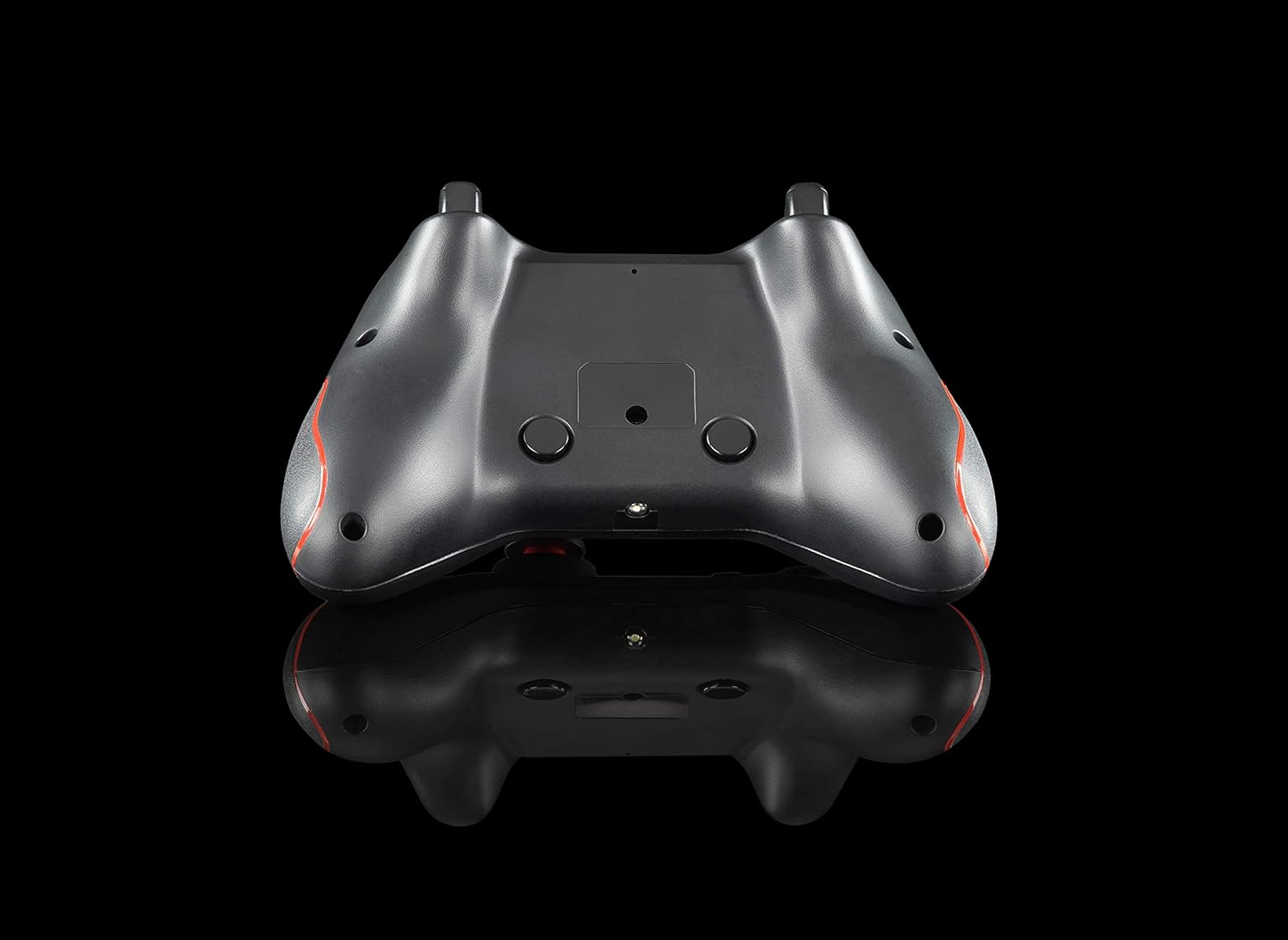
تصویر: پیچھے view of the gamepad, showing the K1 and K2 macro keys.
To program a macro key (specific instructions may vary slightly, refer to the physical manual for exact steps):
- Press and hold the 'Program' button (if available, or a specific combination like 'Turbo' + 'Macro Key').
- Press the macro key (K1 or K2) you wish to program.
- Input the desired button sequence or single button press.
- Press the 'Program' button again to save the macro.
4.3 ٹربو فنکشن
The Turbo function allows for rapid, repeated pressing of a button with a single hold. To activate/deactivate:
- چالو کریں: Press and hold the 'Turbo' button, then press the desired action button (e.g., A, B, X, Y, L1, R1, L2, R2). The button will now rapidly repeat its action when held down.
- غیر فعال کریں: Press and hold the 'Turbo' button again, then press the same action button. The Turbo function for that button will be turned off.
4.4 ایل ای ڈی بیک لائٹنگ
The action buttons feature LED backlighting. To toggle the LED lights on or off, press the 'Back' button and the 'A' button simultaneously.
5 دیکھ بھال
To ensure the longevity and optimal performance of your Cosmic Byte Callisto Wireless Gamepad, follow these maintenance guidelines:
- صفائی: Use a soft, dry cloth to wipe down the gamepad. Avoid using abrasive cleaners, solvents, or harsh chemicals, as these can damage the surface and internal components.
- ذخیرہ: گیم پیڈ کو براہ راست سورج کی روشنی، انتہائی درجہ حرارت اور زیادہ نمی سے دور ٹھنڈی، خشک جگہ پر اسٹور کریں۔
- بیٹری کی دیکھ بھال: Avoid completely draining the battery frequently. Charge the gamepad regularly, even if not in constant use, to maintain battery health. Do not attempt to replace the internal battery yourself.
- دیکھ بھال کے ساتھ ہینڈل: Avoid dropping the gamepad or subjecting it to strong impacts, which can cause internal damage.
6 خرابیوں کا سراغ لگانا
If you encounter issues with your gamepad, refer to the following common troubleshooting steps:
- گیم پیڈ منسلک نہیں ہو رہا ہے:
- Ensure the USB dongle is securely inserted into a working USB port on your PC.
- Check if the gamepad battery is charged. Connect it to the charging cable.
- اپنے کمپیوٹر کو دوبارہ شروع کرنے کی کوشش کریں۔
- Test the USB dongle in a different USB port.
- Buttons Unresponsive or Laggy:
- Verify the gamepad is properly connected to the PC (solid LED indicator).
- Ensure there are no physical obstructions preventing button presses.
- Check game settings to ensure gamepad input is enabled and configured correctly.
- Vibration Feature Not Working:
- Confirm that the game you are playing supports vibration feedback.
- یہ یقینی بنانے کے لیے کہ وائبریشن فعال ہے درون گیم سیٹنگز چیک کریں۔
- Ensure the gamepad is fully charged and properly connected.
- Macro Keys Not Programming Correctly:
- Review the macro programming steps in Section 4.2 carefully.
- Note that some games or applications may not fully support custom macro inputs.
7. وضاحتیں
| فیچر | تفصیل |
|---|---|
| برانڈ | کاسمک بائٹ |
| ماڈل کا نام | Callisto Wireless |
| ہم آہنگ آلات | پی سی (ونڈوز) |
| کنٹرولر کی قسم | گیم پیڈ |
| کنیکٹوٹی ٹیکنالوجی | WiFi (via USB Dongle) |
| مصنوعات کی خصوصیات | Wireless, Programmable Buttons, Vibration, Ergonomic Design |
| ہارڈ ویئر پلیٹ فارم | ڈیسک ٹاپ |
| پاور ماخذ کی قسم | Wireless (Rechargeable Battery) |
| شے کا وزن | 220 گرام |
| آئٹم پیکیج کی مقدار | 1 |
| آئٹم کے طول و عرض | 15.6 x 10.5 x 5.5 سینٹی میٹر |
| رنگ | سیاہ |
8. پروڈکٹ ویڈیوز
8.1 پروڈکٹ اوورview
ویڈیو: ایک مختصر پروڈکٹ ختمview of the Cosmic Byte Callisto Wireless Gamepad, highlighting its main features and contents.
8.2 Tech Demo
Video: A technical demonstration of the Cosmic Byte Callisto Wireless Gamepad, showcasing its features like programmable buttons, sensitive triggers, and wireless connectivity.
9. وارنٹی اور سپورٹ
9.1 وارنٹی کی معلومات
The Cosmic Byte Callisto Wireless Gamepad comes with a مینوفیکچرنگ نقائص کے خلاف 1 سالہ وارنٹی خریداری کی تاریخ سے. وارنٹی کے دعووں کے لیے براہ کرم اپنی خریداری کی رسید اپنے پاس رکھیں۔
9.2 کسٹمر سپورٹ
For any support, queries, or warranty claims, please contact Cosmic Byte customer service:
- Webسائٹ: Visit the official Cosmic Byte webسائٹ پر www.thecosmicbyte.com and navigate to their customer support portal.
- ای میل: You can also directly email customer care at cc@thecosmicbyte.com.
Video: An animated guide on how to initiate a warranty claim with Cosmic Byte, detailing the steps to contact customer support and process a replacement.