
پروڈکٹ ختمview
The XIAOMI Redmi 9I is a feature-rich smartphone designed for everyday use. This manual provides essential information for setting up, operating, maintaining, and troubleshooting your device.
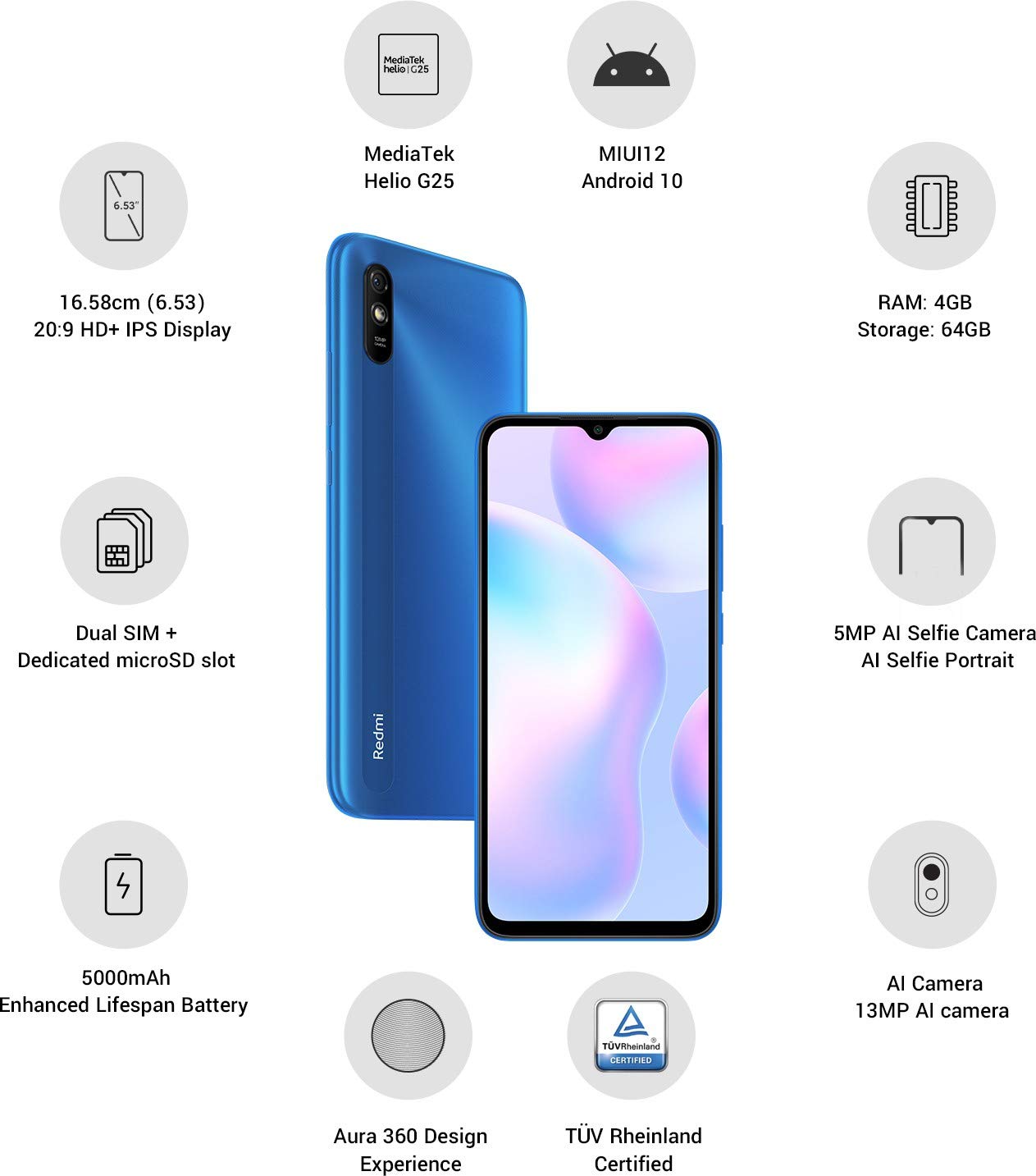
تصویر: ختمview of the Xiaomi Redmi 9I highlighting key features such as the 6.53-inch HD+ IPS Display, MediaTek Helio G25 processor, MIUI12 Android 10, 4GB RAM, 64GB Storage, Dual SIM + dedicated microSD slot, 5000mAh battery, 5MP AI Selfie Camera, 13MP AI Camera, Aura 360 Design Experience, and TÜV Rheinland Certification.
سیٹ اپ گائیڈ
1. ان باکسنگ اور ابتدائی معائنہ
احتیاط سے پیکیجنگ سے تمام اشیاء کو ہٹا دیں. یقینی بنائیں کہ مندرجہ ذیل اجزاء موجود ہیں:
- XIAOMI Redmi 9I Smartphone
- پاور اڈاپٹر
- USB ٹائپ سی کیبل
- سم ایجیکٹر ٹول
- فوری آغاز گائیڈ (اگر شامل ہو)
2. سم کارڈ اور مائیکرو ایس ڈی کارڈ داخل کرنا
Locate the SIM card tray on the side of your device. Use the provided SIM ejector tool to open the tray. Insert your Nano SIM card(s) and/or a microSD card into the designated slots. Ensure the cards are correctly oriented as shown in the diagram below. Gently push the tray back into the phone until it clicks into place.

تصویر: سائیڈ view of the Xiaomi Redmi 9I, illustrating the location of the SIM card tray. The tray is designed to hold dual Nano SIM cards and a dedicated microSD card.
3. ڈیوائس کو چارج کرنا
Before first use, fully charge your Redmi 9I. Connect the USB Type-C cable to the phone's charging port (located at the bottom) and the other end to the power adapter. Plug the adapter into a wall outlet. The charging indicator will appear on the screen.

تصویر: نیچے view of the Xiaomi Redmi 9I, showing the USB Type-C charging port and speaker grille.
4. پاور آن اور ابتدائی کنفیگریشن
Press and hold the Power button (located on the right side of the device) until the XIAOMI logo appears. Follow the on-screen instructions to complete the initial setup, including language selection, Wi-Fi connection, Google account setup, and security settings.

تصویر: سائیڈ view of the Xiaomi Redmi 9I, clearly showing the power button and volume rocker on the right edge of the device.
آپریٹنگ ہدایات
بنیادی نیویگیشن
- ٹچ: Tap icons to open apps, select items, or confirm actions.
- سوائپ: Slide your finger across the screen to scroll, switch between home screens, or navigate within apps.
- چوٹکی: تصاویر کو زوم ان یا آؤٹ کرنے کے لیے دو انگلیوں کا استعمال کریں۔ web صفحات
- لانگ پریس: Press and hold an item for additional options or to move icons.
کال کرنا اور پیغامات بھیجنا
Tap the Phone icon to access the dialer. Enter a number or select a contact. Tap the Messages icon to compose and send text messages.
نیٹ ورکس سے جڑ رہا ہے۔
- وائی فائی: پر جائیں۔ ترتیبات > Wi-Fi، Wi-Fi آن کریں، اور اپنا مطلوبہ نیٹ ورک منتخب کریں۔ اگر اشارہ کیا جائے تو پاس ورڈ درج کریں۔
- بلوٹوتھ: پر جائیں۔ ترتیبات > بلوٹوتھ, turn Bluetooth on, and pair with compatible devices.
- موبائل ڈیٹا (4G): یقینی بنائیں کہ آپ کا سم کارڈ فعال ہے اور موبائل ڈیٹا فعال ہے۔ سیٹنگز > سم کارڈز اور موبائل نیٹ ورکس.
کیمرہ استعمال کرنا
Tap the Camera icon to open the camera application. The Redmi 9I features a 13MP rear camera and a 5MP front camera. Switch between modes (Photo, Video, Portrait, etc.) by swiping across the screen. Tap the shutter button to capture photos or start/stop video recording.

تصویر: پیچھے view of the Xiaomi Redmi 9I, showcasing the 13MP AI camera module and the Redmi branding.
دیکھ بھال
اپنے آلے کی صفائی۔
اپنے فون کی سکرین اور باڈی کو صاف کرنے کے لیے نرم، لنٹ سے پاک کپڑا استعمال کریں۔ سخت کیمیکلز یا کھرچنے والے مواد کے استعمال سے گریز کریں، جو ڈسپلے یا ختم کو نقصان پہنچا سکتے ہیں۔ ضدی smudges کے لئے، تھوڑا سا dampur پانی کے ساتھ کپڑا یا الیکٹرانکس کے لیے ڈیزائن کیا گیا سکرین کلینر۔
سافٹ ویئر اپڈیٹس
بہترین کارکردگی، سیکورٹی، اور نئی خصوصیات تک رسائی کو یقینی بنانے کے لیے باقاعدگی سے سافٹ ویئر اپ ڈیٹس کو چیک کریں اور انسٹال کریں۔ پر جائیں۔ ترتیبات > فون کے بارے میں > MIUI ورژن اپ ڈیٹس کو چیک کرنے کے لیے۔
بیٹری کی دیکھ بھال
The Redmi 9I is equipped with a 5000 mAh Lithium-Polymer battery. To prolong battery life:
- انتہائی درجہ حرارت سے پرہیز کریں۔
- بار بار چارج کرنے سے پہلے بیٹری کو مکمل طور پر ختم نہ ہونے دیں۔
- اصل چارجر اور کیبل استعمال کریں۔
- Optimize battery usage in ترتیبات > بیٹری اور کارکردگی.
اسٹوریج مینجمنٹ
آپ کا آلہ 64GB اندرونی اسٹوریج کے ساتھ آتا ہے۔ اسٹوریج کو مؤثر طریقے سے منظم کرنے کے لیے:
- باقاعدگی سے غیر ضروری کو حذف کریں۔ files، تصاویر، اور ویڈیوز۔
- غیر استعمال شدہ ایپلیکیشنز کو ان انسٹال کریں۔
- کلاؤڈ اسٹوریج کی خدمات استعمال کریں۔
- بڑی حرکت کریں۔ files to an inserted microSD card.
خرابی کا سراغ لگانا
This section addresses common issues you might encounter with your Redmi 9I.
ڈیوائس آن نہیں ہو رہی ہے۔
- Ensure the battery is charged. Connect the phone to its charger for at least 30 minutes.
- زبردستی دوبارہ شروع کرنے کے لیے پاور بٹن کو 10-15 سیکنڈ تک دبائے رکھیں۔
ناقص نیٹ ورک کنیکٹیویٹی
- چیک کریں کہ آیا آپ کا سم کارڈ صحیح طریقے سے ڈالا گیا ہے۔
- Toggle Airplane Mode on and off (swipe down from the top for Quick Settings).
- اپنا آلہ دوبارہ شروع کریں۔
- Verify your mobile data plan is active and you are in an area with network coverage.
ایپلی کیشنز کریشنگ یا فریزنگ
- پریشانی والی ایپ کو بند کریں اور دوبارہ کھولیں۔
- ایپ کا کیش اور ڈیٹا صاف کریں (Settings > Apps > Manage apps > [App Name] > Clear data).
- یقینی بنائیں کہ ایپ اس کے تازہ ترین ورژن میں اپ ڈیٹ ہے۔
- اپنا فون دوبارہ شروع کریں۔
اسکرین غیر جوابدہ
- پاور بٹن کو دبا کر آلہ کو زبردستی دوبارہ شروع کریں۔
- اگر مسئلہ برقرار رہتا ہے تو، فیکٹری ری سیٹ پر غور کریں (Warning: This will erase all data on your phone. Back up important data first. پر جائیں۔ سیٹنگز > فون کے بارے میں > فیکٹری ری سیٹ).
وضاحتیں
| فیچر | تفصیل |
|---|---|
| برانڈ | XIAOMI |
| ماڈل | Redmi 9I |
| آپریٹنگ سسٹم | Android 9.0 (MIUI12) |
| رام | 4 جی بی |
| اندرونی اسٹوریج | 64 جی بی |
| پروسیسر | اسنیپ ڈریگن (2 گیگا ہرٹز سی پی یو اسپیڈ) |
| ڈسپلے کی قسم | LCD |
| اسکرین کا سائز | 6.53 انچ |
| پیچھے والا کیمرہ | 13 MP |
| سامنے والا کیمرہ | 5 MP |
| بیٹری کی صلاحیت | 5000 ملی۔amp Hours (Lithium-Polymer) |
| سم کارڈ سلاٹ | Dual SIM (Nano) |
| کنیکٹوٹی | 4G, Wi-Fi, Bluetooth, USB Type C |
| جی پی ایس | گلوناس |
| مواد | پلاسٹک |
| پانی کی مزاحمت کی سطح | پانی مزاحم |
وارنٹی کی معلومات
The XIAOMI Redmi 9I comes with a 1 سالہ صنعت کار کی وارنٹی from the date of purchase. This warranty covers manufacturing defects under normal use. For detailed terms and conditions, please refer to the warranty card included in your product packaging or visit the official XIAOMI support webسائٹ
کسٹمر سپورٹ
If you encounter issues not covered in this manual or require further assistance, please contact XIAOMI customer support. You can typically find contact information (phone numbers, email, chat support) on the official XIAOMI webسائٹ یا آپ کے آلے کی ترتیبات میں سپورٹ سیکشن کے ذریعے۔
Before contacting support, please have your device's model number (Redmi 9I) and serial number ready. The serial number can usually be found in سیٹنگز > فون کے بارے میں > سٹیٹس.