
1. تعارف
Thank you for choosing the Strong SRT55UC7433 55-inch 4K UHD Smart Android TV. This manual provides essential information for setting up, operating, and maintaining your new television. Please read it thoroughly before use and retain it for future reference.
This television offers an immersive viewing experience with its 4K Ultra HD resolution, High Dynamic Range 10 (HDR), and Wide Color Gamut (WCG) technology, delivering vibrant colors and exceptional detail. Powered by Android TV, it provides seamless access to a wide range of streaming services and applications, enhanced by integrated Wi-Fi and Google Assistant voice control.
2. حفاظتی معلومات
محفوظ آپریشن کو یقینی بنانے اور نقصان کو روکنے کے لیے، براہ کرم درج ذیل حفاظتی تدابیر پر عمل کریں:
- بجلی کی فراہمی: صحیح والیوم کے ساتھ ٹی وی کو صرف AC پاور آؤٹ لیٹ سے جوڑیں۔tage پاور آؤٹ لیٹس کو اوورلوڈ نہ کریں۔
- وینٹیلیشن: Ensure adequate ventilation around the TV. Do not block ventilation openings or place the TV on soft surfaces that may impede airflow.
- جگہ کا تعین: ٹی وی کو ایک مستحکم سطح پر رکھیں تاکہ اسے گرنے سے روکا جا سکے۔ اسے براہ راست سورج کی روشنی میں، گرمی کے ذرائع کے قریب، یا زیادہ نمی والے علاقوں میں رکھنے سے گریز کریں۔
- پانی اور نمی: Do not expose the TV to rain or moisture. Do not place objects filled with liquids, such as vases, on or near the TV.
- صفائی: صاف کرنے سے پہلے ٹی وی کو ان پلگ کریں۔ نرم، خشک کپڑا استعمال کریں۔ مائع یا ایروسول کلینر استعمال نہ کریں۔
- بچے: Supervise children to prevent them from climbing on the TV or playing with the remote controls.
- سروسنگ: خود ٹی وی کی خدمت کرنے کی کوشش نہ کریں۔ تمام خدمات کا حوالہ اہل سروس اہلکاروں کو دیں۔
3. پیکیج کے مشمولات
تصدیق کریں کہ تمام اشیاء پیکیجنگ میں موجود ہیں:
- Strong SRT55UC7433 55-inch 4K UHD Smart Android TV
- معیاری ریموٹ کنٹرول
- Smart Remote Control with Google Assistant button
- AAA Batteries (4x) for remote controls
- پاور کیبل
- فوری انسٹالیشن گائیڈ (QIG)
- TV Stand/Feet (2x) and screws
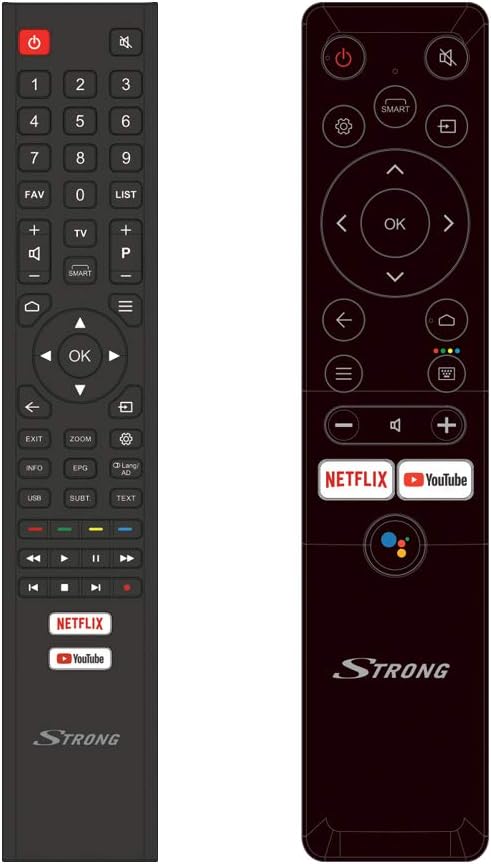
Image: The two included remote controls, one standard and one smart remote with Google Assistant.
4. سیٹ اپ
4.1 پیک کھولنا اور جگہ کا تعین کرنا
Carefully remove the TV from its packaging. It is recommended to have two people for this process due to the size and weight of the unit. Place the TV in a location that allows for proper ventilation and is away from direct sunlight or heat sources. Ensure the surface is stable enough to support the TV's weight.

Image: The TV in a typical room, illustrating its dimensions (1231.6 mm width, 715.2 mm height without stand).
4.2 اسٹینڈ کو جوڑنا
If you are not wall-mounting the TV, attach the included stand feet:
- اسکرین کو پہنچنے والے نقصان کو روکنے کے لیے ٹی وی کا چہرہ نرم، صاف سطح پر رکھیں۔
- ہر اسٹینڈ پاؤں کو ٹی وی کے نچلے حصے میں متعلقہ سلاٹس کے ساتھ سیدھ میں رکھیں۔
- Secure the feet using the provided screws. Ensure they are tightened firmly.

تصویر: سامنے view of the Strong SRT55UC7433 TV with its stand properly attached.
4.3 کنیکٹنگ پیری فیرلز
آپ کا TV بیرونی آلات کے لیے کنکشن کے مختلف اختیارات پیش کرتا ہے:
- HDMI: Connect Blu-ray players, game consoles, or set-top boxes to the HDMI ports (3x HDMI 2.0).
- USB: Connect USB storage devices for media playback (2x USB ports).
- اینٹینا/کیبل: اپنے اینٹینا یا کیبل ٹی وی سگنل کو مناسب ان پٹ سے جوڑیں۔
- ایتھرنیٹ: مستحکم انٹرنیٹ کنکشن کے لیے، ایتھرنیٹ کیبل کو LAN پورٹ سے جوڑیں۔
- سی آئی سلاٹ: Insert a Common Interface module for conditional access to Pay TV services.

Image: Icons representing the various connectivity options including HDMI, USB, AV, Headphone, Ethernet, SAT in, CI slot, and S/PDIF.
4.4 ابتدائی پاور آن اور سیٹ اپ وزرڈ
After connecting all necessary cables, plug the TV into a power outlet and press the power button on the TV or remote control. The TV will guide you through the initial setup process, which typically includes:
- زبان کا انتخاب: اپنی پسند کی زبان منتخب کریں۔
- نیٹ ورک سیٹ اپ: اپنے Wi-Fi نیٹ ورک سے جڑیں یا وائرڈ ایتھرنیٹ کنکشن استعمال کریں۔
- گوگل اکاؤنٹ لاگ ان: Sign in with your Google account to access Android TV features and the Google Play Store.
- چینل سکین: The TV will automatically scan for available channels from your antenna or cable connection. You can create favorite channel lists later.
5. آپریٹنگ ہدایات
5.1 ریموٹ کنٹرولز
Your TV comes with two remote controls. The standard remote provides full functionality, while the smart remote offers simplified navigation and direct access buttons for popular streaming services and Google Assistant.
- پاور بٹن: ٹی وی کو آن یا آف کرتا ہے۔
- نیویگیشن بٹن: مینو کو نیویگیٹ کرنے کے لیے دشاتمک پیڈ اور اوکے بٹن کا استعمال کریں۔
- والیوم/چینل: حجم کو ایڈجسٹ کریں اور چینلز کو تبدیل کریں۔
- Netflix/YouTube بٹن: ان اسٹریمنگ ایپلی کیشنز تک براہ راست رسائی۔
- گوگل اسسٹنٹ بٹن: Activate voice commands on the smart remote.
5.2 اسمارٹ ٹی وی کی خصوصیات (Android TV)
The Android TV interface provides access to a world of entertainment:
- درخواستیں: Download and install apps from the Google Play Store, including streaming services like Netflix, YouTube, Prime Video, and Disney+.
- گوگل اسسٹنٹ: Press the Google Assistant button on your smart remote and speak commands to search for content, get information, or control smart home devices.
- کاسٹنگ: Use built-in Chromecast functionality to cast content from your smartphone or tablet to the TV.

Image: The Android TV home screen showing various applications like YouTube, Google Play Store, and other streaming services.
5.3 اضافی خصوصیات
- والدین کا کنٹرول: Set up parental controls to restrict access to certain channels or content based on ratings.
- ہوٹل موڈ: This feature allows for customization of TV settings for use in hotel environments.
- الیکٹرانک پروگرام گائیڈ (EPG): View upcoming TV programs and schedule recordings (if supported by external recording device).
- ٹیلی ٹیکسٹ: Access text-based information services provided by broadcasters.
6 دیکھ بھال
6.1 اسکرین کی صفائی
اسکرین صاف کرنے کے لیے، پہلے ٹی وی کو ان پلگ کریں۔ نرم، لنٹ فری کپڑے سے اسکرین کو آہستہ سے صاف کریں۔ ضدی نشانات کے لیے، تھوڑا سا ڈیampen the cloth with water or a specialized screen cleaner, then wipe dry immediately. Avoid applying pressure to the screen.
6.2 عمومی نگہداشت
Keep the TV free from dust by regularly wiping the cabinet with a soft, dry cloth. Do not use abrasive cleaners or solvents. Ensure the TV is not exposed to extreme temperatures or humidity.
7 خرابیوں کا سراغ لگانا
اگر آپ کو اپنے ٹی وی کے ساتھ مسائل کا سامنا ہے، تو درج ذیل عام مسائل اور حل دیکھیں:
| مسئلہ | ممکنہ وجہ | حل |
|---|---|---|
| کوئی طاقت نہیں۔ | Power cable disconnected; power outlet fault | پاور کیبل کنکشن چیک کریں؛ ایک مختلف دکان کی کوشش کریں. |
| کوئی تصویر نہیں، لیکن آواز موجود ہے۔ | Incorrect input source; faulty HDMI cable | Press the 'Source' button on the remote to select the correct input; replace HDMI cable. |
| کوئی آواز نہیں لیکن تصویر موجود ہے۔ | حجم خاموش یا بہت کم؛ بیرونی آڈیو سسٹم کا مسئلہ | Unmute volume or increase level; check connections to external audio devices. |
| ریموٹ کنٹرول کام نہیں کر رہا ہے۔ | مردہ بیٹریاں؛ ریموٹ اور ٹی وی کے درمیان رکاوٹ | بیٹریاں تبدیل کریں؛ کسی بھی رکاوٹ کو ہٹا دیں. |
| Wi-Fi سے منسلک نہیں ہو سکتا | غلط پاس ورڈ؛ روٹر مسئلہ؛ ٹی وی راؤٹر سے بہت دور ہے۔ | وائی فائی پاس ورڈ کی تصدیق کریں۔ راؤٹر کو دوبارہ شروع کریں؛ ٹی وی کو روٹر کے قریب لے جائیں یا ایتھرنیٹ استعمال کریں۔ |
If the problem persists after trying these solutions, please contact Strong customer support.
8. وضاحتیں
| فیچر | تفصیلات |
|---|---|
| برانڈ | مضبوط |
| ماڈل نمبر | SRT55UC7433 |
| اسکرین کا سائز | 55 انچ (139 سینٹی میٹر) |
| قرارداد | 3840 x 2160 (4K UHD) |
| ڈسپلے ٹیکنالوجی | ایل ای ڈی |
| آپریٹنگ سسٹم | اینڈرائیڈ |
| کنیکٹوٹی | Wi-Fi, Ethernet, 3x HDMI 2.0, 2x USB, Common Interface (CI) |
| خصوصی خصوصیات | HDR10, WCG, Google Assistant, Parental Control, Hotel Mode, EPG, Teletext |
| طول و عرض (اسٹینڈ کے ساتھ) | 1231.6 x 260 x 782.4 ملی میٹر |
| وزن (اسٹینڈ کے ساتھ) | 13.2 کلوگرام |
| ریفریش ریٹ | 120 Hz |
| رنگ | سیاہ |
9. وارنٹی اور سپورٹ
For warranty information and customer support, please refer to the documentation included with your product or visit the official Strong website. You can also find useful numbers and information on Strong's Facebook profile and LinkedIn page.
Strong is committed to providing support for all your needs. Please ensure you have your model number (SRT55UC7433) and purchase details ready when contacting support.