
تعارف
This manual provides essential instructions for the proper use and maintenance of your Vikefon Type C Charging and Data Cable. This 1-meter cable is designed for efficient charging and high-speed data transfer between your Type C enabled devices and compatible power sources or computers.

Image: The Vikefon Type C Charging and Data Cable, featuring a standard USB-A connector on one end and a reversible USB-C connector on the other.
مصنوعات کی خصوصیات
- USB Connector Quality: Ensures reliable charging and high-speed data transmission.
- پاور آؤٹ پٹ: Supports up to 5V, 3 Amp تیزی سے چارج کرنے کے لئے.
- عالمگیر مطابقت: Fully compatible with all Type C mobile devices for fast charging and syncing.
- الٹنے والا USB Type-C کنیکٹر: Allows for quick and easy connections in any orientation.
- پائیدار ڈیزائن: Features intricate nylon braiding for enhanced durability and longevity, outlasting standard cables.
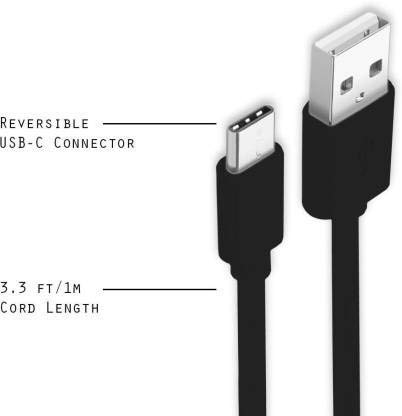
Image: A diagram illustrating the reversible nature of the USB-C connector and the cable's 1-meter (3.3 ft) cord length.
سیٹ اپ
- کنیکٹرز کی شناخت کریں: The cable has a standard USB-A connector on one end and a smaller, oval-shaped USB Type-C connector on the other.
- Connect to Power Source/Computer: Insert the USB-A end of the cable into a compatible USB port on a wall adapter, power bank, car charger, or computer.
- ڈیوائس سے جڑیں: Insert the USB Type-C end into the charging/data port of your smartphone, tablet, or other Type C enabled device. The USB Type-C connector is reversible, so it can be inserted in either orientation.
- کنکشن کی تصدیق کریں: Ensure both ends are securely connected. Your device should indicate that it is charging or connected for data transfer.
آپریٹنگ ہدایات
آپ کے آلے کو چارج کرنا
- Connect the USB-A end of the cable to a compatible USB power adapter (e.g., wall charger, car charger, power bank).
- Connect the USB Type-C end to your device's charging port.
- Ensure the power adapter is plugged into a live power outlet. Your device should begin charging.
ڈیٹا کی منتقلی
- کیبل کے USB-A سرے کو اپنے کمپیوٹر پر USB پورٹ سے جوڑیں۔
- Connect the USB Type-C end to your device.
- On your device, you may receive a prompt asking to allow data access or to select a USB connection mode (e.g., "File Transfer," "MTP"). Select the appropriate option to enable data transfer.
- Your device should appear as a removable drive or media device on your computer, allowing you to transfer files.
دیکھ بھال
- مناسب ہینڈلنگ: Always grasp the connector head when plugging or unplugging the cable. Avoid pulling directly on the cable itself to prevent damage to the internal wires.
- جھکنے سے بچیں: Do not excessively bend or crimp the cable, especially near the connectors, as this can cause internal wire breakage.
- ذخیرہ: Store the cable in a clean, dry place away from extreme temperatures and direct sunlight. Avoid tangling the cable.
- صفائی: If necessary, gently wipe the cable and connectors with a dry, soft cloth. Do not use liquids or abrasive cleaners.

تصویر: ایک قریبی اپ view highlighting the durable metal heads of the Vikefon Type C cable connectors, designed for anti-oxidation and corrosion resistance.
خرابی کا سراغ لگانا
- ڈیوائس چارج نہیں ہو رہی ہے:
- یقینی بنائیں کہ کیبل کے دونوں سرے محفوظ طریقے سے جڑے ہوئے ہیں۔
- تصدیق کریں کہ پاور اڈاپٹر صحیح طریقے سے کام کر رہا ہے اور لائیو آؤٹ لیٹ میں پلگ ان ہے۔
- ایک مختلف پاور اڈاپٹر یا USB پورٹ استعمال کرنے کی کوشش کریں۔
- Check your device's charging port for any debris or damage.
- سست چارجنگ:
- Ensure you are using a power adapter that supports fast charging (e.g., 3A output).
- اپنے آلے پر کسی بھی غیر ضروری پس منظر کی ایپلی کیشنز کو بند کریں۔
- کوئی ڈیٹا ٹرانسفر نہیں:
- Confirm the cable is properly connected to both your device and computer.
- On your device, check the notification panel for USB options and select "File Transfer" or "MTP."
- اپنے کمپیوٹر پر ایک مختلف USB پورٹ سے جڑنے کی کوشش کریں۔
- اپنے آلہ اور کمپیوٹر دونوں کو دوبارہ شروع کریں۔
وضاحتیں
| فیچر | تفصیل |
|---|---|
| برانڈ | Vikefon |
| ماڈل کا نام | قسم سی |
| ماڈل نمبر | قسم C 0129 |
| کنیکٹر کی قسم | USB Type C (Male-to-Male) |
| کیبل کی قسم | یو ایس بی |
| ہم آہنگ آلات | Laptop, PC, Smartphone (e.g., Xiaomi Redmi 8A, Poco M2, Poco M2 Pro, Samsung, Motorola, Lenovo, Lava, Sony, HTC, LG, Karbonn, Maxx) |
| خصوصی خصوصیات | Charging Wire, Durable, High Data Transfer Rate, High Quality, Long Length |
| ڈیٹا کی منتقلی کی شرح | Up to 0.48 Gigabits Per Second (480 Mbps) |
| کنیکٹوٹی ٹیکنالوجی | یو ایس بی |
| تفصیلات میٹ | آئی ایس او |
| رنگ | سیاہ |
| آئٹم کی شکل | گول |
| Outer Material Type | Rubber (with Nylon Braiding) |
| کیبل کی لمبائی | 1 میٹر |
وارنٹی اور سپورٹ
Specific warranty details for the Vikefon Type C Charging and Data Cable are not provided in this manual. For information regarding warranty coverage, returns, or technical support, please refer to the product packaging or contact the manufacturer directly through their official channels.