
1. تعارف
This user manual provides detailed instructions for the proper use and maintenance of your Zebra DS8178 Wireless 2D/1D Barcode Scanner. Please read this manual thoroughly before operating the device to ensure optimal performance and safety. The DS8178 is designed for efficient and reliable barcode scanning in various environments, offering both 1D and 2D barcode reading capabilities with wireless connectivity.
2. حفاظتی معلومات
آلے کو چوٹ یا نقصان سے بچنے کے لیے درج ذیل حفاظتی تدابیر پر عمل کریں:
- Do not expose the scanner or cradle to extreme temperatures, moisture, or corrosive substances.
- Avoid direct eye exposure to the scanner's light source.
- چارج کرنے کے لیے صرف مخصوص پاور اڈاپٹر اور USB کیبل استعمال کریں۔
- ڈیوائس کو الگ کرنے یا اس میں ترمیم کرنے کی کوشش نہ کریں۔ تمام خدمات کو اہل اہلکاروں سے رجوع کریں۔
- ڈیوائس کو مضبوط مقناطیسی فیلڈز سے دور رکھیں۔
3. پیکیج کے مشمولات
تصدیق کریں کہ تمام اشیاء آپ کے پیکیج میں موجود ہیں:
- Zebra DS8178 Wireless Barcode Scanner
- USB Communication/Charging Cradle
- USB کیبل
- کوئیک اسٹارٹ گائیڈ (اس دستی میں شامل نہیں)
4. پروڈکٹ ختمview
Familiarize yourself with the components of your Zebra DS8178 scanner and its cradle.

تصویر 4.1: طرف view of the Zebra DS8178 Wireless Barcode Scanner, showing its ergonomic design.

تصویر 4.2: سامنے والا view of the Zebra DS8178 Wireless Barcode Scanner, highlighting the scanning window and trigger button.

تصویر 4.3: سامنے والا view of the USB Communication/Charging Cradle, featuring the pairing button.
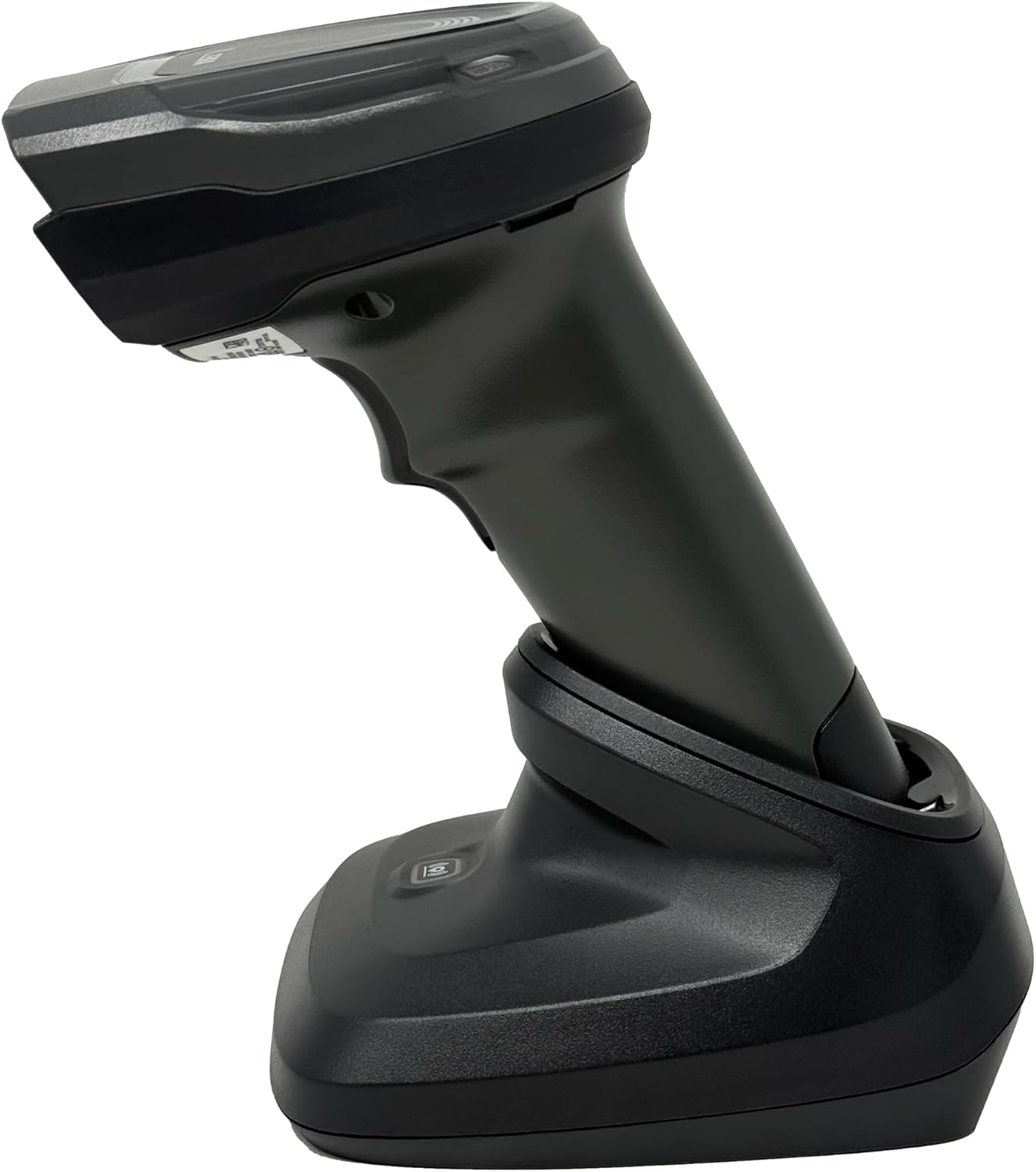
تصویر 4.4: The Zebra DS8178 scanner securely docked in its USB cradle, ready for charging or communication.
4.1 سکینر کے اجزاء
- اسکین ونڈو: Area through which barcodes are read.
- محرک: Activates the scanning beam.
- ایل ای ڈی اشارے: Provide status feedback (e.g., battery, scan success).
- بیٹری ٹوکری: Houses the removable/rechargeable battery.
4.2 Cradle Components
- Scanner Slot: Where the scanner docks for charging and communication.
- USB پورٹ: Connects the cradle to a host device (PC, laptop).
- جوڑا بٹن: Initiates Bluetooth pairing with the scanner.
- ایل ای ڈی اشارے: Show cradle status (e.g., power, connection).
5. سیٹ اپ
5.1 سکینر کو چارج کرنا
- Connect the USB cable to the cradle's USB port.
- Connect the other end of the USB cable to a powered USB port on your computer or a USB wall adapter.
- Place the DS8178 scanner into the cradle. Ensure it is seated correctly.
- The scanner's LED indicator will show charging status. A full charge typically takes approximately 3-4 hours.
5.2 Connecting the Cradle to a Host Device
The cradle connects to your computer via a standard USB cable.
- Plug the USB cable into the USB port on the back of the cradle.
- Connect the other end of the USB cable to an available USB port on your desktop or laptop computer.
- The operating system should automatically detect and install the necessary drivers.
5.3 بلوٹوتھ جوڑی
The DS8178 offers two primary Bluetooth pairing methods: via the cradle or direct to a host device.
5.3.1 Pairing via Cradle (Recommended for PC/Laptop)
- Ensure the cradle is connected to your host device (PC/Laptop) via USB.
- Place the DS8178 scanner into the cradle.
- The scanner will automatically pair with the cradle. Once paired, the scanner can be removed from the cradle and will communicate wirelessly with the host device through the cradle.
- A successful connection is indicated by a specific LED pattern on both the scanner and cradle (refer to the scanner's LED guide for details).
5.3.2 Direct Bluetooth Pairing (for Phones/Tablets or PC/Laptop without cradle)
- Power on the DS8178 scanner.
- Scan the "Pairing Barcode" (usually found in a quick start guide or on the scanner itself) to put the scanner into discoverable mode. Alternatively, press and hold the Bluetooth pairing button on the scanner (if available) or scan a specific Bluetooth pairing configuration barcode.
- On your phone, tablet, or computer, navigate to the Bluetooth settings.
- تلاش کریں۔ available devices. The DS8178 should appear in the list (e.g., "Zebra DS8178").
- Select the scanner to initiate pairing. You may be prompted to confirm a passkey or scan a pairing barcode displayed on your screen.
- Once paired, the scanner's LED will indicate a successful connection.
6. آپریشن
6.1 بارکوڈز کو اسکین کرنا
- Point the scan window of the DS8178 scanner at the barcode you wish to read.
- Press and hold the trigger button. A red aiming pattern will appear.
- Center the aiming pattern over the barcode. For 1D barcodes, the aiming line should cross the entire barcode. For 2D barcodes, the aiming pattern should encompass the entire code.
- Once the barcode is successfully read, the scanner will emit an audible beep and/or the LED indicator will flash green.
- ٹرگر جاری کریں۔
6.2 Cordless Range
The Zebra DS8178 offers a cordless range of up to 330 feet (100 meters) from its cradle or directly paired host device, depending on environmental conditions and line of sight. Obstructions such as walls or other electronic devices may reduce the effective range.
6.3 اسکیننگ موڈز
- ٹرگر موڈ: The scanner reads a barcode only when the trigger is pressed.
- Presentation Mode (Hands-Free): When placed in the presentation cradle, the scanner can be configured to automatically detect and read barcodes placed within its field of view without requiring a trigger press. This mode is ideal for high-volume scanning applications.
7 دیکھ بھال
7.1 سکینر کی صفائی
To maintain optimal scanning performance, keep the scan window clean.
- نرم، صاف، لنٹ سے پاک کپڑا استعمال کریں۔ampened with water or a mild cleaning solution (e.g., isopropyl alcohol).
- اسکین ونڈو اور اسکینر کے بیرونی حصے کو آہستہ سے صاف کریں۔
- کھرچنے والے کلینر، سالوینٹس یا سخت کیمیکل استعمال نہ کریں۔
- Ensure the scanner is powered off before cleaning.
7.2 بیٹری کی دیکھ بھال
The DS8178 features a 2500mAh removable and rechargeable battery. Proper battery care extends its lifespan.
- پہلے استعمال سے پہلے بیٹری کو مکمل چارج کریں۔
- Avoid completely discharging the battery regularly.
- اسکینر کو ٹھنڈی، خشک جگہ پر ذخیرہ کریں جب طویل مدت تک استعمال نہ ہو۔
- If the battery performance significantly degrades, it may need replacement. Contact support for genuine replacement batteries.
8 خرابیوں کا سراغ لگانا
| مسئلہ | ممکنہ وجہ | حل |
|---|---|---|
| سکینر آن نہیں ہو رہا ہے۔ | کم یا ختم ہونے والی بیٹری۔ | Charge the scanner using the USB cradle and cable. |
| سکینر بلوٹوتھ کے ذریعے منسلک نہیں ہو رہا ہے۔ | Not in pairing mode; out of range; interference; host device Bluetooth off. | Ensure scanner is in pairing mode. Check host device Bluetooth settings. Move closer to the host device. Reduce interference. |
| سکینر بارکوڈز نہیں پڑھ رہا ہے۔ | Barcode damaged/poor quality; scan window dirty; incorrect symbology enabled; scanner not aimed correctly. | Try scanning a different barcode. Clean the scan window. Ensure correct aiming. Check scanner configuration for enabled symbologies. |
| میزبان کو کوئی ڈیٹا منتقل نہیں کیا گیا۔ | Not paired; application not in focus; incorrect interface settings. | Confirm successful Bluetooth pairing. Ensure the target application (e.g., text editor, POS software) is active and ready to receive input. |
9. وضاحتیں
| فیچر | تفصیل |
|---|---|
| ماڈل | ڈی ایس 8178 |
| برانڈ | Zebra (formerly Symbol) |
| کنیکٹوٹی ٹیکنالوجی | بلوٹوتھ، USB کیبل، وائرلیس |
| ہم آہنگ آلات | Desktop, Laptop, Phones, Tablets |
| طاقت کا منبع | Battery Powered, Corded Electric, Rechargeable |
| بیٹری کی صلاحیت | 2500mAh (Removable/Rechargeable) |
| Cordless Range | 330 فٹ (100 میٹر) تک |
| سکیننگ کی صلاحیت | 1D and 2D Barcodes |
| کا اصلی زاویہ View | 17 ڈگری |
| UPC / GTIN | 649661651499 |
10. وارنٹی اور سپورٹ
This Zebra DS8178 Barcode Scanner comes with a 90 دن کی محدود وارنٹی. This warranty covers defects in materials and workmanship under normal use. It does not cover damage caused by misuse, accidents, unauthorized modifications, or external causes.
For technical support, warranty claims, or to purchase genuine replacement parts (such as batteries), please contact your reseller or visit the official Zebra support website. Please have your model number (DS8178) and any purchase information ready when contacting support.