
ZIPRO 6299212
ZIPRO Dash Foldable Rowing Machine User Manual
ماڈل: 6299212
تعارف
The ZIPRO Dash Rowing Machine is designed to provide an effective and smooth full-body workout in the comfort of your home. Featuring a magnetic braking system, it offers quiet operation and adjustable resistance levels to suit individual training needs. The integrated training computer is compatible with the iConsole+ mobile application, allowing for wireless control via Bluetooth from your smartphone or tablet. Additionally, it supports the Kinomap application for enhanced training experiences. The computer tracks essential workout data such as time, stroke count, calorie consumption, and heart rate (with the included Polar telemetry band), displaying them on its LCD screen. Its foldable design ensures convenient storage.

Image: The ZIPRO Dash Foldable Rowing Machine, showcasing its sleek black design with green accents, magnetic resistance unit, and comfortable seat on a sturdy rail.
اہم حفاظتی معلومات
Please read all instructions carefully before assembling and using the ZIPRO Dash Rowing Machine. Keep this manual for future reference.
- ورزش کا کوئی بھی پروگرام شروع کرنے سے پہلے اپنے معالج سے مشورہ کریں۔
- استعمال کے دوران بچوں اور پالتو جانوروں کو مشین سے دور رکھیں۔
- روئنگ مشین کو ایک فلیٹ، مستحکم سطح پر رکھیں جس کے ارد گرد مناسب کلیئرنس ہو۔
- ہر استعمال سے پہلے مشین کے ڈھیلے یا پہنے ہوئے حصوں کا معائنہ کریں۔ اگر خراب ہو تو استعمال نہ کریں۔
- ورزش کے دوران مناسب ایتھلیٹک جوتے اور لباس پہنیں۔
- صارف کا زیادہ سے زیادہ وزن 135 کلوگرام (297 پونڈ) سے زیادہ نہ ہو۔
- مشین کو صرف اس کے مطلوبہ مقصد کے لیے استعمال کریں جیسا کہ اس ہدایت نامہ میں بیان کیا گیا ہے۔
- اگر آپ بیہوش، چکر آتے ہیں یا درد محسوس کرتے ہیں تو فوری طور پر ورزش کرنا بند کریں۔
پیکیج کے مشمولات
Carefully unpack all components and ensure you have received the following parts:
- Main Frame Assembly (with magnetic resistance unit and console mount)
- سیٹ ریل
- سلائیڈنگ سیٹ
- فرنٹ اسٹیبلائزر
- ریئر اسٹیبلائزر
- Footrests (2)
- ہینڈل بار
- Training Computer (LCD display)
- Polar T34 Telemetry Heart Rate Band
- ہارڈ ویئر کٹ (بولٹ، واشر، گری دار میوے، اوزار)
- صارف دستی
اگر کوئی پرزہ غائب یا خراب ہو تو، براہ کرم فوری طور پر کسٹمر سپورٹ سے رابطہ کریں۔
اسمبلی اور سیٹ اپ
Assembly typically takes 30-60 minutes. It is recommended to have two people for assembly. Ensure all parts are present before beginning.
- سٹیبلائزر منسلک کریں: Securely attach the front and rear stabilizers to the main frame using the provided bolts and tools. Ensure the stabilizing pads are properly aligned.
- Install Seat Rail: Connect the seat rail to the main frame. Make sure it is firmly attached and aligned.
- ماؤنٹ سیٹ: Slide the seat onto the seat rail. Verify that the ball bearings allow for smooth movement.
- فوٹریسٹ منسلک کریں: Secure the two footrests to the main frame. Ensure they are stable and the straps are adjustable.
- ہینڈل بار کو جوڑیں: Attach the handlebar to the pulling strap/chain mechanism.
- Install Console: Mount the training computer onto its designated holder. Insert the included batteries (AA Mignon cells). Connect any necessary cables from the main unit to the console.
- فائنل چیک: Before first use, double-check all bolts and connections to ensure they are tight and secure. Test the rowing motion and resistance adjustment.
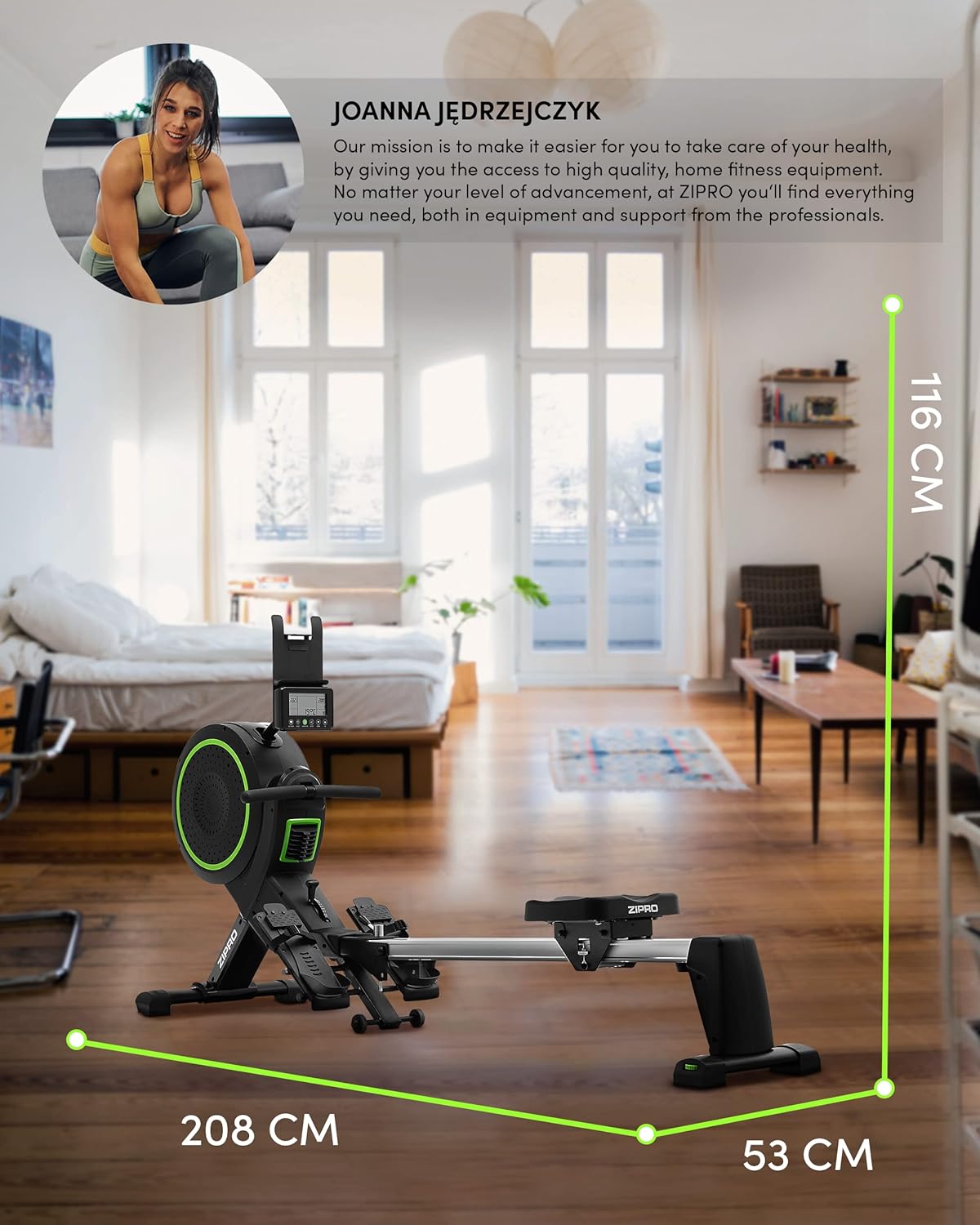
Image: Diagram showing the dimensions of the ZIPRO Dash Rowing Machine (208 cm length, 53 cm width, 116 cm height), useful for planning placement.
آپریٹنگ ہدایات
Powering On the Console
The LCD training computer powers on automatically when you begin rowing or press any button. It is powered by AA batteries (included).

تصویر: کلوز اپ view of the ZIPRO Dash Rowing Machine's LCD console, showing various workout metrics and control buttons.
مزاحمت کو ایڈجسٹ کرنا۔
The ZIPRO Dash features an 8-step magnetic resistance system. To adjust the resistance, locate the resistance knob or lever on the main unit (often near the fan/flywheel housing). Turn the knob clockwise to increase resistance and counter-clockwise to decrease it. Choose a level that challenges you appropriately for your fitness level.
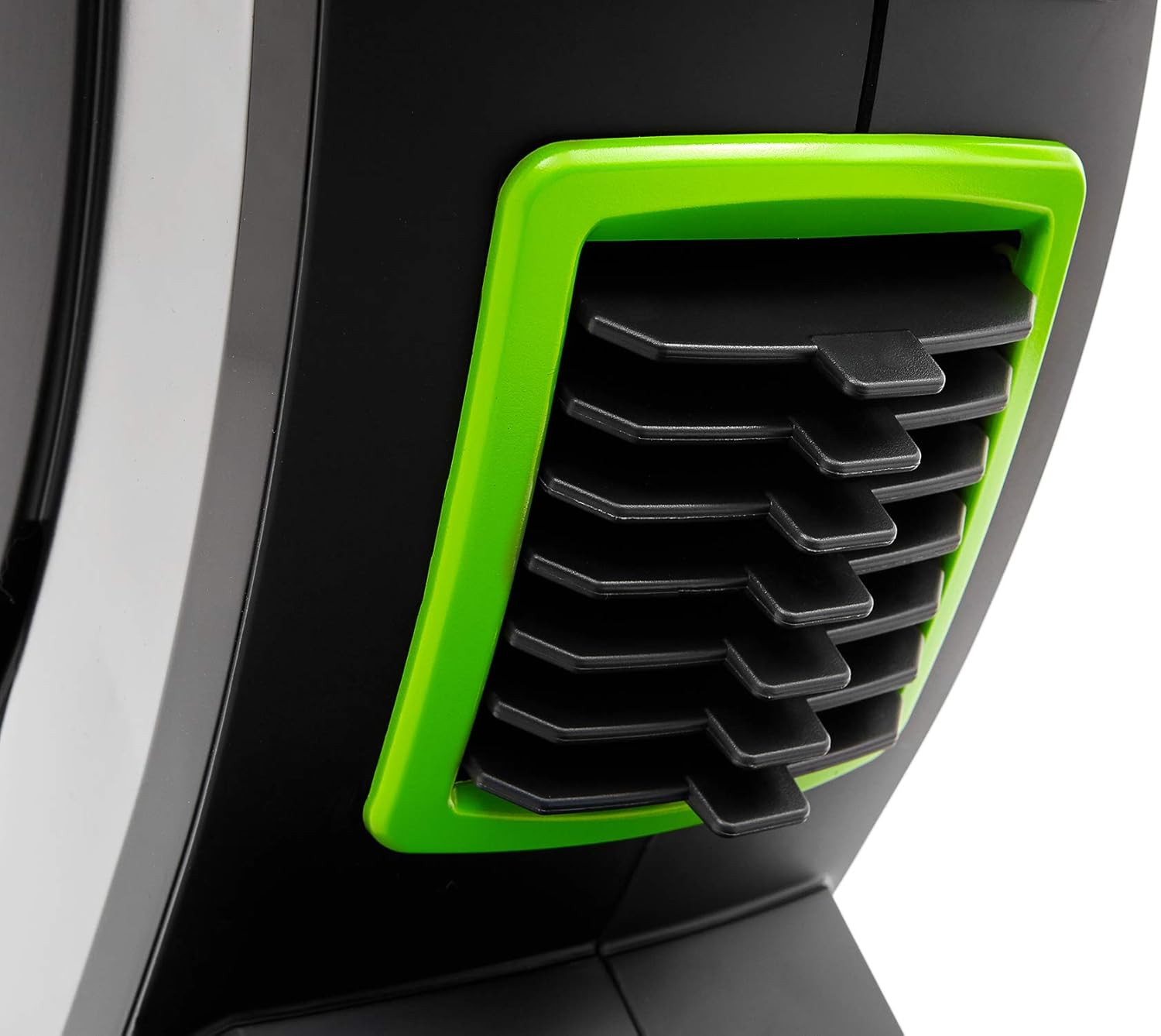
Image: Detail of the resistance adjustment mechanism on the ZIPRO Dash Rowing Machine, showing the numbered settings.
تربیتی کمپیوٹر کا استعمال
The LCD display shows various workout metrics:
- وقت: آپ کی ورزش کا دورانیہ۔
- اسٹروک: کئے گئے اسٹروک کی کل تعداد۔
- تقویم: تخمینی کیلوریز جل گئیں۔
- دل کی شرح: Your heart rate, measured via the Polar T34 telemetry band (if worn and connected).
- Other metrics may include distance, strokes per minute, etc.
Use the buttons on the console (e.g., MODE, SET, RESET) to navigate through display modes, set target values, or reset your workout data. Refer to the console's specific instructions for detailed button functions.
Connecting to Mobile Applications (iConsole+ & Kinomap)
The ZIPRO Dash computer is Bluetooth-enabled for connectivity with mobile apps.
- ایپس ڈاؤن لوڈ کریں: Download the "iConsole+" and/or "Kinomap" applications from your device's app store.
- بلوٹوتھ کو فعال کریں: یقینی بنائیں کہ آپ کے اسمارٹ فون یا ٹیبلیٹ پر بلوٹوتھ فعال ہے۔
- جڑیں: Open the chosen app and follow the in-app instructions to search for and connect to your ZIPRO Dash rowing machine. The app will typically detect the machine automatically.
- خصوصیات:
- iConsole+: Allows wireless control of the rowing computer, access to workout programs, and virtual routes.
- Kinomap: Tracks your progress and offers virtual routes with real-world video, allowing you to compete with other users.

Image: A user rowing on the ZIPRO Dash, with logos for Kinomap and iConsole+ apps, highlighting the machine's smart connectivity features.
فولڈنگ اور اسٹوریج
The ZIPRO Dash is designed to be foldable for convenient storage.
- رہائی کا طریقہ کار: Locate the folding release pin or knob, usually near the connection point of the seat rail to the main frame.
- Fold Up: Carefully lift the seat rail upwards until it locks into the vertical storage position. Ensure it is securely latched.
- منتقل کریں: Use the integrated transport wheels (located on the front stabilizer) to easily move the folded machine for storage.

Image: The ZIPRO Dash Rowing Machine shown in its folded, upright storage position, demonstrating its space-saving design.
دیکھ بھال
Regular maintenance will prolong the life of your rowing machine.
- صفائی: اشتہار کے ساتھ مشین کو صاف کریں۔amp پسینے اور دھول کو دور کرنے کے لیے ہر استعمال کے بعد کپڑا۔ کھرچنے والے کلینر کا استعمال نہ کریں۔
- چکنا: Periodically check the seat rail for smooth operation. If needed, apply a small amount of silicone-based lubricant to the rail.
- معائنہ: Regularly check all bolts, nuts, and moving parts for tightness and wear. Tighten any loose fasteners. Inspect the pulling strap/chain for fraying or damage.
- بیٹری کی تبدیلی: If the console display becomes dim or unresponsive, replace the AA batteries. Note that the battery compartment might require unscrewing the console from its mount.
خرابی کا سراغ لگانا
| مسئلہ | ممکنہ وجہ | حل |
|---|---|---|
| کنسول ڈیٹا ڈسپلے نہیں کر رہا ہے۔ | Batteries are dead or incorrectly installed. Loose connection. | Replace batteries. Check all cable connections to the console. |
| Resistance feels inconsistent or too weak/strong. | Resistance setting is incorrect. Internal mechanism issue. | Adjust the resistance knob. If problem persists, contact support. |
| سیٹ آسانی سے نہیں پھسلتی۔ | Dirt or debris on the rail. Rail needs lubrication. | Clean the seat rail. Apply silicone lubricant. |
| مشین غیر معمولی آوازیں نکالتی ہے۔ | Loose bolts or components. Worn parts. | Check and tighten all bolts. Inspect for worn parts and contact support if necessary. |
| App (iConsole+/Kinomap) not connecting via Bluetooth. | Bluetooth off on device. App permissions. Console not active. | Ensure Bluetooth is on. Grant app permissions. Start rowing to activate console. Restart app/device. |
وضاحتیں
| ماڈل کا نام | ZIPRO Dash |
| ماڈل نمبر | 6299212 |
| رنگ | سیاہ |
| مزاحمت کا طریقہ کار | Magnetic (8 levels) |
| ڈسپلے کی قسم | LCD |
| Tracked Metrics | Time, Strokes, Calories, Heart Rate (with Polar T34 band) |
| کنیکٹوٹی | Bluetooth (iConsole+, Kinomap compatible) |
| زیادہ سے زیادہ صارف کا وزن | 135 کلوگرام (297 پونڈ) |
| Maximum Recommended User Height | 200 سینٹی میٹر (6 فٹ 7 انچ) |
| پروڈکٹ کے طول و عرض (L x W x H) | 207 x 53 x 115 سینٹی میٹر (81.5 x 20.9 x 45.3 انچ) |
| تہہ شدہ ابعاد (تقریباً) | (Vertical storage, specific dimensions not provided but implied by foldable feature) |
| شے کا وزن | 40 کلوگرام (88 پونڈ) |
| فریم کا مواد | Metal / Alloy Steel |
| طاقت کا منبع | Manual (hand-operated), Console: Batteries (AA) |
| خصوصی خصوصیات | Foldable design, Anti-slip footrests, Portable device holder, Stabilizing pads, Transport wheels |
وارنٹی اور سپورٹ
For warranty information, please refer to the warranty card included with your product or visit the official ZIPRO webسائٹ وارنٹی کے دعووں کے لیے اپنی خریداری کا ثبوت رکھیں۔
If you encounter any issues not covered in the troubleshooting section or require further assistance, please contact ZIPRO customer support. Contact details can typically be found on the manufacturer's webسائٹ یا مصنوعات کی پیکیجنگ پر۔
مینوفیکچرر: Morele.net Sp. z oo
Ask a question about this manual
Ask about setup, troubleshooting, compatibility, parts, safety, or missing instructions. Manuals+ will review the question and use this page’s manual context to help answer it.