
NEXT 8000
اگلا 8000 فل ایچ ڈی سیٹلائٹ ریسیور صارف دستی
ماڈل: 8000
تعارف
Thank you for choosing the NEXT 8000 Full HD Satellite Receiver. This manual provides detailed instructions for the proper installation, operation, and maintenance of your device. Please read this manual thoroughly before using the receiver to ensure optimal performance and safety.
The NEXT 8000 is designed to deliver a high-quality viewing experience with its Full HD capabilities, multi-satellite search, and media playback features. It supports various languages and offers convenient software upgrades via USB.
پیکیج کے مشمولات
براہ کرم تصدیق کریں کہ تمام اشیاء پیکیج میں موجود ہیں:
- NEXT 8000 Satellite Receiver Unit
- ریموٹ کنٹرول
- HDMI کیبل
- USB کیبل
- پاور اڈاپٹر

Image: The NEXT 8000 Full HD Satellite Receiver unit shown alongside its remote control.
سیٹ اپ گائیڈ
1. وصول کنندہ کو جوڑنا
اپنے سیٹلائٹ ریسیور کو اپنے ٹیلی ویژن اور سیٹلائٹ ڈش سے جوڑنے کے لیے ان اقدامات پر عمل کریں:
- سیٹلائٹ IN: Connect the coaxial cable from your satellite dish to the 'LNB IN' port on the back of the receiver.
- HDMI کنکشن: Use the provided HDMI cable to connect the 'HD OUT' port on the receiver to an available HDMI input on your television. Note the HDMI input number on your TV (e.g., HDMI 1, HDMI 2).
- AV Connection (Optional): If your TV does not have an HDMI input, use an AV cable (not included) to connect the 'AV' port on the receiver to the corresponding AV inputs on your television.
- پاور کنکشن: Connect the power adapter to the 'DC 12V' input on the receiver, then plug the adapter into a power outlet.
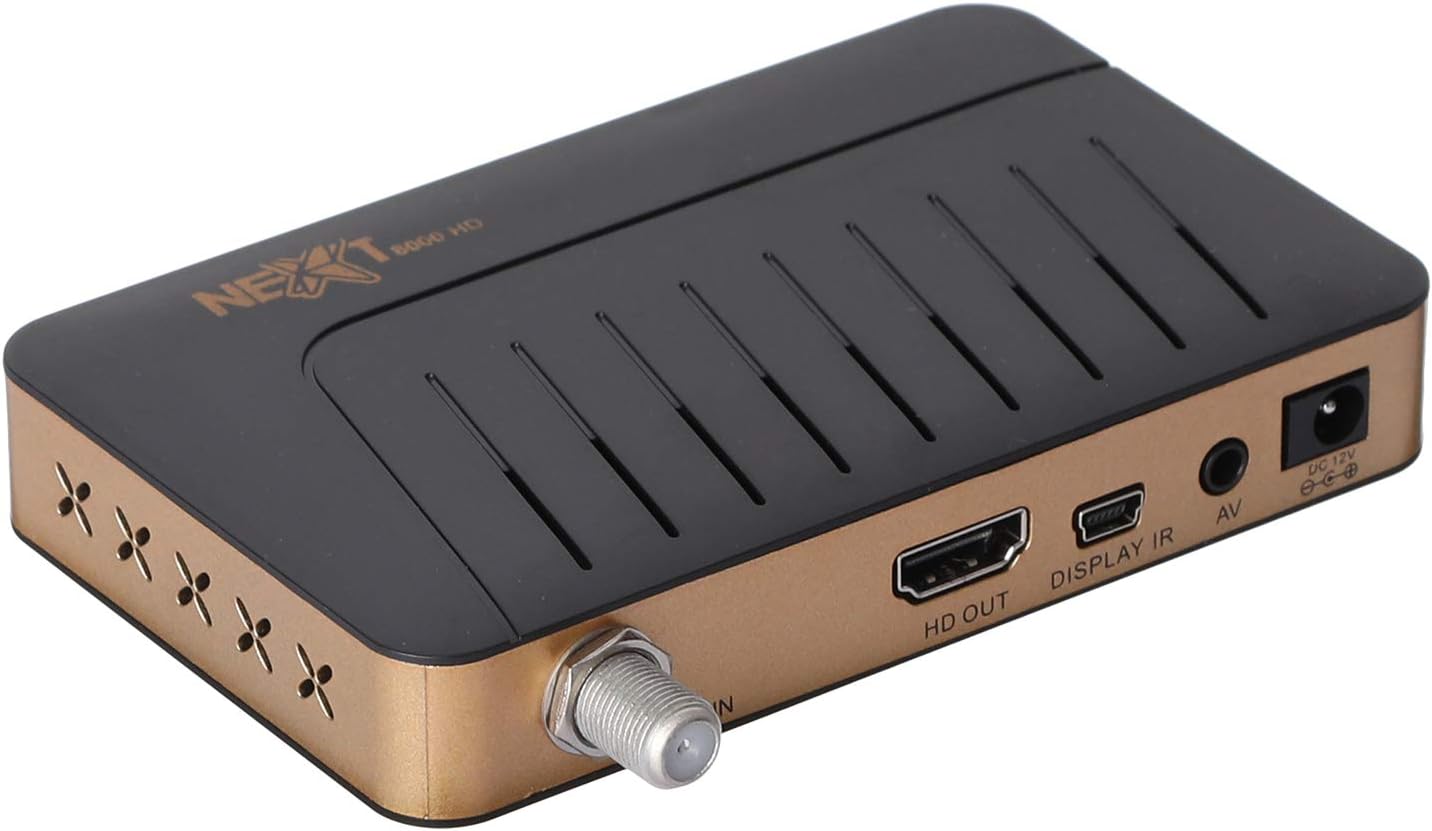
تصویر: پیچھے view of the NEXT 8000 receiver, highlighting the LNB IN, HD OUT (HDMI), AV, and DC 12V power input ports.
2 ابتدائی پاور آن اور سیٹ اپ
تمام کیبلز کو جوڑنے کے بعد:
- Turn on your television and select the correct HDMI or AV input source.
- The receiver will power on automatically. The initial setup wizard should appear on your screen.
- Follow the on-screen instructions to select your preferred language, time zone, and perform a channel scan. Refer to the 'Operating Instructions' section for details on channel scanning.
3. ریموٹ کنٹرول اوورview
ریموٹ کنٹرول کے افعال سے خود کو واقف کریں:

Image: The remote control for the NEXT 8000 satellite receiver, showing various buttons for power, navigation, volume, channel, and special functions.
- پاور بٹن: Turns the receiver on/off or to standby mode.
- مینو: Accesses the main menu for settings and features.
- ٹھیک ہے: Confirms selections or displays channel list.
- تیر کے بٹن (اوپر/نیچے/بائیں/دائیں): مینوز اور اختیارات کے ذریعے نیویگیٹ کرتا ہے۔
- باہر نکلیں: پچھلی اسکرین پر واپس آتا ہے یا مینو سے باہر نکلتا ہے۔
- VOL +/-: حجم کو ایڈجسٹ کرتا ہے۔
- CH +/-: چینلز بدلتے ہیں۔
- ای پی جی: الیکٹرانک پروگرام گائیڈ دکھاتا ہے۔
- SAT: Selects satellite.
- USB: Accesses USB media playback.
- وقت کی شفٹ: Activates the Timeshift function (requires USB storage).
آپریٹنگ ہدایات
1. Channel Search and Management
To find and organize channels:
- دبائیں مینو ریموٹ کنٹرول پر بٹن.
- Navigate to 'Installation' or 'Channel Search' using the arrow buttons and press OK.
- Select 'Multi-satellite search' or 'Network search' based on your setup.
- Follow the on-screen prompts to initiate the scan. The receiver will automatically detect available channels.
- After the scan, you can access options to 'Program lock', 'Delete', 'Move', or 'Rename' channels within the channel management menu.
2. Media Playback via USB
The receiver supports media playback from a USB flash drive.
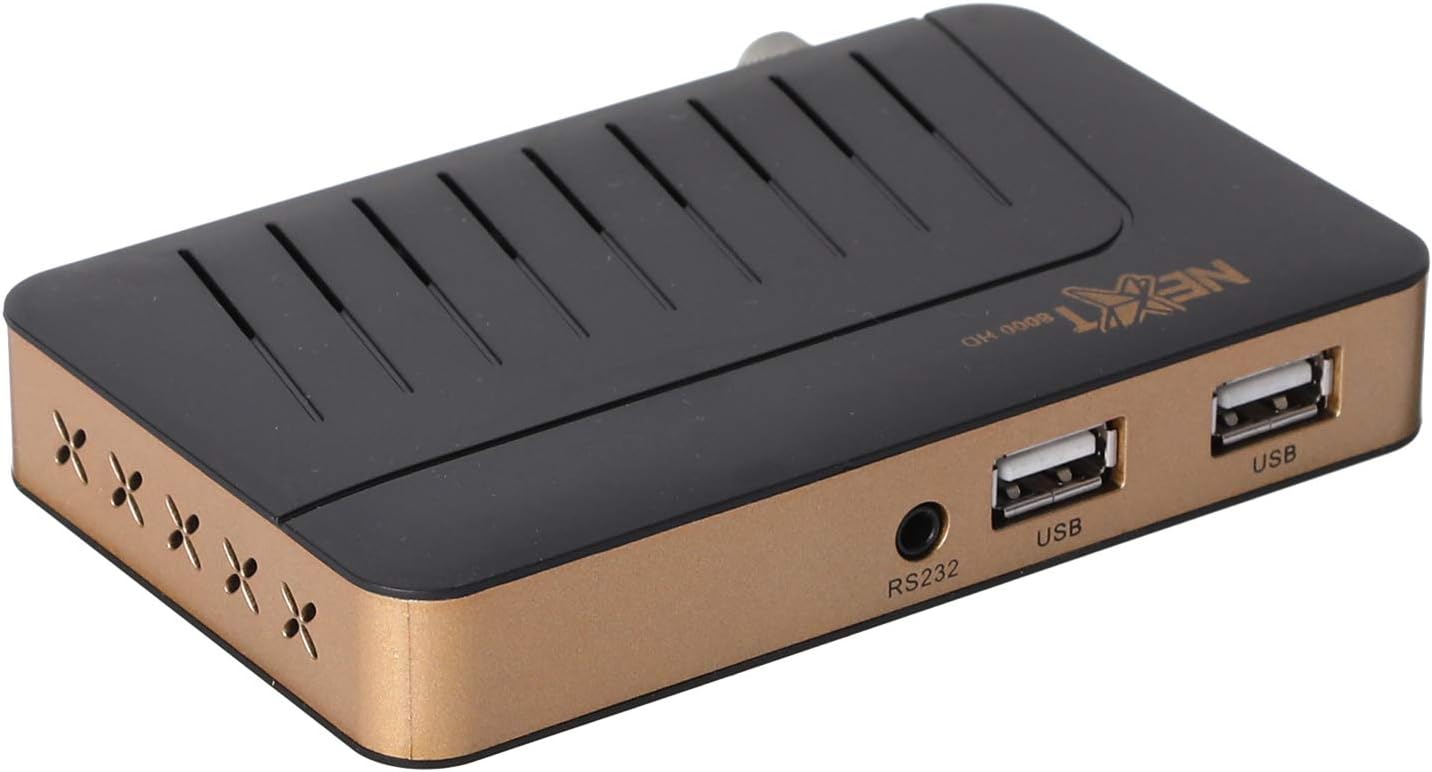
تصویر: سامنے view of the NEXT 8000 receiver, showing the two USB ports available for connecting external storage devices.
- Insert a USB flash drive into one of the USB ports on the receiver.
- دبائیں یو ایس بی button on the remote control or navigate to the 'Media' menu.
- Select the type of media you wish to play (e.g., Video, Music, Photo).
- Browse your USB drive content and select the desired file. The receiver supports AVI, MKV, TS, TP, TRP, MPG, and MP4 files.
3. ریکارڈنگ اور ٹائم شفٹ
To record programs or use the Timeshift function, a USB storage device must be connected.
- ریکارڈنگ: ایک پروگرام دیکھتے وقت، دبائیں ریکارڈ button (usually a red circle) on the remote control to start recording. Press it again to stop. Recorded content will be saved to the connected USB drive.
- وقت کی شفٹ: دبائیں ٹائم شفٹ button on the remote control to pause live TV. You can then fast-forward or rewind within the buffered content.
4. Electronic Program Guide (EPG)
دبائیں ای پی جی پر ریموٹ کنٹرول پر بٹن view the 7-day electronic program guide. This allows you to see upcoming programs and set reminders or recordings.
5. Parental Lock
To restrict access to certain channels or menus, navigate to the 'System Settings' or 'Parental Control' menu. You can set a password to lock programs or specific functions.
دیکھ بھال
1. Software Upgrade via USB
To ensure your receiver has the latest features and bug fixes, you can upgrade its software:
- جدید ترین سافٹ ویئر ڈاؤن لوڈ کریں۔ file from the official NEXT website to a USB flash drive. Ensure the file is placed in the root directory of the USB drive.
- Insert the USB flash drive into the receiver's USB port.
- پر جائیں۔ مینو > 'System Settings' > 'Software Upgrade' (or similar option).
- Select 'Upgrade by USB' and choose the software file.
- Confirm the upgrade. The receiver will restart automatically after the upgrade is complete. Do not power off the receiver during the upgrade process.
2. صفائی
To clean the receiver, disconnect it from the power supply. Use a soft, dry cloth to wipe the exterior surfaces. Do not use liquid cleaners or abrasive materials.
خرابی کا سراغ لگانا
If you encounter issues with your NEXT 8000 receiver, refer to the following table:
| مسئلہ | ممکنہ وجہ | حل |
|---|---|---|
| کوئی تصویر یا آواز نہیں۔ | Incorrect TV input selected; Loose HDMI/AV cable; Receiver not powered on. | Select correct TV input; Check all cable connections; Ensure receiver is powered on. |
| کوئی چینل نہیں ملا | Satellite dish not aligned; Incorrect LNB settings; Channel scan not performed. | Check satellite dish alignment; Verify LNB settings in menu; Perform a channel scan. |
| ریموٹ کنٹرول کام نہیں کر رہا ہے۔ | Dead batteries; Obstruction between remote and receiver; Remote sensor blocked. | Replace batteries; Remove obstructions; Ensure receiver's IR sensor is clear. |
| USB میڈیا نہیں چل رہا ہے۔ | غیر تعاون یافتہ file format; USB drive not properly inserted; Corrupted file. | چیک کریں۔ file format compatibility; Re-insert USB drive; Try a different USB drive or file. |
اگر ان حلوں کو آزمانے کے بعد بھی مسئلہ برقرار رہتا ہے، تو براہ کرم کسٹمر سپورٹ سے رابطہ کریں۔
وضاحتیں
Key technical specifications for the NEXT 8000 Full HD Satellite Receiver:
- ماڈل: 8000
- ویڈیو آؤٹ پٹ ریزولوشن: 576i, 576p, 720p, 1080i, 1080p (50/60 Hz)
- کنیکٹوٹی: HDMI, USB (2 ports), RS232, AV
- معاون آڈیو فارمیٹس: Dolby Digital, DTS, AAC, PCM
- Supported Video/Media Formats: AVI, MKV, TS, TP, TRP, MPG, MP4
- اسٹوریج میموری: 100 satellites, 4000 frequencies, 8000 channels
- پروسیسر: سنپلس
- خصوصیات: Recording by USB flash, Screen enlargement, Multi-satellite search, Network search, Media playback, 7-day Electronic Program Guide (EPG), Teletex, Timeshift, Parental lock.
- طول و عرض: 19.6 x 17.4 x 6.6 سینٹی میٹر
- وزن: 396 گرام
وارنٹی اور سپورٹ
For warranty information and technical support, please refer to the documentation provided with your purchase or visit the official NEXT product support webسائٹ وارنٹی دعووں کے لیے خریداری کے ثبوت کے طور پر اپنی خریداری کی رسید رکھیں۔
Ask a question about this manual
Ask about setup, troubleshooting, compatibility, parts, safety, or missing instructions. Manuals+ will review the question and use this page’s manual context to help answer it.