
1. تعارف
خریداری کے لیے آپ کا شکریہasing the ONIKUMA K1 RGB Gaming Headset. This manual provides detailed instructions for setup, operation, maintenance, and troubleshooting to ensure optimal performance and longevity of your headset. Please read this manual carefully before use and retain it for future reference.
2. پروڈکٹ ختمview
The ONIKUMA K1 is a wired gaming headset designed for multi-platform compatibility, featuring vibrant RGB lighting, 7.1 surround sound, and a noise-cancelling microphone. It is built for comfort during extended gaming sessions.
اہم خصوصیات:
- 7.1 آس پاس کی آواز: Provides immersive audio for an enhanced gaming experience.
- شور کو منسوخ کرنے والا مائیکروفون: Ensures clear communication by reducing background noise.
- آرجیبی لائٹنگ: Dynamic lighting effects for an aesthetic appeal.
- ملٹی پلیٹ فارم مطابقت: Works with PC, PlayStation (PS3, PS4), Mobile devices, and Xbox (Xbox One requires an adapter, not included).
- آرام دہ ڈیزائن: Features soft protein earpads, an adjustable headband, and cozy head cushions.
- ان لائن کنٹرولز: Easy access to volume adjustment and microphone mute.
اجزاء:
The headset includes the main unit with integrated microphone and a wired connection featuring a 3.5mm audio jack and a USB connector for RGB lighting.

Figure 1: Headset with in-line volume and microphone mute control, USB connector for RGB lighting, and 3.5mm audio jack.

Figure 2: Flexible microphone with 160-degree adjustment and 360-degree voice pick-up for clear communication.

Figure 3: Soft protein earpads, adjustable headband, and cozy head cushions designed for supreme comfort.
3. سیٹ اپ ہدایات
Follow these steps to connect your ONIKUMA K1 headset to your device.
ملٹی پلیٹ فارم مطابقت:
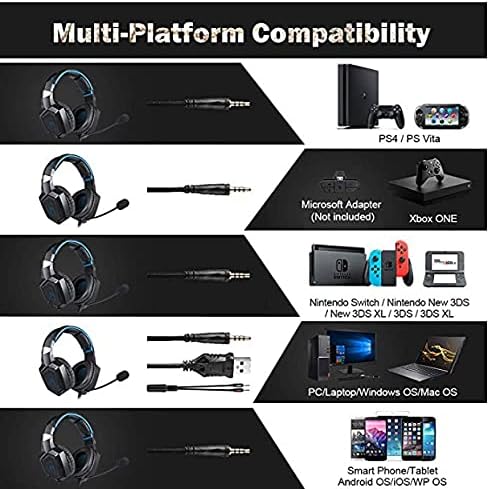
شکل 4: مطابقت ختم ہوگئیview for PC, PlayStation, Xbox, Nintendo Switch, and mobile devices.
- For PC/Laptop (Windows OS/Mac OS):
Connect the 3.5mm audio jack to your computer's audio output/input port. Connect the USB cable to a USB port for RGB lighting. Ensure your sound settings are configured to use the headset. - For PlayStation (PS4/PS Vita/PS3):
Connect the 3.5mm audio jack to the controller or console's audio port. For PS4, go to Settings > Devices > Audio Devices > Output to Headphones > All Audio. Connect the USB for RGB lighting if a USB port is available. - For Xbox ONE:
An additional Microsoft Adapter (not included) is required for older Xbox One controllers. Connect the 3.5mm audio jack to the adapter, then connect the adapter to your controller. Newer Xbox One controllers have a built-in 3.5mm jack. Connect the USB for RGB lighting if a USB port is available on the console. - For Nintendo Switch/New 3DS XL/3DS/3DS XL:
Connect the 3.5mm audio jack directly to the console's audio port. - For Smart Phone/Tablet (Android OS/iOS/WP OS):
Connect the 3.5mm audio jack directly to your mobile device's headphone jack.
4. آپریٹنگ ہدایات
Once connected, you can begin using your headset. Here are the basic operating functions:
- حجم کنٹرول: Use the in-line volume roller to adjust the audio output level. Roll up to increase volume, roll down to decrease.
- مائیکروفون خاموش: Use the in-line switch to mute or unmute the microphone. Slide the switch to the 'OFF' position to mute and 'ON' to unmute.
- Microphone Adjustment: The microphone is flexible. Adjust its position closer to your mouth for optimal voice pickup or away when not in use.
- آرجیبی لائٹنگ: The RGB lighting is powered via the USB connection. Once the USB is plugged in, the lighting will activate automatically. There are no user-adjustable controls for the RGB lighting patterns on the headset itself.
- ہیڈسیٹ فٹ: Adjust the headband to ensure a comfortable and secure fit over your ears. The earpads should fully cover your ears for optimal sound isolation and comfort.
5 دیکھ بھال
مناسب دیکھ بھال آپ کے ہیڈسیٹ کی زندگی کو بڑھا دے گی۔
- صفائی: Use a soft, dry cloth to clean the headset. Do not use liquid cleaners or abrasive materials.
- ذخیرہ: ہیڈسیٹ کو کسی ٹھنڈی، خشک جگہ پر براہ راست سورج کی روشنی اور انتہائی درجہ حرارت سے دور رکھیں۔
- کیبل کی دیکھ بھال: Avoid sharp bends or excessive pulling on the cables to prevent damage. The cable is designed to be tangle-free.
- نمی سے بچیں: The headset is not water-resistant. Keep it away from liquids.
6 خرابیوں کا سراغ لگانا
اگر آپ کو اپنے ہیڈسیٹ کے ساتھ مسائل کا سامنا کرنا پڑتا ہے، تو براہ کرم درج ذیل عام حل سے رجوع کریں:
| مسئلہ | ممکنہ حل |
|---|---|
| کوئی آواز یا کم حجم نہیں |
|
| مائکروفون کام نہیں کر رہا ہے۔ |
|
| آر جی بی لائٹنگ کام نہیں کر رہی ہے۔ |
|
| Sound quality issues (e.g., no 7.1 surround sound) |
|
7. وضاحتیں
| فیچر | تفصیل |
|---|---|
| ماڈل کا نام | K1-B-Black RGB |
| کنیکٹوٹی ٹیکنالوجی | وائرڈ |
| ہیڈ فون جیک | 3.5 ملی میٹر جیک |
| حساسیت | 104 ڈی بی |
| تعدد رسپانس | Not specified (Original data: 3045 Unknown Rate) |
| شور کنٹرول | فعال شور منسوخی |
| ہیڈ فون فارم فیکٹر | کان سے زیادہ |
| کان کی جگہ کا تعین | کان سے زیادہ |
| رنگ | سیاہ |
| برانڈ کا نام | اونیکوما |
| مصنوعات کے طول و عرض | 22.5 x 19.5 x 10.5 سینٹی میٹر |
| شے کا وزن | 394 گرام |
| کیبل کی خصوصیت | الجھن سے پاک |
| کنٹرول کی قسم | والیوم کنٹرول |
| ہم آہنگ آلات | ملٹی پلیٹ فارم |
| تجویز کردہ استعمال | Gaming, Making Calls |
| مصنوعات کے مخصوص استعمال | گیمنگ ہیڈسیٹ |
| مواد | Plastic, Polycarbonate Leather (PC) |
| عمر کی حد کی تفصیل | بالغ |
| پانی کی مزاحمت کی سطح | پانی مزاحم نہیں |
8. وارنٹی اور سپورٹ
For warranty information or technical support, please refer to the documentation included with your purchase or contact the seller directly. Keep your proof of purchase for any warranty claims.