
1. تعارف
Welcome to the user manual for your new Alienware m15 R4 Gaming Laptop. This powerful machine is designed to deliver an immersive gaming experience with its high-performance components. Featuring an Intel Core i7-10870H processor, NVIDIA GeForce RTX 3070 graphics, a 15.6-inch Full HD 300Hz display, and a 1TB PCIe SSD, this laptop is built for speed and responsiveness. This manual provides essential information on setting up, operating, maintaining, and troubleshooting your device to ensure optimal performance and longevity.
2. باکس میں کیا ہے۔
Upon unboxing your Alienware m15 R4, please verify that all the following items are included:
- Alienware m15 R4 Notebook
- پاور کی ہڈی
- پاور اڈاپٹر
- صارف دستی (یہ دستاویز)
3. پروڈکٹ ختمview
Familiarize yourself with the key features and components of your Alienware m15 R4 gaming laptop.
3.1 محاذ View
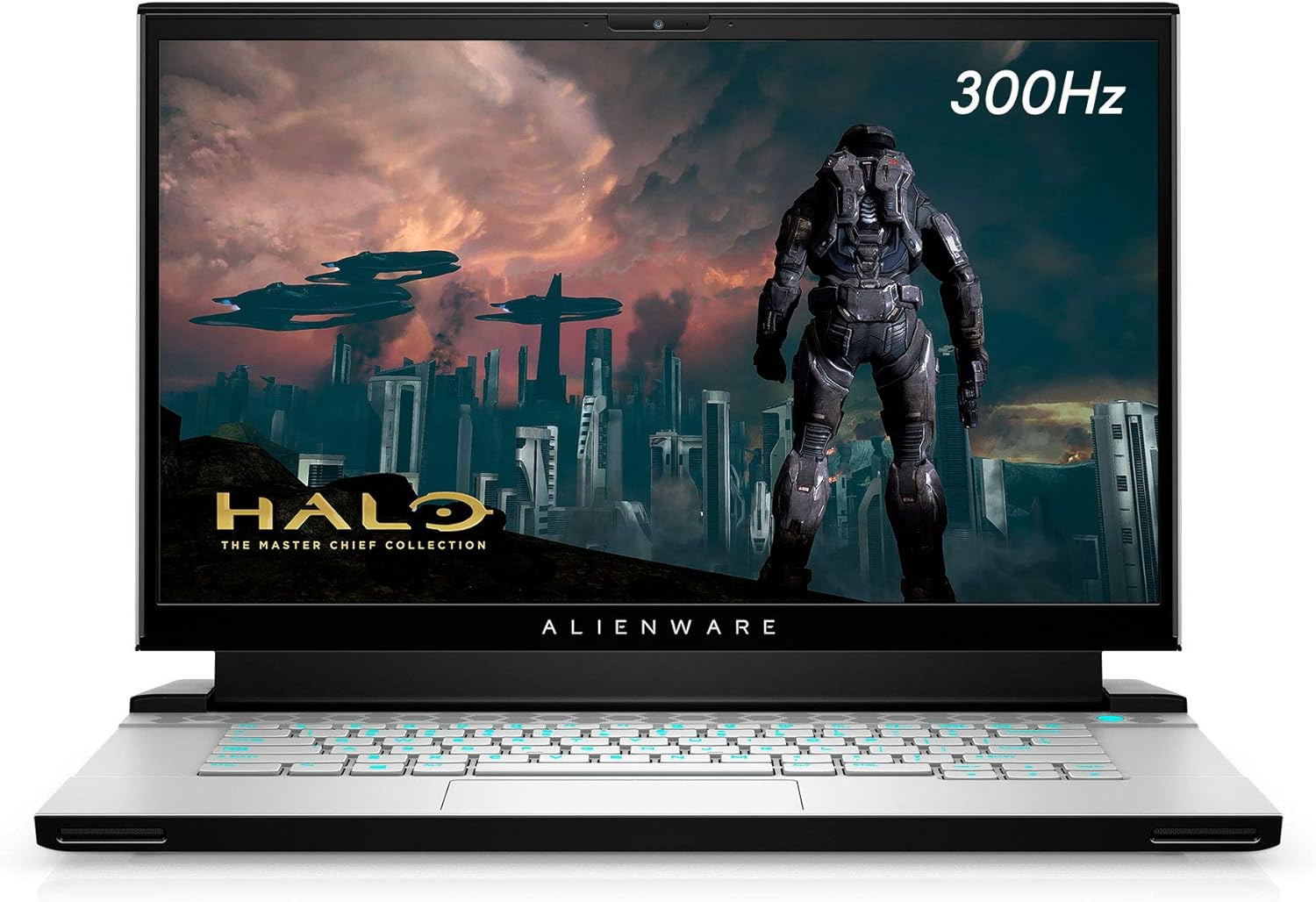
تصویر 3.1: سامنے والا view of the Alienware m15 R4 laptop, showcasing the 15.6-inch Full HD display with a 300Hz refresh rate, ideal for immersive gaming. The Alienware logo is visible below the screen.
3.2 بائیں طرف کی بندرگاہیں۔

تصویر 3.2: Left side of the laptop, featuring a USB 3.0 Type-A port, an Ethernet port for wired network connectivity, and a 3.5mm audio jack for headphones or headsets.
3.3 دائیں طرف کی بندرگاہیں۔

تصویر 3.3: Right side of the laptop, equipped with two USB 3.0 Type-A ports and an SD card reader for convenient data transfer from memory cards.
3.4 Rear Ports and Cooling

تصویر 3.4: پیچھے view of the laptop, highlighting the robust cooling vents and essential ports including HDMI, Mini-DisplayPort, Thunderbolt 3 (USB-C), and the power adapter input. This design optimizes airflow and connectivity.
3.5 کی بورڈ اور ٹچ پیڈ

تصویر 3.5: اپر سے نیچے view of the Alienware m15 R4's keyboard and touchpad. The keyboard features per-key RGB lighting and a comfortable layout for gaming and typing. The precision touchpad offers smooth navigation.
3.6 Laptop Back and Alienware Logo

تصویر 3.6: The back of the Alienware m15 R4 laptop, featuring the iconic illuminated Alienware head logo. The sleek design and Lunar Light finish are prominent.
3.7 کلیدی خصوصیات
- ڈسپلے: 15.6-inch FHD (1920 x 1080) 300Hz 3ms 300-nits 100% sRGB color gamut for fluid visuals.
- پروسیسر: 10th Generation Intel Core i7-10870H (8-Core, 16MB Cache, up to 5.0GHz Max Turbo Frequency).
- یادداشت: 16GB 2933MHz DDR4 RAM (Note: RAM is soldered and not user-upgradeable on some configurations).
- ذخیرہ: 1TB PCIe SSD for fast boot times and game loading.
- گرافکس: NVIDIA GeForce RTX 3070 8GB GDDR6 for high-fidelity gaming.
- کنیکٹوٹی: Killer Wi-Fi 6 AX1650i 802.11ax 2x2 Wireless LAN + Bluetooth 5.1.
- آپریٹنگ سسٹم: Windows 10 Home (upgradeable to Windows 11).
4. سیٹ اپ گائیڈ
Follow these steps to set up your Alienware m15 R4 for the first time.
- پاور سے رابطہ کریں: Plug the power adapter into the laptop's power input port (located at the rear) and then into a wall outlet.
- ابتدائی بوٹ: Open the laptop lid and press the power button (located on the top right of the keyboard deck). The Alienware logo will illuminate, and the system will begin its initial boot sequence.
- ونڈوز سیٹ اپ: Follow the on-screen instructions to complete the Windows 10 Home setup. This includes selecting your region, language, creating a user account, and connecting to a Wi-Fi network.
- ڈرائیور اپڈیٹس: After Windows setup, it is recommended to connect to the internet and allow Windows Update to download and install the latest drivers and security patches. You can also visit the official Alienware support website for the latest specific drivers for your model.
- ایلین ویئر کمانڈ سینٹر: Explore the pre-installed Alienware Command Center software to customize lighting, power profiles, and monitor system performance.
5. آپریٹنگ ہدایات
This section covers basic operation and usage tips for your Alienware m15 R4.
5.1 پاور مینجمنٹ
- پاور آن/آف: Press the power button to turn on the laptop. To turn off, go to Start > Power > Shut down in Windows.
- نیند موڈ: Close the lid or select Sleep from the Start > Power menu to put the laptop into a low-power state.
- دوبارہ شروع کریں: Select Restart from the Start > Power menu to reboot the system.
5.2 کی بورڈ اور ٹچ پیڈ
- کی بورڈ بیک لائٹنگ: Customize the per-key RGB lighting effects using the Alienware Command Center.
- فنکشن کیز: استعمال کریں۔ Fn key in combination with the F1-F12 keys for quick access to features like volume control, screen brightness, and external display switching.
- ٹچ پیڈ اشارے: The precision touchpad supports multi-touch gestures for scrolling, zooming, and switching applications. Refer to Windows settings for customization.
5.3 گیمنگ پرفارمنس
- گیم موڈ: Windows 10 includes a Game Mode feature that optimizes system resources for gaming. Enable it via Windows Settings > Gaming > Game Mode.
- ایلین ویئر کمانڈ سینٹر: Utilize the Command Center to create custom performance profiles for your games, manage fan speeds, and monitor temperatures.
- بیرونی ڈسپلے: For an enhanced gaming experience, connect to an external high-refresh-rate monitor using the HDMI or Mini-DisplayPort.
6 دیکھ بھال
Regular maintenance helps ensure the longevity and optimal performance of your laptop.
- صفائی:
- اسکرین اور بیرونی حصے کو صاف کرنے کے لیے نرم، لنٹ سے پاک کپڑا استعمال کریں۔ سخت کیمیکلز سے پرہیز کریں۔
- Use compressed air to clear dust from cooling vents periodically to maintain airflow.
- سافٹ ویئر اپ ڈیٹس:
- Regularly check for Windows Updates to ensure your operating system is secure and up-to-date.
- Update graphics drivers (NVIDIA GeForce Experience) and other system drivers (Alienware Update or Dell SupportAssist) for best performance.
- بیٹری کی دیکھ بھال:
- بیٹری کو بار بار مکمل طور پر خارج کرنے سے گریز کریں۔
- اگر لیپ ٹاپ کو لمبے عرصے کے لیے اسٹور کر رہے ہیں، تو یقینی بنائیں کہ بیٹری تقریباً 50-80% تک چارج ہو رہی ہے۔
- اسٹوریج مینجمنٹ: وقتا فوقتا غیر ضروری چیزوں کو صاف کریں۔ files and uninstall unused programs to free up disk space and maintain system speed.
7 خرابیوں کا سراغ لگانا
This section addresses common issues you might encounter with your Alienware m15 R4.
7.1 Performance Issues (Lag, Slowdowns)
- Check Background Processes: Open Task Manager (Ctrl+Shift+Esc) to identify and close resource-intensive applications.
- ڈرائیوروں کو اپ ڈیٹ کریں: Ensure your graphics drivers and chipset drivers are up-to-date.
- کولنگ: Ensure cooling vents are not obstructed. Excessive heat can lead to performance throttling. Consider using Alienware Command Center to adjust fan profiles.
- پاور موڈ: Ensure the laptop is set to a "High Performance" or "Balanced" power plan, especially when gaming.
7.2 زیادہ گرم ہونا
- وینٹیلیشن: Ensure the laptop is on a hard, flat surface to allow proper airflow. Avoid using it on soft surfaces like beds or couches.
- وینٹ صاف کریں: Use compressed air to clear dust from the intake and exhaust vents.
- پنکھے کی رفتار: Adjust fan curves in Alienware Command Center to increase cooling during intense workloads.
7.3 ڈسپلے کے مسائل (کوئی تصویر نہیں، ٹمٹماہٹ)
- بیرونی مانیٹر: یہ چیک کرنے کے لیے کہ آیا مسئلہ لیپ ٹاپ کے ڈسپلے یا گرافکس کارڈ میں ہے ایک بیرونی مانیٹر کو جوڑیں۔
- ڈرائیور کی دوبارہ تنصیب: Reinstall graphics drivers.
- چمک: Ensure display brightness is not set to minimum.
7.4 Keyboard/Touchpad Unresponsive
- دوبارہ شروع کریں: A simple restart can often resolve temporary unresponsiveness.
- ڈرائیور چیک: Ensure keyboard and touchpad drivers are correctly installed and up-to-date in Device Manager.
- بیرونی آلات: Disconnect any external keyboards or mice to rule out conflicts.
8. وضاحتیں
Detailed technical specifications for the Alienware m15 R4 (Model: AWM15R4-7689WHT-PUS).
| فیچر | تفصیلات |
|---|---|
| برانڈ | ایلین ویئر |
| ماڈل کا نام | ایلین ویئر ایم 15 آر 4 |
| آئٹم ماڈل نمبر | AWM15R4-7689WHT-PUS |
| اسکرین کا سائز | 15.6 انچ |
| اسکرین ریزولوشن | 1920 x 1080 پکسلز (FHD) |
| ریفریش ریٹ ڈسپلے کریں۔ | 300Hz |
| پروسیسر | Intel Core i7-10870H (8-Core, up to 5.0GHz) |
| رام | 16 GB DDR4 (2933 MHz) |
| ہارڈ ڈرائیو | 1 ٹی بی PCIe SSD |
| گرافکس کا پروسیسر | NVIDIA GeForce RTX 3070 |
| گرافکس کارڈ ریم کا سائز | 8 جی بی جی ڈی ڈی آر 6 |
| آپریٹنگ سسٹم | ونڈوز 10 ہوم |
| وائرلیس قسم | Killer Wi-Fi 6 AX1650i 802.11ax, Bluetooth 5.1 |
| USB 3.0 پورٹس | 3 |
| شے کا وزن | 5.5 پاؤنڈ |
| پروڈکٹ کے طول و عرض (LxWxH) | 14.19 x 10.86 x 0.78 انچ |
| رنگ | Lunar Light (White) |
| بیٹریاں | 1 لتیم آئن بیٹری (شامل) |
9. وارنٹی اور سپورٹ
Your Alienware m15 R4 laptop comes with a standard manufacturer's warranty. For detailed information regarding warranty coverage, terms, and conditions, please refer to the warranty documentation included with your purchase or visit the official Dell/Alienware support webسائٹ
تکنیکی معاونت:
- For technical assistance, driver downloads, and troubleshooting guides, please visit the ڈیل سپورٹ webسائٹ.
- You can also contact Alienware customer support directly through their webذاتی مدد کے لیے سائٹ۔
Please have your service tag or express service code ready when contacting support, as this will help expedite the process.