
SPRT POS58 IVU
SPRT POS58 IVU Receipt Thermal Printer User Manual
Model: POS58 IVU
تعارف
This manual provides essential information for the proper setup, operation, and maintenance of your SPRT POS58 IVU Receipt Thermal Printer. Please read this manual thoroughly before using the printer to ensure optimal performance and longevity.
The SPRT POS58 IVU is a compact and efficient thermal receipt printer designed for various point-of-sale applications. It features USB connectivity and is compatible with 5.7 cm wide thermal paper.
سیٹ اپ
1 پیک کھولنا اور معائنہ
- پیکیجنگ سے پرنٹر اور تمام لوازمات کو احتیاط سے ہٹا دیں۔
- Verify that all components are present: printer unit, power adapter, USB cable.
- Inspect the printer for any visible damage. If damaged, contact your supplier immediately.
2. پرنٹر کو جوڑنا
- پاور سے رابطہ کریں: Insert the power adapter cable into the printer's power port and plug the other end into a suitable power outlet.
- USB سے جڑیں: USB کیبل کے ایک سرے کو پرنٹر کے USB پورٹ سے اور دوسرے سرے کو اپنے کمپیوٹر یا POS سسٹم پر دستیاب USB پورٹ سے جوڑیں۔
- پاور آن: Locate the power switch on the printer (typically on the side or front) and turn it to the 'ON' position.
3. Loading Thermal Paper
The SPRT POS58 IVU printer uses standard 5.7 cm wide thermal paper rolls.
- Open the paper cover by pressing the release button or lifting the latch (location may vary slightly).
- Insert the thermal paper roll with the printing surface facing the thermal head. Ensure the roll is seated correctly in the paper compartment.
- کٹر کے پاس سے تھوڑی مقدار میں کاغذ نکالیں۔
- Close the paper cover firmly until it clicks into place.
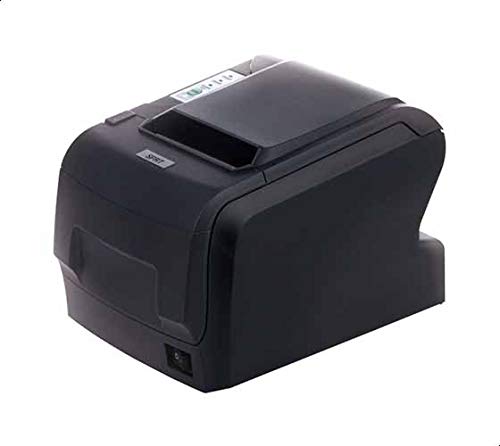
Figure 1: SPRT POS58 IVU Receipt Thermal Printer. This image displays the compact black thermal printer from an angled view, highlighting its paper output slot and the power switch located on the side.
آپریٹنگ ہدایات
بنیادی پرنٹنگ
- یقینی بنائیں کہ پرنٹر آن ہے اور آپ کے کمپیوٹر/POS سسٹم سے منسلک ہے۔
- Install the necessary printer drivers on your operating system if not already installed. Refer to the driver installation guide provided separately or available from the manufacturer's webسائٹ
- From your application (e.g., POS software, word processor), select the SPRT POS58 IVU as your printer.
- Initiate the print command. The printer will automatically feed and print the receipt.
- Tear off the receipt against the serrated edge of the paper output slot.
اشارے لائٹس
پرنٹر میں عام طور پر اس کی حیثیت دکھانے کے لیے اشارے کی روشنی ہوتی ہے:
- بجلی کی روشنی: اشارہ کرتا ہے کہ پرنٹر آن ہے۔
- خرابی کی روشنی: Illuminates or blinks to indicate an error condition (e.g., paper out, print head overheat).
- Paper Out Light: Indicates that the paper roll is empty or incorrectly loaded.
دیکھ بھال
تھرمل ہیڈ کی صفائی
Regular cleaning of the thermal head ensures clear print quality and extends printer life. Clean the thermal head after every 50-100 km of printing or if print quality degrades.
- پرنٹر کو بند کریں اور پاور کیبل کو منقطع کریں۔
- کاغذ کا احاطہ کھولیں۔
- Wait a few minutes for the thermal head to cool down if the printer has been recently used.
- Gently wipe the thermal head surface with a cotton swab lightly moistened with absolute alcohol (ethanol).
- Allow the alcohol to evaporate completely before closing the cover and reconnecting power.
باہر کی صفائی
پرنٹر کے بیرونی حصے کو نرم سے صاف کریں، ڈیamp کپڑا مضبوط سالوینٹس یا کھرچنے والے کلینر کا استعمال نہ کریں۔
کاغذ کی ہینڈلنگ
- Use only high-quality thermal paper to prevent damage to the thermal head and ensure optimal print quality.
- Store thermal paper in a cool, dry place away from direct sunlight and heat.
خرابی کا سراغ لگانا
| مسئلہ | ممکنہ وجہ | حل |
|---|---|---|
| پرنٹر آن نہیں ہوتا ہے۔ | Power cable not connected; power outlet faulty; printer switch off. | Check power cable connection; try a different outlet; ensure power switch is ON. |
| No printing / Blank output. | Paper loaded incorrectly (upside down); paper out; driver not installed/configured; printer not selected. | Reload paper correctly (printing side facing thermal head); replace paper roll; install/reinstall drivers; select printer in application. |
| ناقص پرنٹ کوالٹی۔ | Thermal head dirty; low-quality paper; paper stored improperly. | Clean thermal head; use recommended thermal paper; store paper correctly. |
| کاغذ کا جام۔ | Paper not loaded straight; foreign object in paper path. | Open cover, remove jammed paper carefully, reload paper straight; inspect for obstructions. |
وضاحتیں
| فیچر | تفصیل |
|---|---|
| برانڈ | ایس پی آر ٹی |
| ماڈل نمبر | POS58 IVU |
| پرنٹر کی قسم | رسید تھرمل پرنٹر |
| کنیکٹوٹی ٹیکنالوجی | یو ایس بی |
| پرنٹ میڈیا | Labels (commonly used for receipts) |
| کاغذ کی چوڑائی | 5.7 سینٹی میٹر |
| رنگ | سیاہ |
| شے کا وزن | 1.82 کلوگرام |
| پیکیج کے طول و عرض | 28 x 21.4 x 17.8 سینٹی میٹر |
وارنٹی اور سپورٹ
Specific warranty terms and detailed support contact information are not provided within the available product data. For warranty claims, technical support, or service inquiries, please refer to the documentation included with your purchase or contact your point of sale or the manufacturer directly.
You may find additional resources and contact details on the official SPRT webسائٹ
Ask a question about this manual
Ask about setup, troubleshooting, compatibility, parts, safety, or missing instructions. Manuals+ will review the question and use this page’s manual context to help answer it.