
تعارف
Thank you for choosing the Opal Selfie Stick OP-Sel-BT-01. This manual provides essential information for the safe and effective use of your device. Please read it thoroughly before operation and retain it for future reference.
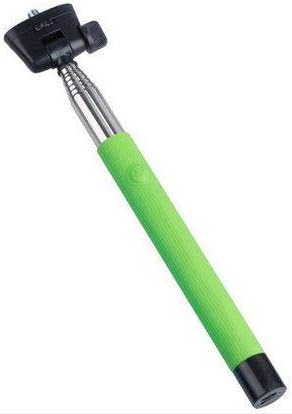
تصویر 1: The Opal Selfie Stick OP-Sel-BT-01 in green, showing its extendable arm, phone holder, and comfortable grip.
مصنوعات کی خصوصیات
- رنگ: سبز
- اہم مواد: سٹیل
- زیادہ سے زیادہ بوجھ کی اہلیت: 500 گرام
- کنیکٹوٹی: وائرلیس (بلوٹوتھ)
- ہم آہنگ نظام: Android 3.0 اور اس سے اوپر، iOS 4.0 اور اس سے اوپر
سیٹ اپ
- Unfold the Selfie Stick: Gently pull the phone holder section upwards to extend the stick.
- Adjust Phone Holder: فون cl کھولیں۔amp and securely place your smartphone within it. Ensure the phone is centered and stable. The clamp is designed to hold various phone sizes.
- پاور آن: Locate the power button (if applicable, usually on the handle) and press it to turn on the selfie stick. An indicator light may illuminate.
آپریٹنگ ہدایات
بلوٹوت جوڑی بنانا
- Ensure the selfie stick is powered on and in pairing mode (indicator light may flash rapidly).
- اپنے اسمارٹ فون پر، پر جائیں۔ ترتیبات > بلوٹوتھ.
- بلوٹوتھ آن کریں اور دستیاب آلات تلاش کریں۔
- Select "Opal OP-Sel-BT-01" or a similar name from the list of devices.
- Once paired, the indicator light on the selfie stick may turn solid or turn off, indicating a successful connection.
تصاویر/ویڈیوز لینا
- اپنے اسمارٹ فون کی کیمرہ ایپلیکیشن کھولیں۔
- سیلفی اسٹک کو اپنی مطلوبہ لمبائی تک بڑھائیں۔
- Position your phone for the desired shot.
- Press the shutter button on the selfie stick handle to capture a photo or start/stop video recording.
دیکھ بھال
- صفائی: Wipe the selfie stick with a soft, dry cloth. Do not use abrasive cleaners or solvents.
- ذخیرہ: Store the device in a cool, dry place away from direct sunlight and extreme temperatures. Retract the stick fully before storage.
- بیٹری کی دیکھ بھال: If the selfie stick has a rechargeable battery, ensure it is charged periodically even when not in use to maintain battery health.
خرابی کا سراغ لگانا
| مسئلہ | ممکنہ وجہ | حل |
|---|---|---|
| فون کے ساتھ جوڑا نہیں بنایا جا سکتا | Selfie stick not in pairing mode; Bluetooth off on phone; battery low. | Ensure stick is on and in pairing mode. Turn phone's Bluetooth off/on. Charge the selfie stick. |
| Shutter button not working | Not paired; camera app settings. | Verify successful Bluetooth pairing. Check camera app settings for volume button shutter control. |
| Phone not stable in clamp | Phone not centered; clamp not fully secured. | Re-position phone to be centered. Ensure clamp is firmly gripping the phone. |
وضاحتیں
- ماڈل: OP-Sel-BT-01
- برانڈ: دودھیا پتھر
- رنگ: سبز
- اہم مواد: سٹیل
- زیادہ سے زیادہ بوجھ کی اہلیت: 500 گرام
- کنیکٹوٹی: وائرلیس (بلوٹوتھ)
- تعاون یافتہ آپریٹنگ سسٹمز: Android 3.0+ ، iOS 4.0+
- ASIN: B091DBB122
- پہلی دستیاب تاریخ: 30 مارچ 2021
وارنٹی اور سپورٹ
For information regarding warranty coverage or technical support, please refer to the documentation included with your purchase or visit the official Opal webسائٹ مخصوص وارنٹی کی شرائط علاقے اور خوردہ فروش کے لحاظ سے مختلف ہو سکتی ہیں۔
حفاظتی معلومات
- طویل عرصے تک آلے کو انتہائی درجہ حرارت، نمی، یا براہ راست سورج کی روشنی کے سامنے نہ رکھیں۔
- بچوں کی پہنچ سے دور رکھیں۔
- ڈیوائس کو الگ کرنے یا اس میں ترمیم کرنے کی کوشش نہ کریں۔ یہ وارنٹی کو باطل کر سکتا ہے اور نقصان کا سبب بن سکتا ہے۔
- Ensure your phone is securely fastened in the clamp before extending the stick.