
LG 27GP850-B
LG 27GP850-B الٹرا گیئر گیمنگ مانیٹر صارف دستی
تعارف
This manual provides essential information for the safe and efficient use of your LG 27GP850-B UltraGear Gaming Monitor. Please read it thoroughly before operating the device and retain it for future reference.
اہم خصوصیات:
- 27-inch QHD (2560 x 1440) Nano IPS Display
- 1ms (GtG) Response Time
- 165Hz Refresh Rate (Overclockable to 180Hz)
- NVIDIA G-SYNC ہم آہنگ
- AMD FreeSync پریمیم
- DCI-P3 98% Color Gamut with HDR 10
- 3-Side Virtually Borderless Display
- Height, Pivot, and Tilt Adjustable Stand
کیا شامل ہے۔
تصدیق کریں کہ تمام اجزاء پیکیجنگ میں موجود ہیں:
- مانیٹر
- اسٹینڈ (بیس اور گردن)
- پاور کی ہڈی
- Warranty Card & Owner's Manual
- HDMI کیبل
- ڈسپلے پورٹ کیبل
- USB 3.0 کیبل
سیٹ اپ کی ہدایات
1 اسٹینڈ کو جمع کرنا
Carefully remove the monitor and stand components from the packaging. Attach the stand base to the stand neck, then secure the assembled stand to the monitor panel.

Image showing the monitor panel, stand neck, and stand base components.

Image illustrating the attachment of the stand neck to the monitor panel.
2 کنیکٹنگ کیبلز
Connect the power cord to the monitor and a power outlet. Use the provided DisplayPort or HDMI cable to connect the monitor to your computer's graphics card. For USB hub functionality, connect the USB 3.0 upstream cable from the monitor to your computer.

پیچھے view of the LG 27GP850-B monitor, highlighting the input/output ports.

Close-up of the monitor's connectivity ports: DisplayPort, HDMI, USB upstream, and USB downstream.
3 مانیٹر کی پوزیشن کو ایڈجسٹ کرنا
The stand allows for height, tilt, and pivot adjustments to optimize your viewتجربہ ہے.
- اونچائی ایڈجسٹمنٹ: Gently push or pull the monitor vertically to adjust its height.
- جھکاؤ ایڈجسٹمنٹ: Tilt the monitor panel forward or backward to find a comfortable viewING زاویہ
- پیوٹ ایڈجسٹمنٹ: زمین کی تزئین اور پورٹریٹ واقفیت کے درمیان سوئچ کرنے کے لیے مانیٹر کو 90 ڈگری گھمائیں۔

Illustration of the monitor's height adjustment mechanism.

The LG 27GP850-B monitor rotated 90 degrees into portrait mode.
آپریٹنگ ہدایات
1. پاور آن/آف
Press the joystick button located at the bottom center of the monitor to power it on or off.
2. آن اسکرین ڈسپلے (OSD) مینو
Use the joystick button to navigate the OSD menu. Press the joystick to open the menu, then move it up/down/left/right to select and adjust settings.
عام OSD ترتیبات:
- گیم موڈ: Select various game modes (e.g., Gamer 1, FPS, RTS) for optimized visual settings.
- تصویر: چمک، کنٹراسٹ، نفاست، گاما، اور رنگ درجہ حرارت کو ایڈجسٹ کریں۔
- ان پٹ: Select the active input source (DisplayPort, HDMI 1, HDMI 2).
- عمومی: زبان، OSD لاک، پاور انڈیکیٹر، اور معلومات کے لیے رسائی کی ترتیبات۔
3. ریفریش ریٹ اور اڈاپٹیو سنک
The monitor supports a native 165Hz refresh rate, overclockable to 180Hz. Ensure your graphics card settings are configured to utilize the highest available refresh rate.
NVIDIA G-SYNC ہم آہنگ: This monitor is officially verified to work with NVIDIA G-SYNC technology, reducing screen tearing and stuttering for smoother gameplay. Enable G-SYNC in your NVIDIA Control Panel.

Visual comparison of screen tearing (left) versus smooth gameplay with NVIDIA G-SYNC Compatible technology (right).
AMD FreeSync پریمیم: For AMD graphics cards, enable FreeSync Premium in your AMD Radeon Software to eliminate screen tearing and choppiness.
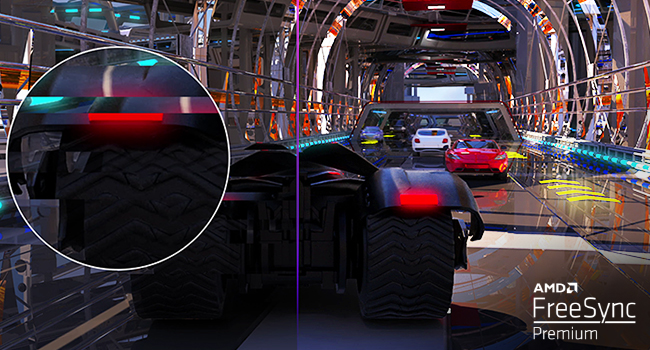
Image demonstrating how AMD FreeSync Premium eliminates screen stuttering and tearing.
4. گیمنگ کی خصوصیات
The LG UltraGear monitor includes several features designed to enhance your gaming experience:
- ڈائنامک ایکشن سنک (DAS): Minimizes input lag for real-time action.
- بلیک اسٹیبلائزر: Enhances visibility in dark areas of games.
- کراسئر: FPS گیمز میں بہتر ہدف کی درستگی کے لیے اسکرین کے بیچ میں ایک فکسڈ کراس ہیئر رکھتا ہے۔
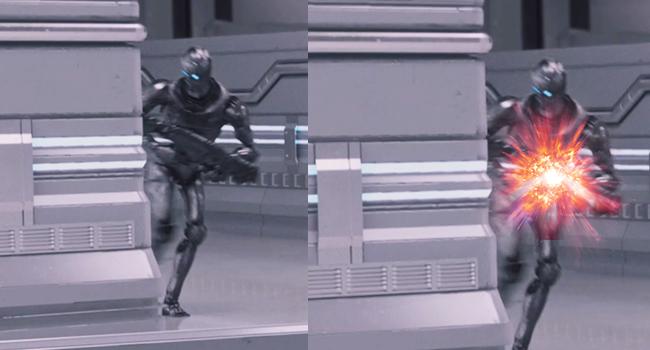
Side-by-side comparison illustrating reduced input lag with Dynamic Action Sync (DAS).
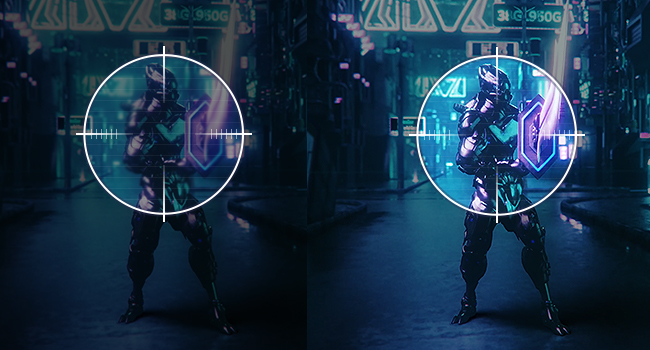
Before and after image showing enhanced visibility in dark game scenes using Black Stabilizer.
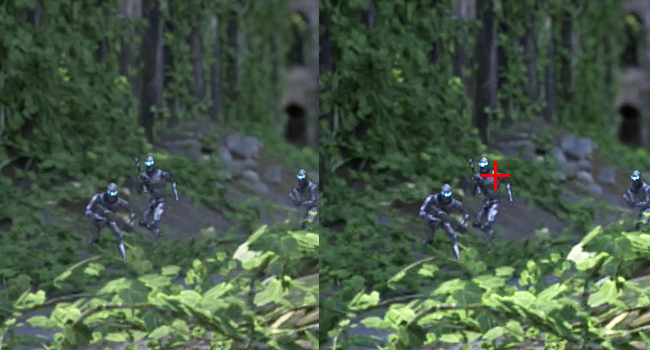
Image displaying the on-screen Crosshair feature for improved aiming accuracy.
دیکھ بھال
اپنے مانیٹر کی لمبی عمر اور بہترین کارکردگی کو یقینی بنانے کے لیے، دیکھ بھال کے ان رہنما خطوط پر عمل کریں:
- سکرین کی صفائی: نرم، لنٹ فری کپڑے سے اسکرین کو آہستہ سے صاف کریں۔ ضدی نشانات کے لیے، ہلکے سے ڈیampur پانی یا ایک خصوصی سکرین کلینر کے ساتھ کپڑے. سخت کیمیکلز یا کھرچنے والے مواد کے استعمال سے پرہیز کریں۔
- سی کی صفائیasing: مانیٹر کو صاف کرنے کے لیے نرم، خشک کپڑا استعمال کریں۔asing.
- وینٹیلیشن: اس بات کو یقینی بنائیں کہ زیادہ گرمی سے بچنے کے لیے مانیٹر کے وینٹیلیشن کے سوراخوں کو بلاک نہیں کیا گیا ہے۔
- بجلی بند: مانیٹر کو ہمیشہ بند کر دیں اور صفائی کرنے سے پہلے اسے پاور آؤٹ لیٹ سے ان پلگ کر دیں یا اگر یہ طویل عرصے تک غیر استعمال میں رہے گا۔
خرابی کا سراغ لگانا
کوئی پاور/کوئی ڈسپلے نہیں۔
- چیک کریں کہ آیا پاور کی ہڈی مانیٹر اور پاور آؤٹ لیٹ دونوں سے محفوظ طریقے سے جڑی ہوئی ہے۔
- Verify that the power indicator light on the monitor is on.
- Ensure the correct input source (DisplayPort, HDMI) is selected in the OSD menu.
- Confirm that your computer is powered on and not in sleep mode.
Image Issues (Blurry, Distorted, No Signal)
- Check the connection of the DisplayPort or HDMI cable to both the monitor and the computer. Try re-seating the cable.
- یقینی بنائیں کہ آپ کے گرافکس کارڈ ڈرائیور اپ ٹو ڈیٹ ہیں۔
- Adjust the resolution and refresh rate settings in your computer's display settings to match the monitor's capabilities (2560 x 1440, 165Hz/180Hz).
- If using G-SYNC or FreeSync, ensure it is enabled correctly in both the monitor's OSD and your graphics card software.
ڈیڈ پکسلز
While rare, a small number of non-functioning pixels (dead or stuck pixels) may appear on the screen. This is a characteristic of LCD/IPS technology and is generally not considered a defect unless the number exceeds manufacturer specifications. Refer to LG's pixel policy for more details.
تکنیکی وضاحتیں
| فیچر | تفصیلات |
|---|---|
| اسکرین کا سائز | 27 انچ |
| پینل کی قسم | نینو آئی پی ایس |
| قرارداد | QHD (2560 x 1440) |
| پہلو کا تناسب | 16:9 |
| رسپانس ٹائم | 1ms (GtG) |
| ریفریش ریٹ | 165Hz (اوور کلاک ایبل سے 180Hz) |
| چمک | 400 Candela (cd/m²) |
| کلر گامٹ | DCI-P3 98٪ |
| ایچ ڈی آر سپورٹ | HDR 10, VESA DisplayHDR 400 |
| اڈاپٹیو سنک | NVIDIA G-SYNC Compatible, AMD FreeSync Premium |
| Viewآئی اینگل | 178°(R/L), 178°(U/D) |
| کنیکٹوٹی | 2x HDMI, 1x DisplayPort, 3x USB (1 Upstream, 2 Downstream) |
| ایڈجسٹمنٹ کھڑے ہو جاؤ | Height, Tilt, Pivot |
| چڑھنے کی قسم | VESA Compatible (100x100mm) |
| پروڈکٹ کے طول و عرض (اسٹینڈ کے ساتھ) | 11.5 x 24.2 x 22.7 انچ |
| شے کا وزن (اسٹینڈ کے ساتھ) | 13.86 پاؤنڈ |
| بجلی کی کھپت (قسم) | 48W |
| بجلی کی کھپت (زیادہ سے زیادہ) | 65W |
| کارخانہ دار | ایل جی الیکٹرانکس |
| ماڈل نمبر | 27GP850-B |
| پہلی تاریخ دستیاب ہے۔ | 27 اپریل 2021 |
وارنٹی اور سپورٹ
Your LG 27GP850-B UltraGear Gaming Monitor is covered by a manufacturer's warranty. For detailed warranty terms, conditions, and registration information, please refer to the warranty card included in your product packaging or visit the official LG webسائٹ
For technical assistance, troubleshooting, or service requests, please contact LG Customer Support. Contact information can typically be found on the LG webسائٹ یا آپ کی وارنٹی دستاویزات میں۔
Ask a question about this manual
Ask about setup, troubleshooting, compatibility, parts, safety, or missing instructions. Manuals+ will review the question and use this page’s manual context to help answer it.