
Saooer BLUE 20A
Saooer 20A Solar Charge Controller User Manual
Model: BLUE 20A
تعارف
This manual provides essential information for the safe and efficient operation of your Saooer 20A Solar Charge Controller. This intelligent regulator is designed to manage the working of solar panels and batteries in a solar system, featuring dual USB ports for mobile device charging. It is compatible with 12V and 24V systems and includes multiple protection functions to ensure system efficiency and prolong battery lifespan.

شکل 1: سامنے view of the Saooer 20A Solar Charge Controller.
حفاظتی ہدایات
- Ensure all connections are correct before powering on the controller. Incorrect wiring can damage the device or connected components.
- The controller is designed for indoor use or in a protected environment. Avoid exposure to direct sunlight, high temperatures, or moisture.
- Do not attempt to disassemble or repair the controller yourself. Refer to qualified personnel for service.
- بچوں کی پہنچ سے دور رکھیں۔
- This controller is only suitable for lead-acid batteries: OPEN, AGM, GEL. Do not use with other battery types like Lithium-ion or LiFePO4, as this may cause damage or safety hazards.
- Always connect the battery first, then the solar panel, and finally the load. When disconnecting, reverse the order: disconnect the load, then the solar panel, and finally the battery.
مصنوعات کی خصوصیات
- خودکار نظام والیومtagای شناخت: Automatically detects 12V/24V system voltage.
- PWM Charging: Efficient Pulse Width Modulation charging mode.
- دوہری USB پورٹس: Provides 5V/2A output for charging mobile devices.
- LCD ڈسپلے: Clear display of status and data, allowing for convenient mode switching and parameter configuration.
- ایک سے زیادہ تحفظ کے افعال: شارٹ سرکٹ پروٹیکشن، اوپن سرکٹ پروٹیکشن، ریورس پروٹیکشن اور اوور لوڈ پروٹیکشن شامل ہیں۔
- سایڈست پیرامیٹرز: User-adjustable charge and discharge parameters.
- درجہ حرارت کا معاوضہ: Automatic temperature compensation for optimal charging.
سیٹ اپ اور انسٹالیشن
Follow these steps carefully to install your solar charge controller. Incorrect installation can lead to damage or malfunction.
- وائرنگ تیار کریں: Ensure all wires are properly stripped and have appropriate connectors if necessary. Use wires of sufficient gauge for your system's current.
- بیٹری کو جوڑیں: Connect the battery to the charge regulator first. Observe correct polarity (+ to + and - to -). The controller will automatically recognize the battery voltage (12V یا 24V)۔
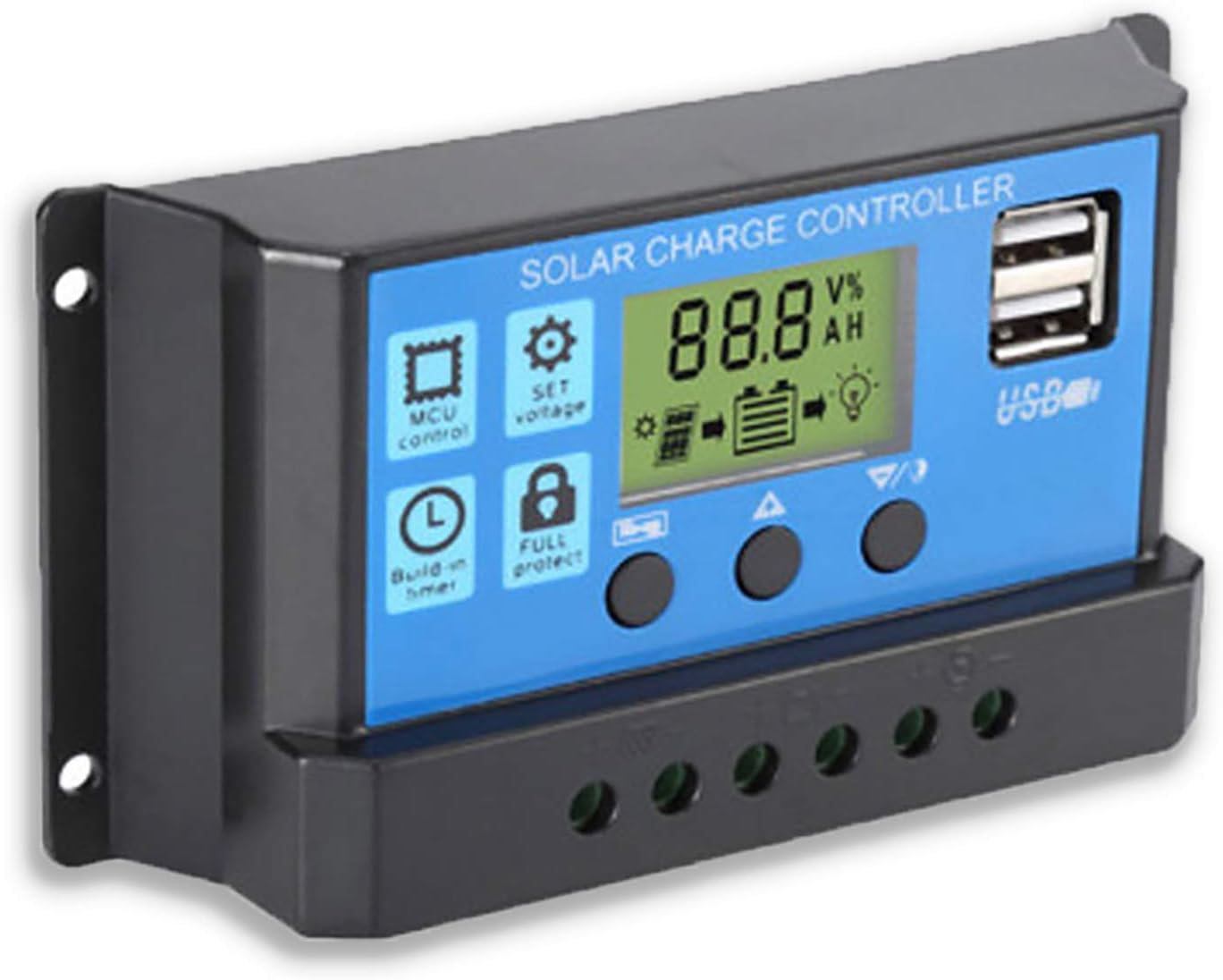
شکل 2: طرف view showing the connection terminals for battery, solar panel, and load.
- سولر پینل کو جوڑیں: Connect the solar panel to the solar charge controller. Ensure correct polarity.
- لوڈ کو جوڑیں: Connect the consumer or load to the charge controller regulator. Ensure correct polarity.
اہم نوٹ: Always connect the battery first, then the solar panel, and finally the load. When disconnecting the controller, please remove the solar panel, then the load, and finally the battery. This sequence helps the controller recognize the battery voltage correctly and prevents damage.
آپریٹنگ ہدایات
LCD ڈسپلے اور بٹن

شکل 3: زاویہ دار view showing the LCD display and control buttons.
The controller features an LCD display and three buttons for operation:
- مینو بٹن: Used to cycle through display modes and enter parameter setting mode.
- اپ بٹن: Used to increase values or navigate upwards in menus.
- نیچے بٹن: Used to decrease values or navigate downwards in menus.
ڈسپلے موڈز
Press the Menu button to cycle through the following display modes:
- بیٹری والیومtagای (وی)
- شمسی پینل جلدtagای (وی)
- لوڈ کرنٹ (A)
- Battery Temperature (°C)
- چارج کرنٹ (A)
- ڈسچارج کرنٹ (A)
- Load Working Mode (24H, 0-23H, 0H)
پیرامیٹر کی ترتیبات
To enter parameter setting mode, press and hold the Menu button for 5 seconds. Use the Up and Down buttons to adjust values, and the Menu button to confirm and move to the next parameter. Press and hold Menu again to exit setting mode.
| پیرامیٹر | تفصیل | Default (12V) | Range (12V) |
|---|---|---|---|
| B01/B02/B03 | Battery Type Selection (B01=Lead-acid, B02=Lithium Ion, B03=LiFePO4) | بی 01 | N/A |
| Charge Off Voltage | والیومtage at which charging stops | 14.4V | 13.0V - 15.0V |
| ڈسچارج ری کنیکٹ والیومtage | والیومtage at which load reconnects after low voltagای منقطع کریں | 12.6V | 11.0V - 13.5V |
| ڈسچارج اسٹاپ والیومtage | والیومtage at which load disconnects to protect battery | 10.7V | 9.0V - 11.5V |
| Load Working Time | Timer for load output (24H, 0-23H, 0H) | 24H | N/A |
Note: For 24V systems, multiply the 12V values by two.
دیکھ بھال
- باقاعدہ معائنہ: وقتاً فوقتاً تمام وائرنگ کنکشن کو سختی اور سنکنرن کے لیے چیک کریں۔
- صفائی: Keep the controller clean and free from dust. Use a dry cloth for cleaning.
- وینٹیلیشن: زیادہ گرمی سے بچنے کے لیے کنٹرولر کے ارد گرد مناسب وینٹیلیشن کو یقینی بنائیں۔
- بیٹری کی صحت: مانیٹر بیٹری والیومtage and health regularly. Replace batteries as needed.
خرابی کا سراغ لگانا
| مسئلہ | ممکنہ وجہ | حل |
|---|---|---|
| Controller not powering on / LCD blank | بیٹری منسلک نہیں ہے یا پولرٹی ریورس نہیں ہے۔ بیٹری والیومtagای بہت کم | Check battery connections and polarity. Ensure battery has sufficient charge. |
| Solar panel not charging battery | Solar panel not connected or reverse polarity; Insufficient sunlight; Damaged solar panel. | Check solar panel connections and polarity. Ensure panel is in direct sunlight. Test solar panel output. |
| لوڈ کام نہیں کر رہا ہے۔ | Load not connected or reverse polarity; Battery voltagای بہت کم (کم والیومtage disconnect); Overload protection activated. | Check load connections and polarity. Charge battery. Reduce load or check for short circuit. |
| USB پورٹس چارج نہیں ہو رہی ہیں۔ | بیٹری جلدtage too low; Device not compatible; Faulty USB cable. | Ensure battery is charged. Try a different device or cable. |
| Controller gets hot | اوورلوڈ ناقص وینٹیلیشن۔ | Reduce load. Ensure controller has adequate airflow and is not in an enclosed space. |
وضاحتیں
| فیچر | تفصیل |
|---|---|
| ماڈل | نیلا 20A |
| نظام جلد۔tage | 12V / 24V آٹو |
| زیادہ سے زیادہ چارج/ڈسچارج کرنٹ | 20A |
| USB آؤٹ پٹ | Dual USB, 5V/2A (Max) |
| بیٹری کی قسم کی مطابقت | Lead-acid (OPEN, AGM, GEL) |
| مصنوعات کے طول و عرض | 5.12 x 2.76 x 1.5 انچ (133 ملی میٹر x 70 ملی میٹر x 38 ملی میٹر تقریباً) |
| شے کا وزن | 5 اونس |
| ڈسپلے | LCD |
| آپریٹنگ درجہ حرارت | -35°C سے +60°C |

Figure 4: Product dimensions of the solar charge controller.
وارنٹی اور سپورٹ
For warranty information or technical support, please contact the manufacturer, Saooer, through their official channels. Refer to your purchase documentation for specific warranty terms and contact details.
مینوفیکچرر: Saooer
ASIN: B095764VB7
UPC: 605832982977
آپ ملاحظہ کر سکتے ہیں۔ Saooer Store on Amazon مزید معلومات کے لیے یا سپورٹ سے رابطہ کرنے کے لیے۔
Ask a question about this manual
Ask about setup, troubleshooting, compatibility, parts, safety, or missing instructions. Manuals+ will review the question and use this page’s manual context to help answer it.