
1. تعارف
خریداری کے لیے آپ کا شکریہasing the Soundsation MIOMIX 404FXM 6-Channel Mixer. This versatile mixer is designed for a wide range of audio applications, including home recording, live performances, and podcasting. It combines professional audio quality with portability, featuring low-noise preamplifiers, digital effects, a USB media player/recorder, and Bluetooth connectivity. This manual provides essential information for safe operation, setup, and optimal use of your MIOMIX 404FXM mixer.
2. حفاظتی ہدایات
انتباہ: آگ یا بجلی کے جھٹکے کے خطرے کو کم کرنے کے لیے، اس آلات کو بارش یا نمی کے سامنے نہ رکھیں۔
- یونٹ کو چلانے سے پہلے ان ہدایات کو بغور پڑھیں۔
- مستقبل کے حوالے کے لیے اس دستی کو رکھیں۔
- تمام انتباہات پر عمل کریں اور تمام ہدایات پر عمل کریں۔
- اس آلے کو پانی کے قریب استعمال نہ کریں۔
- صرف خشک کپڑے سے صاف کریں۔
- وینٹیلیشن کے کسی بھی سوراخ کو مسدود نہ کریں۔ کارخانہ دار کی ہدایات کے مطابق انسٹال کریں۔
- گرمی کے کسی بھی ذرائع جیسے ریڈی ایٹرز، ہیٹ رجسٹر، چولہے، یا دیگر آلات (بشمول amplifiers) جو گرمی پیدا کرتی ہے۔
- پولرائزڈ یا گراؤنڈنگ قسم کے پلگ کے حفاظتی مقصد کو شکست نہ دیں۔ پولرائزڈ پلگ میں دو بلیڈ ہوتے ہیں جن میں سے ایک دوسرے سے چوڑا ہوتا ہے۔ گراؤنڈنگ قسم کے پلگ میں دو بلیڈ اور تیسرا گراؤنڈ کانگ ہوتا ہے۔ چوڑا بلیڈ یا تیسرا کانٹا آپ کی حفاظت کے لیے فراہم کیا گیا ہے۔ اگر فراہم کردہ پلگ آپ کے آؤٹ لیٹ میں فٹ نہیں ہوتا ہے، تو متروک آؤٹ لیٹ کو تبدیل کرنے کے لیے الیکٹریشن سے رجوع کریں۔
- بجلی کی ہڈی کو چلنے یا چوٹکی ہونے سے بچائیں، خاص طور پر پلگ، سہولت رسیپٹیکلز، اور اس مقام پر جہاں وہ آلات سے باہر نکلتے ہیں۔
- صرف مینوفیکچرر کی طرف سے مخصوص منسلکات/لوازمات استعمال کریں۔
- بجلی کے طوفان کے دوران یا طویل عرصے تک غیر استعمال ہونے پر اس آلات کو ان پلگ کریں۔
- تمام سروسنگ کو اہل سروس اہلکاروں سے رجوع کریں۔ سروسنگ کی ضرورت اس وقت ہوتی ہے جب اپریٹس کو کسی بھی طرح سے نقصان پہنچا ہو، جیسے کہ پاور سپلائی کی ہڈی یا پلگ کو نقصان پہنچا ہو، مائع پھیل گیا ہو یا کوئی چیز اپریٹس میں گر گئی ہو، اپریٹس بارش یا نمی کے سامنے آ گیا ہو، عام طور پر کام نہیں کرتا ہے۔ ، یا گرا دیا گیا ہے۔
3. پیکیج کے مشمولات
Please check that all items listed below are included in the package:
- Soundsation MIOMIX 404FXM Mixer
- پاور اڈاپٹر
- صارف دستی
4. مصنوعات کی خصوصیات
- 6-channel mixer with digital multi-effect processor.
- Integrated USB player/recorder supporting WAV, MP3, WMA, and FLAC formats.
- Wireless Bluetooth audio streaming.
- 4 Mic/Line channels with low-noise preamps and Combo connectors.
- Selectable Hi-Z inputs for guitars and other high-impedance instruments.
- +48V Phantom Power for condenser microphones.
- Peak indicators on input channels.
- 1 stereo line channel with 6.3mm jacks and +4/-10 dB pad adapter.
- 2-band EQ on channels 1-4.
- 24-bit/48 kHz digital effects processor with 16 presets (Reverb, Delay, Echo, Chorus, etc.) and TAP-Tempo function.
- USB player level control.
- لیول کنٹرول کے ساتھ ہیڈ فون آؤٹ پٹ۔
- XLR main outputs with volume control.
- Stereo VU Meter with 2 x 6 LED bars.
5. کنٹرول اور افعال
5.1 فرنٹ پینل اوورview

Image: Front panel of the Soundsation MIOMIX 404FXM mixer, showing all input channels, EQ controls, effect section, USB/Bluetooth media player, and main output controls.
Input Channels (MIC/INST 1-4)
- MIC/INST Input (Combo Jack): Connect XLR microphones or 1/4" instrument/line cables.
- +48V فینٹم پاور: Activates phantom power for condenser microphones. Use with caution.
- Hi-Z Switch: Engages high impedance input for direct connection of guitars or basses.
- GAIN Knob: منسلک مائکروفون یا آلے کے لیے ان پٹ کی حساسیت کو ایڈجسٹ کرتا ہے۔
- HIGH Knob: Adjusts the high-frequency equalization (treble).
- LOW Knob: Adjusts the low-frequency equalization (bass).
- ایف ایکس نوب: Controls the amount of signal sent to the internal digital effects processor.
- PAN Knob: Adjusts the stereo position (left/right) of the channel.
- VOL نوب: Adjusts the output volume of the individual channel.
- PK (Peak) LED: ان پٹ سگنل بہت زیادہ ہونے پر روشن ہوتا ہے، ممکنہ کلپنگ کی نشاندہی کرتا ہے۔
Stereo Line Input (CH 5-6)
- L/Mono, R Inputs (1/4" Jacks): Connect stereo line-level devices (keyboards, CD players, DJ consoles, etc.). The L/Mono input can be used alone for a mono signal.
- +4/-10dB Switch: Adjusts input sensitivity for different line-level devices.
- PAN Knob: چینل کی سٹیریو پوزیشن کو ایڈجسٹ کرتا ہے۔
- VOL نوب: Adjusts the output volume of the stereo channel.
- PK (Peak) LED: Illuminates when the input signal is too high.
USB & Bluetooth Media Player
- USB پورٹ: Connect a USB drive for playing audio files or recording.
- ڈسپلے سکرین: موجودہ موڈ، ٹریک کی معلومات، اور ترتیبات دکھاتا ہے۔
- Up/Rewind Button: Navigates up in menus or rewinds current track.
- Down/Forward Button: Navigates down in menus or fast-forwards current track.
- Play/Pause/Enter Button: Plays/pauses audio or confirms menu selections.
- مینو بٹن: Accesses media player menu options (BT streaming, music player, audio recorder, selection).
- MP3 PLAYER LVL Knob: Controls the output level of the USB/Bluetooth media player.
Digital Effects Processor (24-bit/48 kHz)
- اثر ڈسپلے: Shows the selected effect number and parameter values.
- PROGRAM Knob: Rotates to select one of the 16 built-in digital effects. Press to confirm selection.
- ٹیمپو بٹن کو تھپتھپائیں: Tap multiple times to set the tempo for time-based effects (e.g., Delay).
- لیول نوب: Adjusts the overall wet/dry mix of the effects.
Output & Monitoring Section
- PHONES Jack (1/4"): نگرانی کے لیے ہیڈ فون جوڑیں۔
- PHONES LVL Knob: ہیڈ فون آؤٹ پٹ کے والیوم کو ایڈجسٹ کرتا ہے۔
- MAIN OUT L/R (XLR): Balanced XLR outputs for connecting to powered speakers, amplifiers، یا ریکارڈنگ کے آلات.
- MAIN OUT Knob: Controls the overall output volume of the main mix.
- VU Meter (LED): Displays the stereo output level of the main mix.
5.2 ریئر پینل اوورview
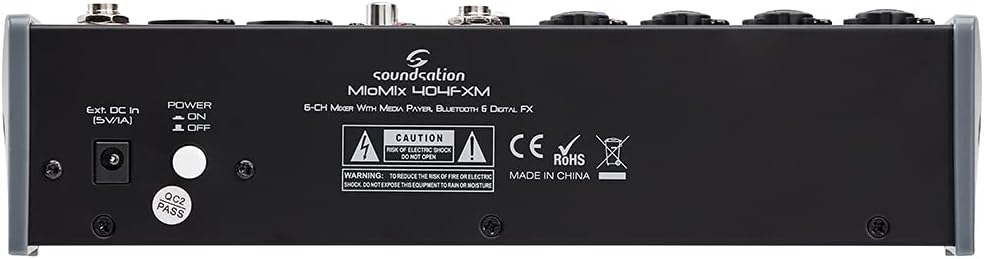
Image: Rear panel of the Soundsation MIOMIX 404FXM mixer, showing the power input, power switch, and main output connections.
- Ext. DC In (5V/1A): Power input for connecting the provided external power adapter.
- پاور آن/آف سوئچ: Turns the mixer's power on or off.
- REC OUT L/R (RCA): Unbalanced RCA outputs for connecting to recording devices.
6. سیٹ اپ
- مکسر کھولیں: Carefully remove the MIOMIX 404FXM from its packaging.
- جگہ کا تعین: Place the mixer on a stable, flat surface, ensuring adequate ventilation around the unit.
- پاور کنکشن: Ensure the mixer's POWER switch is in the OFF position. Connect the provided power adapter to the "Ext. DC In (5V/1A)" port on the rear panel, then plug the adapter into a suitable power outlet.
- ابتدائی پاور آن: Flip the POWER switch to the ON position. The mixer's indicators should light up, and the display should activate.
- کنیکٹ آؤٹ پٹ: Connect the MAIN OUT XLR outputs to your powered speakers, amplifier, or audio interface. Connect headphones to the PHONES jack for monitoring.
- کنیکٹ ان پٹس: Connect your microphones, instruments, and line-level devices to the appropriate input channels.
7. آپریٹنگ ہدایات
7.1 آڈیو ذرائع کو جوڑنا
- مائیکروفونز: Connect dynamic microphones via XLR cables to the MIC/INST Combo jacks. For condenser microphones, connect via XLR and activate the +48V Phantom Power switch for the respective channel.
- Instruments (Guitars/Basses): Connect directly using a 1/4" TS cable to the MIC/INST Combo jack and engage the Hi-Z switch for that channel.
- Line-Level Devices (Keyboards, CD Players): Connect using 1/4" TS cables to the MIC/INST Combo jacks (for mono) or to the CH 5-6 L/Mono and R inputs (for stereo). Adjust the +4/-10dB switch on CH 5-6 as needed.
7.2 Adjusting Channel Levels and EQ
- Set all GAIN, VOL, and MAIN OUT knobs to their minimum positions before starting.
- Speak into the microphone or play your instrument. Slowly increase the GAIN knob for the respective channel until the PK LED flashes only occasionally during the loudest parts.
- Adjust the HIGH and LOW EQ knobs to shape the tone of your sound.
- Use the PAN knob to position the sound in the stereo field.
- Slowly increase the channel's VOL knob to blend it into the overall mix.
7.3 Using the USB Media Player/Recorder
- پلے بیک: Insert a USB drive containing WAV, MP3, WMA, or FLAC files into the USB port. The display will show the file list. Use the Up/Down buttons to navigate and Play/Pause/Enter to select and play. Adjust the MP3 PLAYER LVL knob to control its volume in the mix.
- ریکارڈنگ: In the media player menu (accessed via MENU button), select the 'Audio Recorder' function. Ensure your USB drive has enough free space. Press Play/Pause/Enter to start and stop recording. The mixer records the main stereo mix.
7.4 بلوٹوتھ کنیکٹیویٹی
- Press the MENU button on the media player and select 'BT Streaming'. The display will show 'Bluetooth' and indicate it's searching.
- On your smartphone or Bluetooth device, search for available devices and select 'MIOMIX 404FXM'.
- Once paired, you can stream audio from your device to the mixer. Control the volume using your device and the MP3 PLAYER LVL knob on the mixer.
7.5 Applying Digital Effects
- Turn the FX knob on the desired input channel to send signal to the effects processor.
- Rotate the PROGRAM knob to browse through the 16 available effects. Press the PROGRAM knob to select an effect.
- Adjust the LEVEL knob in the FX section to control the overall amount of effect applied to the mix.
- For time-based effects, use the TAP TEMPO button to synchronize the effect to your music.
7.6 Monitoring and Main Output
- ہیڈ فون: Connect headphones to the PHONES jack and adjust the PHONES LVL knob for comfortable monitoring.
- مین آؤٹ پٹ: Slowly increase the MAIN OUT knob to send the mixed audio to your connected speakers or amplifier. Monitor the VU Meter to ensure levels are not clipping (avoiding red LEDs).
8 دیکھ بھال
- صفائی: Use a soft, dry cloth to clean the mixer's surface. Do not use liquid cleaners or solvents.
- ذخیرہ: جب لمبے عرصے تک استعمال نہ ہو، تو مکسر کو براہ راست سورج کی روشنی اور انتہائی درجہ حرارت سے دور کسی ٹھنڈی، خشک جگہ پر محفوظ کریں۔
- وینٹیلیشن: اس بات کو یقینی بنائیں کہ زیادہ گرمی سے بچنے کے لیے وینٹیلیشن کے سوراخوں کو مسدود نہیں کیا گیا ہے۔
9 خرابیوں کا سراغ لگانا
- کوئی آواز آؤٹ پٹ نہیں:
- Check all power connections and ensure the mixer is turned ON.
- Verify that all channel VOL knobs, MAIN OUT knob, and PHONES LVL knob are turned up.
- Ensure your speakers/amplifier are powered on and connected correctly.
- Check input source connections and ensure GAIN knobs are set appropriately.
- مسخ شدہ آواز:
- Reduce the GAIN knob for the input channel.
- Check if the PK LED is constantly lit; if so, reduce the input level.
- Lower the MAIN OUT volume if the VU Meter is consistently in the red.
- فینٹم پاور کام نہیں کر رہی:
- Ensure the +48V switch is engaged for the specific channel.
- Verify that you are using an XLR cable, as phantom power is only supplied via XLR.
- بلوٹوتھ کنیکٹ نہیں ہو رہا ہے:
- Ensure the mixer's media player is in 'BT Streaming' mode.
- Make sure your device's Bluetooth is enabled and it's searching for devices.
- آلہ کا جوڑا ختم کرنے اور دوبارہ جوڑا بنانے کی کوشش کریں۔
- USB Playback/Recording Issues:
- Ensure the USB drive is formatted correctly (FAT32 is generally recommended).
- چیک کریں کہ آڈیو۔ files are in a supported format (WAV, MP3, WMA, FLAC).
- For recording, ensure the USB drive has sufficient free space.
10. وضاحتیں
| فیچر | تفصیلات |
|---|---|
| کارخانہ دار | ساؤنڈیشن |
| ماڈل نمبر | E923E |
| چینلز کی تعداد | 6 |
| شے کا وزن | 1900 گرام |
| کنیکٹوٹی ٹیکنالوجی | یو ایس بی، بلوٹوتھ |
| طاقت کا منبع | الیکٹرک کیبل |
| آؤٹ پٹ کنیکٹر کی قسم | XLR |
| آڈیو ان پٹ | XLR, 1/4" Jack |
| والیومtage | 48 Volts (Phantom Power) |
| ڈیجیٹل اثرات | 16 Presets, 24-bit/48 kHz |
| تائید شدہ USB آڈیو فارمیٹس | WAV, MP3, WMA, FLAC |
11. وارنٹی اور سپورٹ
Soundsation products are designed and manufactured to the highest quality standards. For information regarding warranty coverage, service, or technical support, please refer to the warranty card included with your product or visit the official Soundsation webسائٹ کسی بھی وارنٹی دعووں کے لیے خریداری کے ثبوت کے طور پر اپنی خریداری کی رسید رکھیں۔