
تعارف
This user manual provides detailed instructions for the installation, operation, maintenance, and troubleshooting of your Xprinter XP-K200L 80mm Thermal Receipt Printer. Please read this manual thoroughly before using the printer to ensure proper function and to extend the product's lifespan. Keep this manual for future reference.
حفاظتی معلومات
- Always use the power adapter supplied with the printer.
- Do not expose the printer to water or moisture.
- پرنٹر کو براہ راست سورج کی روشنی میں یا گرمی کے ذرائع کے قریب رکھنے سے گریز کریں۔
- پرنٹر کے ارد گرد مناسب وینٹیلیشن کو یقینی بنائیں.
- خود پرنٹر کو الگ کرنے یا مرمت کرنے کی کوشش نہ کریں۔ اہل سروس کے اہلکاروں سے رابطہ کریں۔
- بچوں کی پہنچ سے دور رکھیں۔
پیکیج کے مشمولات
Please check the package contents upon unpacking. If any items are missing or damaged, contact your vendor.
- Xprinter XP-K200L Thermal Receipt Printer
- پاور اڈاپٹر
- پاور کی ہڈی
- USB کیبل
- تھرمل پیپر رول (اسٹارٹر رول)
- کیش دراز کیبل
- صارف دستی (یہ دستاویز)
پروڈکٹ ختمview
Familiarize yourself with the main components of your Xprinter XP-K200L thermal receipt printer.

شکل 1: طرف view of the Xprinter XP-K200L thermal receipt printer. On the right, the power switch is visible, and on the left, a button to open the paper cover is present.
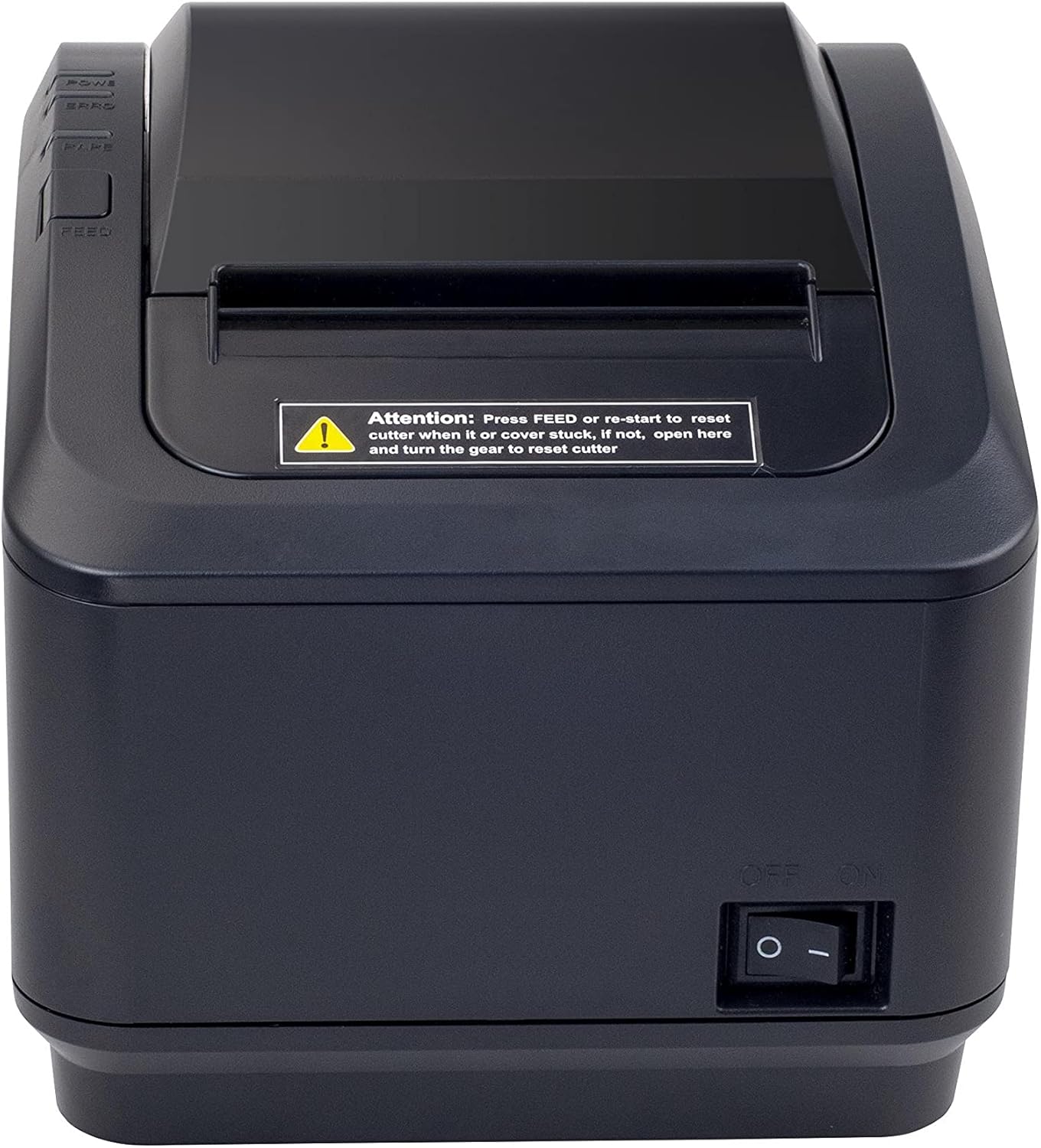
شکل 2: ایک سامنے view of the Xprinter XP-K200L thermal receipt printer. The paper output slot is at the top, and below it are control buttons for functions like feed and error reset. A warning label is also visible.

Figure 3: This image displays the Xprinter XP-K200L thermal receipt printer with its top cover open, showing the internal compartment where the thermal paper roll is loaded. The print head mechanism is also visible.
سیٹ اپ
1. پاور کو جوڑنا
- Ensure the printer's power switch is in the آف پوزیشن
- Connect the power adapter to the printer's power port.
- بجلی کی تار کو کسی مناسب برقی آؤٹ لیٹ میں لگائیں۔
2. Loading Thermal Paper
- Press the cover open button (refer to Figure 1) to open the top cover of the printer.
- Insert a new 80mm thermal paper roll into the compartment, ensuring the paper feeds from the bottom and the leading edge extends slightly out of the printer.
- Close the top cover firmly until it clicks into place. Ensure there is no slack in the paper roll.
3. Connecting to a Computer/Network
The XP-K200L printer supports both USB and LAN (Ethernet) connectivity.
USB کنکشن:
- USB کیبل کے ایک سرے کو پرنٹر کے USB پورٹ سے جوڑیں۔
- USB کیبل کے دوسرے سرے کو اپنے کمپیوٹر پر دستیاب USB پورٹ سے جوڑیں۔
- Install the printer drivers. Drivers are typically provided on a CD or can be downloaded from the manufacturer's webسائٹ انسٹالیشن کے لیے آن اسکرین ہدایات پر عمل کریں۔
LAN (Ethernet) Connection:
- Connect one end of an Ethernet cable to the printer's LAN port.
- ایتھرنیٹ کیبل کے دوسرے سرے کو اپنے نیٹ ورک روٹر یا سوئچ سے جوڑیں۔
- Configure the printer's network settings (e.g., IP address) if necessary. This usually involves printing a self-test page to get the current IP address and then accessing the printer's web interface or using a utility tool provided by the manufacturer.
- Install the printer drivers on your computer, selecting the network connection option during setup.
4. Connecting a Cash Drawer
- Connect the cash drawer cable to the dedicated cash drawer port on the printer.
- Ensure your POS software is configured to send commands to open the cash drawer via the printer.
آپریٹنگ ہدایات
پاورنگ آن/آف
- To power on the printer, flip the power switch (refer to Figure 1) to the ON پوزیشن
- To power off the printer, flip the power switch to the آف پوزیشن
بنیادی پرنٹنگ
Once the printer is connected and drivers are installed, you can print receipts from your POS software or any application that supports printing.
- Ensure the printer is powered on and has paper loaded.
- From your application, select the print option.
- Choose the "Xprinter XP-K200L" from the list of available printers.
- Confirm print settings and click "Print".
Self-Test Page
To print a self-test page, which provides information about the printer's settings and status:
- Ensure the printer is powered off and the paper roll is loaded.
- دبائیں اور تھامیں۔ فیڈ بٹن
- منعقد کرتے ہوئے فیڈ button, turn the power switch to ON.
- جاری کریں۔ فیڈ button after the printer starts printing.
دیکھ بھال
پرنٹر کی صفائی
- پرنٹ ہیڈ: روئی کی جھاڑی کو ہلکے سے استعمال کریں۔ampened with isopropyl alcohol to gently wipe the thermal print head. Allow it to dry completely before use. Clean regularly to ensure print quality.
- کٹر: If the cutter becomes jammed or dirty, carefully clean it with a soft brush or cloth.
- بیرونی: Wipe the exterior of the printer with a soft, dry cloth. Do not use abrasive cleaners or solvents.
Replacing Thermal Paper
When the paper roll is depleted or near its end, replace it following the steps in the "Loading Thermal Paper" section under Setup.
خرابی کا سراغ لگانا
| مسئلہ | ممکنہ وجہ | حل |
|---|---|---|
| پرنٹر آن نہیں ہوتا ہے۔ | Power cord or adapter not connected properly; power outlet issue. | تمام پاور کنکشن چیک کریں۔ ایک مختلف پاور آؤٹ لیٹ آزمائیں۔ |
| No printing. | No paper; paper loaded incorrectly; printer offline; driver issue; incorrect connection. | Load paper correctly. Check printer status. Reinstall drivers. Verify USB/LAN connection. |
| ناقص پرنٹ کوالٹی۔ | Dirty print head; low quality thermal paper. | Clean the print head (see Maintenance). Use recommended thermal paper. |
| Paper jam or cutter error. | Paper loaded incorrectly; debris in cutter mechanism. | As per printer label: دبائیں فیڈ or re-start to reset cutter. If the issue persists, open the top cover and carefully turn the gear to reset the cutter mechanism. Ensure paper is loaded correctly and remove any obstructions. |
| Cash drawer does not open. | Cable not connected; POS software not configured. | Check cash drawer cable connection. Verify POS software settings for cash drawer trigger. |
وضاحتیں
| فیچر | تفصیل |
|---|---|
| برانڈ | ایکس پرنٹر |
| ماڈل کا نام | XP-K200L |
| پرنٹر ٹیکنالوجی | تھرمل |
| کنیکٹوٹی ٹیکنالوجی | USB, LAN (Ethernet) |
| خصوصی خصوصیات | نیٹ ورک تیار ہے۔ |
| رنگ | سیاہ |
| پرنٹر آؤٹ پٹ | مونوکروم |
| شے کا وزن | 1.5 کلوگرام |
| پروڈکٹ کے طول و عرض (DxWxH) | 19.5 سینٹی میٹر x 14 سینٹی میٹر x 13.8 سینٹی میٹر |
| Compatible OS/Controller Type | Android (and typically Windows/Linux via drivers) |
| پرنٹ میڈیا | Plain Thermal Paper |
| پرنٹ رنگین | سیاہ |
| قرارداد | 576 x 512 dots per inch (or dots per line) |
| Max Print Resolution B/W | 576 ڈی پی آئی |
| اضافی پرنٹر کے افعال | صرف پرنٹ کریں۔ |
| کنٹرول کا طریقہ | ریموٹ |
| زیادہ سے زیادہ میڈیا سائز | 80 ملی میٹر |
| کاغذ کا سائز | 79.5 ملی میٹر |
| طاقت | 60 واٹ |
| شامل اجزاء | Power adapter, Cash drawer cable |
| سلسلہ | XP-K |
| مخصوص استعمال | Restaurants, bars, cinemas, garages, transportation, hospitals, clinics |
| کل USB پورٹس | 1 |
وارنٹی اور سپورٹ
For warranty information and technical support, please refer to the documentation provided with your purchase or contact your vendor directly. Keep your proof of purchase for warranty claims.
For driver downloads and further support resources, visit the official Xprinter webسائٹ