
CDIYTOOL 4yhujuyj
CDIYTOOL 100A MPPT Solar Charge Controller User Manual
Model: 4yhujuyj
تعارف
This manual provides essential information for the safe and efficient operation of your CDIYTOOL 100A MPPT Solar Charge Controller. This controller is designed for 36V, 48V, and 60V battery systems and features an LCD display, multiple load control modes, and dual USB outputs. Please read this manual thoroughly before installation and use.
The controller automatically adapts to 36V/48V/60V systems and is not suitable for 12V/24V systems. It utilizes innovative MPPT technology for high tracking efficiency, detecting the maximum charging current.
حفاظتی ہدایات
Always adhere to the following safety guidelines to prevent injury and damage to the controller or other components.
- یقینی بنائیں کہ بیٹری میں کافی والیوم ہے۔tage for the controller to recognize the correct battery type upon first use.
- Connect the battery to the controller first, then connect the solar panels. Reversing this order can damage the controller.
- زیادہ سے زیادہ ان پٹ والیومtage is 50V. Ensure your solar panel configuration does not exceed this limit. For example, a 19V photovoltaic panel matches a 12V battery, and a 38V photovoltaic panel matches a 24V battery. When a 38V panel is connected, the maximum voltage may reach 42V.
- The controller is suitable for various battery types (including open, lead-acid, gel, and lithium batteries). Refer to the controller's settings for specific battery types.
- The controller provides protection against overvoltage, short circuit, overload, overcharge, and over-discharge.
- خود کنٹرولر کو الگ کرنے یا مرمت کرنے کی کوشش نہ کریں۔ خدمت کے لیے اہل افراد سے رابطہ کریں۔

Image: Excerpt from the user manual detailing safety instructions and a connection diagram.
مصنوعات کی خصوصیات
- Multi-function LCD Display: Provides real-time display of charging current, discharge current, and power generation.
- MPPT ٹیکنالوجی: Innovative Maximum Power Point Tracking with high efficiency (up to 99%) for optimal solar energy harvesting.
- قابل اعتماد تحفظ: اوورول پر مشتمل ہے۔tage, short circuit, overload, overcharge, and over-discharge protection.
- Automatic Focusing MPPT Tracking: Ensures high charging efficiency and bidirectional focusing tracking.
- درجہ حرارت کا معاوضہ: چارجنگ والیوم کو خود بخود ایڈجسٹ کرتا ہے۔tage based on ambient temperature changes.
- دوہری USB آؤٹ پٹ: Provides 5V/2A output for charging mobile devices.

تصویر: سامنے view of the CDIYTOOL 100A MPPT Solar Charge Controller, highlighting the LCD display and dual USB ports.
سیٹ اپ اور انسٹالیشن
سولر چارج کنٹرولر کی مناسب تنصیب کے لیے ان اقدامات پر عمل کریں:
- وائرنگ تیار کریں: Ensure all wires are correctly sized for the expected current and are properly insulated.
- بیٹری کو جوڑیں: Connect the battery to the charge controller first. Ensure correct polarity (+ to + and - to -). The controller requires sufficient battery voltage to recognize the system type.
- سولر پینل کو جوڑیں: Connect the solar panel(s) to the charge controller. Ensure correct polarity. Do not exceed the maximum input voltage of 50V
- Connect Load (Optional): Connect your DC load to the load terminals of the controller. The controller can manage load output based on settings.
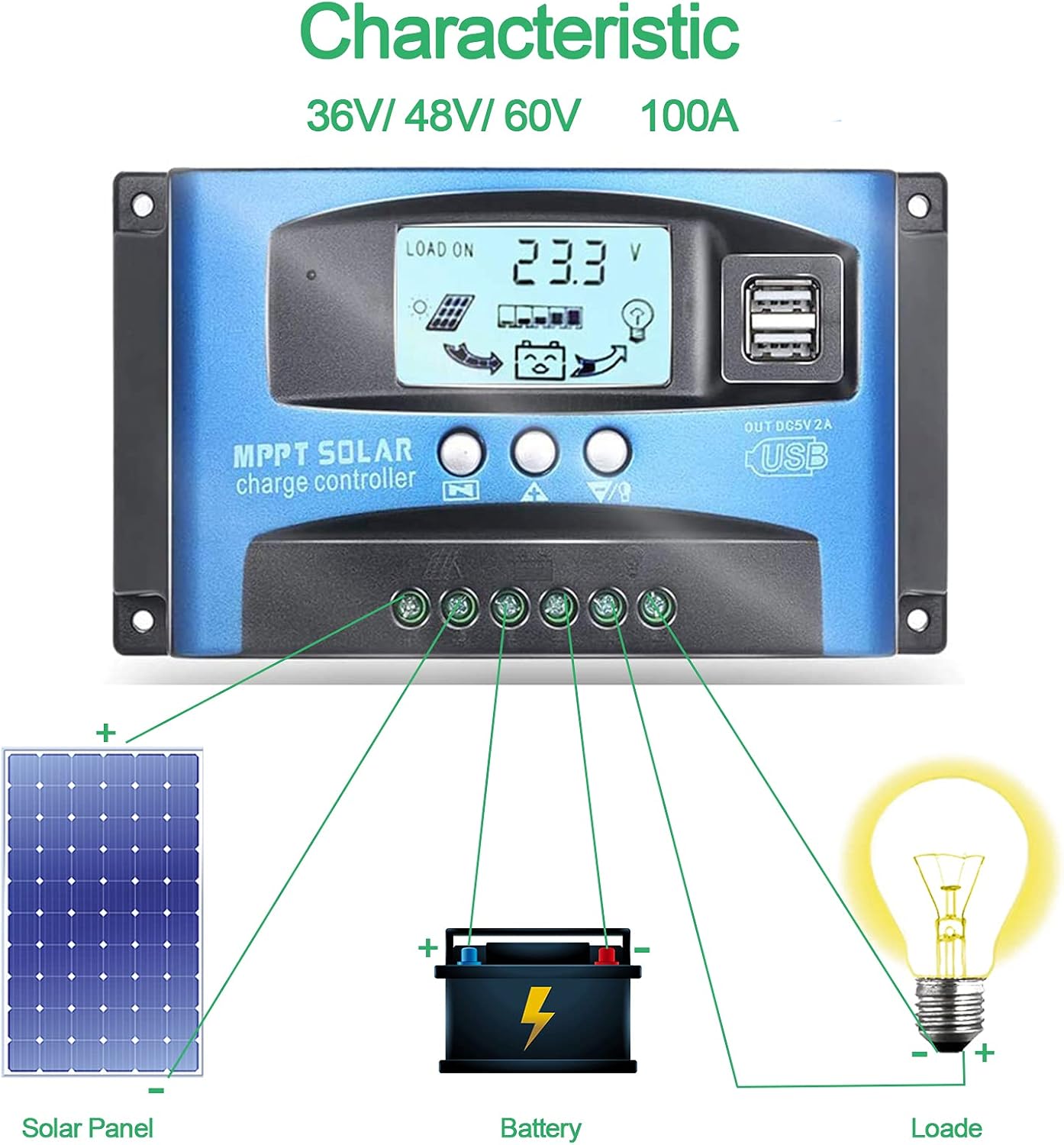
Image: Connection diagram illustrating how to connect solar panels, battery, and load to the charge controller.

تصویر: تفصیلی view of the controller with labels for its components, including buttons, LCD, USB ports, and connection points.
آپریٹنگ ہدایات
The controller features an LCD display and three buttons for operation: Menu, Page Up, and Page Down/Manual.
LCD ڈسپلے
The LCD displays various parameters including battery voltage, charging current, discharge current, and system status. The icons on the display indicate solar panel activity, battery charge level, and load status.
بٹن کے افعال
- مینو بٹن: Press to enter the menu interface and cycle through different settings. Long press to modify parameters.
- پیج اپ بٹن: Used to increase values or navigate upwards in menus.
- Page Down/Manual Button: Used to decrease values or navigate downwards in menus. Also functions as a manual load control switch (on/off) when on the main interface.
USB چارجنگ
The controller is equipped with dual USB ports providing 5V/2A output for charging compatible devices such as mobile phones and tablets.

Image: Demonstration of the controller's dual USB ports being used to charge a mobile phone.
دیکھ بھال
باقاعدگی سے دیکھ بھال آپ کے سولر چارج کنٹرولر کی لمبی عمر اور بہترین کارکردگی کو یقینی بناتی ہے۔
- کنکشن کا معائنہ کریں: Periodically check all wiring connections for tightness and corrosion. Loose connections can lead to power loss or overheating.
- کلین کنٹرولر: کنٹرولر کو صاف اور دھول اور ملبے سے پاک رکھیں۔ سطح کو صاف کرنے کے لیے خشک کپڑا استعمال کریں۔ مائع کلینر استعمال نہ کریں۔
- مانیٹر کارکردگی: Regularly check the LCD display for normal operation and expected voltagای/موجودہ ریڈنگز۔
- بیٹری کی صحت: Ensure your battery is well-maintained and within its recommended operating parameters.
خرابی کا سراغ لگانا
یہ سیکشن عام مسائل کا حل فراہم کرتا ہے جن کا آپ کو سامنا ہو سکتا ہے۔
| صورتحال | ممکنہ وجہ | حل |
|---|---|---|
| اسکرین پر کوئی ڈسپلے نہیں۔ | بیٹری منسلک نہیں ہے یا کم والیومtage | Connect battery, check battery voltage |
| No charge when sunny | Solar panel reversed or open circuit | Reconnect solar panel, check wiring |
| لوڈ کام نہیں کر رہا ہے۔ | Load short circuit, overload, or over-discharge protection | Check load wiring, reduce load, or charge battery |
| کنٹرولر چارج نہیں کر رہا ہے۔ | سولر پینل والیومtage too low or battery full | Ensure sufficient solar input, check battery status |
The controller includes built-in protections for reverse polarity, overvoltage, short circuit, overload, overcharge, and over-discharge. If an issue persists after troubleshooting, contact customer support.
وضاحتیں
| پیرامیٹر | قدر |
|---|---|
| ماڈل | 4yhujuyj |
| برانڈ | CDIYTOOL |
| ریٹیڈ کرنٹ | 100A |
| نظام جلد۔tage | 36V/48V/60V Auto Adapt (Not for 12V/24V) |
| زیادہ سے زیادہ سولر ان پٹ والیومtage | 50V |
| USB آؤٹ پٹ | Dual 5V/2A |
| ڈسپلے کی قسم | LCD |
| شے کا وزن | 14.4 اونس |
| پیکیج کے طول و عرض | 6.81 x 3.98 x 2.01 انچ |

Image: Diagram showing the physical dimensions of the solar charge controller.
اضافی وسائل اور معاونت
For further assistance or to access the mobile application for monitoring, please refer to the following:
موبائل ایپلیکیشن
The BL-912V APP can be installed on your Android phone to monitor and control the solar charge controller. Scan the QR code below or visit the provided link to download and install the application.
ڈاؤن لوڈ لنک: http://fir.sdhzwl.cn/5w4b
The mobile phone app allows for remote monitoring of charging and discharging data, daily power generation, and other functions.
Image: Section of the user manual detailing the BL-912V APP installation process, including a QR code.
وارنٹی اور کسٹمر سروس
For warranty information or technical support, please contact CDIYTOOL customer service through the platform where you purchased the product. Keep your purchase receipt for warranty claims.
عام ایپلی کیشنز
The CDIYTOOL MPPT Solar Charge Controller is suitable for a variety of off-grid solar power applications, including:
- Residential solar power systems
- RV and marine solar setups
- Solar street lighting
- Remote monitoring stations
- Agricultural irrigation systems

تصویر: سابقamples of typical applications for the solar charge controller in various settings.
Ask a question about this manual
Ask about setup, troubleshooting, compatibility, parts, safety, or missing instructions. Manuals+ will review the question and use this page’s manual context to help answer it.