
1. پروڈکٹ ختمview
The Infinix Note 10 is a feature-rich smartphone designed for communication, entertainment, and productivity. It comes equipped with a large display, powerful processor, and versatile camera system to enhance your mobile experience.
1.1 پیکیج کے مشمولات
- Infinix Note 10 Smartphone
- چارجر اڈاپٹر
- USB کیبل
- سم ایجیکٹر ٹول
- کوئیک اسٹارٹ گائیڈ
- وارنٹی کارڈ
1.2 ڈیوائس لے آؤٹ

تصویر 1.1: سامنے والا View of Infinix Note 10. This image shows the front of the smartphone, highlighting the large display and the front-facing camera located at the top center.
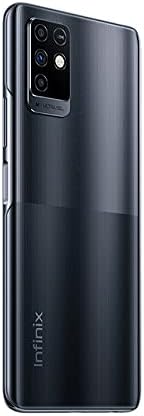
تصویر 1.2: پیچھے View of Infinix Note 10. This image displays the rear of the device, featuring the multi-camera module in the upper left corner and the Infinix branding towards the bottom.
2. اہم حفاظتی معلومات
Please read all safety information before using your device to ensure safe and proper use. Failure to follow these instructions may result in injury, damage to your device, or other hazards.
- بیٹری کی حفاظت: Do not disassemble, impact, squeeze, or put the battery into fire. If severe swelling occurs, discontinue use.
- چارج کرنا: Use only Infinix-approved chargers and cables. Unapproved chargers may cause fire, explosion, or other hazards.
- پانی کی مزاحمت: یہ آلہ پانی سے بچنے والا نہیں ہے۔ مائعات کی نمائش سے گریز کریں۔
- ڈرائیونگ سیفٹی: Always prioritize driving and obey all local laws and regulations. Avoid using your phone while driving.
- طبی آلات: Maintain a safe distance between your phone and medical devices like pacemakers to avoid interference.
- تصرف: Dispose of the device and battery properly according to local regulations. Do not dispose of with household waste.
3. شروع کرنا: سیٹ اپ
3.1 بیٹری چارج کرنا
Before first use, fully charge the device. Connect the USB cable to the charging port on your phone and the other end to the power adapter. Plug the adapter into a wall outlet. The charging indicator will appear on the screen.
3.2 Installing SIM and MicroSD Cards
- اپنے آلے کے سائیڈ پر سم کارڈ ٹرے کو تلاش کریں۔
- سم ایجیکٹر ٹول کو ٹرے کے آگے چھوٹے سوراخ میں داخل کریں اور ٹرے کے باہر آنے تک آہستہ سے دھکیلیں۔
- اپنے نینو سم کارڈ(ز) اور/یا مائیکرو ایس ڈی کارڈ کو ٹرے پر نامزد سلاٹس میں رکھیں، اس بات کو یقینی بناتے ہوئے کہ سونے کے رابطے نیچے ہوں۔
- ٹرے کو احتیاط سے سلاٹ میں واپس دھکیلیں جب تک کہ یہ آلہ سے فلش نہ ہوجائے۔
3.3 ابتدائی سیٹ اپ
Press and hold the Power button until the Infinix logo appears. Follow the on-screen prompts to:
- اپنی زبان منتخب کریں۔
- Wi-Fi نیٹ ورک سے جڑیں۔
- اپنے Google اکاؤنٹ کے ساتھ سائن ان کریں یا ایک نیا بنائیں۔
- Set up screen lock (PIN, pattern, fingerprint).
- Review اور شرائط و ضوابط کو قبول کریں۔
4. Operating Your Infinix Note 10
4.1 بنیادی نیویگیشن
- تھپتھپائیں: اسے منتخب کرنے کے لیے کسی آئیکن یا آپشن کو ٹچ کریں۔
- سوائپ: اسکرینوں کے درمیان سکرول کرنے یا نیویگیٹ کرنے کے لیے اپنی انگلی کو اسکرین پر گھسیٹیں۔
- چوٹکی: Use two fingers to zoom in or out on photos or web صفحات
- لانگ پریس: مزید اختیارات کے لیے ایک آئٹم کو دبائیں اور تھامیں۔
4.2 کال کرنا اور پیغامات بھیجنا
To make a call, open the Phone app, enter the number, and tap the call icon. To send a message, open the Messages app, tap the new message icon, enter the recipient and your message, then send.
4.3 کیمرے کا استعمال
Open the Camera app from your home screen or app drawer. Tap the shutter button to take a photo. Swipe left or right to switch between different modes like Video, Portrait, or Super Night. Tap the camera switch icon to toggle between front and rear cameras.
4.4 کنیکٹیویٹی
- وائی فائی: ترتیبات > نیٹ ورک اور انٹرنیٹ > Wi-Fi پر جائیں۔ وائی فائی آن کریں اور اپنا مطلوبہ نیٹ ورک منتخب کریں۔
- بلوٹوتھ: Go to Settings > Connected devices > Bluetooth. Turn Bluetooth on and pair with available devices.
- موبائل ڈیٹا: Go to Settings > Network & internet > Mobile network to manage your data connection.
4.5 ایپ مینجمنٹ
To install apps, open the Google Play Store. To uninstall an app, long-press its icon on the home screen or in the app drawer, then drag it to 'Uninstall' or select 'App info' and choose 'Uninstall'.
5. دیکھ بھال اور دیکھ بھال
5.1 اپنے آلے کو صاف کرنا
Use a soft, lint-free cloth to clean the screen and body of your phone. Avoid using harsh chemicals or abrasive materials. Do not spray cleaners directly onto the device.
5.2 بیٹری کی دیکھ بھال
- انتہائی درجہ حرارت سے بچیں، جو بیٹری کی زندگی کو کم کر سکتا ہے۔
- فون کے مکمل چارج ہونے کے بعد اسے طویل عرصے تک چارج کرنے کے لیے مت چھوڑیں۔
- For optimal battery health, try to keep the charge level between 20% and 80%.
5.3 سافٹ ویئر اپ ڈیٹس
Regularly check for software updates to ensure your device has the latest features, security patches, and performance improvements. Go to Settings > System > System update.
5.4 ڈیٹا بیک اپ
Regularly back up your important data (photos, contacts, documents) to a cloud service (like Google Drive) or a computer to prevent data loss.
6. عام مسائل کا ازالہ کرنا
| مسئلہ | ممکنہ حل |
|---|---|
| آلہ آن نہیں ہوگا۔ | یقینی بنائیں کہ بیٹری چارج ہے۔ پاور بٹن کو کم از کم 10 سیکنڈ تک دبائے رکھیں۔ |
| ایپس کریش ہو رہی ہیں یا منجمد ہو رہی ہیں۔ | ایپ کیشے کو صاف کریں (ترتیبات > ایپس > [ایپ کا نام] > اسٹوریج > کیش صاف کریں)۔ ڈیوائس کو دوبارہ شروع کریں۔ |
| خراب بیٹری کی زندگی | Reduce screen brightness, close unused apps, disable unnecessary features like GPS or Bluetooth when not in use. |
| Wi-Fi سے منسلک نہیں ہو سکتا | Restart your router and phone. Forget the network and reconnect. Ensure Wi-Fi is enabled. |
| Phone is slow | Clear storage space, uninstall unused apps, restart the device regularly. |
If the issue persists, consider performing a factory reset (back up your data first) or contacting customer support.
7. تکنیکی تفصیلات
| فیچر | تفصیلات |
|---|---|
| ماڈل کا نام | نوٹ 10 |
| برانڈ | انفینکس |
| آپریٹنگ سسٹم | اینڈرائیڈ 10.0 |
| انسٹال شدہ RAM میموری کا سائز | 6 جی بی |
| میموری ذخیرہ کرنے کی صلاحیت | 128 جی بی |
| اسکرین کا سائز | 6.95 انچ (مرئی اسکرین اخترن: 7" / 18 سینٹی میٹر) |
| سی پی یو ماڈل | سنیپ ڈریگن |
| وائرلیس کیریئر | تمام کیریئرز کے لئے کھلا |
| سیلولر ٹیکنالوجی | 4G |
| کنیکٹوٹی ٹیکنالوجی | بلوٹوتھ، یو ایس بی، وائی فائی |
| بیٹریاں | 1 لتیم پولیمر بیٹری (شامل) |
| پیکیج کے طول و عرض | 18.6 x 10.8 x 6.2 سینٹی میٹر |
| شے کا وزن | 250 گرام |
| کارخانہ دار | انفینکس |
| پہلی تاریخ دستیاب ہے۔ | یکم جون 26 |
8. وارنٹی اور سپورٹ
8.1 وارنٹی کی معلومات
Your Infinix Note 10 comes with a limited warranty. Please refer to the warranty card included in your package for specific terms, conditions, and duration. Keep your purchase receipt as proof of purchase for warranty claims.
8.2 کسٹمر سپورٹ
For technical assistance, troubleshooting beyond this manual, or warranty service, please contact Infinix customer support. Visit the official Infinix webرابطے کی تفصیلات، عمومی سوالنامہ، اور سروس سینٹر کے مقامات کے لیے سائٹ۔
نوٹ: وضاحتیں پیشگی اطلاع کے بغیر تبدیل کی جاسکتی ہیں۔