
1. تعارف
This user manual provides essential information for the safe and efficient operation of your Qoltec 51758 Mains & Inverter Adapter. This power adapter is designed to provide reliable power to compatible HP notebooks, featuring advanced protection mechanisms against overvoltage, overload, short circuit, and overheating. Please read this manual thoroughly before using the product to ensure proper functionality and longevity.
2. حفاظتی ہدایات
To prevent injury or damage to your device, always follow these safety precautions:
- Do not expose the adapter to water, moisture, or high humidity.
- Do not disassemble, modify, or attempt to repair the adapter. Refer all servicing to qualified personnel.
- پاور آؤٹ لیٹ والیوم کو یقینی بنائیںtage is compatible with the adapter's specifications.
- اڈاپٹر کو براہ راست سورج کی روشنی میں یا گرمی کے ذرائع کے قریب رکھنے سے گریز کریں۔
- Do not use the adapter if the cable or connector is damaged.
- بچوں کی پہنچ سے دور رکھیں۔
- اڈاپٹر کو پاور آؤٹ لیٹ سے ان پلگ کریں جب توسیعی مدت تک استعمال نہ ہو۔
3. پروڈکٹ ختمview
The Qoltec 51758 adapter is a compact and efficient power solution. It includes the main adapter unit and various interchangeable tips to ensure compatibility with a range of HP notebooks.
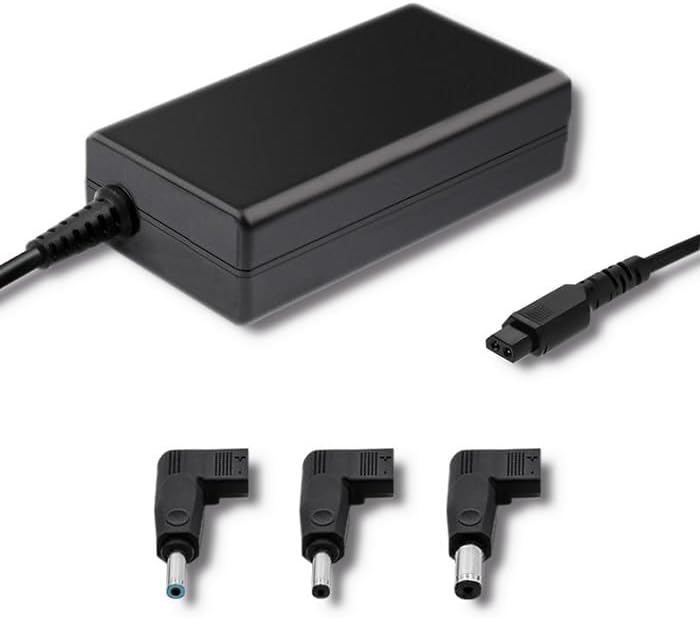
شکل 3.1: سامنے view of the Qoltec 51758 power adapter showing the main unit and three common interchangeable tips.

شکل 3.2: پیچھے view of the Qoltec 51758 power adapter, highlighting the AC input port and the three interchangeable tips.
The adapter features a robust design with a standard AC input port and a DC output cable that connects to the interchangeable tips. These tips ensure a secure and correct fit for various HP notebook models.
4. سیٹ اپ
- Identify the Correct Tip: Select the interchangeable tip that matches the power input port of your HP notebook. Ensure it fits snugly and securely.
- Connect the Tip: Attach the selected tip to the DC output cable of the Qoltec 51758 adapter.
- Connect to Notebook: Insert the connected tip into the power input port of your HP notebook.
- پاور آؤٹ لیٹ سے جڑیں: Plug the AC input cable of the adapter into a standard wall power outlet.
- کنکشن کی تصدیق کریں: Confirm that the power indicator light (if present on your notebook or adapter) illuminates, indicating a successful power connection.
5. آپریٹنگ
Once properly set up, the Qoltec 51758 adapter operates automatically to provide power to your connected HP notebook. It will charge the notebook's battery and/or power the notebook directly.
- چارج کرنا: When connected, the adapter will charge your notebook's battery until it reaches full capacity.
- Direct Power: The adapter can also power your notebook directly, even if the battery is fully charged or removed (if supported by the notebook).
- تحفظ کی خصوصیات: The adapter is equipped with built-in protections against overvoltage, overload, short circuit, and overheating. In case of an anomaly, the adapter may temporarily cease operation to protect itself and the connected device. Disconnect and reconnect to reset if this occurs.
6 دیکھ بھال
Proper maintenance ensures the longevity and optimal performance of your adapter.
- صفائی: Disconnect the adapter from all power sources and devices before cleaning. Use a soft, dry cloth to wipe the surface. Do not use liquid cleaners or aerosols.
- ذخیرہ: When not in use, store the adapter in a cool, dry place away from direct sunlight and extreme temperatures. Avoid tightly winding the cables to prevent damage.
- کیبل کی دیکھ بھال: Regularly inspect the power cables and connectors for any signs of wear, cuts, or damage. Replace if necessary.
7 خرابیوں کا سراغ لگانا
| مسئلہ | ممکنہ وجہ | حل |
|---|---|---|
| اڈاپٹر بجلی فراہم نہیں کر رہا ہے۔ | No power from outlet; loose connection; damaged cable/adapter. | Check outlet with another device. Ensure all connections are secure. Inspect cables for damage. |
| Notebook not charging. | Incorrect tip used; notebook power port issue; adapter fault. | Verify the correct tip is used and fully inserted. Test with another compatible adapter if possible. |
| اڈاپٹر گرم محسوس ہوتا ہے۔ | Normal operation under load; poor ventilation; overload. | Ensure adequate ventilation around the adapter. If excessively hot, disconnect and allow to cool. Reduce load if possible. |
If the problem persists after attempting these solutions, please contact Qoltec customer support.
8. وضاحتیں
| فیچر | تفصیل |
|---|---|
| برانڈ | کولٹیک |
| ماڈل | 51758 |
| واٹtage | 65 واٹ |
| مصنوعات کے طول و عرض | 2.79 x 24.64 x 16.51 سینٹی میٹر |
| شے کا وزن | 214 گرام |
| ہم آہنگ آلات | HP Notebooks |
| تحفظ کی خصوصیات | اوور وول۔tage, Overload, Short Circuit, Overheat Protection |
| کنیکٹر کی قسم | Interchangeable DC Power Tips |
| کنیکٹوٹی ٹیکنالوجی | Wired Power Adapter |
| پہلی تاریخ دستیاب ہے۔ | 29 اپریل 2022 |
نوٹ: وضاحتیں بغیر اطلاع کے تبدیل کی جاسکتی ہیں۔
9. وارنٹی اور سپورٹ
Qoltec products are manufactured to high quality standards. For information regarding warranty coverage, terms, and conditions, please refer to the warranty card included with your product or visit the official Qoltec webسائٹ
For technical support, troubleshooting assistance, or inquiries about replacement parts, please contact Qoltec customer service through their official channels. Have your product model number (51758) and purchase details ready when contacting support.
Qoltec Official Webسائٹ: www.qoltec.com (نوٹ: یہ پلیس ہولڈر ہے۔ URL, please refer to actual Qoltec webسپورٹ کے لیے سائٹ۔)