
1. تعارف
This manual provides detailed instructions for the setup, operation, and maintenance of your WISE TIGER LED Digital Alarm Clock (Model CK-LED1302). Please read this manual thoroughly before use to ensure proper functionality and to maximize your product experience.

Image 1.1: WISE TIGER LED Digital Alarm Clock and its remote control.
2. پیکیج کے مشمولات
براہ کرم تصدیق کریں کہ تمام اشیاء آپ کے پیکیج میں موجود ہیں:
- WISE TIGER LED Digital Alarm Clock (Model CK-LED1302)
- ریموٹ کنٹرول
- USB پاور کیبل
- صارف دستی (یہ دستاویز)
- Fixed Bracket (for desk placement)
3. پروڈکٹ ختمview
The WISE TIGER LED Digital Alarm Clock features a modern 3D design, offering clear time display and multiple functions for various environments.
3.1 کلیدی خصوصیات
- ٹائم ڈسپلے: 12-hour or 24-hour format.
- کیلنڈر ڈسپلے: Shows date.
- الارم گھڑی: With snooze function.
- درجہ حرارت ڈسپلے: محیطی درجہ حرارت دکھاتا ہے۔
- سایڈست چمک: Automatic brightness sensor and manual adjustment via remote control.
- نائٹ لائٹ فنکشن: Provides soft illumination.
- میموری فنکشن: Built-in battery retains time settings for 4-8 hours during power disconnection.
- ورسٹائل پلیسمنٹ: Suitable for desk or wall mounting.

Image 3.1: Visual representation of the clock's main functions.
3.2 اجزاء
ایک اوور کے لیے نیچے دیے گئے خاکے کو دیکھیںview of the clock's components and connection points.
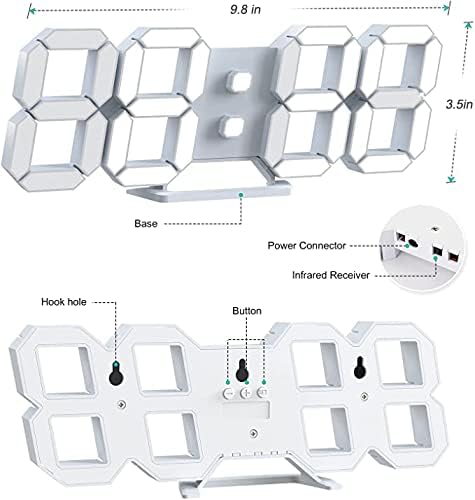
تصویر 3.2: پیچھے view and dimensions of the clock, highlighting the power connector, infrared receiver, and mounting options.
- ڈسپلے: Large 3D LED digits for time, date, and temperature.
- بنیاد: Removable stand for desk placement.
- پاور کنیکٹر: USB port for power input.
- اورکت وصول کنندہ: ریموٹ کنٹرول سگنلز کے لیے۔
- Hook Holes: دیوار لگانے کے لیے۔
- کنٹرول بٹن: Located on the back for basic settings (Power, Up, Down, Set).
4. سیٹ اپ
4.1 پاور کنکشن
- Connect the provided USB power cable to the power connector on the back of the clock.
- USB کیبل کے دوسرے سرے کو معیاری USB پاور اڈاپٹر (شامل نہیں) یا کمپیوٹر USB پورٹ میں لگائیں۔
- The clock will power on and display the time.
The clock is powered by the USB cable only. A built-in battery serves to record time settings when power is disconnected, ensuring settings are retained for 4-8 hours.

Image 4.1: Explanation of the clock's power and memory function.
4.2 تعیناتی کے اختیارات
The clock can be used as a desk clock or a wall clock.
- ڈیسک پلیسمنٹ: Attach the fixed bracket to the bottom of the clock. The angle of the bracket can be adjusted for optimal viewing
- دیوار چڑھانا: Remove the fixed bracket if attached. Use the installation slots (hook holes) on the back of the clock to hang it securely on a wall using appropriate fasteners (not included).

Image 4.2: The clock configured for wall mounting and desk placement.
5. آپریٹنگ ہدایات
The clock's functions are primarily controlled using the included remote control. Basic settings can also be adjusted via the buttons on the back of the clock.
5.1 وقت اور تاریخ کی ترتیب
- دبائیں TIME ٹائم سیٹنگ موڈ میں داخل ہونے کے لیے ریموٹ کنٹرول پر بٹن۔
- استعمال کریں۔ UP اور نیچے arrows to adjust the hour.
- دبائیں TIME again to move to minute setting, then use UP اور نیچے ایڈجسٹ کرنے کے لئے.
- دبانا جاری رکھیں TIME to cycle through year, month, and day settings, adjusting each with UP اور نیچے.
- دبائیں TIME one last time or wait a few seconds for the settings to save automatically.
5.2 12/24 گھنٹے کی شکل
12-hour اور 24-hour ٹائم فارمیٹس کے درمیان سوئچ کرنے کے لیے، دبائیں۔ 12/24H ریموٹ کنٹرول پر بٹن.

تصویر 5.1: مثال کے طور پرample of 12-hour and 24-hour time display.
5.3 الارم سیٹ کرنا۔
- دبائیں الارم button on the remote control to enter alarm setting mode.
- استعمال کریں۔ UP اور نیچے arrows to set the desired alarm hour.
- دبائیں الارم again to move to minute setting, then use UP اور نیچے ایڈجسٹ کرنے کے لئے.
- دبائیں الارم one last time or wait for the settings to save.
- الارم کو فعال/غیر فعال کرنے کے لیے، دبائیں۔ الارم button briefly outside of setting mode. An alarm icon will appear/disappear on the display.
5.4 اسنوز فنکشن۔
جب الارم بجتا ہے ، دبائیں۔ اسنوز کریں button on the remote control to temporarily silence the alarm. The alarm will sound again after a set interval (typically 5-10 minutes).

Image 5.2: The snooze alarm function in use.
5.5 چمک کی ایڈجسٹمنٹ
The clock features both automatic and manual brightness control.
- خودکار چمک: The built-in sensor automatically adjusts the display brightness based on ambient light conditions.
- Manual Brightness: دبائیں روشن button on the remote control to cycle through different brightness levels (e.g., high, medium, low).

Image 5.3: Automatic brightness adjustment based on ambient light.

Image 5.4: Manual adjustment through three brightness levels.
5.6 درجہ حرارت کا ڈسپلے
The clock automatically displays the ambient temperature. No manual adjustment is typically required for this function.
6 دیکھ بھال
To ensure the longevity and optimal performance of your WISE TIGER LED Digital Alarm Clock, follow these maintenance guidelines:
- صفائی: ڈسپلے کو صاف کرنے کے لیے نرم، خشک کپڑا استعمال کریں اور casing. Avoid abrasive cleaners, solvents, or spray cleaners directly on the clock.
- طاقت: Always use the provided USB cable for power. Ensure the power source is stable.
- ماحولیات: گھڑی کو انتہائی درجہ حرارت، براہ راست سورج کی روشنی اور زیادہ نمی سے دور رکھیں۔
- ریموٹ کنٹرول: Store the remote control in a safe place to prevent loss or damage. Ensure batteries are replaced when needed (typically 2 Lithium Ion batteries, included).
7 خرابیوں کا سراغ لگانا
اگر آپ کو اپنی گھڑی میں مسائل درپیش ہیں، تو درج ذیل عام مسائل اور حل دیکھیں:
| مسئلہ | ممکنہ وجہ | حل |
|---|---|---|
| گھڑی آن نہیں ہوتی | کوئی طاقت یا ڈھیلا کنکشن نہیں۔ | Ensure USB cable is securely connected and power source is active. Try a different USB port or adapter. |
| ریموٹ کنٹرول کام نہیں کر رہا ہے۔ | Remote batteries are dead or remote is out of range/blocked | Replace remote control batteries. Ensure remote is pointed at the clock's infrared receiver (refer to Image 3.2) and within 8 meters. Remove any obstructions. |
| وقت غلط ہے۔ | Time was not set precisely | Reset the time carefully, ensuring you set it at the exact second of the desired time. |
| ڈسپلے بہت مدھم یا بہت زیادہ روشن ہے۔ | Brightness setting needs adjustment | دبائیں روشن button on the remote to cycle through manual brightness levels. Check if automatic brightness is functioning correctly in different light conditions. |
| الارم نہیں بجتا ہے۔ | Alarm is not activated or set incorrectly | Ensure the alarm is set and activated (alarm icon visible). Verify the alarm time is correct. |
8. وضاحتیں
| فیچر | تفصیل |
|---|---|
| برانڈ | WISE TIGER |
| ماڈل نمبر | CK-LED1302 |
| ڈسپلے کی قسم | ڈیجیٹل |
| رنگ | سفید |
| مصنوعات کے طول و عرض | 9.7"W x 3.5"H |
| طاقت کا منبع | کورڈڈ الیکٹرک (USB) |
| میموری بیٹری | 2 Lithium Ion batteries (included), retains settings for 4-8 hours |
| چڑھنے کی قسم | Wall Mount, Desk Mount |
| خصوصی خصوصیات | Adjustable Brightness, Alarm Clock, Temperature Display, Date Display, 12/24 Hour Format |
| مواد | ایکریلونائٹریل بوٹاڈیئن اسٹیرن |
| شے کا وزن | 0.317 اونس (تقریباً 9 گرام) |
| یو پی سی | 728990655931 |
9. وارنٹی اور سپورٹ
For warranty information or technical support, please refer to the product packaging or contact the retailer where the product was purchased. Keep your purchase receipt as proof of purchase.