
PowMr ML2440
PowMr 40A MPPT سولر چارج کنٹرولر صارف دستی
ماڈل: ML2440
1. تعارف
This manual provides essential information for the safe and efficient operation of your PowMr 40A MPPT Solar Charge Controller, model ML2440. Please read this manual thoroughly before installation and use to ensure optimal performance and longevity of the product.
2. حفاظتی ہدایات
- یقینی بنائیں کہ تمام وائرنگ صحیح طریقے سے جڑی ہوئی ہے اور شارٹ سرکٹ یا نقصان کو روکنے کے لیے محفوظ ہے۔
- Always connect the battery to the charge controller first, then the solar panels, and finally the load. Disconnect in the reverse order.
- خود کنٹرولر کی مرمت یا ترمیم کرنے کی کوشش نہ کریں۔ خدمت کے لیے اہل افراد سے رابطہ کریں۔
- آتش گیر مواد اور براہ راست سورج کی روشنی سے دور، اچھی ہوادار جگہ پر کنٹرولر انسٹال کریں۔
- برقی نظام کے ساتھ کام کرتے وقت مناسب ذاتی حفاظتی سامان (PPE) پہنیں۔
- سسٹم والیوم کو یقینی بنائیںtage matches the controller's specifications (12V/24V auto-detection).
3. پروڈکٹ ختمview
The PowMr 40A MPPT Solar Charge Controller is designed to efficiently manage power from your solar panels to charge various battery types, including Lithium, Sealed, Gel, and Flooded batteries. It features Maximum Power Point Tracking (MPPT) technology for optimized solar energy harvesting, automatic 12V/24V system voltage detection, and a clear LCD display for monitoring system status.
تصویر 3.1: سامنے والا view of the PowMr 40A MPPT Solar Charge Controller.
This image shows the main unit of the PowMr 40A MPPT Solar Charge Controller, highlighting its compact design and integrated LCD screen.
The controller supports a maximum solar input voltage of 100V and a maximum input power of 1100W for a 24V system (550W for 12V). It also includes temperature compensation for accurate charging across varying environmental conditions.

تصویر 3.2: Temperature compensation feature.
This image illustrates the temperature compensation capability of the controller, ensuring optimal battery charging performance in both hot and cold environments.
4. انسٹالیشن اور وائرنگ
آپ کے سولر چارج کنٹرولر کے محفوظ اور موثر آپریشن کے لیے مناسب تنصیب بہت ضروری ہے۔ ان اقدامات پر احتیاط سے عمل کریں۔
4.1 وائرنگ ڈایاگرام

تصویر 4.1: Wiring diagram for the PowMr MPPT Solar Charge Controller.
This diagram illustrates the correct connection order for the battery, solar panels, DC load, and optional inverter. A temperature sensor is also shown.
4.2 کنکشن کے مراحل
- سب سے پہلے بیٹری کو جوڑیں: Connect the battery to the charge controller's battery terminals. Ensure correct polarity. The controller will auto-detect 12V or 24V system voltage.
- سولر پینلز کو جوڑیں: Connect the solar panels to the PV input terminals. Ensure correct polarity. The controller will begin charging if sufficient sunlight is available.
- ڈی سی لوڈ کو جوڑیں (اختیاری): If using a DC load directly from the controller, connect it to the load terminals.
- Connect Inverter (Optional): If using an inverter, connect it to the battery terminals (not directly to the load terminals of the controller).
- درجہ حرارت سینسر کو مربوط کریں: For accurate temperature compensation, connect the provided temperature sensor to the designated port on the controller and place the sensor near the battery.
منقطع حکم: To disconnect the system, always follow the reverse order: Disconnect load, then solar panels, then battery.
5. آپریٹنگ ہدایات
This section details how to monitor and configure your charge controller using its integrated LCD display and the optional Bluetooth mobile application.
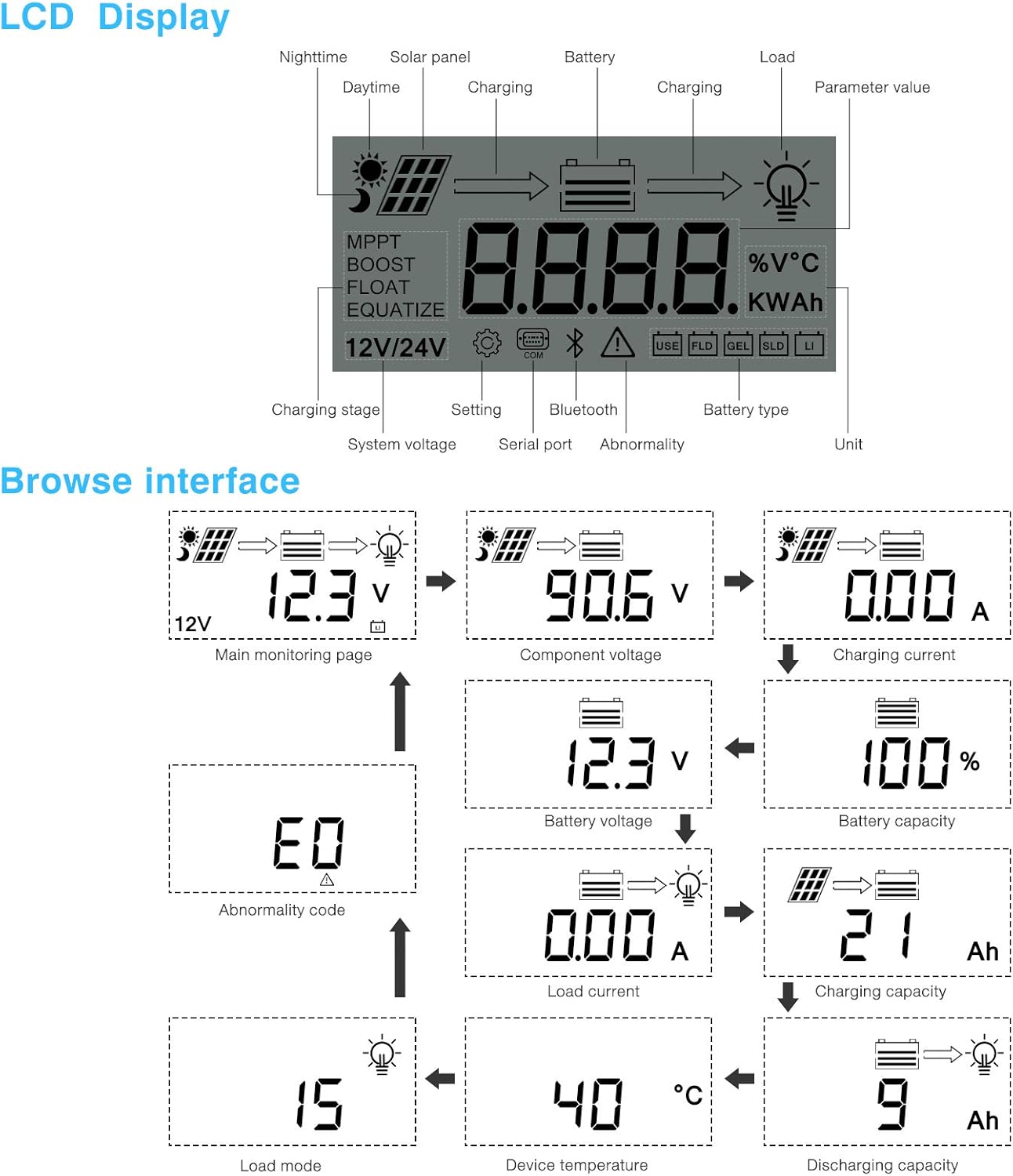
5.1 LCD ڈسپلے اوورview

تصویر 5.1: LCD Display and Browse Interface.
This image shows the various icons and parameters displayed on the LCD screen, along with the navigation flow through different monitoring pages.
The LCD provides real-time information about your solar system. Key indicators include:
- چارجنگ ایسtage: MPPT, Boost, Float, Equalize.
- نظام جلد۔tage: 12V/24V auto-detected.
- بیٹری کی قسم: Icons for Lithium (Li), Sealed (SLD), Gel (GEL), Flooded (FLD).
- حیثیت اشارے: Solar panel activity, battery charging, load status, abnormality.
- پیرامیٹر کی قدر: دکھاتا ہے والیومtage, current, capacity, temperature, etc.
Use the buttons below the LCD to navigate through different screens to view parameters such as main monitoring page, component voltagای، چارجنگ کرنٹ، بیٹری والیومtage, battery capacity, load current, charging capacity, device temperature, discharging capacity, abnormality codes, and load mode.
5.2 Bluetooth Mobile Application
The controller supports an optional Bluetooth module (BT-1) for remote monitoring and parameter adjustment via a mobile application (available for Apple iOS and Android devices). The Bluetooth module connects to the RS232 port on the controller.

تصویر 5.2: Controller with optional Bluetooth module.
This image displays the PowMr MPPT Solar Charge Controller alongside its optional BT-1 Bluetooth communication module and connecting cable.

تصویر 5.3: BT-1 Bluetooth module.
ایک مفصل view of the BT-1 Bluetooth module, which enables wireless communication with the solar charge controller for remote monitoring and settings adjustments.

تصویر 5.4: Bluetooth Mobile Interface Display.
This image shows various screens from the mobile application, including real-time monitoring, data records, energy records, and parameter settings.
The mobile application allows you to:
- Monitor real-time system data (voltage, current, power, temperature).
- View historical data and energy records.
- Adjust various charging parameters and battery settings.
- فیکٹری کی طے شدہ ترتیبات کو بحال کریں۔
6 دیکھ بھال
Regular maintenance ensures the longevity and optimal performance of your charge controller.
- صفائی: دھول اور ملبہ ہٹانے کے لیے وقتاً فوقتاً کنٹرولر کے بیرونی حصے کو خشک کپڑے سے صاف کریں۔ یقینی بنائیں کہ وینٹیلیشن کے سوراخ صاف ہیں۔
- رابطے: Annually check all wiring connections for tightness and corrosion. Loose connections can cause overheating and poor performance.
- ماحولیات: Ensure the installation environment remains within the specified operating temperature range and is free from excessive moisture or dust.
7 خرابیوں کا سراغ لگانا
This section provides guidance for common issues. Refer to the LCD display for abnormality codes.
- کوئی ڈسپلے/کوئی پاور نہیں:
- بیٹری کے کنکشن چیک کریں اور بیٹری والیوم کو یقینی بنائیںtage آپریٹنگ رینج کے اندر ہے۔
- Verify that the battery fuse (if installed) is intact.
- کوئی چارجنگ نہیں:
- Ensure solar panels are connected correctly and receiving sufficient sunlight.
- سولر پینل والیوم چیک کریں۔tagای اور موجودہ.
- Verify that the battery is not fully charged or in a protection state.
- لوڈ کام نہیں کر رہا:
- Check load connections and ensure the load current does not exceed the controller's rating.
- تصدیق کریں کہ بیٹری والیومtage کم والیوم سے اوپر ہے۔tage disconnect (LVD) setting.
- Check for any abnormality codes on the LCD related to load output.
- Abnormality Codes (e.g., "E0"):
- Refer to the specific abnormality code displayed on the LCD. Consult the full product manual or manufacturer's support for detailed explanations and solutions for each code.
8. وضاحتیں
Technical specifications for the PowMr 40A MPPT Solar Charge Controller (Model ML2440).

تصویر 8.1: Product Specifications Table.
This table provides detailed technical parameters for the ML2420, ML2430, and ML2440 models. The ML2440 column is relevant for this 40A controller.
| پیرامیٹر | Value (ML2440) |
|---|---|
| ماڈل | ایم ایل 2440 |
| نظام جلد۔tage | 12V / 24V آٹو |
| کوئی بوجھ نہیں | 0.7 ڈبلیو سے 1.2 ڈبلیو |
| بیٹری جلدtage | 9 سے 35V |
| زیادہ سے زیادہ سولر ان پٹ والیومtage | 100V (25°C)، 90V (-25°C) |
| زیادہ سے زیادہ پاور پوائنٹ والیومtagای رینج | بیٹری جلدtage +2V سے 75V |
| موجودہ شرح چارج | 40A |
| شرح شدہ لوڈ کرنٹ | 20A |
| زیادہ سے زیادہ اہلیت کی بوجھ کی گنجائش | 10000uF |
| زیادہ سے زیادہ فوٹوولٹک نظام ان پٹ پاور | 550W/ 12V, 1100W/ 24V |
| تبادلوں کی کارکردگی | ≤ 98% |
| MPPT ٹریکنگ کی کارکردگی | > 99% |
| درجہ حرارت معاوضہ کا عنصر | -3.0mv/ °C/ 2V (default) |
| آپریٹنگ درجہ حرارت | -35°C سے +45°C |
| تحفظ کی ڈگری | آئی پی 32 |
| وزن | 2 کلو |
| مواصلات کا طریقہ | RS232 |
| اونچائی | ≤ 3000m |
| مصنوعات کے طول و عرض | 238*173*72.5 ملی میٹر |
9. وارنٹی اور سپورٹ
For warranty information, please refer to the documentation included with your product packaging or visit the official PowMr website. If you encounter any issues not covered in this manual or require further assistance, please contact PowMr customer support.
PowMr Official Webسائٹ: Amazon پر PowMr اسٹور پر جائیں۔
متعلقہ دستاویزات - ایم ایل 2440
 |
PowMr Solar Charge Controller Troubleshooting Guide A concise troubleshooting guide for PowMr MPPT solar charge controllers, addressing common issues like no display, power-on problems, voltage discrepancies, and charging failures. Includes step-by-step solutions and contact information for warranty support. |
 |
PowMr MPPT Solar Charger Controller Quick Installation Guide This guide provides quick installation instructions for the PowMr MPPT Solar Charger Controller. It details the essential steps for connecting your battery and solar panel, important wiring precautions, and an overview of the controller's button operations for 12V, 24V, 36V, and 48V battery systems. Learn how to set up your solar charging system safely and efficiently. |
 |
PowMr کیپر سیریز MPPT سولر چارج کنٹرولر دستی PowMr کیپر سیریز MPPT سولر چارج کنٹرولر کے لیے یوزر مینوئل، MPPT 20A-40A ماڈلز کے لیے انسٹالیشن، آپریشن، فیچرز، ٹیکنیکل ڈیٹا اور فالٹ مینجمنٹ کا احاطہ کرتا ہے۔ |
 |
سولر چارج کنٹرولر صارف دستی User manual for the 10A-100A Solar Charge Controller, covering installation, operation, troubleshooting, and technical specifications. |
 |
کیپر سیریز MPPT سولر چارج کنٹرولر یوزر مینوئل کیپر سیریز میکسمم پاور پوائنٹ ٹریکنگ (MPPT) سولر چارج کنٹرولر کے لیے صارف دستی، MPPT 20A-40A ماڈل۔ پروڈکٹ کے بارے میں تفصیلی معلومات فراہم کرتا ہے۔view، ظاہری شکل، وائرنگ، آپریشن، تحفظ، عام خرابیاں، اور تکنیکی وضاحتیں۔ |
 |
PowMr HHJ-60A MPPT سولر چارج کنٹرولر صارف دستی Comprehensive user manual for the PowMr HHJ-60A MPPT Solar Charge Controller, detailing installation, operation, safety guidelines, troubleshooting, and technical specifications for solar power systems. |
Ask a question about this manual
Ask about setup, troubleshooting, compatibility, parts, safety, or missing instructions. Manuals+ will review the question and use this page’s manual context to help answer it.